GIGABYTE B760 Gaming X DDR4 ATX Motherboard Review: Specs, Pros and Cons
As an Amazon Associate we earn from qualifying purchases. Links on this page are affiliate links.
This gigabyte b760 gaming x ddr4 gen5 atx motherboard review focuses on the GIGABYTE B760 GAMING X DDR4 GEN5 ATX Motherboard. It is an ATX board built for modern gaming setups. The design centers on two key specs: support for DDR4 memory and PCIe 5.0 connectivity. These features define its capability to handle current graphics cards and future expansion needs. The board includes robust cooling solutions to maintain stability. You get three M.2 slots and four SATA ports for storage flexibility. This listing provides a clear view of its hardware capabilities for your build.
What stands out
- PCIe 5.0 x16 slot for high bandwidth graphics cards
- Supports up to 128GB of DDR4 memory with XMP profiles
- Three PCIe 4.0 x4 M.2 slots for NVMe SSDs
- VRM Thermal Armor Advanced and M.2 Thermal Guard for cooling
Who it fits
Good fit for
This motherboard suits gamers and builders who want PCIe 5.0 support without the cost of DDR5. It is ideal for users who already own DDR4 memory or prefer sticking with it. The ATX form factor fits standard mid-tower and full-tower cases. You will appreciate the three M.2 slots if you need fast storage for games and applications. The thermal armor helps keep components cool during heavy loads. It is a practical choice for stable, high-performance gaming rigs.
Who should skip it
You should look at another option if you need DDR5 memory support. This board only supports DDR4, limiting your memory upgrade path. If you require more than three M.2 slots, this ATX board may not provide enough connectivity. Users seeking a smaller form factor like Micro-ATX or Mini-ITX will find this board too large. Additionally, if you need PCIe 5.0 for storage rather than just graphics, note that the M.2 slots are PCIe 4.0. Check your specific expansion needs before buying.
Verdict: The GIGABYTE B760 Gaming X DDR4 ATX Motherboard offers solid PCIe 5.0 graphics support and ample storage options for DDR4 users. It is a reliable choice for standard ATX gaming builds.
Key specs explained for this board
Chipset: B760
The B760 chipset sits between entry-level and high-end options. It supports Intel processors with standard features for gaming and multitasking. You get reliable performance for daily tasks and modern games. This chipset does not allow CPU overclocking, which simplifies your build. It is a practical choice if you want stability without complex tuning. Compare it with Z-series boards if you need extra expansion or overclocking headroom.
Memory Type: DDR4
This board uses DDR4 RAM instead of the newer DDR5 standard. DDR4 is often more affordable and widely available. You can find many compatible sticks at various capacities. The listing notes support for up to 128GB of memory. This allows for large workloads or heavy gaming. If you already own DDR4 modules, this board lets you reuse them. It is a cost-effective path for building a system.
PCIe Version: PCIe 5.0
The board features a PCIe 5.0 x16 slot for your graphics card. This version doubles the bandwidth compared to PCIe 4.0. You benefit from faster data transfer between your GPU and the system. This ensures you are ready for future high-end graphics cards. Even current cards run well on this slot. It provides high bandwidth for system expansion. This spec is key for gamers who want long-term compatibility with new hardware.
Form Factor: ATX
ATX is the standard size for most desktop cases. This board measures 12 inches by 9.61 inches. You will find many cases that fit this form factor. It offers ample space for components and airflow. This size allows for multiple expansion slots and storage options. If you plan to add several drives or cards, ATX is ideal. It is the most common choice for general gaming builds. Check your case dimensions to ensure it fits your chassis.
M.2 Slots: 3
This motherboard includes three M.2 slots for NVMe SSDs. You can install multiple fast storage drives directly on the board. This is useful for separating your operating system from your games. The listing mentions these are PCIe 4.0 x4 slots. They offer high speeds for loading large files quickly. You get flexible storage options without needing extra adapters. This is a strong feature for users who need lots of fast storage space.
Design and Build Overview
According to the listing, this motherboard measures 9.61 inches in length and 12 inches in width. It follows the standard ATX form factor, which means it fits into most mid-tower and full-tower cases. The board weighs 2.2 pounds, a typical weight for an ATX PCB with reinforced components. These dimensions ensure compatibility with standard PC cases while providing enough physical space for component placement.
The listing highlights specific cooling mechanisms, including VRM Thermal Armor Advanced and M.2 Thermal Guard. These features are designed to maintain stable operation under heavy loads. The VRM armor likely helps dissipate heat from the voltage regulator modules, while the M.2 guard protects storage drives. This design choice suggests the board is built for sustained gaming sessions or content creation tasks where thermal management is critical.
The layout includes three PCIe 4.0 x4 M.2 slots and four SATA3 ports. This configuration offers flexible storage options, allowing you to combine high-speed NVMe SSDs with traditional SATA devices. The inclusion of a PCIe 5.0 x16 slot ensures compatibility with the latest graphics cards. This future-proofing allows for high bandwidth expansion. The overall build focuses on reliability and expansion capabilities for gaming setups.
Setup and daily operation
Installing this motherboard requires a standard ATX case, as the board measures 9.61 inches by 12 inches. You will need DDR4 memory modules, with support for up to 128GB of capacity. The listing notes that you can use XMP profiles for easy memory overclocking. This simplifies the initial setup process for those who want higher memory speeds without manual tuning.
For storage, the board provides three PCIe 4.0 x4 M.2 slots and four SATA3 ports. This configuration allows you to mix fast NVMe drives with traditional SATA devices. You can build a flexible storage array that balances speed and capacity. The inclusion of PCIe 5.0 on the primary x16 slot ensures compatibility with the latest graphics cards. This future-proofs your build for high-bandwidth expansion cards.
Thermal management is handled by VRM Thermal Armor Advanced and M.2 Thermal Guard. These mechanisms help maintain stable operation under heavy loads. This is relevant for gaming sessions or intensive multitasking where sustained performance matters. The B760 chipset supports Intel processors, providing reliable performance for daily tasks and modern games. It does not allow CPU overclocking, so you should pair it with a non-K Intel processor for best results. The board is designed for gaming use cases, ensuring that core components remain cool and responsive during extended play. You can expect straightforward installation with standard ATX compatibility and clear support for DDR4 systems.
Before You Buy This Motherboard
Before you buy, confirm your case fits the 9.61 by 12 inch ATX layout. You must source DDR4 RAM, as this board does not support newer DDR5 modules. Check that your power supply provides adequate connectors for the three M.2 slots and four SATA ports. The VRM Thermal Armor helps manage heat during gaming, but ensure your case has good airflow to maintain stability under heavy loads. You will need an Intel processor compatible with the B760 chipset. Since the chipset limits CPU overclocking, pair this with a standard unlocked or non-overclocking Intel chip for best value. This board sits in the mid-range tier of 1 options here. It suits gamers who want PCIe 5.0 graphics support without the cost of Z-series boards. Verify your GPU fits the PCIe 5.0 x16 slot for future-proof bandwidth. Regularly update BIOS for new CPU compatibility. This setup offers a balanced mix of modern expansion and reliable DDR4 performance for daily gaming tasks.
Check before you buy
- Verify your case fits the 9.61 by 12 inch ATX dimensions.
- Purchase DDR4 memory modules, as DDR5 is not supported.
- Ensure your Intel CPU is compatible with the B760 chipset.
- Check that your power supply has enough connectors for storage.
The product at a glance
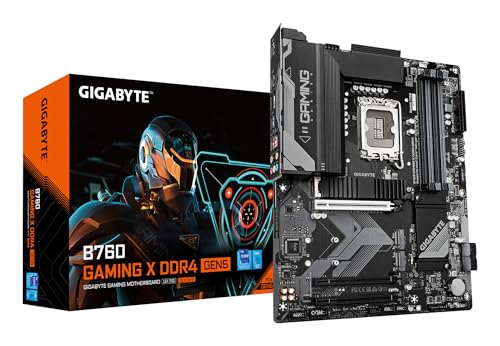
GIGABYTE B760 Gaming X DDR4 ATX Motherboard
Best for: Gaming builds using DDR4 RAM and PCIe 5.0 GPUs
- Chipset
- B760
- Form Factor
- ATX
- Memory Type
- DDR4
- PCIe Version
- PCIe 5.0
- M.2 Slots
- 3
- Use Case
- Gaming
View on Amazon: GIGABYTE B760 Gaming X DDR4 ATX Motherboard Affiliate link
This GIGABYTE B760 Gaming X motherboard uses the ATX form factor and supports DDR4 memory up to 128GB. It features a PCIe 5.0 x16 slot for modern graphics cards. Three PCIe 4.0 M.2 slots and four SATA3 ports provide flexible storage options. Thermal Armor and M.2 Thermal Guard help maintain stability under load. It suits gamers needing reliable expansion and cooling.
Pros
- PCIe 5.0 x16 slot for high bandwidth
- Supports up to 128GB DDR4 memory
- Three PCIe 4.0 x4 M.2 slots
- VRM Thermal Armor and M.2 Thermal Guard
Cons
- Only four SATA3 ports available
- Uses older DDR4 memory standard
- No mention of Wi-Fi connectivity
Good fit if
- You need a PCIe 5.0 graphics slot
- You want to use DDR4 RAM
- You require multiple M.2 storage slots
Skip if
- You require DDR5 memory support
- You need built-in Wi-Fi
- You prefer a smaller ITX form factor
Verdict: GIGABYTE B760 Gaming X DDR4 ATX fits users who want PCIe 5.0 expansion and DDR4 memory support with strong thermal management for gaming builds.
Specifications side by side
| Spec | GIGABYTE B760 Gaming X DDR4 ATX Motherboard |
|---|---|
| Chipset | B760 |
| Form Factor | ATX |
| Memory Type | DDR4 |
| PCIe Version | PCIe 5.0 |
| M.2 Slots | 3 |
| Use Case | Gaming |
| Dimensions | 9.61 × 12 × 1.38 inches |
| Weight | 2.2 pounds |
| Model | B760 GAMING X D4 GEN5 |
Frequently asked questions
Does this motherboard support DDR5 RAM?
No, this board uses DDR4 memory. You must source DDR4 modules for your build. The listing confirms support for up to 128GB of capacity. It also allows XMP profiles for memory tuning. This choice keeps costs lower but limits future DDR5 upgrades without replacing the board.
Is the GIGABYTE B760 Gaming X ATX or ITX?
It is an ATX motherboard. The board measures 9.61 inches in length and 12 inches in width. This standard size fits most mid-tower and full-tower cases. The ATX form factor provides ample space for expansion slots and multiple storage drives compared to smaller formats.
Can I use a PCIe 5.0 graphics card?
Yes, this motherboard supports PCIe 5.0 for GPUs. The product is designed for gaming builds using PCIe 5.0 graphics cards. This ensures you can use the latest high-speed video cards. It also offers PCIe 5.0 expansion for future M.2 storage devices, keeping your system ready for new tech.
What chipset does this motherboard use?
It uses the Intel B760 chipset. This chipset sits between entry-level and high-end options. It supports Intel processors with standard features for gaming and multitasking. You get reliable performance for daily tasks and modern games. Note that this chipset does not allow CPU overclocking.
How much does the motherboard weigh?
The board weighs 2.2 pounds. This is a typical weight for an ATX motherboard of this class. The weight comes from the PCB material and built-in heatsinks. It is heavy enough to feel sturdy but light enough for standard case mounting without special support brackets.
Is this board good for gaming?
Yes, it is built for gaming builds. The design centers on PCIe 5.0 expansion and DDR4 memory support. It includes strong thermal management for gaming loads. The B760 chipset provides reliable performance for modern games. It is a solid choice if you prioritize stable gaming performance over extreme overclocking.
Does it support M.2 SSDs?
Yes, the listing notes three M.2 slots. You should check that your power supply provides adequate connectors for these slots. The board supports PCIe 5.0 for M.2 storage, allowing for very fast drive speeds. This setup helps reduce load times in games and large file transfers.