Best Core i7 Motherboards: 14 Spec-Based Picks
As an Amazon Associate we earn from qualifying purchases. Links on this page are affiliate links.
Choosing the right Core i7 motherboard requires matching your processor generation with compatible system components. We compared 14 products using the specifications published on their listings to outline platforms across multiple hardware generations.
The Biostar LGA 1151 DDR4 ATX Motherboard takes the top position by pairing an ATX form factor with an LGA 1151 CPU socket and DDR4 memory support. This guide helps you decide which socket type, form factor, and memory standard fit your build.
Quick picks
The best fit for you
- You want an ATX board for LGA 1151 Biostar LGA 1151 DDR4 ATX Motherboard It provides an ATX form factor with an LGA 1151 socket and DDR4 memory support.
- You need a modern 20-core processor with DDR5 INLAND Core i7-14700K and MSI PRO Z790-P Bundle This bundle includes an LGA 1700 20-core processor paired with PCIe 5.0 and DDR5 support.
- You want an ATX server board for Core i7 SHANGZHAOYUAN LGA 2011-3 Server Motherboard It provides an ATX layout designed for server use with LGA 2011-3 compatibility and PCIe 3.0 expansion.
- You need a Micro-ATX board with DDR3 RAM SHANGZHAOYUAN Micro-ATX LGA 1150 DDR3 Motherboard It combines a Micro-ATX form factor with DDR3 memory slots and a PCIe 3.0 interface.
Our 14 picks

Biostar LGA 1151 DDR4 ATX Motherboard
Best for: LGA 1151 Core i7 ATX builds
- Series
- Core i7 (what this guide is about)
- CPU Socket
- LGA1151
- Chipset
- B250
- Form Factor
- ATX
- Memory Type
- DDR4
- Dimensions
- 13.2 × 10.2 × 2.5 inches
This Biostar ATX motherboard runs Intel Core i7 processors on the LGA 1151 socket. It features the Intel B250 chipset and supports DDR4 system memory alongside SATA storage drives and PCI Express expansion cards. Its standard ATX form factor fits common mid-tower and full-tower computer cases. This board suits you if you need a standard desktop foundation for an LGA 1151 Intel Core build using DDR4 memory and expansion cards.
Pros
- Supports LGA 1151 socket Intel Core processors
- Compatible with DDR4 system memory
- Standard ATX form factor
- Features PCI Express and SATA connections
Cons
- Socket LGA 1151 does not fit newer LGA 1700 CPUs
- DDR5 memory is not supported
- Built-in Wi-Fi is not listed
Good fit if
- You use an LGA 1151 Intel Core i7 processor.
- You need a standard ATX layout with PCI Express slots.
- You plan to use DDR4 memory modules.
Skip if
- You use an LGA 1700 or LGA 1150 processor.
- You require DDR5 high-speed memory.
- You need factory-integrated wireless networking.
Verdict: Biostar LGA 1151 DDR4 ATX Motherboard provides a direct ATX platform for LGA 1151 Core i7 processors using DDR4 memory. It covers baseline expansion needs through standard PCI Express and SATA connections.

Biostar B250 LGA 1151 ATX Motherboard
Best for: multi-GPU setups using LGA 1151 processors
- Series
- Core i7 (what this guide is about)
- CPU Socket
- LGA1151
- Chipset
- Intel B250
- Form Factor
- ATX
- Memory Type
- DDR4
- Dimensions
- 8.27 × 1.57 × 11.6 inches
The Biostar LGA 1151 DDR4 ATX Motherboard is built for Intel Core i7 setups requiring broad expansion capacity. This ATX board features an LGA 1151 CPU socket and supports DDR4 system memory. Its primary hardware feature is support for up to 12 GPUs across its PCI Express layout. This board suits you if you need a high-density graphics card configuration paired with a compatible Intel Core processor and DDR4 components.
Pros
- Supports up to 12 GPUs
- Standard ATX form factor
- Compatible with DDR4 memory
- LGA 1151 socket for Core i7 series CPUs
Cons
- Restricted to older LGA 1151 socket processors
- No DDR5 memory support
Good fit if
- You need a motherboard that supports up to 12 GPUs.
- You are building with an LGA 1151 Core i7 processor and DDR4 memory.
Skip if
- You plan to use newer socket processors such as LGA 1700.
- You want to build a system using DDR5 memory.
Verdict: Biostar LGA 1151 DDR4 ATX Motherboard provides dedicated hardware support for up to 12 GPUs. It is a focused platform if you are assembling an LGA 1151 Core i7 system with DDR4 memory.

SHANGZHAOYUAN Mini-ITX LGA 1150 Motherboard
Best for: compact 4th Gen Intel Core i7 builds
- Series
- Core i7 (what this guide is about)
- CPU Socket
- LGA 1150
- Chipset
- H97
- Form Factor
- Mini ITX
- Memory Type
- DDR3
- PCIe Version
- PCIe 3.0
This compact Mini-ITX board gives you an LGA 1150 socket paired with the Intel H97 chipset. You can run fourth-generation Intel Core i7 processors alongside up to 16GB of dual-channel DDR3 system memory across two slots. For modern storage and displays, you get an NVMe M.2 slot, dual gigabit Ethernet ports, and DisplayPort output. It suits you if you need a replacement board for a compact legacy build.
Pros
- Supports NVMe M.2 solid-state drives
- Provides dual gigabit RJ45 network ports
- Compact Mini-ITX form factor measuring 6.7 by 6.7 inches
- Offers DisplayPort, HDMI, and VGA video outputs
Cons
- Limits maximum system RAM to 16GB DDR3
- Does not include a CR2032 battery or printed manual
Good fit if
- You run a fourth-generation Intel Core i7 CPU like the i7-4790K.
- You need a small Mini-ITX footprint with dual gigabit LAN ports.
- You want an M.2 NVMe storage slot on an LGA 1150 setup.
Skip if
- You require more than 16GB of system memory.
- You use newer DDR4 or DDR5 Intel Core i7 processors.
Verdict: SHANGZHAOYUAN Mini-ITX LGA 1150 Motherboard delivers modern M.2 NVMe storage and dual gigabit networking to fourth-generation Core i7 setups. Its compact dimensions make it a practical choice for small legacy systems.

INLAND Core i7-14700K and MSI PRO Z790-P Bundle
Best for: DDR5 systems needing a bundled 20-core CPU
- Series
- Core i7 (what this guide is about)
- CPU Socket
- LGA 1700
- Chipset
- Z790
- Memory Type
- DDR5
- PCIe Version
- PCIe 5.0
- M.2 Slots
- 4
View on Amazon: INLAND Core i7-14700K and MSI PRO Z790-P Bundle
This bundle pairs an Intel Core i7-14700K processor with an MSI PRO Z790-P WIFI motherboard. You get 20 cores, 28 threads, and boost speeds up to 5.6 GHz alongside DDR5 support. The board features PCIe 5.0, four PCIe 4.0 M.2 slots, and onboard Wi-Fi. It suits you if you want a high-thread-count setup with fast storage options out of the box.
Pros
- Includes 20-core, 28-thread Core i7-14700K CPU reaching up to 5.6 GHz
- Provides four PCIe 4.0 M.2 slots and six SATA connectors
- Features PCIe 5.0 support, onboard Wi-Fi, and USB 3.2 Gen 2x2
- Supports DDR5 memory speeds above 7000 MHz via overclocking
Cons
- Board is configured for DDR5 and cannot accept DDR4 RAM
- Includes a bundled processor rather than selling as a standalone motherboard
Good fit if
- You need an Intel Core i7-14700K bundled directly with a compatible board.
- You plan to run modern DDR5 memory and multiple M.2 solid-state drives.
- You want built-in Wi-Fi connectivity and high-speed USB 3.2 Gen 2x2 ports.
Skip if
- You already own an LGA 1700 processor and only require a motherboard.
- You intend to reuse existing DDR4 memory modules for your system.
Verdict: INLAND Core i7-14700K and MSI PRO Z790-P Bundle delivers a 20-core processor paired with an expandable DDR5 motherboard. It gives you PCIe 5.0 support and four M.2 slots in a single package.

ASUS TUF Gaming ATX Motherboard with Core i7 Bundle
Best for: matched ATX Core i7 desktop builds
- Series
- Core i7 (what this guide is about)
- CPU Socket
- LGA 1700
- Chipset
- B760
- Form Factor
- ATX
- PCIe Version
- PCIe 5.0
- Power Phases
- 12+1
View on Amazon: ASUS TUF Gaming ATX Motherboard with Core i7 Bundle
This bundle pairs an ASUS TUF ATX motherboard with an unlocked 12th Gen Intel Core i7-12700K processor running at 3.60 GHz. You get an LGA 1700 socket, a PCIe 5.0 expansion slot, PCIe 4.0 M.2 storage options, and integrated Intel UHD 770 Graphics. It suits you if you want a matched desktop platform with high-speed rear USB 3.2 Gen 2x2 Type-C connectivity and dedicated VRM cooling.
Pros
- Bundled Intel Core i7-12700K processor with integrated UHD 770 Graphics
- PCIe 5.0 expansion slot for graphics cards
- Rear USB 3.2 Gen 2x2 Type-C port and Thunderbolt header support
- 12+1 DrMOS power stages and enlarged VRM heatsinks
Cons
- M.2 slots support PCIe 4.0 rather than PCIe 5.0
- Full ATX form factor will not fit compact cases
- Bundled CPU is 12th Gen rather than newer generation
Good fit if
- You want a motherboard bundled with an unlocked 3.60 GHz processor.
- You need a PCIe 5.0 expansion slot alongside PCIe 4.0 M.2 storage.
- You use external devices that benefit from rear USB 3.2 Gen 2x2 Type-C speeds.
Skip if
- You need a smaller micro-ATX or mini-ITX motherboard footprint.
- You require PCIe 5.0 data speeds on your M.2 storage drives.
- You prefer a factory-bundled 13th Generation or newer processor.
Verdict: ASUS TUF ATX Motherboard and Core i7 Bundle provides a full ATX setup complete with an unlocked 3.60 GHz processor and PCIe 5.0 hardware support. It gives you capable cooling, integrated graphics, and fast rear USB 3.2 Gen 2x2 connectivity straight out of the box.

INLAND Intel i7-14700K TUF Z790 Motherboard Bundle
Best for: high-end DDR5 gaming and multitasking setups
- Series
- Core i7 (what this guide is about)
- CPU Socket
- LGA 1700
- Memory Type
- DDR5
- PCIe Version
- PCIe 5.0
- Power Phases
- 16+1
- Use Case
- Gaming
View on Amazon: INLAND Intel i7-14700K TUF Z790 Motherboard Bundle
This bundle pairs an Intel Core i7-14700K processor with an ASUS TUF GAMING Z790-PLUS WIFI motherboard. You get 20 cores and 28 threads running up to 5.6 GHz, DDR5 memory support, and a PCIe 5.0 expansion slot. The board includes 16+1 DrMOS power stages, USB 3.2 Gen2x2 Type-C connectivity, and built-in Wi-Fi. It suits you if you want high-end gaming and multitasking performance right out of the box.
Pros
- Intel Core i7-14700K CPU with 20 cores, 28 threads, and boost clock up to 5.6 GHz
- PCIe 5.0 Safeslot and high-speed DDR5 memory architecture
- 16+1 DrMOS power stages with heatsinks on VRM and M.2 slots
- Rear USB 3.2 Gen2x2 Type-C and front-panel USB 3.2 Gen 2 Type-C support
Cons
- Requires DDR5 memory with no support for DDR4
- Thunderbolt 4 support is limited to an onboard header rather than integrated rear ports
Good fit if
- You want an Intel 14th Gen Core i7-14700K CPU paired with a Z790 motherboard.
- You plan to run DDR5 memory and a PCIe 5.0 graphics card.
- You need 20 cores and 28 threads for gaming or multitasking.
Skip if
- You want to reuse older DDR4 memory modules.
- You already have an LGA 1700 desktop processor.
Verdict: INLAND Intel i7-14700K TUF Z790 Motherboard Bundle delivers top-tier LGA 1700 performance with 20 CPU cores, DDR5 speed, and PCIe 5.0 support. It provides a complete, modern foundation for high-demand gaming and content creation.

SHANGZHAOYUAN LGA 2011-3 Server Motherboard
Best for: LGA 2011-3 Core i7 server builds
- Series
- Core i7 (what this guide is about)
- CPU Socket
- LGA 2011-3
- Chipset
- Intel C612
- Form Factor
- Micro ATX
- Memory Type
- DDR4
- PCIe Version
- PCIe 3.0
This SHANGZHAOYUAN LGA 2011-3 server motherboard features an Intel C612 chipset and supports Intel Core i7 alongside Xeon E5 V3 and V4 processors. You get four DDR4 slots handling up to 128GB of desktop or ECC memory at 2133MHz or 2400MHz. It also provides an 8-phase power delivery design, an M.2 NVMe slot, and a PCIe 3.0 x16 interface, making it a functional option if you run server workloads.
Pros
- Supports up to 128GB of dual-channel DDR4 desktop or ECC/RECC RAM
- Equipped with Intel C612 chipset and LGA 2011-v3 socket
- Includes M.2 slot supporting NVMe and NGFF solid-state drives
- Features an 8-phase power supply and 8-layer PCB design
Cons
- Package does not include a CR2032 CMOS battery
- Printed user manual is not included in the box
- Memory frequencies are limited to 2133MHz and 2400MHz
Good fit if
- You need ECC or RECC memory support alongside desktop DDR4.
- You plan to use an LGA 2011-v3 Intel Core i7 or Xeon E5 V3/V4 processor.
- You require an M.2 slot for NVMe or NGFF solid-state storage.
Skip if
- You want DDR4 memory frequencies faster than 2400MHz.
- You need a newer PCIe 4.0 or PCIe 5.0 expansion standard.
- You expect a physical paper manual and CMOS battery included in the package.
Verdict: SHANGZHAOYUAN LGA 2011-3 Server Motherboard delivers dual-channel ECC DDR4 support and LGA 2011-v3 processor compatibility on an Intel C612 platform. It provides the essential PCIe 3.0 expansion and M.2 storage required for entry-level server setups.

ASUS V500 Core i7 Mini Tower PC
Best for: compact desktop productivity without DIY assembly
- Series
- Core i7 (what this guide is about)
- Memory Type
- DDR5
- Wi-Fi Standard
- Wi-Fi 6
- Dimensions
- 13.7 × 6.1 × 11.7 inches
- Weight
- 13.2 pounds
The ASUS V500 Core i7 Mini Tower PC is a prebuilt system powered by a 13th Gen Intel Core i7-13620H processor rather than a standalone motherboard. It includes 16GB of DDR5 RAM, a 512GB PCIe NVMe SSD, and Wi-Fi 6 connectivity inside a compact chassis. You get quiet cooling that stays below 38 dB under load, making it suitable for standard productivity and 4K media tasks without custom assembly.
Pros
- Intel Core i7-13620H 13th Gen processor
- 16GB high-speed DDR5 memory
- 512GB PCIe NVMe solid-state storage
- Wi-Fi 6 wireless networking support
- Low noise levels reaching 0 dB at idle and under 38 dB under full load
Cons
- Complete prebuilt desktop rather than an individual motherboard component
- Integrated Intel UHD Graphics only
- 512GB storage capacity may limit local data storage
Good fit if
- You prefer a preconfigured desktop instead of building around a bare board.
- You need modern DDR5 memory and Wi-Fi 6 connectivity immediately.
- You want quiet acoustic operation with a zero-decibel fan-stop mode during light workloads.
Skip if
- You are shopping specifically for a bare motherboard to build your own system.
- You need a dedicated discrete graphics card rather than integrated Intel UHD Graphics.
Verdict: ASUS V500 Core i7 Mini Tower PC provides an all-in-one prebuilt solution equipped with a 13th Gen Core i7 processor and DDR5 RAM. It suits users who prefer an integrated desktop over assembling discrete motherboard components.

SHANGZHAOYUAN Micro-ATX LGA 1150 DDR3 Motherboard
Best for: compact 4th Gen Intel Core i7 builds
- Series
- Core i7 (what this guide is about)
- CPU Socket
- LGA 1150
- Chipset
- B85
- Form Factor
- Micro-ATX
- Memory Type
- DDR3
- PCIe Version
- PCIe 3.0
View on Amazon: SHANGZHAOYUAN Micro-ATX LGA 1150 DDR3 Motherboard
This micro-ATX motherboard pairs with 4th Gen Intel Core i7 processors via an LGA 1150 socket. It provides four dual-channel DDR3 memory slots supporting up to 32GB of RAM, an M.2 NVMe slot, and a PCIe 3.0 x16 slot. Video outputs include HDMI, DVI, and VGA. This board suits you if you need a compact platform to rebuild or maintain an older fourth-generation Core i7 desktop setup.
Pros
- Supports up to 32GB dual-channel DDR3 across 4 slots
- Integrated M.2 slot with NVMe and SATA switching
- Includes HDMI, DVI, and VGA display outputs
- Equipped with 1GbE Gigabit Ethernet
Cons
- Does not include a CR2032 CMOS battery
- Printed user manual excluded from package
- Limited to DDR3 memory and older LGA 1150 processors
Good fit if
- You have a 4th Gen Intel Core i7 processor like the i7 4790K.
- You need a micro-ATX motherboard with legacy PCI and PCIe slots.
- You want M.2 NVMe storage support on an older Intel platform.
Skip if
- You require DDR4 or DDR5 memory support.
- You plan to install 12th, 13th, or 14th Gen Intel processors.
Verdict: SHANGZHAOYUAN Micro-ATX LGA 1150 Motherboard delivers a functional micro-ATX foundation for 4th Gen Intel Core i7 systems with modern M.2 storage support. It provides essential display outputs and quad-slot DDR3 expansion for compact desktop rebuilds.

MACHINIST LGA 2011-3 Core i7 Motherboard
Best for: Core i7 LGA 2011-3 multi-NVMe workstation builds
- Series
- Core i7 (what this guide is about)
- CPU Socket
- LGA 2011-3
- Chipset
- Intel C612
- Form Factor
- M-ATX
- Memory Type
- DDR4
- PCIe Version
- PCIe 3.0
This board features the Intel LGA 2011-3 socket, making it compatible with fifth- and sixth-generation Intel Core i7 processors alongside Xeon E5 V3 and V4 CPUs. You get four DDR4 memory slots supporting up to 128GB of RAM, three NVMe M.2 PCIe 3.0 slots, and a PCIe 3.0 x16 slot. It suits you if you want multi-drive NVMe storage and quad-channel memory for a legacy high-end desktop workstation or server build.
Pros
- Three NVMe M.2 slots running at PCIe 3.0 x4 bandwidth
- Four-channel DDR4 memory support up to 128GB capacity
- Integrated VRM cooling fan with dedicated heat dissipation armor
- Compatible with Intel Core i7 5th/6th gen and Xeon E5 V3/V4 processors
Cons
- CR2032 motherboard battery is not included in the package
- Physical user manual is omitted from the packaging
- Onboard TPM M.2 interface only supports ASUS TPM modules
Good fit if
- You run an Intel 5th or 6th generation Core i7 or Xeon E5 V3/V4 CPU.
- You require three PCIe 3.0 x4 NVMe M.2 slots for high-speed storage.
- You need quad-channel DDR4 memory support up to 128GB.
Skip if
- You need modern PCIe 4.0 or PCIe 5.0 expansion standard support.
- You want an included CMOS battery and printed user guide in the box.
- You plan to use a non-ASUS TPM security module.
Verdict: MACHINIST LGA 2011-3 Core i7 Motherboard pairs LGA 2011-3 processor support with three NVMe M.2 slots and quad-channel DDR4 memory. It provides functional expansion for legacy Core i7 workstations.

MACHINIST Mini-ITX LGA 1155 Motherboard
Best for: compact 2nd and 3rd Gen Intel builds
- Series
- Core i7 (what this guide is about)
- CPU Socket
- LGA 1155
- Chipset
- B75
- Form Factor
- ITX
- Memory Type
- DDR3
- M.2 Slots
- 1
This compact Mini-ITX board from MACHINIST measures roughly 6.7 by 6.7 inches and supports 2nd and 3rd Generation Intel Core i7 processors on the LGA 1155 socket. You get two DDR3 memory slots supporting up to 16GB of RAM, an M.2 storage connector for NVMe or NGFF solid-state drives, and onboard HDMI and VGA ports. It suits you if you want to assemble a small-form-factor desktop around legacy hardware.
Pros
- Supports 2nd and 3rd Gen Intel Core i7 and Xeon E3-12xx processors
- Onboard M.2 slot compatible with both NVMe and NGFF solid-state drives
- Dual-display output via integrated HDMI and VGA connections
- Compact 6.7 by 6.7-inch Mini-ITX dimensions
- Equipped with 1GbE wired Ethernet networking
Cons
- Maximum memory capacity is limited to 16GB DDR3 across two slots
- Single PCIe expansion slot operates at x8 rather than x16 bandwidth
- Package does not include a CMOS battery or printed manual
Good fit if
- You want to build a compact desktop using an LGA 1155 Core i7 CPU.
- You need an M.2 slot alongside SATA 3.0 and SATA 2.0 headers.
- You plan to run dual monitors using integrated processor graphics.
Skip if
- You require more than 16GB of RAM or modern DDR4/DDR5 modules.
- You need a full-bandwidth PCIe x16 expansion slot for add-in cards.
Verdict: MACHINIST LGA 1155 Mini-ITX Motherboard delivers essential connectivity for older Intel processors in a small footprint. It provides a practical foundation for compact legacy systems requiring M.2 storage and dual video outputs.

ASRock Z390 Phantom Gaming 4/AC ATX Motherboard
Best for: LGA 1151 Core i7 gaming setups
- Series
- Core i7 (what this guide is about)
- CPU Socket
- LGA 1151
- Chipset
- Z390
- Form Factor
- ATX
- Memory Type
- DDR4
- PCIe Version
- PCIe 3.0
View on Amazon: ASRock Z390 Phantom Gaming 4/AC ATX Motherboard
This ATX motherboard features the Intel Z390 chipset and an LGA 1151 socket designed for Intel Core i7 builds. It supports DDR4 memory up to 64GB and uses PCIe 3.0 expansion. You get standard desktop ATX dimensions with dedicated gaming focus and power supply module stabilization. It suits you if you are assembling or repairing a Core i7 rig using LGA 1151 parts and DDR4 RAM.
Pros
- Intel Z390 chipset with LGA 1151 CPU socket
- Supports DDR4 memory up to 64GB
- Standard ATX form factor layout
- PCIe 3.0 expansion support
Cons
- PCIe 3.0 speed rather than newer standards
- LGA 1151 socket limits CPU compatibility to older generations
Good fit if
- You run a compatible Intel Core i7 CPU on the LGA 1151 socket.
- You build with a standard ATX enclosure.
- You use DDR4 memory modules up to 64GB capacity.
Skip if
- You plan to run processors requiring LGA 1200 or LGA 1700 sockets.
- You require PCIe 4.0 or faster bandwidth for expansion cards.
Verdict: ASRock Z390 Phantom Gaming 4/AC ATX Motherboard delivers core gaming functionality for LGA 1151 Core i7 processors using the Intel Z390 platform. It provides a standard ATX form factor with 64GB DDR4 memory capacity.
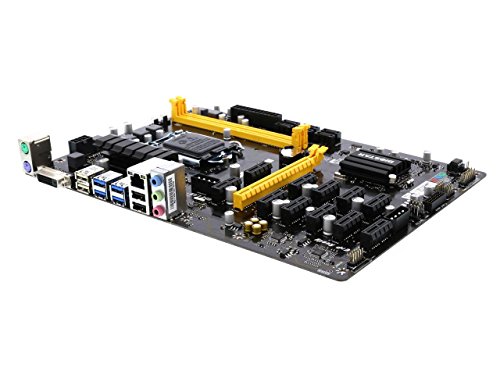
Biostar LGA 1151 Multi-GPU Motherboard
Best for: 12-card multi-GPU rigs using LGA 1151 processors
- Series
- Core i7 (what this guide is about)
- CPU Socket
- LGA1151
- Chipset
- Intel B250
- Memory Type
- DDR4
- Dimensions
- 13.1 × 10 × 2.5 inches
- Weight
- 1 pounds
This Biostar board pairs an LGA 1151 socket with the Intel B250 chipset for Core i7, i5, and i3 builds. It handles DDR4 memory at speeds up to 2400 MHz and provides support for up to 12 graphics cards using a combination of six AMD and six NVIDIA GPUs. It fits your setup if you want multi-GPU expansion on an LGA 1151 platform.
Pros
- Supports up to 12 graphics cards across six AMD and six NVIDIA GPUs
- Compatible with LGA 1151 Core i7, i5, i3, Pentium, and Celeron processors
- Supports DDR4 memory frequencies of 1866, 2133, and 2400 MHz
Cons
- Requires manual BIOS configuration changes to enable all 12 GPUs
- Windows limits installations to no more than eight GPUs of a single brand
- Maximum supported memory speed is limited to DDR4 2400 MHz
Good fit if
- You want to connect up to 12 total AMD and NVIDIA graphics cards.
- You use an LGA 1151 Core i7 processor with DDR4 memory.
Skip if
- You need memory speeds beyond DDR4 2400 MHz.
- You plan to run more than eight GPUs of the same brand on Windows.
Verdict: Biostar LGA 1151 Multi-GPU Motherboard delivers high-density expansion for LGA 1151 Core i7 systems pairing AMD and NVIDIA hardware. Be prepared for manual BIOS configuration and operating system limits on identical graphics cards.

GIGABYTE B760 Aorus Elite AX and Core i7-12700KF
Best for: 125W Core i7 DDR5 gaming builds
- Series
- Core i7 (what this guide is about)
- CPU Socket
- LGA 1700
- Chipset
- B760
- Form Factor
- ATX
- Memory Type
- DDR5
- M.2 Slots
- 3
View on Amazon: GIGABYTE B760 Aorus Elite AX and Core i7-12700KF
This bundle pairs an ATX motherboard with an unlocked 125W Core i7-12700KF processor. You get an LGA 1700 socket, four DDR5 DIMM slots, and a 12+1+1 twin hybrid phase power design. The board includes triple M.2 slots with thermal guards and fully covered MOSFET heatsinks. It suits you if you plan to build a dedicated gaming rig with high-speed memory and separate discrete graphics.
Pros
- Includes 125W unlocked Intel Core i7-12700KF processor
- Four DDR5 DIMM slots with dual-channel support
- 12+1+1 twin hybrid digital power design with 60A DrMOS
- Triple M.2 storage slots with M.2 Thermal Guard cooling
Cons
- Requires a discrete graphics card because the processor lacks integrated display output
- Full ATX form factor does not fit smaller micro-ATX or mini-ITX cases
Good fit if
- You need a bundled 125W Intel Core i7 processor and ATX motherboard.
- You plan to run DDR5 system memory across up to four slots.
- You have a dedicated discrete graphics card ready for your build.
Skip if
- You need integrated graphics without installing a separate video card.
- You are assembling a compact PC that requires a smaller board size.
Verdict: GIGABYTE B760 Aorus Elite AX and Core i7-12700KF delivers a capable DDR5 foundation and a 125W desktop processor for dedicated gaming setups. It gives you 12+1+1 phase power delivery, triple M.2 support, and heatsink cooling for demanding workloads.
Specifications side by side
| Spec | Biostar LGA 1151 DDR4 ATX Motherboard | Biostar B250 LGA 1151 ATX Motherboard | SHANGZHAOYUAN Mini-ITX LGA 1150 Motherboard | INLAND Core i7-14700K and MSI PRO Z790-P Bundle | ASUS TUF Gaming ATX Motherboard with Core i7 Bundle | INLAND Intel i7-14700K TUF Z790 Motherboard Bundle | SHANGZHAOYUAN LGA 2011-3 Server Motherboard | ASUS V500 Core i7 Mini Tower PC | SHANGZHAOYUAN Micro-ATX LGA 1150 DDR3 Motherboard | MACHINIST LGA 2011-3 Core i7 Motherboard | MACHINIST Mini-ITX LGA 1155 Motherboard | ASRock Z390 Phantom Gaming 4/AC ATX Motherboard | Biostar LGA 1151 Multi-GPU Motherboard | GIGABYTE B760 Aorus Elite AX and Core i7-12700KF |
|---|---|---|---|---|---|---|---|---|---|---|---|---|---|---|
| CPU Socket | LGA1151 | LGA1151 | LGA 1150 | LGA 1700 | LGA 1700 | LGA 1700 | LGA 2011-3 | not specified | LGA 1150 | LGA 2011-3 | LGA 1155 | LGA 1151 | LGA1151 | LGA 1700 |
| Chipset | B250 | Intel B250 | H97 | Z790 | B760 | not specified | Intel C612 | not specified | B85 | Intel C612 | B75 | Z390 | Intel B250 | B760 |
| Form Factor | ATX | ATX | Mini ITX | not specified | ATX | not specified | Micro ATX | not specified | Micro-ATX | M-ATX | ITX | ATX | not specified | ATX |
| Memory Type | DDR4 | DDR4 | DDR3 | DDR5 | not specified | DDR5 | DDR4 | DDR5 | DDR3 | DDR4 | DDR3 | DDR4 | DDR4 | DDR5 |
| PCIe Version | not specified | not specified | PCIe 3.0 | PCIe 5.0 | PCIe 5.0 | PCIe 5.0 | PCIe 3.0 | not specified | PCIe 3.0 | PCIe 3.0 | not specified | PCIe 3.0 | not specified | not specified |
| M.2 Slots | not specified | not specified | not specified | 4 | not specified | not specified | not specified | not specified | not specified | 3 | 1 | not specified | not specified | 3 |
| Wi-Fi Standard | not specified | not specified | not specified | not specified | not specified | not specified | not specified | Wi-Fi 6 | not specified | not specified | not specified | not specified | not specified | not specified |
| Ethernet Speed | not specified | not specified | Gigabit | not specified | not specified | not specified | Gigabit LAN | not specified | Gigabit | Gigabit | Gigabit LAN | not specified | not specified | not specified |
| Power Phases | not specified | not specified | 4 | 14+1+1 | 12+1 | 16+1 | 8-phase | not specified | 4-phase | 6-phase | not specified | not specified | not specified | 12+1+1 |
| Use Case | not specified | not specified | not specified | not specified | not specified | Gaming | Server | not specified | not specified | not specified | Gaming | Gaming | not specified | Gaming |
| Series | Core i7 | Core i7 | Core i7 | Core i7 | Core i7 | Core i7 | Core i7 | Core i7 | Core i7 | Core i7 | Core i7 | Core i7 | Core i7 | Core i7 |
| Core Count | not specified | not specified | not specified | 20 Cores | not specified | 20 Cores | not specified | not specified | not specified | not specified | not specified | not specified | not specified | not specified |
| TDP | not specified | not specified | not specified | not specified | not specified | not specified | not specified | not specified | not specified | not specified | not specified | not specified | not specified | 125W |
| Dimensions | 13.2 × 10.2 × 2.5 inches | 8.27 × 1.57 × 11.6 inches | 6.7 × 6.69 × 6.7 inches | not specified | not specified | not specified | not specified | 13.7 × 6.1 × 11.7 inches | not specified | not specified | 6.69 × 6.69 × 6.69 inches | not specified | 13.1 × 10 × 2.5 inches | not specified |
| Weight | 1.98 pounds | not specified | not specified | not specified | not specified | not specified | not specified | 13.2 pounds | not specified | not specified | not specified | not specified | 1 pounds | not specified |
| Model | FBA_TB250-BTC | TB250-BTC Pro | H97-STRONG | 14700KPROZ790PWFD5 | B760-PLUS WIFI | 14700KTUFZ790PLWFD5 | X99 B9 | V500MV-DS704 | B85M PRO | B0FYDV1PDY | not specified | LFDDDAGCB | TB250-BTC PRO | GIGABYTE B760 AORUS Elite AX |
| Color | not specified | not specified | not specified | Intel 14th I7-14700K+ PRO Z790-P WiFi DDR5 | not specified | Intel 14th i7-14700K + TUF GAM Z790-Plus WF D5 | not specified | Black | not specified | X99 V9S+ M-ATX | not specified | One Color | not specified | not specified |
| Size | not specified | not specified | not specified | not specified | not specified | not specified | not specified | 16GB/512GB | not specified | not specified | not specified | One Size | not specified | B760 AORUS ELITE AX |
Is a Core i7 Motherboard Platform Worth It?
A Core i7 platform delivers high-compute hardware configurations across diverse build types. Modern setups provide up to 20 cores, 3.60 GHz base clocks, and 125W thermal envelopes for heavy gaming or content tasks. These boards pair with PCIe 5.0 bandwidth and DDR5 memory for high-throughput workflows. Older generations enable multi-GPU expansion for up to 12 cards, dual gigabit networking, or quad-channel DDR4 memory for workstation environments. Choosing this tier determines your core counts, memory generations, and expansion slot capabilities.
Worth it if
- You need up to 20 cores or unlocked 3.60 GHz processor speeds for gaming and content creation.
- You require high-throughput hardware support like PCIe 5.0, DDR5 memory, or up to 12 GPU slots.
Skip it if
- You do not need heavy multi-core processing or motherboards designed for 125W power delivery.
- You only require standard everyday computing without quad-channel memory or high-lane PCIe expansion.
If you prefer a prebuilt PC instead of assembling components, compare specifications across best gaming desktops with Core i7.
How We Picked Core i7 Motherboards
You find every board on this list by its verified processor compatibility. We identify each model when the listing states Core i7 in the title or feature list. All details come directly from published product specifications. Products are not physically handled. We include only one variant per product family across the 14 options.
Products in stock appear first. We review published specifications such as CPU socket, form factor, and memory type. These technical details help you evaluate expandability, memory support, and chassis clearance. This information ensures you find a compatible platform for your processor and components.
How to Choose a Core i7 Motherboard
-
Form Factor Selection
Motherboard dimensions dictate the size of the computer chassis you can use. Standard ATX boards measure larger and offer ample space for expansion cards. Micro-ATX boards balance a smaller footprint with multiple PCIe slots for mid-tower setups. Mini-ITX designs measure roughly 6.7 by 6.7 inches to fit into ultra-compact cases. If you want a small desk build, look at models like the SHANGZHAOYUAN Mini-ITX LGA 1150 Motherboard. Always check your PC case dimensions against the board specifications before buying.
-
Memory Generation Support
RAM slots are physically keyed to specific generations, preventing older modules from fitting into newer motherboards. You must verify whether a board requires DDR3, DDR4, or DDR5 memory. Legacy Core i7 platforms rely on DDR3 or DDR4 modules, which cannot fit into modern DDR5 boards. Newer boards, such as the INLAND Intel i7-14700K TUF Z790 Motherboard Bundle, run exclusively with DDR5 RAM for high memory bandwidth. Check your current RAM inventory or intended memory kit specs to make sure the types match precisely.
-
PCI Express Bus Generations
Motherboard expansion relies on PCI Express lanes to connect dedicated graphics cards and add-in adapters. Older boards operate on PCIe 3.0 lanes, which supply sufficient transfer rates for basic display adapters and older cards. Newer platforms feature PCIe 5.0 expansion, doubling throughput over PCIe 4.0 to support bandwidth-heavy modern hardware. The ASUS TUF Gaming ATX Motherboard with Core i7 Bundle provides PCIe 5.0 hardware for modern graphics cards. Check the PCIe generation on the expansion slot if you plan on running modern accelerators.
-
High-Speed Storage Connections
Internal drive connections determine how many fast storage drives you can install. Traditional boards rely heavily on SATA connectors, which top out at standard solid-state drive speeds. Modern layouts feature dedicated M.2 slots using the NVMe protocol for rapid data read and write operations. The MACHINIST LGA 2011-3 Core i7 Motherboard provides three NVMe M.2 slots directly on the PCB. If you handle large project files or library storage, verify the count of onboard M.2 slots to avoid relying on external enclosures.
-
Networking and Connectivity Options
Network connectivity specifications determine how your desktop links to local networks and peripheral hardware. Most baseline Core i7 boards include a standard 1GbE Ethernet port for steady wired connections. If you cannot run an Ethernet cable to your workstation, look for models with built-in Wi-Fi adapters. The GIGABYTE B760 Aorus Elite AX and Core i7-12700KF bundle includes integrated wireless networking right on the board. Review the rear input-output panel specifications to verify USB port revisions and networking support match your peripheral gear.
-
Bundles Versus Prebuilt Units
Consider whether you prefer individual DIY assembly or an all-in-one system. Motherboard and CPU bundles supply matched components that eliminate socket guessing while letting you choose your own power supply, case, and cooling. In contrast, prebuilt machines arrive assembled with memory and storage already installed. The ASUS V500 Core i7 Mini Tower PC provides an integrated setup without requiring separate component purchases or manual assembly. Compare your comfort level with desktop hardware assembly against the convenience of fully integrated systems before deciding.
Frequently asked questions
Can you run DDR3 memory on modern Core i7 motherboards?
No, modern Core i7 motherboards use DDR4 or DDR5 RAM, while DDR3 is limited to older socket types. If you build with fourth-generation processors on boards like the SHANGZHAOYUAN B85M PRO, you must use DDR3 memory. Newer platforms using the LGA 1700 socket, such as the MSI PRO Z790-P or GIGABYTE B760 Aorus Elite AX, require DDR5 memory instead.
What chipset features should you look for on an Intel Z390 motherboard?
Intel Z390 motherboards provide dedicated PCIe 3.0 expansion lanes, high-speed DDR4 memory channels, and integrated wireless connectivity support. For example, the ASRock Z390 Phantom Gaming 4/AC uses the Intel Z390 chipset to deliver up to 64GB of DDR4 system memory capacity. It fits into standard ATX enclosures and supports LGA 1151 processors alongside dedicated PCIe expansion cards.
Can you use ECC RAM with Core i7 server motherboards?
ECC memory support depends entirely on the specific motherboard chipset and the processor architecture you install. Certain specialized platforms, like the SHANGZHAOYUAN LGA 2011-3 Server Motherboard featuring an Intel C612 chipset, explicitly support dual-channel ECC DDR4 memory alongside LGA 2011-v3 processors. However, standard consumer desktop boards with LGA 1151 or LGA 1700 sockets typically require non-ECC unbuffered modules instead.
What is the benefit of PCIe 5.0 on a Core i7 motherboard?
PCIe 5.0 doubles the raw bandwidth compared to PCIe 4.0, giving next-generation expansion cards and fast NVMe storage faster data transfer pathways. Bundles like the INLAND Core i7-14700K with the MSI PRO Z790-P or the ASUS TUF Gaming B760-PLUS include native PCIe 5.0 hardware lanes. This extra speed helps prevent hardware bottlenecks when running high-performance graphics hardware or data-heavy workstation tasks.
Does a Mini-ITX Core i7 motherboard support NVMe M.2 storage?
Yes, several compact Mini-ITX boards incorporate dedicated onboard M.2 slots for high-speed NVMe solid-state drives. The SHANGZHAOYUAN Mini-ITX LGA 1150 Motherboard includes an M.2 NVMe slot despite its compact 6.7-inch dimensions. Similarly, the MACHINIST Mini-ITX LGA 1155 board supplies onboard M.2 storage connectivity alongside dual video display outputs, letting you build small systems without relying solely on traditional SATA cables.
How many M.2 slots can you get on an LGA 2011-3 motherboard?
Expansion slot layouts vary by manufacturer, but select workstation motherboards feature up to three dedicated NVMe M.2 slots. The MACHINIST LGA 2011-3 Core i7 Motherboard provides three NVMe M.2 slots alongside quad-channel DDR4 memory support on a standard ATX layout. This gives you ample direct-attached storage for large files without occupying your main PCIe 3.0 expansion card slots.
What power delivery specs matter when running a 125W Core i7 processor?
High-wattage processors demand stable voltage regulator modules (VRMs) with multiple power phases and dedicated heatsink cooling. A 125W processor like the Core i7-12700KF generates substantial electrical load under heavy operation. Pairing it with a board like the GIGABYTE B760 Aorus Elite AX ensures stable power distribution through its 12+1+1 phase power design and dedicated onboard heatsinks, keeping component temperatures controlled during sustained gaming sessions.