Best Mini-Itx Motherboards: 15 Spec-Based Picks
As an Amazon Associate we earn from qualifying purchases. Links on this page are affiliate links.
Choosing the right Mini-ITX motherboard allows you to build a compact PC without sacrificing essential features. This guide evaluates 15 products using solely the specifications published on their listings. The Gigabyte AM5 Mini-ITX Motherboard takes the top spot because it combines DDR5 memory support, Wi-Fi 6E, and 2.5GbE networking for compact AMD desktop systems.
Other options on this list range from low-power boards with integrated processors to platforms with PCIe 5.0 expansion. This guide helps you decide which socket type, memory standard, and network connectivity fit your space-constrained build.
Quick picks
The best fit for you
- You want a modern compact AM5 desktop build Gigabyte AM5 Mini-ITX Motherboard It features DDR5 memory support, Wi-Fi 6E, and 2.5GbE networking on an AM5 platform.
- You need the fastest wireless connection on AM5 ASUS ROG Strix X870-I Mini-ITX Motherboard It delivers built-in Wi-Fi 7 alongside dual USB4 ports and DDR5 memory support.
- You want an Intel LGA 1700 build using DDR4 GIGABYTE AORUS Mini-ITX DDR4 Motherboard It provides an LGA 1700 socket, DDR4 memory compatibility, and PCIe 4.0 expansion.
- You need a low-power compact multi-drive storage platform Supermicro Mini-ITX Quad-Core CPU Combo It includes six SATA ports, an integrated four-core CPU, and a 14W TDP.
Our 15 picks

Gigabyte AM5 Mini-ITX Motherboard
Best for: compact AMD AM5 desktop builds
- Form Factor
- Mini-ITX
- CPU Socket
- AM5
- Memory Type
- DDR5
- M.2 Slots
- 1
- Wi-Fi Standard
- Wi-Fi 6E
- Ethernet Speed
- 2.5GbE LAN
This Mini-ITX board gives you an AMD AM5 socket supporting Ryzen 7000 and 8000 series processors. You get dual-channel DDR5 memory support up to 6400MHz, integrated Wi-Fi 6E, and 2.5GbE networking on a compact 6.7-by-6.7-inch footprint. A 5+2+1 digital VRM delivers power, while DisplayPort and HDMI ports handle video output. It suits you if you want a modern small-form-factor AMD desktop build with fast networking.
Pros
- Wi-Fi 6E and 2.5GbE LAN built in
- Supports DDR5 memory up to 6400MHz (OC)
- PCIe x16 slot includes EZ-Latch quick-release design
- DisplayPort and HDMI video outputs
Cons
- Only one PCIe 4.0 x4 M.2 storage connector listed
- Two DIMM slots limit maximum memory expansion
Good fit if
- You need a compact AM5 socket board for AMD Ryzen 7000 or 8000 series CPUs.
- You want 2.5GbE wired networking alongside Wi-Fi 6E wireless.
- You plan to build a small-form-factor system with dual-channel DDR5 RAM.
Skip if
- You need multiple onboard M.2 SSD slots.
- You require four DIMM slots for high-capacity memory configurations.
Verdict: Gigabyte AM5 Mini-ITX Motherboard provides a solid foundation for compact Ryzen systems with DDR5 support and 2.5GbE connectivity. It fits builders who want current AM5 socket features without extra bulk.

Supermicro Mini-ITX Celeron Motherboard
Best for: compact low-power dual-LAN builds
- Form Factor
- Mini-ITX
- Memory Type
- DDR3
- Ethernet Speed
- 2GbE
- Dimensions
- 13 × 10 × 2 inches
- Weight
- 4 pounds
This Supermicro board features an integrated Intel Celeron J1900 processor running at 2.42GHz in a compact Mini-ITX form factor. It includes DDR3 memory support, USB 3.0 connectivity, and dual Gigabit Ethernet ports. You get essential networking and input options without needing to source a separate processor. It suits low-power networking or compact server deployments where you want a self-contained board with built-in dual LAN capabilities.
Pros
- Integrated Intel Celeron J1900 2.42GHz processor
- Dual Gigabit Ethernet ports
- Compact Mini-ITX form factor
- USB 3.0 connectivity
Cons
- Uses older DDR3 memory standard
- Integrated CPU prevents processor upgrades
Good fit if
- You want an embedded Intel Celeron J1900 processor.
- You need dual Gigabit Ethernet interfaces.
- You plan to use DDR3 memory.
Skip if
- You require DDR4 or DDR5 memory.
- You want to swap or upgrade your processor.
Verdict: Supermicro Celeron J1900 Mini-ITX Motherboard provides an embedded processor and dual Gigabit Ethernet ports in a standard compact footprint. It serves dedicated, low-power setups that rely on DDR3 memory.

Supermicro Mini-ITX DDR3 Motherboard and CPU Combo
Best for: compact DDR3 integrated CPU builds
- Form Factor
- Mini-ITX
- Memory Type
- DDR3
- Dimensions
- 61.4 × 2.03 × 1.24 inches
- Weight
- 1.88 pounds
View on Amazon: Supermicro Mini-ITX DDR3 Motherboard and CPU Combo
The Supermicro Mini-ITX DDR3 CPU Combo Motherboard pairs an integrated processor with a standard Mini-ITX form factor. It is configured to run DDR3 1333 MHz system memory. Because the processor is bundled directly onto the board, you do not need to purchase or mount a standalone CPU. This configuration suits you if you are building an integrated, compact system around existing DDR3 hardware components.
Pros
- Mini-ITX form factor fits compact chassis
- Integrated CPU combo eliminates separate processor installation
- Supports DDR3 1333 MHz memory
Cons
- Limited to DDR3 memory standard
- Integrated CPU cannot be swapped or upgraded
Good fit if
- You need an all-in-one motherboard with an integrated processor.
- You plan to utilize DDR3 1333 MHz system memory.
Skip if
- You need a platform that supports DDR4 or DDR5 memory.
- You want to install or upgrade a separate desktop processor.
Verdict: Supermicro Mini-ITX DDR3 CPU Combo Motherboard delivers a compact, all-in-one foundation for systems utilizing DDR3 1333 MHz memory.

Supermicro Mini-ITX Quad-Core CPU Combo
Best for: low-power compact storage setups
- Form Factor
- Mini-ITX
- Memory Type
- DDR3
- PCIe Version
- PCI-Express 2.0
- Core Count
- 4 Cores
- Dimensions
- 13 × 10 × 2 inches
This Mini-ITX motherboard comes with an integrated quad-core Intel Atom C2550 processor running at a low 14W TDP. You get four DDR3 ECC SODIMM slots supporting up to 64GB of memory, six SATA storage ports, four USB 3.0 ports, and one PCI-Express 2.0 x8 slot. It suits you if you need an ultra-low-power, storage-ready platform for compact network or basic server deployments.
Pros
- Integrated 14W TDP quad-core Intel Atom C2550 processor
- Four DDR3 ECC SODIMM slots supporting up to 64GB memory
- Six onboard SATA connectors (two SATA3 and four SATA2)
- Four USB 3.0 ports
Cons
- Expansion limited to a single PCIe 2.0 x8 slot
- Requires older DDR3 SODIMM modules rather than standard desktop RAM
- Four of the six SATA ports operate at older SATA2 speeds
Good fit if
- You need an embedded low-power 14W processor on Mini-ITX.
- You require ECC DDR3 memory support up to 64GB.
- You want six SATA connections for a multi-drive compact setup.
Skip if
- You need a full-bandwidth PCIe x16 slot for dedicated graphics.
- You plan to use modern DDR4 or DDR5 desktop memory modules.
Verdict: Supermicro Mini-ITX Intel Atom Combo delivers an energy-efficient compute foundation with six SATA drive ports and ECC SODIMM support. Its low 14W TDP profile fits continuous-run compact storage setups that do not need high-speed PCIe expansion.

Supermicro Mini-ITX Quad-Core Combo
Best for: low-power multi-drive Mini-ITX storage servers
- Form Factor
- Mini-ITX
- Memory Type
- DDR3
- PCIe Version
- PCI-Express 2.0
- Core Count
- 4 Cores
- Dimensions
- 11 × 10 × 2 inches
- Weight
- 10.6 ounces
This Supermicro Mini-ITX motherboard comes with an integrated Intel Atom C2558 quad-core processor rated at a 15W TDP. It provides four DDR3 SODIMM slots that support up to 64GB of ECC memory, along with two SATA3 and four SATA2 ports for storage arrays. You will find it well suited if you need a compact, low-power server platform that runs continuously without requiring a separate processor purchase.
Pros
- Integrated 15W quad-core Intel Atom C2558 processor
- Four DDR3 SODIMM slots supporting up to 64GB ECC memory
- Six onboard storage connections with two SATA3 and four SATA2 ports
- Four USB 3.0 ports
Cons
- Processor is integrated and cannot be upgraded
- Expansion limited to a single PCIe 2.0 x8 slot
- Uses older DDR3 SODIMM memory rather than DDR4 or DDR5
Good fit if
- You need a low-power 15W quad-core system running 24/7.
- You plan to connect up to six SATA storage drives directly to the board.
- You require ECC memory support across four DDR3 SODIMM slots.
Skip if
- You need an interchangeable CPU socket for future processor upgrades.
- You require modern high-bandwidth PCIe 4.0 or PCIe 5.0 expansion slots.
- You intend to use standard desktop DDR4 or DDR5 RAM.
Verdict: Supermicro Mini-ITX Intel Atom Quad-Core Combo offers an efficient all-in-one platform with six SATA connections and ECC memory capability. It provides a reliable foundation when energy efficiency and compact drive connectivity matter most.

Supermicro Mini-ITX Intel Xeon Motherboard
Best for: compact low-power ECC server builds
- Form Factor
- Mini-ITX
- Chipset
- System on Chip
- Memory Type
- DDR4
- Dimensions
- 7 × 7 × 2.5 inches
This Supermicro Mini-ITX board features an integrated eight-core Intel Xeon D-1540 processor with a 45W TDP. It provides four DDR4 DIMM slots supporting up to 128GB of ECC registered memory or 64GB of unbuffered memory, alongside six SATA3 ports. If you need a compact, low-power server platform with dense memory support and multi-drive storage connectivity, this integrated board gives you an efficient all-in-one foundation for your build.
Pros
- Includes an eight-core Intel Xeon D-1540 processor with a 45W TDP
- Supports up to 128GB ECC registered DDR4 memory across four DIMM slots
- Six SATA3 ports driven directly by the SoC
Cons
- Processor is integrated and cannot be upgraded
- Memory speed is limited to a maximum of DDR4-2133MHz
Good fit if
- You need an embedded eight-core Xeon processor with low 45W power draw.
- You require up to 128GB of ECC memory in a 6.7 by 6.7-inch Mini-ITX footprint.
- You plan to run up to six SATA3 storage drives without an add-in card.
Skip if
- You want an interchangeable desktop CPU socket for future processor upgrades.
- You need DDR4 memory speeds faster than 2133MHz.
Verdict: Supermicro Mini-ITX Xeon DDR4 Motherboard delivers eight-core processing, dense ECC memory capacity, and six SATA3 connections in a 6.7-inch footprint. It provides a reliable foundation when you need an integrated low-power server platform.

Supermicro Mini-ITX Pentium N3700 Server Motherboard
Best for: compact networking servers requiring quad Gigabit LAN
- Form Factor
- Mini-ITX
- CPU Socket
- Socket BGA-1170
- Memory Type
- DDR3
- Dimensions
- 23.6 × 23.6 × 33.5 inches
- Weight
- 6 pounds
View on Amazon: Supermicro Mini-ITX Pentium N3700 Server Motherboard
This Supermicro Mini-ITX server board combines an embedded Intel Pentium N3700 processor with DDR3 memory support on a compact platform. It includes four Gigabit Ethernet ports, SATA3, and USB 3.0 connectivity. The BGA-1170 socket means the processor comes integrated directly onto the board. If you need a compact, low-power server base for dedicated networking or lightweight tasks without buying a separate CPU, this integrated board fits your build.
Pros
- Integrated Intel Pentium N3700 processor on Socket BGA-1170
- Four Gigabit Ethernet ports
- SATA3 and USB 3.0 connectivity
- Compact Mini-ITX server form factor
Cons
- Embedded BGA-1170 processor prevents future CPU upgrades
- Uses DDR3 memory rather than newer DDR4 or DDR5
Good fit if
- You need four Gigabit Ethernet ports on a single Mini-ITX board.
- You want an all-in-one motherboard with an integrated Intel Pentium processor.
Skip if
- You plan to upgrade or swap your processor later.
- You require DDR4 or DDR5 system memory.
Verdict: Supermicro Pentium N3700 Mini-ITX Server Board provides an embedded Intel processor and quad Gigabit LAN ports for compact server setups. It limits you to DDR3 memory and offers no CPU upgrade path.

Supermicro Mini-ITX Xeon Motherboard
Best for: embedded systems requiring integrated Xeon processing
- Form Factor
- Mini-ITX
The Supermicro Mini-ITX Xeon Motherboard provides a compact Mini-ITX platform built around an integrated Intel Xeon D-2141I processor. Instead of requiring a separate socketed CPU purchase, this board incorporates the computing hardware directly onto the system. It suits you if you need a space-saving embedded setup for specialized computing workloads where standard desktop processors are not required.
Pros
- Compact Mini-ITX form factor
- Integrated Intel Xeon D-2141I processor
- Manufacturer full warranty coverage
Cons
- Integrated CPU prevents future processor upgrades
- Lacks a standard desktop CPU socket
Good fit if
- You need a compact Mini-ITX board with an integrated Intel Xeon D-2141I processor.
- You want an all-in-one embedded motherboard setup.
Skip if
- You want to choose and install a standard socketed desktop CPU.
- You plan on upgrading the processor in the future.
Verdict: Supermicro Mini-ITX Xeon Motherboard delivers a dedicated Mini-ITX build featuring a built-in Xeon D-2141I processor. It gives you an integrated foundation when you do not need swappable desktop components.

GIGABYTE AORUS Mini-ITX DDR4 Motherboard
Best for: compact 12th Gen Intel DDR4 builds
- Form Factor
- Mini-ITX
- CPU Socket
- LGA 1700
- Chipset
- B660
- Memory Type
- DDR4
- PCIe Version
- PCIe 4.0
- M.2 Slots
- 1
This Mini-ITX motherboard pairs an Intel LGA 1700 socket with dual-channel DDR4 memory support across two DIMM slots. You get high-speed networking through integrated Wi-Fi 6 and 2.5GbE Ethernet, alongside an 8+1+1 phase digital VRM design and a PCIe 4.0 expansion slot. It suits you if you plan a compact gaming build around a 12th Gen Intel Core processor while retaining existing DDR4 memory modules.
Pros
- 8+1+1 phase digital VRM design with 90A power stages
- Intel 2.5GbE LAN, Wi-Fi 6, and Bluetooth 5 connectivity
- USB 3.2 Gen 2x2 Type-C port
- Q-Flash Plus updates the BIOS without installing a CPU, memory, or GPU
Cons
- Offers only a single M.2 storage slot
- Limited to DDR4 memory rather than DDR5
Good fit if
- You want an LGA 1700 Mini-ITX board that runs DDR4 memory.
- You need fast networking with both 2.5GbE LAN and Wi-Fi 6.
- You prefer flashing firmware easily using Q-Flash Plus without core components installed.
Skip if
- You need more than one onboard M.2 NVMe SSD.
- You plan to build your system around DDR5 memory.
Verdict: Gigabyte Aorus Pro DDR4 Mini-ITX Motherboard delivers robust power stages and fast networking for 12th Gen Intel CPUs in tight spaces. It provides a practical foundation if you want LGA 1700 compatibility without switching to DDR5 memory.
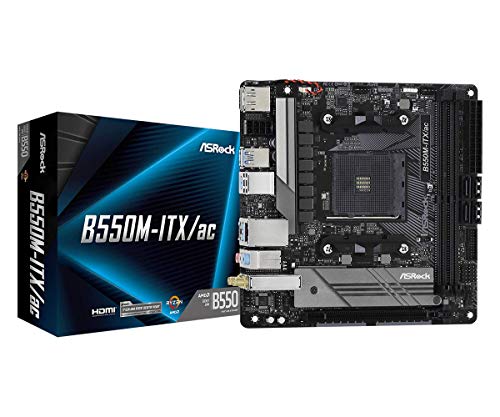
ASRock Mini-ITX AM4 Motherboard
Best for: compact AMD Ryzen AM4 desktop builds
- Form Factor
- Mini-ITX
- CPU Socket
- AM4
- Memory Type
- DDR4
- Dimensions
- 11 × 8.5 × 2.5 inches
- Weight
- 15 ounces
This compact Mini-ITX board pairs an AMD AM4 socket with dual video outputs via DisplayPort and HDMI. You get support for Ryzen 3000 through 5000 series processors, including G-Series models with integrated graphics, alongside DDR4 memory reaching 4733+ MHz when overclocked. It suits you if you want a dedicated small-form-factor base for high-speed DDR4 RAM and dual-monitor setups without moving to newer socket formats.
Pros
- Supports DDR4 memory up to 4733+ MHz (OC)
- Includes both DisplayPort and HDMI video outputs
- Compatible with Ryzen 3000, 4000 G-Series, and 5000 series CPUs
- Integrated Realtek ALC887 7.1-channel HD audio
Cons
- Not compatible with AMD Athlon processors
- Limited to DDR4 memory rather than DDR5
- Uses previous-generation AM4 socket instead of AM5
Good fit if
- You build a compact system using an AMD Ryzen 3000, 4000, or 5000 series desktop CPU.
- You need native DisplayPort and HDMI connections for dual monitors.
- You want to pair high-speed overclocked DDR4 RAM with an AM4 processor.
Skip if
- You plan to use an AMD Athlon processor.
- You require the newer AM5 platform for latest-generation processors and DDR5 memory.
Verdict: ASRock Mini-ITX AM4 Motherboard provides dependable AM4 CPU compatibility and high-speed DDR4 overclocking support in a space-saving footprint. It offers dual video outputs and multi-channel audio for streamlined compact builds.

ASRock Mini-ITX AM4 Motherboard
Best for: compact AMD AM4 Ryzen desktop builds
- Form Factor
- Mini-ITX
- CPU Socket
- AM4
- Memory Type
- DDR4
- PCIe Version
- PCIe 3.0
- Dimensions
- 10.8 × 8.35 × 2.28 inches
- Weight
- 0.32 ounces
This compact Mini-ITX board gives you a solid foundation for compact builds based on AMD AM4 processors, including Ryzen 3000 and 4000 series chips. It features support for fast DDR4 memory up to 4733+ MHz when overclocked, one PCIe 3.0 x16 slot for an add-in card, and dual display outputs via DisplayPort and HDMI. You get integrated 7.1-channel HD audio for straightforward media setups.
Pros
- Supports DDR4 memory speeds up to 4733+ MHz (OC)
- Dual monitor connectivity with HDMI and DisplayPort
- Realtek ALC887 codec provides 7.1-channel HD audio
- Full-length PCIe 3.0 x16 slot for add-in cards
Cons
- Limited to PCIe 3.0 bandwidth
- Socket AM4 excludes newer DDR5 and AM5 platforms
Good fit if
- You build a compact Mini-ITX system using an AMD AM4 processor.
- You need both HDMI and DisplayPort video outputs.
- You plan to run overclocked DDR4 memory.
Skip if
- You require PCIe 4.0 or PCIe 5.0 expansion speeds.
- You want to use newer AM5 processors or DDR5 RAM.
Verdict: ASRock Mini-ITX AM4 Motherboard provides essential connectivity and high DDR4 speeds for small-form-factor AM4 systems. It delivers reliable dual-display outputs and standard PCIe 3.0 expansion in a space-saving layout.

ASUS ROG Strix X870-I Mini-ITX Motherboard
Best for: compact AM5 builds needing Wi-Fi 7
- Form Factor
- Mini-ITX
- CPU Socket
- AM5
- Chipset
- AMD X870
- Memory Type
- DDR5
- M.2 Slots
- 2
- Wi-Fi Standard
- Wi-Fi 7
This ASUS ROG Strix X870-I Mini-ITX Motherboard brings high-speed networking and modern connectivity to small systems. Built around the AMD AM5 socket, it supports Ryzen 7000, 8000, and 9000 series processors with DDR5 memory up to 8400. You get built-in Wi-Fi 7, two USB4 ports, and a 2.5Gbit Ethernet port. It suits you if you want current AM5 features in a compact build.
Pros
- Integrated Wi-Fi 7 and 2.5Gbit Ethernet
- Dual USB4 ports and two M.2 slots
- 10+2+1 power stages rated for 110A per stage
- Supports AMD Ryzen 7000, 8000, and 9000 series CPUs
Cons
- Limited to two M.2 storage slots
- Restricted to AMD AM5 socket processors
Good fit if
- You need Wi-Fi 7 and 2.5Gbit networking in a Mini-ITX footprint.
- You plan to run an AMD Ryzen 7000, 8000, or 9000 series processor.
- You want dual USB4 connectivity on your motherboard.
Skip if
- You need an Intel-compatible CPU socket.
- You require more than two M.2 drives.
Verdict: ASUS ROG Strix X870-I Mini-ITX Motherboard delivers Wi-Fi 7 support, dual USB4 ports, and a 10+2+1 power design for compact AMD AM5 setups.

ASUS ROG Strix Mini-ITX AM5 Motherboard
Best for: compact AM5 builds needing USB4 connectivity
- Form Factor
- Mini-ITX
- CPU Socket
- AM5
- Chipset
- AMD X670
- Memory Type
- DDR5
- PCIe Version
- PCIe 5.0
- M.2 Slots
- 2
This Mini-ITX motherboard brings AMD AM5 socket support to small-form-factor builds with DDR5 memory compatibility. It features a 10+2 power stage design paired with active VRM cooling, PCIe 5.0 support, and two M.2 slots for fast storage. Dual USB4 Type-C ports, Wi-Fi 6E, and the external ROG Strix Hive audio unit expand connectivity outside your case. It suits you if you build a high-bandwidth, compact gaming rig with Ryzen processors.
Pros
- Dual USB4 Type-C ports and HDMI 2.1 output
- PCIe 5.0 support with two M.2 slots
- 10+2 power stages with active VRM cooling
- External ROG Strix Hive audio with ESS SABRE 9260Q DAC
- Onboard Wi-Fi 6E and Intel 2.5 Gb Ethernet
Cons
- Requires a BIOS update for Ryzen 8000 and 9000 series processors
- Primary audio connections rely on an external desktop module
- Limited to two M.2 storage drives
Good fit if
- You need dual USB4 ports and PCIe 5.0 in a Mini-ITX enclosure.
- You plan to build with AMD AM5 processors and DDR5 memory.
- You want external desktop audio control with a built-in DAC.
Skip if
- You prefer built-in rear audio jacks without external hardware.
- You require more than two M.2 solid-state drives.
- You want a completely passively cooled motherboard VRM.
Verdict: ASUS ROG Strix AM5 Mini-ITX Motherboard delivers high-speed connectivity with dual USB4 ports, PCIe 5.0, and an external audio interface. It offers robust 10+2 power delivery designed for compact AM5 setups.
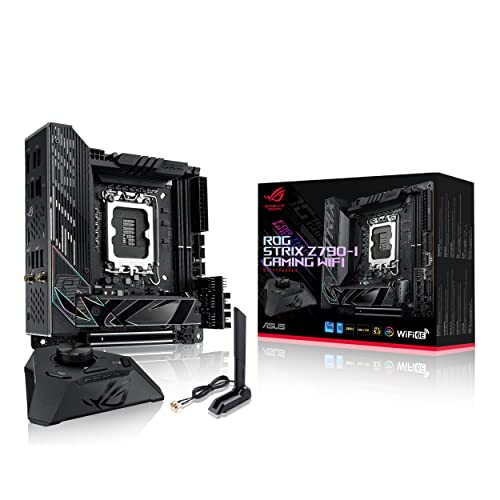
ASUS ROG Strix Z790-I Mini-ITX Motherboard
Best for: compact Intel LGA 1700 gaming setups
- Form Factor
- Mini-ITX
- CPU Socket
- LGA 1700
- Chipset
- Intel Z790
- Memory Type
- DDR5
- Use Case
- Gaming
- Dimensions
- 6.69 × 6.69 × 1.97 inches
The ASUS ROG Strix Z790-I Gaming WiFi is a compact Mini-ITX motherboard built around the Intel Z790 chipset and the LGA 1700 socket. It supports Intel Core i3, i5, i7, and i9 processors alongside Pentium Gold and Celeron chips. With two DDR5 DIMM slots handling up to 64 GB of non-ECC memory, it suits you if you want high-tier Intel hardware in a small 6.7 by 6.7-inch footprint.
Pros
- Intel Z790 chipset with LGA 1700 socket
- Supports DDR5-SDRAM across 2 DIMM slots
- Compact Mini-ITX form factor measuring 6.69 by 6.69 inches
- Compatible with Intel Core i3, i5, i7, i9, Pentium Gold, and Celeron CPUs
Cons
- Maximum memory capacity is limited to 64 GB
- Offers only 2 memory slots
Good fit if
- You need a Mini-ITX motherboard with an Intel Z790 chipset and LGA 1700 socket.
- You plan to run DDR5 memory up to 64 GB in a small-form-factor build.
- You use an Intel Core, Pentium Gold, or Celeron LGA 1700 processor.
Skip if
- You need more than 64 GB of system RAM.
- You require more than two DIMM slots for memory expansion.
Verdict: ASUS ROG Strix Z790-I Gaming WiFi Mini-ITX Motherboard delivers Intel Z790 performance and DDR5 compatibility within a compact Mini-ITX footprint. It provides a dedicated foundation for small-form-factor LGA 1700 gaming rigs that do not require over 64 GB of RAM.

ASUS ROG Strix B650E-I Gaming WiFi Mini-ITX Motherboard
Best for: AM5 Mini-ITX builds needing PCIe 5.0
- Form Factor
- Mini-ITX
- CPU Socket
- AM5
- Memory Type
- DDR5
- PCIe Version
- PCIe 5.0
- M.2 Slots
- 2
- Wi-Fi Standard
- WiFi 6E
View on Amazon: ASUS ROG Strix B650E-I Gaming WiFi Mini-ITX Motherboard
The ASUS ROG Strix B650E-I Gaming WiFi Mini-ITX Motherboard provides high-bandwidth expansion in a compact form factor. Built around the AMD AM5 socket, it supports AMD Ryzen 7000 and 9000 series processors with up to 64GB of DDR5 memory. You get PCIe 5.0 support, two M.2 slots, Intel 2.5Gb Ethernet, and Wi-Fi 6E connectivity. This board suits you if you plan to build a small-form-factor gaming PC with modern graphics and storage interfaces.
Pros
- PCIe 5.0 interface support
- Intel 2.5Gb Ethernet and Wi-Fi 6E networking
- Two M.2 slots with dedicated heatsinks
- 10 + 2 power stages
- Thunderbolt 4 and USB 3.2 Gen 2x2 ports
Cons
- Capped at 64GB maximum DDR5 capacity
- Requires a BIOS update for Ryzen 9000 series processors
Good fit if
- You need PCIe 5.0 compatibility in a compact Mini-ITX footprint.
- You plan to run an AMD AM5 Ryzen 7000 or 9000 series processor.
- You want high-speed networking with both 2.5GbE LAN and Wi-Fi 6E.
Skip if
- You require more than 64GB of system memory.
- You need more than two onboard M.2 storage drives.
Verdict: ASUS ROG Strix B650E-I Gaming WiFi Mini-ITX Motherboard delivers PCIe 5.0 expansion and AM5 processor support for compact builds. It is a capable choice if you need modern high-speed connectivity and dual M.2 storage.
Specifications side by side
| Spec | Gigabyte AM5 Mini-ITX Motherboard | Supermicro Mini-ITX Celeron Motherboard | Supermicro Mini-ITX DDR3 Motherboard and CPU Combo | Supermicro Mini-ITX Quad-Core CPU Combo | Supermicro Mini-ITX Quad-Core Combo | Supermicro Mini-ITX Intel Xeon Motherboard | Supermicro Mini-ITX Pentium N3700 Server Motherboard | Supermicro Mini-ITX Xeon Motherboard | GIGABYTE AORUS Mini-ITX DDR4 Motherboard | ASRock Mini-ITX AM4 Motherboard | ASRock Mini-ITX AM4 Motherboard | ASUS ROG Strix X870-I Mini-ITX Motherboard | ASUS ROG Strix Mini-ITX AM5 Motherboard | ASUS ROG Strix Z790-I Mini-ITX Motherboard | ASUS ROG Strix B650E-I Gaming WiFi Mini-ITX Motherboard |
|---|---|---|---|---|---|---|---|---|---|---|---|---|---|---|---|
| CPU Socket | AM5 | not specified | not specified | not specified | not specified | not specified | Socket BGA-1170 | not specified | LGA 1700 | AM4 | AM4 | AM5 | AM5 | LGA 1700 | AM5 |
| Chipset | not specified | not specified | not specified | not specified | not specified | System on Chip | not specified | not specified | B660 | not specified | not specified | AMD X870 | AMD X670 | Intel Z790 | not specified |
| Form Factor | Mini ITX | Mini-ITX | Mini ITX | Mini-ITX | Mini-ITX | Mini-ITX | Mini-ITX | Mini-ITX | Mini-ITX | Mini ITX | Mini ITX | Mini ITX | Mini-ITX | Mini-ITX | mini-ITX |
| Memory Type | DDR5 | DDR3 | DDR3 | DDR3 | DDR3 | DDR4 | DDR3 | not specified | DDR4 | DDR4 | DDR4 | DDR5 | DDR5 | DDR5 | DDR5 |
| PCIe Version | not specified | not specified | not specified | PCI-Express 2.0 | PCI-Express 2.0 | not specified | not specified | not specified | PCIe 4.0 | not specified | PCIe 3.0 | not specified | PCIe 5.0 | not specified | PCIe 5.0 |
| M.2 Slots | 1 | not specified | not specified | not specified | not specified | not specified | not specified | not specified | 1 | not specified | not specified | 2 | 2 | not specified | 2 |
| Wi-Fi Standard | Wi-Fi 6E | not specified | not specified | not specified | not specified | not specified | not specified | not specified | Wi-Fi 6 | not specified | not specified | Wi-Fi 7 | Wi-Fi 6E | not specified | WiFi 6E |
| Ethernet Speed | 2.5GbE LAN | 2GbE | not specified | not specified | not specified | not specified | not specified | not specified | 2.5 GbE | not specified | not specified | 2.5 GbE | 2.5 Gb | not specified | 2.5G LAN |
| Power Phases | 5+2+1 | not specified | not specified | not specified | not specified | not specified | not specified | not specified | 8+1+1 | not specified | not specified | 10+2+1 | 10+2 | not specified | 10+2 |
| Wi-Fi | Wi-Fi 6E | not specified | not specified | not specified | not specified | not specified | not specified | not specified | Wi-Fi 6 | not specified | not specified | Wi-Fi 7 | Wi-Fi 6E | not specified | Wi-Fi 6E |
| Use Case | not specified | not specified | not specified | not specified | not specified | not specified | not specified | not specified | Gaming | not specified | not specified | Gaming | Gaming | Gaming | Gaming |
| Core Count | not specified | not specified | not specified | 4 Cores | 4 Cores | not specified | not specified | not specified | not specified | not specified | not specified | not specified | not specified | not specified | not specified |
| Dimensions | 6.69 × 6.69 × 1.38 inches | 13 × 10 × 2 inches | 61.4 × 2.03 × 1.24 inches | 13 × 10 × 2 inches | 11 × 10 × 2 inches | 7 × 7 × 2.5 inches | 23.6 × 23.6 × 33.5 inches | not specified | 9.25 × 8.94 × 3.74 inches | 11 × 8.5 × 2.5 inches | 10.8 × 8.35 × 2.28 inches | 6.69 × 6.69 × 0.39 inches | 8.9 × 4.3 × 11 inches | 6.69 × 6.69 × 1.97 inches | 6.69 × 6.69 × 1.97 inches |
| Weight | not specified | 4 pounds | 1.88 pounds | not specified | 10.6 ounces | not specified | 6 pounds | not specified | not specified | 15 ounces | 0.32 ounces | 2.43 pounds | not specified | 3.31 pounds | 2.2 pounds |
| Size | Mini ITX | not specified | not specified | not specified | not specified | not specified | 8 Gb | not specified | B660I AORUS PRO DDR4 | 700W | not specified | not specified | ROG X670E-I|DDR5|WIFI 6E | Mini-ITX | B650E-I GAMING WIFI |
| Color | Black | not specified | not specified | not specified | not specified | not specified | not specified | not specified | black | not specified | not specified | black | BLACK | schwarz | not specified |
| Model | A620I AX | MBD-X10SBA | MBD-A1SAi-2750F-O | A1SAI-2550F-O | A1SRI-2558F-O | X10SDV-F-O | MBD-X11SBA-LN4F-B | X11SDV-8C+-TLN2F | B660I | B550M-ITX/AC | A520M-ITX/AC | 90MB1IW0-M0EAY0 | ROG STRIX X670E-I GAMING WIFI | 90MB1CM0-M0EAY0 | 90MB1BI0-M0EAY0 |
Is a Mini-ITX Motherboard Worth It?
Mini-ITX defines a 6.7-inch square form factor. This compact footprint dictates physical hardware limits. You gain compatibility with space-constrained cases, compact servers, and small desktop enclosures. You trade away expansion room. Motherboards in this category restrict layouts to a single PCIe expansion slot or soldered embedded processors. Modern models integrate fast connections directly into the board, including Wi-Fi 7, USB4, and 2.5GbE networking. Mini-ITX fits installations where minimal chassis volume matters most.
Worth it if
- You plan a compact desktop, networking appliance, or multi-drive storage server.
- You need built-in high-speed networking like 2.5GbE, Wi-Fi 6E, or Wi-Fi 7 without secondary cards.
Skip it if
- You need multiple PCIe slots for expansion cards.
- You require swappable desktop processors on embedded combo motherboards.
If you also need an enclosure, you can compare dimensions and clearance specifications for each Mini-ITX PC case to match your build.
How We Picked Mini-ITX Motherboards
You find 15 models here selected entirely from published specifications on Amazon listings. A motherboard qualifies when its listing states the Mini-ITX form factor in the title or feature list. We show only one variant per product family so you see distinct choices. Products are not physically handled. Every detail comes strictly from published specifications on the listings.
We order the list with products in stock first, then by Amazon sales rank (better-selling products first). Availability updates at least daily on the page, so you always see current stock status without relying on outdated records.
How to Choose a Mini-ITX Motherboard
-
Check PCIe Bus Generation
Check the PCIe generation supported by the main expansion slot. A PCIe 4.0 slot handles common modern discrete graphics cards and standard add-in cards. If you plan to install next-generation add-in cards or want maximum throughput for future hardware, look for PCIe 5.0 support instead. For example, the ASUS ROG Strix B650E-I Gaming WiFi Motherboard includes PCIe 5.0 capability. Review your planned expansion card specifications so you do not pair a high-bandwidth device with a slower interface.
-
Evaluate Wired Network Speeds
Evaluate the Ethernet speed and port count if you rely on a wired local network. Modern gaming motherboards typically provide a single 2.5GbE port, which doubles standard Gigabit transfer rates when connected to compatible switches or routers. Dedicated network or appliance setups may benefit more from multiple physical connections. For instance, the Supermicro Pentium N3700 Server Motherboard supplies quad Gigabit LAN ports. Choose multi-port boards for network segmentation, or select a single 2.5GbE port for high-throughput single-client connections.
-
Verify Wi-Fi Generation Support
Check the integrated Wi-Fi generation if you plan to connect without an Ethernet cable. Standard Wi-Fi 6 operates across 2.4 GHz and 5 GHz frequency bands. Newer standards, such as Wi-Fi 6E and Wi-Fi 7, expand into the 6 GHz spectrum to reduce congestion and improve throughput. The ASUS ROG Strix X870-I Mini-ITX Motherboard features built-in Wi-Fi 7 for setups running on current high-band routers. Verify your wireless router specifications to ensure your motherboard matches your network capability.
-
Count Internal Drive Ports
Check the number of internal storage headers if you build a compact storage server or network-attached storage box. Many general-purpose desktop Mini-ITX boards provide limited SATA connections because of surface constraints. Server-oriented designs prioritize drive capacity over high-power peripherals. For instance, the Supermicro Mini-ITX Quad-Core CPU Combo provides six SATA drive ports alongside low 14W power consumption. Match your drive count to the onboard port tally to ensure your chassis drives connect directly without needing add-in host bus adapter cards.
-
Decide Between Embedded Processors
Decide whether your system requires a modular CPU socket or an integrated, embedded processor. Socketed platforms allow you to choose and later swap your desktop processor. In contrast, combo boards feature a pre-soldered CPU that cannot be replaced or upgraded. For example, the Supermicro Mini-ITX Celeron Motherboard integrates an embedded Celeron J1900 processor directly onto the board. This configuration suits fixed-function, low-power continuous operation where you do not need CPU upgrades or component flexibility over the hardware lifespan.
Frequently asked questions
Can you run high-speed networking on a Mini-ITX motherboard?
Yes, you can find high-speed wired networking across various Mini-ITX models. Boards such as the Gigabyte A620I AX, Gigabyte B660I, and ASUS B650E-I feature built-in 2.5GbE Ethernet ports for faster local transfers. For specialized server applications, Supermicro models provide multi-port configurations, including dual Gigabit ports on the MBD-X10SBA and quad Gigabit LAN ports on the MBD-X11SBA-LN4F-B.
Do Mini-ITX motherboards come with integrated processors?
Yes, several Mini-ITX boards feature integrated processors soldered directly onto the PCB. Supermicro offers all-in-one combos equipped with low-power chips, such as the Celeron J1900 on the MBD-X10SBA or quad-core Intel Atom processors on the A1SAI-2550F-O. Higher-end enterprise options like the X11SDV-8C+-TLN2F feature built-in Xeon D-2141I CPUs, meaning you cannot upgrade the CPU separately.
What wireless networking standards do Mini-ITX boards include?
Wireless connectivity varies by board generation and chipset. You can find Wi-Fi 6 on boards like the Gigabyte B660I, while newer platforms like the Gigabyte A620I AX, ASUS ROG Strix X670E-I, and ASUS B650E-I offer Wi-Fi 6E. For the latest standard, the ASUS ROG Strix X870-I includes Wi-Fi 7, providing high-bandwidth wireless capability inside a small footprint.
Can you build a dedicated storage server on Mini-ITX?
Yes, certain Mini-ITX boards are specifically designed for continuous-run storage builds. Models such as the Supermicro A1SAI-2550F-O and A1SRI-2558F-O feature six SATA drive connections paired with energy-efficient quad-core Intel Atom processors. The Supermicro X10SDV-F-O also provides six SATA3 ports alongside an eight-core Xeon processor, giving you dense storage connectivity and ECC memory support in a standard compact form factor.
Do Mini-ITX motherboards feature USB4 ports?
Yes, select advanced Mini-ITX motherboards include native USB4 connectivity. Both the ASUS ROG Strix X870-I and ASUS ROG Strix X670E-I provide dual USB4 ports directly on the board. This allows you to connect high-bandwidth external storage devices and peripherals without relying on PCIe add-in expansion cards, which Mini-ITX cases rarely have physical space to accommodate.
Can you use ECC memory with a Mini-ITX motherboard?
Yes, you can use ECC memory if you choose a motherboard engineered for server or embedded workloads. Supermicro Mini-ITX boards like the A1SAI-2550F-O and A1SRI-2558F-O support ECC SODIMM DDR3 modules, while the Xeon-based X10SDV-F-O supports dense DDR4 ECC memory. Standard desktop gaming boards generally lack ECC support and instead specify standard non-ECC DDR4 or DDR5 RAM.
Are Mini-ITX motherboards capable of handling PCIe 5.0 speeds?
Yes, select modern Mini-ITX boards support PCIe 5.0 expansion. The ASUS ROG Strix B650E-I Gaming WiFi and ASUS ROG Strix X670E-I motherboards both feature PCIe 5.0 support for modern high-speed bandwidth demands. Older or more entry-level options on this form factor operate on PCIe 4.0 or PCIe 3.0 interfaces instead.