GIGABYTE Motherboards: 15 Picks Ranked by Specs
As an Amazon Associate we earn from qualifying purchases. Links on this page are affiliate links.
Finding the right GIGABYTE motherboard depends on your processor socket, memory preference, and case dimensions. The brand covers form factors including Mini-ITX, Micro-ATX, ATX, and E-ATX across platforms such as AMD AM4, AM5, Intel LGA 1151, LGA 1200, and LGA 1700.
The Gigabyte Micro-ATX DDR5 Gaming Motherboard takes the top spot for compact DDR5 gaming builds by pairing DDR5 support with PCIe 4.0 expansion in a smaller footprint. To help you evaluate your options, this guide compares 15 motherboards ranked strictly by the specifications published on their listings.
Quick picks
Our 15 picks

Gigabyte Micro-ATX DDR5 Gaming Motherboard
Best for: compact DDR5 gaming builds
- Chipset
- AMD A620
- Form Factor
- Micro ATX
- Memory Type
- DDR5
- PCIe Version
- PCIe 4.0
- Use Case
- Gaming
- Dimensions
- 9.61 × 9.61 × 1.38 inches
The GIGABYTE Gaming X Micro ATX Motherboard gives you a compact platform built around the AMD A620 chipset and DDR5 memory support. Its Micro-ATX dimensions measure 9.61 by 9.61 inches, making it a fit for smaller PC cases while providing PCIe 4.0 bandwidth for modern expansion cards. With integrated USB 3.2 Gen1x2 Type-C connectivity, this board suits you if you need essential modern standards in a space-saving gaming setup.
Pros
- Supports high-speed DDR5 system memory
- PCIe 4.0 interface for expansion devices
- Includes USB 3.2 Gen1x2 Type-C connectivity
- Compact 9.61 by 9.61-inch Micro-ATX footprint
Cons
- Lacks PCIe 5.0 expansion support
- No wireless connectivity listed in specifications
Good fit if
- You want DDR5 memory support in a Micro-ATX build
- You need USB 3.2 Gen1x2 Type-C connectivity
- You plan a gaming setup utilizing PCIe 4.0
Skip if
- You require PCIe 5.0 support for expansion cards
- You need integrated Wi-Fi straight from the motherboard
Verdict: GIGABYTE Gaming X Micro ATX Motherboard delivers core gaming essentials including DDR5 compatibility and PCIe 4.0 support in a compact design. It provides a straightforward foundation for space-conscious builds requiring modern connectivity.

GIGABYTE AORUS LGA 1151 ATX Motherboard
Best for: 8th Gen Intel builds needing dual LAN
- CPU Socket
- LGA1151
- Chipset
- Z370
- Form Factor
- ATX
- M.2 Slots
- 3
- Ethernet Speed
- Gigabit LAN
- Use Case
- Gaming
This ATX motherboard features an LGA 1151 socket designed for 8th Generation Intel Core processors. You get three M.2 slots with M.2 Thermal Guard cooling, dual network options via Killer E2500 and Intel Gigabit LAN, and an ESS Sabre DAC. It also includes front and rear USB 3.1 Gen 2 Type-C connectivity. This board suits you if you need a full-size platform with multi-drive storage and dual wired networking.
Pros
- Three M.2 slots equipped with M.2 Thermal Guard cooling
- Dual wired networking with Killer E2500 and Intel Gigabit LAN
- USB 3.1 Gen 2 Type-C connectivity including a front header
- Onboard ESS Sabre DAC audio hardware
Cons
- CPU compatibility limited to 8th Generation Intel Core processors
- No wireless Wi-Fi adapter listed in specifications
- Operating system support documented only for Windows 10 64-bit
Good fit if
- You build with an 8th Generation Intel Core processor.
- You require dual Ethernet ports with Killer and Intel LAN controllers.
- You want multiple M.2 drives protected by Thermal Guard heatsinks.
Skip if
- You need built-in Wi-Fi wireless connectivity out of the box.
- You plan to use a newer generation of Intel or AMD processors.
- You run an operating system other than 64-bit Windows 10.
Verdict: GIGABYTE AORUS LGA 1151 ATX Motherboard delivers extensive high-speed storage and dual Gigabit LAN for 8th Gen Intel builds. It provides robust wired connectivity and dedicated audio hardware in a standard ATX layout.

GIGABYTE AORUS Z390 ATX Motherboard
Best for: 8th and 9th Gen Intel gaming builds
- CPU Socket
- LGA1151
- Chipset
- Z390
- Form Factor
- ATX
- Memory Type
- DDR4
- M.2 Slots
- 2
- Wi-Fi Standard
- 802.11ac
This ATX board uses the Intel Z390 chipset and an LGA 1151 socket to run 8th and 9th Generation Intel Core processors. It delivers power through a 12+1 phase digital VRM design and provides dual-channel DDR4 support across four DIMM slots. With onboard 802.11ac Wi-Fi, Bluetooth 5, and two M.2 Thermal Guard slots, it suits you if you want a dedicated gaming setup built around compatible Intel hardware.
Pros
- 12+1 phases digital VRM solution with DrMOS
- Onboard Intel CNVi 802.11ac 2x2 Wave 2 Wi-Fi and Bluetooth 5
- Dual-channel non-ECC unbuffered DDR4 across four DIMMs
- ALC1220-VB audio with WIMA capacitors
Cons
- Limits CPU compatibility to 8th and 9th Generation Intel Core processors
- Uses 802.11ac Wi-Fi rather than newer wireless standards
- Provides two M.2 slots instead of three
Good fit if
- You plan to build a gaming system with an 8th or 9th Gen Intel Core processor.
- You need integrated 802.11ac Wi-Fi and Bluetooth 5 connectivity.
- You want four DDR4 memory slots with Intel Optane memory support.
Skip if
- You plan to use a newer CPU socket than LGA 1151.
- You require DDR5 memory for your build.
- You need more than two M.2 storage slots.
Verdict: GIGABYTE Z390 AORUS PRO Wi-Fi Motherboard provides a solid foundation for LGA 1151 builds with robust power delivery, onboard Wi-Fi, and dual M.2 cooling. It gives you dependable specs for gaming on 8th and 9th Generation Intel processors.

Gigabyte X570 Gaming X ATX Motherboard
Best for: AM4 PCIe 4.0 DDR4 gaming builds
- Chipset
- X570
- Form Factor
- ATX
- Memory Type
- DDR4
- PCIe Version
- PCIe 4.0
- M.2 Slots
- 2
- Ethernet Speed
- GbE
The GIGABYTE X570 Gaming X ATX Motherboard is built around the AMD X570 chipset and DDR4 memory. It features a 12-phase digital VRM alongside PCIe 4.0 expansion support. Dual NVMe M.2 slots give you room for fast storage, though only one slot includes a thermal guard. This board suits your build if you run a compatible 2nd or 3rd Gen AMD Ryzen processor and prioritize straightforward PCIe 4.0 connectivity.
Pros
- True 12-phase digital VRM design
- Dual NVMe PCIe 4.0/3.0 x4 M.2 connectors
- Four DDR4 DIMM slots supporting ECC and non-ECC memory
- HDMI 2.0b video output port
Cons
- Single thermal guard included for two M.2 slots
- No integrated Wi-Fi networking listed
- Uses entry-level Realtek ALC887 audio codec
Good fit if
- You use a 2nd or 3rd Gen AMD Ryzen processor.
- You want PCIe 4.0 storage and expansion using DDR4 memory.
- You need an ATX layout with four DIMM slots.
Skip if
- You need built-in Wi-Fi hardware.
- You require factory heatsinks across all M.2 slots.
- You are building a newer platform requiring DDR5 RAM.
Verdict: GIGABYTE X570 Gaming X ATX Motherboard provides a 12-phase power configuration and dual PCIe 4.0 M.2 slots for compatible AMD Ryzen setups. It covers essential ATX expansion needs without built-in wireless.
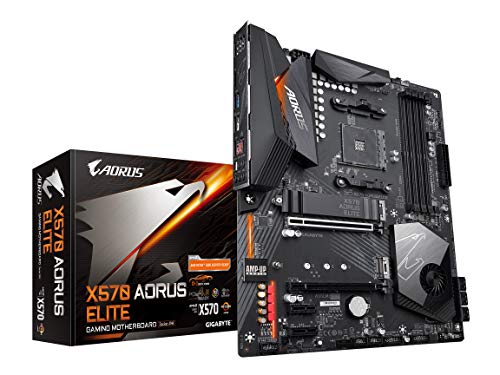
Gigabyte Aorus Elite ATX Motherboard
Best for: AM4 gaming builds using PCIe 4.0 storage
- Chipset
- X570
- Form Factor
- ATX
- Memory Type
- DDR4
- PCIe Version
- PCIe 4.0
- M.2 Slots
- 2
- Power Phases
- 12
The GIGABYTE X570 AORUS Elite ATX Motherboard runs on the AMD X570 chipset for 2nd and 3rd Gen AMD Ryzen processors. You get four DDR4 memory slots, dual PCIe 4.0 NVMe M.2 connectors with a thermal guard, and a 12-phase digital VRM design. It suits you if you build a standard ATX gaming desktop using compatible Ryzen hardware and need stable power delivery alongside high-speed PCIe storage.
Pros
- True 12 phases digital VRM with extended heatsink
- Dual NVMe PCIe 4.0/3.0 x4 M.2 connectors with thermal guard
- Four DIMM slots for dual-channel DDR4 memory
- Front panel USB Type-C support
Cons
- No onboard Wi-Fi listed
- Limited to DDR4 memory instead of DDR5
Good fit if
- You plan to build an ATX PC with a 2nd or 3rd Gen AMD Ryzen CPU.
- You need dual NVMe M.2 slots operating at PCIe 4.0 speeds.
- You want a 12-phase digital VRM with extended heatsinks.
Skip if
- You require built-in Wi-Fi connectivity out of the box.
- You want an AM5 motherboard that supports DDR5 memory.
Verdict: GIGABYTE X570 AORUS Elite ATX Motherboard provides PCIe 4.0 bandwidth and a 12-phase digital VRM for Ryzen desktop builds. It offers reliable core connectivity if you do not require integrated wireless networking.
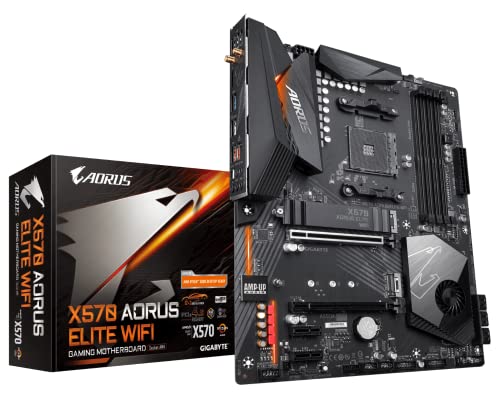
GIGABYTE X570 AORUS Elite Wi-Fi ATX Motherboard
Best for: PCIe 4.0 AMD Ryzen DDR4 builds
- Chipset
- X570
- Form Factor
- ATX
- Memory Type
- DDR4
- PCIe Version
- PCIe 4.0
- M.2 Slots
- 2
- Wi-Fi Standard
- 802.11ac
View on Amazon: GIGABYTE X570 AORUS Elite Wi-Fi ATX Motherboard
The GIGABYTE X570 AORUS Elite Wi-Fi is an ATX gaming motherboard built on the AMD X570 chipset. It supports AMD 2nd and 3rd Generation Ryzen processors and features four DIMM slots for dual-channel DDR4 memory. You get PCIe 4.0 support alongside dual NVMe PCIe 4.0/3.0 x4 M.2 connectors, paired with a 12+2 phase digital VRM setup and built-in Wi-Fi 5. This board suits you if you want a full-sized AM4 build with PCIe 4.0 connectivity.
Pros
- 12+2 phases digital VRM solution with DrMOS
- Dual NVMe PCIe 4.0/3.0 x4 M.2 slots with single thermal guard
- Built-in Intel dual band 802.11ac Wi-Fi
- Four DIMM slots supporting dual channel DDR4 memory
Cons
- Uses older Wi-Fi 5 standard instead of Wi-Fi 6 or Wi-Fi 7
- Limited to DDR4 memory rather than newer DDR5
- Only one M.2 thermal guard provided for two M.2 slots
Good fit if
- You build with an AMD 2nd or 3rd Gen Ryzen processor.
- You need an ATX board with PCIe 4.0 and dual M.2 slots.
- You require integrated Wi-Fi 5 wireless networking.
Skip if
- You plan to run newer DDR5 system memory.
- You need a compact micro ATX or Mini-ITX form factor.
- You require updated Wi-Fi 6 or Wi-Fi 7 connectivity.
Verdict: GIGABYTE X570 AORUS Elite Wi-Fi ATX Motherboard provides a solid foundation for compatible Ryzen processors with its 12+2 phase VRM and PCIe 4.0 bandwidth. It gives you dependable power delivery and onboard Wi-Fi without moving to a newer memory platform.

Gigabyte Z590 UD ATX Motherboard
Best for: 10th and 11th Gen Intel desktop builds
- CPU Socket
- LGA 1200
- Chipset
- Intel Z590
- Form Factor
- ATX
- Memory Type
- DDR4
- PCIe Version
- PCIe 4.0
- M.2 Slots
- 3
The GIGABYTE Z590 ATX Motherboard provides an LGA 1200 socket engineered for 10th and 11th Gen Intel Core processors. You get PCIe 4.0 connectivity, three M.2 storage slots, and 2.5GbE wired networking. Its four DDR4 slots support dual-channel memory alongside a direct 12+1 phase digital VRM design. It fits your system if you need a reliable full-size base for an Intel desktop build.
Pros
- Direct 12+1 phases digital VRM solution with 50A DrMOS
- Triple M.2 connectors for storage drives
- PCIe 4.0 expansion support
- High-speed 2.5GbE LAN connectivity
Cons
- No integrated Wi-Fi networking included
- Limited to LGA 1200 socket 10th and 11th Gen Intel CPUs
Good fit if
- You are building with a 10th or 11th Gen Intel Core processor.
- You want three M.2 drive slots in a standard ATX layout.
- You use a 2.5GbE wired network connection.
Skip if
- You need onboard Wi-Fi without adding an expansion card.
- You plan to use newer LGA 1700 or AMD processors.
Verdict: GIGABYTE Z590 ATX Motherboard delivers direct 12+1 phase power delivery, triple M.2 storage, and 2.5GbE LAN for LGA 1200 builds.

GIGABYTE AORUS Mini-ITX DDR4 Motherboard
Best for: compact DDR4 small-form-factor gaming builds
- CPU Socket
- LGA 1700
- Chipset
- B660
- Form Factor
- Mini-ITX
- Memory Type
- DDR4
- PCIe Version
- PCIe 4.0
- M.2 Slots
- 1
This compact Mini-ITX board gives you an Intel LGA 1700 socket designed for 12th Gen Intel Core processors alongside two DDR4 memory slots. It integrates Wi-Fi 6, 2.5GbE networking, and a PCIe 4.0 expansion slot into a small footprint. Built with an 8+1+1 phase power design and a single PCIe 4.0 M.2 slot, it suits you if you want a space-saving gaming setup without transitioning to DDR5 memory.
Pros
- Compact Mini-ITX form factor for small builds
- Built-in Wi-Fi 6 and 2.5GbE LAN
- 8+1+1 phase digital VRM with 90A SPS
- USB 3.2 Gen 2x2 Type-C connectivity
Cons
- Limited to a single M.2 storage slot
- Only two DDR4 memory slots available
Good fit if
- You are building a compact small-form-factor gaming PC.
- You plan to use a 12th Gen Intel Core CPU with DDR4 memory.
- You need high-speed wired 2.5GbE and Wi-Fi 6 wireless networking.
Skip if
- You need multiple M.2 NVMe drives in your build.
- You plan to use newer DDR5 memory kits.
Verdict: GIGABYTE AORUS DDR4 Mini-ITX Motherboard provides essential high-speed networking and PCIe 4.0 support for compact builds. It is a focused option if you want reliable power delivery in a small-form-factor footprint.

GIGABYTE AORUS ATX DDR5 Motherboard
Best for: Intel desktop builds needing Wi-Fi 7
- CPU Socket
- LGA 1700
- Chipset
- Z790
- Form Factor
- ATX
- Memory Type
- DDR5
- PCIe Version
- PCIe 5.0
- M.2 Slots
- 4
This GIGABYTE ATX board features an Intel LGA 1700 socket that supports 12th, 13th, and 14th Generation Intel Core processors. It equips you with dual-channel DDR5 memory across four slots, high-speed Wi-Fi 7, and 2.5GbE LAN. You also get four PCIe 4.0 x4 M.2 slots and a PCIe 5.0 slot. It suits you if you want modern connectivity and high-bandwidth storage for a high-performance desktop build.
Pros
- Supports 14th, 13th, and 12th Gen Intel Core CPUs on socket LGA 1700
- Equipped with fast Wi-Fi 7 and a 2.5GbE Ethernet port
- Provides four PCIe 4.0 x4 M.2 storage slots with thermal guards
- Twin 16+1+2 digital VRM phase design for power delivery
Cons
- Does not include any PCIe 5.0 M.2 storage slots
- Requires DDR5 memory and lacks backward support for DDR4
- Standard ATX size will not fit into smaller micro-ATX or ITX cases
Good fit if
- You plan to run a 12th, 13th, or 14th Gen Intel Core processor.
- You want built-in Wi-Fi 7 and 2.5GbE wired network support.
- You intend to run multiple PCIe 4.0 NVMe solid-state drives.
Skip if
- You plan to reuse an existing DDR4 memory kit.
- You require an M.2 slot that supports PCIe 5.0 speeds.
- You are building inside a compact Mini-ITX or micro-ATX case.
Verdict: GIGABYTE AORUS ATX Motherboard with Wi-Fi 7 delivers strong power phases, fast wireless networking, and ample PCIe 4.0 storage for modern Intel rigs. It provides a reliable ATX foundation if you are upgrading to DDR5 memory.

GIGABYTE Eagle ATX AM5 Motherboard
Best for: AM5 builds needing Wi-Fi 6E connectivity
- CPU Socket
- AM5, LGA 1718
- Chipset
- B650
- Form Factor
- ATX
- Memory Type
- DDR5
- PCIe Version
- PCIe 5.0, PCIe 4.0
- M.2 Slots
- 3
This ATX motherboard features the AMD AM5 socket for Ryzen 7000, 8000, and 9000 series processors. You get four DDR5 memory slots, three M.2 storage slots including one PCIe 5.0 interface, and built-in AMD Wi-Fi 6E. A 12+2+2 phase digital VRM delivers processor power, while a 1GbE LAN port handles wired networking. It suits builders who need high-speed wireless networking alongside PCIe 5.0 storage expansion for modern AMD desktop systems.
Pros
- AMD Wi-Fi 6E wireless networking support
- One PCIe 5.0 M.2 slot plus two PCIe 4.0 M.2 slots
- 12+2+2 phase digital VRM power delivery
- USB 3.2 Gen 2x2 Type-C connectivity
Cons
- 1GbE wired Ethernet rather than multi-gigabit speeds
- Full ATX form factor requires larger PC cases
Good fit if
- You need AMD Wi-Fi 6E wireless connectivity built into your motherboard.
- You plan to run an AMD AM5 processor with DDR5 memory.
- You want PCIe 5.0 solid-state drive support alongside two additional M.2 slots.
Skip if
- You require 2.5GbE or faster wired Ethernet speeds.
- You need a compact Micro ATX or Mini-ITX build.
Verdict: GIGABYTE Eagle AX AM5 ATX Motherboard pairs AMD Wi-Fi 6E with PCIe 5.0 M.2 storage on an AM5 platform. It provides essential high-speed wireless and DDR5 memory support for modern AMD desktop processors.

GIGABYTE AORUS Xtreme AM5 E-ATX Motherboard
Best for: enthusiast AMD builds needing maximum expansion
- CPU Socket
- AM5, LGA 1718
- Chipset
- X870E
- Form Factor
- E-ATX
- Memory Type
- DDR5
- PCIe Version
- PCIe 5.0
- M.2 Slots
- 4
This GIGABYTE motherboard uses an E-ATX form factor and houses the AMD AM5 socket for Ryzen 9000, 8000, and 7000 series processors. You get four DDR5 DIMM slots, an 18+2+2 phase power design, and PCIe 5.0 expansion support alongside four M.2 slots. Built-in Wi-Fi 7 and dual USB4 ports provide high-speed connections. It fits your build if you run high-demand AMD hardware and need maximum connectivity across storage and peripherals.
Pros
- 18+2+2 phase power design with 110A Smart Power Stages
- PCIe 5.0 support with four M.2 storage slots
- Dual USB4 ports and Wi-Fi 7 connectivity
- EZ-Latch mechanisms for tool-free M.2 and PCIe hardware swaps
- Five-year manufacturer warranty
Cons
- E-ATX dimensions require a large chassis with extended clearance
- Total assembly weight exceeds eight pounds
Good fit if
- You run an AMD Ryzen 9000, 8000, or 7000 series desktop processor.
- You require four M.2 slots and dual USB4 transfer speeds.
- You build inside a PC case that supports E-ATX motherboards.
Skip if
- You use a standard ATX, Micro ATX, or Mini-ITX chassis.
- You build with an Intel processor or older DDR4 system memory.
Verdict: GIGABYTE AORUS E-ATX AM5 Motherboard delivers high-phase power delivery and modern connectivity including Wi-Fi 7 and USB4. Its large footprint suits builders who prioritize storage slots and cooling coverage over case compatibility.

Gigabyte AM4 Micro-ATX Motherboard
Best for: compact AM4 builds needing basic DDR4 expansion
- CPU Socket
- AM4
- Form Factor
- MicroATX
- Memory Type
- DDR4
- PCIe Version
- PCIe 3.0
- M.2 Slots
- 1
- Ethernet Speed
- 1GbE
This Micro-ATX motherboard fits AMD AM4 processors, including 3rd Gen AMD Ryzen chips. You get two dual-channel DDR4 DIMM slots, one PCIe 3.0 x16 slot, and a single NVMe PCIe 3.0 x4 M.2 slot for storage. A 4+3 phases digital PWM setup handles power delivery, while networking runs on 1GbE LAN. It suits you if you plan a compact AM4 build using DDR4 memory and standard PCIe 3.0 expansion.
Pros
- One NVMe PCIe 3.0 x4 M.2 slot
- 4+3 phases digital PWM power design
- Compact Micro-ATX form factor
- 1GbE wired LAN connectivity
Cons
- Only two DDR4 DIMM memory slots
- Limits storage expansion to one M.2 slot
- Supports PCIe 3.0 rather than newer PCIe generations
Good fit if
- You use a 3rd Gen AMD Ryzen processor on the AM4 socket.
- You need a Micro-ATX board with two DDR4 memory slots.
- You run a single NVMe PCIe 3.0 x4 M.2 drive for storage.
Skip if
- You need four DDR4 memory slots for additional RAM.
- You require PCIe 4.0 support or multiple M.2 slots.
Verdict: GIGABYTE AM4 Micro-ATX Motherboard delivers core AM4 connectivity with dual DDR4 slots, one PCIe 3.0 x16 slot, and 1GbE networking. It serves as a straightforward option for basic compact systems.

GIGABYTE AM4 Multi-Display Motherboard
Best for: basic AM4 desktop builds with legacy displays
- CPU Socket
- AM4
- Memory Type
- DDR4
- PCIe Version
- PCIe 3.0
- Ethernet Speed
- GbE
- Power Phases
- 4+3
- Dimensions
- 8.07 × 9.61 × 1.38 inches
This GIGABYTE AM4 DDR4 Motherboard provides a straightforward foundation for AMD Ryzen 3000, 4000 G-Series, and 5000 Series processors. You get two DDR4 memory slots, a 4+3 phase digital VRM, and a PCIe 3.0 x4 M.2 connector for high-speed storage. Built-in HDMI, DVI-D, and D-sub ports offer broad legacy and modern monitor compatibility. It fits your needs if you want an essential AM4 build for everyday desktop tasks or entry-level computing.
Pros
- Triple display outputs with HDMI, DVI-D, and D-sub ports
- NVMe PCIe 3.0 x4 M.2 connector
- Pure Digital 4+3 phase VRM solution
- Smart Fan 5 with Fan Stop technology
Cons
- Limited to two DDR4 memory slots
- Restricted to PCIe 3.0 bandwidth
Good fit if
- You use an AMD Ryzen 3000, 4000 G-Series, or 5000 Series AM4 processor.
- You need flexible display connectivity across HDMI, DVI-D, and D-sub.
- You require only two DDR4 DIMM slots for your setup.
Skip if
- You need PCIe 4.0 or faster expansion slots.
- You plan to install four DDR4 memory modules.
Verdict: GIGABYTE AM4 DDR4 Motherboard delivers essential AM4 connectivity with flexible display outputs and NVMe storage support. It serves everyday computing setups that do not require PCIe 4.0 or more than two memory slots.

GIGABYTE B550 ATX AM4 Motherboard
Best for: AM4 gaming builds needing PCIe 4.0 storage
- CPU Socket
- AM4
- Form Factor
- ATX
- Memory Type
- DDR4
- PCIe Version
- PCIe 4.0
- M.2 Slots
- 2
- Ethernet Speed
- 1 GbE
The GIGABYTE B550 ATX AM4 Motherboard provides a solid foundation for Socket AM4 builds. It features an AMD B550 chipset, one PCIe 4.0 x16 slot for graphics, and dual M.2 connectors for high-speed storage. With four DDR4 memory slots, six SATA3 ports, and 1Gb Ethernet, it gives you ample expandability for mainstream setups. This board suits you if you need reliable ATX expansion and PCIe 4.0 speed for gaming.
Pros
- PCIe 4.0 x16 slot and PCIe 4.0 x4 M.2 storage slot
- Four DDR4 memory slots and six SATA3 connectors
- USB 3.2 Gen 1 Type-C port included
Cons
- No integrated Wi-Fi listed in specifications
- Lacks DisplayPort output (HDMI and DVI-D only)
Good fit if
- You build an AMD Socket AM4 desktop using DDR4 memory.
- You want PCIe 4.0 support for your graphics card and NVMe SSD.
- You rely on a wired 1Gb Ethernet connection.
Skip if
- You require onboard Wi-Fi out of the box.
- You need a DisplayPort connection for integrated processor graphics.
Verdict: GIGABYTE B550 ATX AM4 Motherboard delivers PCIe 4.0 graphics and storage support alongside four DDR4 memory slots for standard AM4 desktop configurations.

GIGABYTE AORUS Elite ATX Motherboard
Best for: AM4 Ryzen builds needing Wi-Fi 6
- CPU Socket
- AM4
- Form Factor
- ATX
- Memory Type
- DDR4
- PCIe Version
- PCIe 4.0
- M.2 Slots
- 2
- Wi-Fi Standard
- Wi-Fi 6
This ATX board features the AMD AM4 socket and B550 chipset, making it a direct match if you run an AMD Ryzen 3000, 4000, or 5000 series processor. You get a 12+2 digital twin power phase design, built-in Wi-Fi 6, and 2.5GbE networking. With one PCIe 4.0 M.2 slot and four DDR4 memory slots, it gives you dependable baseline connectivity for a standard desktop build without requiring DDR5 memory.
Pros
- Digital Twin 12+2 power phase design with VRM heatsink
- Integrated Wi-Fi 6 and 2.5GbE Ethernet
- One PCIe 4.0 x16 slot and one PCIe 4.0 M.2 slot
- Four DDR4 DIMM slots with XMP support
Cons
- Second M.2 slot is limited to PCIe 3.0 speeds
- Front Type-C port runs at USB 3.2 Gen 1 speed
- Restricted to DDR4 memory rather than DDR5
Good fit if
- You use an AMD Ryzen 3000, 4000, or 5000 series AM4 processor.
- You need integrated Wi-Fi 6 alongside 2.5GbE wired networking.
- You want four DDR4 memory slots with XMP profile support.
Skip if
- You plan to build on the newer AM5 platform with DDR5 memory.
- You require two full-speed PCIe 4.0 M.2 NVMe storage drives.
Verdict: GIGABYTE AORUS AM4 ATX Motherboard provides a solid 12+2 power delivery solution, PCIe 4.0 support, and built-in Wi-Fi 6 for AM4 Ryzen systems. It is an effective option if you want reliable specs without upgrading to newer DDR5 platforms.
Specifications side by side
| Spec | Gigabyte Micro-ATX DDR5 Gaming Motherboard | GIGABYTE AORUS LGA 1151 ATX Motherboard | GIGABYTE AORUS Z390 ATX Motherboard | Gigabyte X570 Gaming X ATX Motherboard | Gigabyte Aorus Elite ATX Motherboard | GIGABYTE X570 AORUS Elite Wi-Fi ATX Motherboard | Gigabyte Z590 UD ATX Motherboard | GIGABYTE AORUS Mini-ITX DDR4 Motherboard | GIGABYTE AORUS ATX DDR5 Motherboard | GIGABYTE Eagle ATX AM5 Motherboard | GIGABYTE AORUS Xtreme AM5 E-ATX Motherboard | Gigabyte AM4 Micro-ATX Motherboard | GIGABYTE AM4 Multi-Display Motherboard | GIGABYTE B550 ATX AM4 Motherboard | GIGABYTE AORUS Elite ATX Motherboard |
|---|---|---|---|---|---|---|---|---|---|---|---|---|---|---|---|
| CPU Socket | not specified | LGA1151 | LGA1151 | not specified | not specified | not specified | LGA 1200 | LGA 1700 | LGA 1700 | AM5, LGA 1718 | AM5, LGA 1718 | AM4 | AM4 | AM4 | AM4 |
| Chipset | AMD A620 | Z370 | Z390 | X570 | X570 | X570 | Intel Z590 | B660 | Z790 | B650 | X870E | not specified | not specified | not specified | not specified |
| Form Factor | Micro ATX | ATX | ATX | ATX | ATX | ATX | ATX | Mini-ITX | ATX | ATX | E-ATX | MicroATX | not specified | ATX | ATX |
| Memory Type | DDR5 | not specified | DDR4 | DDR4 | DDR4 | DDR4 | DDR4 | DDR4 | DDR5 | DDR5 | DDR5 | DDR4 | DDR4 | DDR4 | DDR4 |
| PCIe Version | PCIe 4.0 | not specified | not specified | PCIe 4.0 | PCIe 4.0 | PCIe 4.0 | PCIe 4.0 | PCIe 4.0 | PCIe 5.0 | PCIe 5.0, PCIe 4.0 | PCIe 5.0 | PCIe 3.0 | PCIe 3.0 | PCIe 4.0 | PCIe 4.0 |
| M.2 Slots | not specified | 3 | 2 | 2 | 2 | 2 | 3 | 1 | 4 | 3 | 4 | 1 | not specified | 2 | 2 |
| Wi-Fi Standard | not specified | not specified | 802.11ac | not specified | not specified | 802.11ac | not specified | Wi-Fi 6 | Wi-Fi 7 | Wi-Fi 6E | Wi-Fi 7 | not specified | not specified | not specified | Wi-Fi 6 |
| Ethernet Speed | not specified | Gigabit LAN | Gigabit | GbE | not specified | not specified | 2.5GbE | 2.5 GbE | 2.5 GbE | GbE | 10 GbE, 5 GbE | 1GbE | GbE | 1 GbE | 2.5 GbE |
| Power Phases | not specified | not specified | 12+1 | 12 | 12 | 12+2 | 12+1 | 8+1+1 | 16+1+2 | 12+2+2 | 18+2+2 | 4+3 | 4+3 | not specified | 12+2 |
| Wi-Fi | not specified | not specified | not specified | not specified | not specified | Wi-Fi 5 | not specified | Wi-Fi 6 | Wi-Fi 7 | Wi-Fi 6E | Wi-Fi 7 | not specified | not specified | not specified | Wi-Fi 6 |
| Use Case | Gaming | Gaming | Gaming | Gaming | Gaming | Gaming | not specified | Gaming | not specified | not specified | not specified | Gaming | not specified | Gaming | not specified |
| Dimensions | 9.61 × 9.61 × 1.38 inches | 13.2 × 10.6 × 3.14 inches | 13.2 × 10.6 × 3.14 inches | 13.2 × 10.6 × 3.14 inches | 13.2 × 10.6 × 3.14 inches | 13.2 × 10.6 × 3.14 inches | not specified | 9.25 × 8.94 × 3.74 inches | 13.2 × 10.6 × 3.14 inches | 3.23 × 10.7 × 13.4 inches | 12.6 × 4.37 × 15.2 inches | 10.4 × 9.25 × 2.04 inches | 8.07 × 9.61 × 1.38 inches | 12 × 9.61 × 1.57 inches | 10.6 × 3.14 × 13.2 inches |
| Weight | 1.96 pounds | 4.15 pounds | 3.09 pounds | 3 pounds | 3 pounds | 12.3 ounces | 2.94 pounds | not specified | 4.89 pounds | 3.87 pounds | 8.14 pounds | 15.5 ounces | 1.01 pounds | 2.47 pounds | not specified |
| Model | A620M GAMING X | Z370 AORUS Gaming 7 | Z390 AORUS PRO WIFI | 889523018026 | X570 AORUS ELITE | 889523018729 | Z590 | B660I | Z790 AORUS ELITE X WIFI7 | B650 EAGLE AX | X870E AORUS XTREME AI TOP | A520M S2H | A520M S2H | B550 GAMING X V2 | B550 AORUS ELITE AX V2 |
| Size | not specified | not specified | not specified | not specified | not specified | not specified | Z590 UD | B660I AORUS PRO DDR4 | ATX | ATX | EATX | Pack of 1 | Standard | atx | ATX |
| Color | not specified | not specified | not specified | not specified | not specified | not specified | not specified | black | not specified | Black | XTREME-AITOP | Multicolor | Black | Black | not specified |
Comparing the GIGABYTE Motherboard Lineup
Modern AMD AM5 and Intel LGA 1700 models suit builders needing DDR5 memory, PCIe 5.0 support, and fast networking. If you need a compact system, the Gigabyte Micro-ATX DDR5 Gaming Motherboard provides PCIe 4.0 expansion in a Micro-ATX layout. For maximum connectivity, the GIGABYTE AORUS Xtreme AM5 E-ATX Motherboard supplies 10GbE networking and Wi-Fi 7 in an E-ATX form factor.
AMD AM4, Intel LGA 1200, and LGA 1151 boards serve setups relying on DDR4 memory. For small-form-factor systems, the GIGABYTE AORUS Mini-ITX DDR4 Motherboard features Wi-Fi 6 and 2.5GbE ethernet. If you require standard ATX expansion on an AM4 build, the GIGABYTE B550 ATX AM4 Motherboard offers PCIe 4.0 storage support with four DDR4 slots.
Where the GIGABYTE Range Fits
This lineup spans compact Mini-ITX hardware up to heavy E-ATX boards weighing over eight pounds. You will find networking options extending from baseline 1GbE ports to 10GbE speeds, alongside wireless hardware progressing from Wi-Fi 5 to Wi-Fi 7.
You should also note specific gaps across this selection. None of the AM5 models offer a Mini-ITX footprint for compact cases. Furthermore, every Micro-ATX board listed lacks integrated wireless connectivity, requiring wired Ethernet. If you need DDR5 memory on AM4 or LGA 1200 sockets, these boards do not support that setup.
How to Choose a GIGABYTE Motherboard
-
Match Processor Socket
Check your processor socket first before picking a board. Intel and AMD CPUs use incompatible physical sockets. The GIGABYTE Eagle ATX AM5 Motherboard houses AMD AM5 processors. Older systems need AM4, LGA 1200, or LGA 1151 sockets. Socket pins must align with processor packaging. Installing a CPU into the wrong socket damages the pins and prevents boot. Always verify socket naming on your processor box against the board spec sheet before finalizing your build components.
-
Select Appropriate Form Factor
Motherboard dimensions dictate case clearance and expansion slot count. Mini-ITX measures around nine inches for small chassis, while standard ATX fits typical mid-towers. The Gigabyte Micro-ATX DDR5 Gaming Motherboard fits mid-sized cases at 9.6 by 9.6 inches. Standard ATX provides extra PCIe slots for expansion cards. Large E-ATX designs require wide chassis trays. Compare case standoff locations and physical clearance against the motherboard dimensions. Choosing a board larger than your computer chassis prevents proper mounting and blocks internal cable pass-throughs.
-
Check Memory Type Support
Memory slots accept either DDR4 or DDR5 RAM modules. These formats are physically and electrically distinct. DDR4 sticks will not insert into DDR5 slots due to notch positioning. The Gigabyte X570 Gaming X ATX Motherboard uses DDR4 memory for existing RAM kits. Newer chipsets often mandate DDR5 for higher base bandwidth. Check your existing memory modules or planned purchase. If you already own compatible DDR4 sticks, selecting a DDR4 board saves hardware swaps. Verify maximum module count and supported memory generation before purchasing.
-
Evaluate PCIe Generation Limits
Peripheral Component Interconnect Express revisions define maximum transfer bandwidth for graphics cards and solid-state drives. PCIe 3.0 offers base speeds, PCIe 4.0 doubles that throughput, and PCIe 5.0 doubles it again. The GIGABYTE AORUS ATX DDR5 Motherboard includes PCIe 5.0 support for modern high-speed storage and GPUs. PCIe slots maintain backward compatibility, meaning older expansion cards run in newer slots. However, transfer rates lock to the slowest component in the connection. Select PCIe 4.0 or PCIe 5.0 boards if you utilize fast NVMe drives.
-
Compare Wired Ethernet Speeds
Motherboard LAN controllers deliver different wired network transfer speeds. Base models provide standard 1GbE ports, which suit general internet browsing and standard home routers. Faster options provide 2.5GbE or 10GbE network interfaces. The Gigabyte Z590 UD ATX Motherboard includes a 2.5GbE Ethernet port for high-speed local data transfers. A 2.5GbE or 10GbE port requires a matching multi-gigabit router or switch to achieve rated speed. Check your local network infrastructure before buying. If your home network tops out at 1Gbps, a standard port meets daily requirements.
-
Verify Integrated Wi-Fi Standards
Integrated wireless networking avoids adding external PCIe adapters or USB dongles. Specifications span Wi-Fi 5, Wi-Fi 6, Wi-Fi 6E, up to Wi-Fi 7. The GIGABYTE AORUS Elite ATX Motherboard features integrated Wi-Fi 6 hardware. If your workspace lacks physical Ethernet cabling, onboard wireless is necessary. Wi-Fi 6 and higher standards improve handling on crowded home routers compared to Wi-Fi 5. Boards without integrated wireless require direct Ethernet cables or separate add-in networking cards. Confirm your router generation to align wireless capabilities across your home setup.
Frequently asked questions
Which GIGABYTE motherboards support DDR5 memory?
You can run DDR5 memory on models like the Gigabyte Micro-ATX DDR5 Gaming Motherboard, GIGABYTE AORUS ATX DDR5 Motherboard, GIGABYTE Eagle ATX AM5 Motherboard, and GIGABYTE AORUS Xtreme AM5 E-ATX Motherboard. These boards match either AMD AM5 or Intel LGA 1700 platforms. Pairing DDR5 with these chipsets delivers higher memory bandwidth than older DDR4 setups. Check your processor socket to ensure your chosen DDR5 board matches your CPU.
What is the difference between GIGABYTE ATX and Micro-ATX motherboards?
The primary difference lies in physical dimensions and expansion capacity. GIGABYTE Micro-ATX models, like the A620M GAMING X measuring 9.6 by 9.6 inches, fit into compact computer cases. Standard ATX models measure larger, often around 12 to 13 inches tall, offering more PCIe expansion slots and internal headers. You should select Micro-ATX for space savings and ATX when you need extra card slots or additional cooling heatsinks.
Does GIGABYTE offer motherboards with 10GbE wired networking?
Yes, the GIGABYTE AORUS Xtreme AM5 E-ATX Motherboard includes a dedicated 10GbE Ethernet controller. Most other motherboards across the lineup feature 1GbE or 2.5GbE LAN ports, such as the Z590 UD or B550 AORUS Elite AX V2. A 10GbE connection provides maximum throughput for local network file transfers, server connections, and network-attached storage setups where standard gigabit speeds cause bottlenecks.
Which GIGABYTE motherboards include onboard Wi-Fi 7?
Both the GIGABYTE AORUS ATX DDR5 Motherboard and the GIGABYTE AORUS Xtreme AM5 E-ATX Motherboard come equipped with integrated Wi-Fi 7. This wireless standard offers higher theoretical bandwidth and lower latency than Wi-Fi 6 or Wi-Fi 6E models, such as the B650 EAGLE AX. You will need a compatible Wi-Fi 7 router and access point to utilize these enhanced multi-band transmission capabilities.
Can you install an AMD Ryzen CPU on an Intel LGA 1700 GIGABYTE motherboard?
No, you cannot install an AMD Ryzen processor into an LGA 1700 motherboard. Socket LGA 1700 is built exclusively for compatible Intel processors on models like the B660I AORUS PRO DDR4 or Z790 AORUS ELITE X WIFI7. AMD processors require their own dedicated sockets: socket AM4 for models like the B550 GAMING X V2, or socket AM5 for motherboards like the B650 EAGLE AX.
Which GIGABYTE motherboards support PCIe 5.0?
GIGABYTE motherboards such as the AORUS ATX DDR5 Motherboard, the Eagle ATX AM5 Motherboard, and the AORUS Xtreme AM5 E-ATX Motherboard include PCIe 5.0 connectivity. This revision provides twice the theoretical throughput of PCIe 4.0. On these boards, PCIe 5.0 bandwidth supports modern graphics cards and high-speed NVMe solid-state storage drives requiring maximum transfer speeds across dedicated system expansion lanes.
What form factor should you pick for a small-form-factor GIGABYTE build?
You should select Mini-ITX for small-form-factor builds, exemplified by the GIGABYTE AORUS Mini-ITX DDR4 Motherboard. Mini-ITX boards measure much smaller than standard ATX designs, featuring a single PCIe slot and two memory slots to fit ultra-compact enclosures. If you need a compact footprint with slightly more expansion slots, consider a Micro-ATX option like the A620M GAMING X instead.