15 Best Motherboards with Wi-Fi 5, Compared
As an Amazon Associate we earn from qualifying purchases. Links on this page are affiliate links.
A reliable motherboard with Wi-Fi 5 gives your PC dependable wireless networking right out of the box without requiring add-in cards. The MSI PRO DDR5 ATX Motherboard leads our list by pairing an Intel LGA 1700 socket with DDR5 memory bandwidth and 2.5GbE wired Ethernet.
We evaluated 15 products strictly based on the specifications published on the listings. This guide helps you decide on the right form factor, processor socket, and expansion specs for your next desktop build.
Quick picks
The best fit for you
- You need an Intel LGA 1700 ATX DDR5 setup. MSI PRO DDR5 ATX Motherboard It combines an LGA 1700 socket, DDR5 memory support, and 2.5GbE Ethernet on an ATX board.
- You need a compact AM4 build on Micro-ATX. ASUS Prime Micro ATX AM4 Motherboard Its Micro-ATX form factor provides AM4 socket compatibility, dual M.2 slots, and PCIe 4.0.
- You want an AMD AM5 board with PCIe 5.0. GIGABYTE AM5 ATX DDR5 Motherboard This ATX board features an AM5 socket, DDR5 memory support, and PCIe 5.0 capability.
- You need an E-ATX board for AMD Threadripper. ASUS ROG Strix E-ATX Threadripper Motherboard It provides an E-ATX form factor tailored for AMD Ryzen Threadripper processors.
Our 15 picks

MSI PRO DDR5 ATX Motherboard
Best for: Intel LGA 1700 builds needing DDR5 memory
- Wi-Fi
- Wi-Fi 5 (what this guide is about)
- CPU Socket
- LGA 1700
- Chipset
- Intel B760
- Form Factor
- ATX
- Memory Type
- DDR5
- PCIe Version
- PCIe 4.0
This MSI Pro Series ATX board provides an LGA 1700 socket that supports 12th and 13th Generation Intel processors. It pairs integrated Wi-Fi 5 wireless networking with a fast 2.5GbE wired Ethernet connection. For memory and expansion, you get DDR5 memory support alongside PCIe 4.0 expansion lanes. The standard ATX dimensions measure 12 by 9.6 inches, fitting standard PC towers when you build an Intel desktop.
Pros
- DDR5 memory support
- 2.5GbE wired Ethernet port
- PCIe 4.0 expansion interface
- Built-in Wi-Fi 5 connectivity
Cons
- Uses Wi-Fi 5 rather than newer wireless standards
- Lacks PCIe 5.0 expansion support
- Full ATX footprint will not fit compact microATX or mini-ITX cases
Good fit if
- You plan to run a 12th or 13th Gen Intel processor on the LGA 1700 socket.
- You want DDR5 RAM and a 2.5GbE wired network port on an ATX board.
Skip if
- You need an AMD processor socket rather than Intel LGA 1700.
- You require DDR4 system memory support.
Verdict: MSI Pro Series ATX DDR5 Motherboard delivers modern DDR5 bandwidth and 2.5GbE wired speed alongside built-in Wi-Fi 5. It serves as a balanced ATX platform for 12th and 13th Gen Intel desktop setups.

MSI MPG X570 Gaming Edge ATX Motherboard
Best for: AM4 builds needing ATX Wi-Fi 5
- Wi-Fi
- Wi-Fi 5 (what this guide is about)
- CPU Socket
- AM4
- Chipset
- X570
- Form Factor
- ATX
- Memory Type
- DDR4
- PCIe Version
- PCIe 4.0
This ATX motherboard features built-in Wi-Fi 5 with MU-MIMO support and an AMD AM4 socket on the AMD X570 chipset. You get PCIe 4.0 connectivity, DDR4 memory support, and M.2 storage slots. It includes an active FROZR heatsink fan and pre-installed IO shielding. This board suits you if you want a full-size gaming platform for a second- or third-generation AMD Ryzen desktop processor.
Pros
- On-board Wi-Fi 5 (802.11ac) with MU-MIMO support
- PCIe 4.0 support on AMD X570 chipset
- FROZR heatsink with dedicated cooling fan
- Pre-installed IO shielding
Cons
- Limited to DDR4 memory
- Supports 2nd and 3rd Gen AMD Ryzen AM4 processors only
- Uses Wi-Fi 5 rather than newer wireless standards
Good fit if
- You use a 2nd or 3rd Gen AMD Ryzen processor on the AM4 socket.
- You want an ATX motherboard with built-in Wi-Fi 5 and MU-MIMO.
- You need PCIe 4.0 expansion with DDR4 memory.
Skip if
- You need compatibility with processors outside 2nd and 3rd Gen AMD Ryzen.
- You require DDR5 memory support.
- You want a smaller microATX form factor.
Verdict: MSI MPG X570 ATX Motherboard provides PCIe 4.0 capabilities and on-board Wi-Fi 5 for AM4 desktop systems. It delivers cooling and pre-installed IO shielding for compatible 2nd and 3rd Gen AMD Ryzen builds.

MSI MPG Gaming Edge Wi-Fi ATX Motherboard
Best for: AM4 gaming builds needing integrated Wi-Fi 5
- Wi-Fi
- Wi-Fi 5 (what this guide is about)
- CPU Socket
- AM4
- Chipset
- AMD X570
- Form Factor
- ATX
- Memory Type
- DDR4
- PCIe Version
- PCIe 4.0
The MSI MPG X570 Gaming Edge Motherboard gives you an AMD AM4 platform with built-in Wi-Fi 5 and MU-MIMO support. Built around the AMD X570 chipset, it supports second- and third-generation Ryzen processors alongside DDR4 memory and PCIe 4.0 expansion. It also features pre-installed IO shielding and an active Frozr heatsink fan. It fits you if you want an ATX gaming board for an AM4 build with integrated wireless networking.
Pros
- Built-in Wi-Fi 5 (802.11ac) with MU-MIMO support
- PCIe 4.0 support across the AMD X570 platform
- Pre-installed IO shielding for electrostatic protection
- Frozr heatsink with propeller blade fan and double ball bearings
Cons
- Limited to Wi-Fi 5 rather than newer wireless standards
- Restricted to older AMD AM4 socket processors and DDR4 memory
- Relies on an active chipset fan instead of fully passive cooling
Good fit if
- You plan to run a 2nd or 3rd Gen AMD Ryzen AM4 processor.
- You want built-in Wi-Fi 5 without installing a dedicated add-in card.
- You require an ATX form factor with PCIe 4.0 support.
Skip if
- You need newer Wi-Fi 6 or Wi-Fi 7 wireless bandwidth.
- You are building a newer platform based on AM5 and DDR5 memory.
Verdict: MSI MPG X570 Gaming Edge Motherboard delivers integrated Wi-Fi 5 and PCIe 4.0 connectivity on a full-size ATX AM4 platform. It is a solid choice if you need dedicated wireless capability for 2nd or 3rd Gen Ryzen hardware.
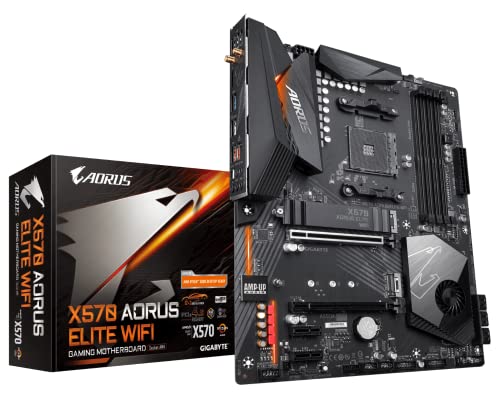
GIGABYTE X570 AORUS Elite Wi-Fi ATX Motherboard
Best for: DDR4-based AMD Ryzen gaming desktop builds
- Wi-Fi
- Wi-Fi 5 (what this guide is about)
- Chipset
- X570
- Form Factor
- ATX
- Memory Type
- DDR4
- PCIe Version
- PCIe 4.0
- M.2 Slots
- 2
View on Amazon: GIGABYTE X570 AORUS Elite Wi-Fi ATX Motherboard
The GIGABYTE X570 AORUS Elite Wi-Fi is an ATX gaming motherboard built for compatible AMD Ryzen processors. It gives you built-in Wi-Fi 5 connectivity alongside PCIe 4.0 support for expansion cards and fast storage drives. With four DDR4 DIMM slots, a 12+2 phase digital VRM design, and dual M.2 connectors, this board suits you if you want a full-sized desktop platform for gaming builds using multi-core AMD processors.
Pros
- 12+2 phases digital VRM solution with DrMOS
- Dual NVMe PCIe 4.0/3.0 x4 M.2 connectors
- Built-in Intel dual band 802.11ac Wi-Fi 5
- Four DDR4 DIMM slots supporting dual-channel memory
Cons
- Only one M.2 slot includes a thermal guard
- Uses Wi-Fi 5 (802.11ac) rather than newer wireless standards
- Supports DDR4 memory rather than DDR5
Good fit if
- You need an ATX motherboard with PCIe 4.0 support and dual M.2 slots.
- You plan to run a 2nd or 3rd Gen AMD Ryzen processor with DDR4 RAM.
- You want a 12+2 phase digital VRM design with integrated Wi-Fi 5.
Skip if
- You need newer DDR5 memory compatibility.
- You require dedicated thermal guards across both M.2 drive slots.
- You plan to build inside a compact microATX or Mini-ITX chassis.
Verdict: GIGABYTE X570 AORUS Elite Wi-Fi ATX Motherboard delivers PCIe 4.0 speeds, a 12+2 phase VRM, and integrated Wi-Fi 5 for AMD AM4 gaming systems. It provides a solid full-sized foundation if you are building an AMD Ryzen desktop around DDR4 memory.

ASUS TUF Gaming AM4 Wi-Fi Micro-ATX Motherboard
Best for: compact AM4 Ryzen builds with Wi-Fi
- Wi-Fi
- Wi-Fi 5 (what this guide is about)
- CPU Socket
- AM4
- Form Factor
- microATX
- Wi-Fi Standard
- 802.11ac
- Use Case
- Gaming
- Dimensions
- 2.75 × 10.8 × 11 inches
View on Amazon: ASUS TUF Gaming AM4 Wi-Fi Micro-ATX Motherboard
This ASUS TUF Gaming board is a Micro-ATX platform built around the AMD AM4 socket. It includes built-in Wi-Fi 5 (802.11ac) wireless networking and supports AMD Ryzen 3000, 4000 G-Series, and 5000 Series processors. You get a 32Gb/s M.2 slot, SATA 6Gb/s ports, and display outputs covering DisplayPort, HDMI, and D-Sub. It suits you if you need a compact AM4 build with dedicated wireless connectivity.
Pros
- Integrated Wi-Fi 5 (802.11ac) wireless networking
- Supports AMD Ryzen 5000, 4000 G-Series, and 3000 Series processors
- Onboard 32Gb/s M.2 slot and SATA 6Gb/s connectivity
- DisplayPort, HDMI, and D-Sub video outputs
- Hardware BIOS FlashBack button included
Cons
- Limited to Wi-Fi 5 instead of newer wireless standards
- No USB Type-C ports listed in the connectivity specs
- AM4 socket does not support newer AM5 processors
Good fit if
- You use an AMD Ryzen 3000, 4000 G-Series, or 5000 Series processor.
- You need a Micro-ATX board with built-in Wi-Fi 5 and a BIOS FlashBack button.
- You require DisplayPort, HDMI, or legacy D-Sub video outputs.
Skip if
- You plan to build with AMD AM5 processors.
- You need faster Wi-Fi 6 networking.
- You require native USB Type-C ports.
Verdict: ASUS TUF Gaming AM4 Micro-ATX Motherboard provides essential AM4 gaming functionality with built-in Wi-Fi 5 and versatile display connections. It serves as a dependable base for Ryzen 3000, 4000 G-Series, or 5000 Series compact desktop systems.

GIGABYTE Z790 ATX Motherboard with Wi-Fi 5
Best for: Intel LGA 1700 builds using DDR5
- Wi-Fi
- Wi-Fi 5 (what this guide is about)
- CPU Socket
- LGA 1700
- Chipset
- Z790
- Form Factor
- ATX
- Memory Type
- DDR5
- PCIe Version
- PCIe 5.0
This ATX board pairs Intel LGA 1700 socket support with Wi-Fi 5 connectivity and DDR5 system memory. It runs Intel 12th, 13th, or 14th Gen processors on a 16+1+1 phase power design. You also get 2.5GbE wired networking, PCIe 5.0 expansion, and three PCIe 4.0 M.2 slots for storage. It suits you if you want modern Intel hardware with fast DDR5 bandwidth.
Pros
- PCIe 5.0 expansion slot and three PCIe 4.0 x4 M.2 connectors
- Fast 2.5GbE wired networking alongside Wi-Fi 5
- 16+1+1 twin hybrid phase digital power design
- Rear USB 3.2 Gen 2x2 Type-C connectivity
Cons
- Wireless connection is limited to Wi-Fi 5 standard
- Incompatible with DDR4 memory modules
Good fit if
- You use an Intel 12th, 13th, or 14th Gen desktop processor.
- You plan to run a high-speed DDR5 memory setup.
- You want 2.5GbE wired networking alongside basic wireless connectivity.
Skip if
- You want to reuse an existing set of DDR4 RAM sticks.
- You need a compact microATX or Mini-ITX build.
- You require newer Wi-Fi 6 or Wi-Fi 7 wireless speeds.
Verdict: GIGABYTE Z790 DDR5 ATX Motherboard delivers PCIe 5.0 expansion and 2.5GbE networking for Intel LGA 1700 builds. It provides modern DDR5 bandwidth while maintaining standard Wi-Fi 5 wireless support.

MSI PRO Micro-ATX DDR4 Motherboard
Best for: compact Intel builds using DDR4 and 2.5GbE
- Wi-Fi
- Wi-Fi 5 (what this guide is about)
- CPU Socket
- LGA 1700
- Form Factor
- mATX
- Memory Type
- DDR4
- PCIe Version
- PCIe 4.0
- Wi-Fi Standard
- Wi-Fi 5
This Micro-ATX board features an LGA 1700 socket that supports 12th, 13th, and 14th Gen Intel processors. You get integrated Wi-Fi 5 wireless networking alongside a 2.5GbE wired Ethernet port. It runs DDR4 memory up to 3200 MHz and includes a PCIe 4.0 expansion slot. It suits you if you need a compact Intel platform with fast wired networking and basic wireless support.
Pros
- 2.5GbE wired Ethernet connection
- Integrated Wi-Fi 5 connectivity
- Supports 12th, 13th, and 14th Gen Intel processors
- PCIe 4.0 support
Cons
- DDR4 memory capped at 3200 MHz
- No support for DDR5 RAM
Good fit if
- You want a compact Micro-ATX platform for an LGA 1700 processor.
- You need 2.5GbE wired speed along with Wi-Fi 5 networking.
- You plan to build with DDR4 memory clocked up to 3200 MHz.
Skip if
- You want to use DDR5 memory modules.
- You need wireless connectivity newer than Wi-Fi 5.
- You plan to run DDR4 memory above 3200 MHz.
Verdict: MSI PRO Micro-ATX DDR4 Motherboard provides LGA 1700 processor compatibility, 2.5GbE Ethernet, and Wi-Fi 5 on a compact footprint. It serves well for practical Intel builds using DDR4 RAM.
MSI Pro Series ATX DDR5 Motherboard
Best for: Intel LGA 1700 DDR5 desktop builds
- Wi-Fi
- Wi-Fi 5 (what this guide is about)
- CPU Socket
- LGA 1700
- Chipset
- Intel B760
- Form Factor
- ATX
- Memory Type
- DDR5
- PCIe Version
- PCIe 4.0
The MSI Pro Series ATX DDR5 Motherboard gives you an LGA 1700 platform with integrated Wi-Fi 5 connectivity. Built on a standard ATX layout, it features high-speed DDR5 memory support up to 6800+ MHz, a 2.5GbE Ethernet port, and PCIe 4.0 capability. It suits you if you plan to run a 12th, 13th, or 14th Gen Intel processor alongside modern DDR5 memory while relying on Wi-Fi 5 networking.
Pros
- Supports DDR5 memory up to 6800+(OC) MHz
- Fast 2.5GbE Ethernet alongside Wi-Fi 5 connectivity
- 12+1 Duet Rail Power System with 8-pin and 4-pin CPU connectors
- Six-layer PCB built with 2oz thickened copper
Cons
- Features Wi-Fi 5 rather than newer wireless standards
- Supports PCIe 4.0 without PCIe 5.0 support
- Requires a full ATX case to fit its 12 by 9.6-inch footprint
Good fit if
- You want an Intel LGA 1700 system equipped with fast DDR5 memory.
- You need 2.5GbE wired network support alongside Wi-Fi 5.
- You have a PC chassis that fits standard ATX motherboards.
Skip if
- You plan to build with an AMD AM4 or AM5 processor.
- You intend to use DDR4 memory modules instead of DDR5.
- You require a smaller micro-ATX or mini-ITX form factor.
Verdict: MSI Pro Series ATX DDR5 Motherboard pairs an Intel LGA 1700 socket with DDR5 memory support and 2.5GbE LAN for desktop builds. It provides a reliable ATX foundation for systems using Wi-Fi 5.

GIGABYTE Micro-ATX AM4 Wi-Fi 5 Motherboard
Best for: compact AMD AM4 desktop builds
- Wi-Fi
- Wi-Fi 5 (what this guide is about)
- CPU Socket
- AM4
- Form Factor
- mATX
- Memory Type
- DDR4
- PCIe Version
- PCIe 4.0
- M.2 Slots
- 2
The GIGABYTE Micro-ATX AM4 Wi-Fi 5 Motherboard gives you a compact platform for AMD Ryzen 5000, 4000, or 3000 series processors. It features built-in Wi-Fi 5 wireless networking and a 1GbE Ethernet port. You get four DDR4 memory slots, one PCIe 4.0 x16 expansion slot, and two M.2 slots for storage. This board suits you if you want a practical Micro-ATX foundation with fast solid-state drive support and integrated wireless capability.
Pros
- Supports AMD Ryzen 5000, 4000, and 3000 series processors
- PCIe 4.0 x16 slot with reinforced UD Armor
- Dual M.2 slots with one PCIe 4.0 interface
- Four DDR4 DIMM slots with XMP memory support
Cons
- Secondary M.2 slot runs at PCIe 3.0 speeds
- Wired network speed limited to 1GbE
- Uses older DDR4 memory rather than DDR5
Good fit if
- You use an AMD Ryzen 3000, 4000, or 5000 series AM4 processor.
- You want four DDR4 memory slots in a compact Micro-ATX build.
- You need built-in Wi-Fi 5 and PCIe 4.0 storage support.
Skip if
- You plan to build with an AMD AM5 processor or DDR5 memory.
- You require wired Ethernet networking speeds beyond 1GbE.
Verdict: GIGABYTE Micro-ATX AM4 Wi-Fi 5 Motherboard delivers reliable AM4 connectivity with dual M.2 slots and four DDR4 memory channels. It provides essential wireless networking and PCIe 4.0 support for compact desktop setups.

ASRock A620AM-X WiFi Micro-ATX Motherboard
Best for: compact AM5 builds needing DDR5 and 2.5GbE
- Wi-Fi
- Wi-Fi 5 (what this guide is about)
- CPU Socket
- AM5
- Form Factor
- Micro-ATX
- Memory Type
- DDR5
- M.2 Slots
- 2
- Wi-Fi Standard
- Wi-Fi 5
The ASRock A620AM-X WiFi is a Micro-ATX board built around the AMD AM5 socket. It pairs integrated Wi-Fi 5 and Bluetooth with 2.5GbE wired networking, making it suitable if you want current-generation Ryzen 9000, 8000, or 7000 series processing with DDR5 memory support. With two PCIe Gen4x4 M.2 slots, dual DIMM slots, and front and rear Type-C ports, it fits compact desktop setups requiring modern AM5 features.
Pros
- Integrated Wi-Fi 5 with Bluetooth and Realtek 2.5GbE LAN
- Supports AMD Ryzen 9000, 8000, and 7000 series processors on AM5
- Dual Hyper M.2 PCIe Gen4x4 slots and four SATA3 connectors
- Front and rear USB 3.2 Gen1 Type-C ports
Cons
- Limited to two DDR5 DIMM memory slots
- Type-C connections run at USB 3.2 Gen1 speeds without Gen2 support
Good fit if
- You plan to build an AMD AM5 setup with Ryzen 7000, 8000, or 9000 series CPUs.
- You need 2.5GbE Ethernet alongside Wi-Fi 5 in a Micro-ATX footprint.
- You want dual PCIe Gen4x4 M.2 NVMe storage drives.
Skip if
- You require four DDR5 DIMM slots for high-capacity memory kits.
- You need faster USB 3.2 Gen2 or Gen2x2 transfer speeds.
Verdict: ASRock A620AM-X WiFi Micro-ATX Motherboard gives AM5 builders a compact platform with DDR5 support, dual Gen4 M.2 slots, and 2.5GbE networking alongside Wi-Fi 5. It handles modern Ryzen processors efficiently if you do not need more than two memory slots.

ASRock B660M-C Micro-ATX Motherboard
Best for: storage-heavy Intel DDR4 Micro-ATX builds
- Wi-Fi
- Wi-Fi 5 (what this guide is about)
- CPU Socket
- LGA1700
- Chipset
- B660
- Form Factor
- Micro-ATX
- Memory Type
- DDR4
- PCIe Version
- PCIe 4.0
The ASRock B660M-C is a Micro-ATX motherboard built for Intel LGA1700 processors across the 12th, 13th, and 14th generations. For wireless networking, you get integrated 802.11ac Wi-Fi 5 and Bluetooth alongside Gigabit Ethernet. Storage expandability stands out with two PCIe Gen4x4 Hyper M.2 slots and eight SATA3 ports. Four memory slots handle up to 128GB of DDR4 RAM. It suits builders seeking dense SATA storage and practical wireless capability.
Pros
- Integrated 802.11ac Wi-Fi 5 and Bluetooth connectivity
- Eight SATA3 ports plus two PCIe Gen4x4 Hyper M.2 slots
- Four DDR4 DIMM slots supporting up to 128GB and 5333+ MHz (OC)
- PCIe 4.0 x16 slot for dedicated graphics
Cons
- Three secondary PCIe 3.0 x16 slots operate only at x1 bandwidth
- Wired networking is limited to 1Gbps Intel LAN
- Restricted to DDR4 memory without DDR5 support
Good fit if
- You need eight SATA3 drive connections alongside two Gen4 M.2 slots.
- You use an Intel 12th, 13th, or 14th Gen CPU with DDR4 memory.
- You want built-in Wi-Fi 5 on a standard Micro-ATX board.
Skip if
- You plan to build with modern DDR5 memory modules.
- You require high-bandwidth secondary PCIe add-in cards.
Verdict: ASRock B660M-C Micro-ATX Motherboard delivers Intel LGA1700 support, Wi-Fi 5 networking, and massive storage capacity through eight SATA3 ports. It provides a balanced, compact foundation if you are building an Intel system using DDR4 memory.

ASRock Z690-C/ac ATX Motherboard
Best for: Intel LGA1700 builds using DDR4 memory
- Wi-Fi
- Wi-Fi 5 (what this guide is about)
- CPU Socket
- LGA1700
- Chipset
- Z690
- Form Factor
- ATX
- Memory Type
- DDR4
- PCIe Version
- PCIe 5.0
The ASRock Z690-C/ac is an ATX motherboard built for 12th, 13th, and 14th Gen Intel LGA1700 processors. It combines an Intel Z690 chipset with built-in Wi-Fi 5 and Bluetooth connectivity. You get four DDR4 memory slots supporting up to 128GB, alongside a high-speed PCIe 5.0 x16 expansion slot and four M.2 storage interfaces. This board suits you if you want an Intel LGA1700 system using DDR4 RAM and multiple M.2 NVMe drives.
Pros
- PCIe 5.0 x16 slot for graphics cards
- Four M.2 slots for high-speed NVMe storage
- Front USB 3.2 Gen2x2 Type-C 20 Gb/s header
- Supports up to 128GB of DDR4 memory across four slots
Cons
- Uses DDR4 memory instead of DDR5
- Wired networking limited to 1 Gb/s Gigabit LAN
- Wireless connectivity limited to Wi-Fi 5 (802.11ac)
Good fit if
- You plan to run a 12th, 13th, or 14th Gen Intel processor on DDR4 memory.
- You need four M.2 slots for internal solid-state drives.
- You want a PCIe 5.0 x16 slot in a standard ATX enclosure.
Skip if
- You require high-speed DDR5 system memory.
- You want newer Wi-Fi 6 or 2.5 Gb/s Ethernet networking.
- You are assembling a compact Micro-ATX or Mini-ITX build.
Verdict: ASRock Z690-C/ac ATX Motherboard delivers PCIe 5.0 support, four M.2 slots, and Wi-Fi 5 on Intel's LGA1700 platform with DDR4 memory. It offers solid expansion capability for full-tower and mid-tower Intel desktop builds.

ASUS ROG Strix E-ATX Threadripper Motherboard
Best for: AMD Threadripper builds needing E-ATX expansion
- Wi-Fi
- Wi-Fi 5 (what this guide is about)
- CPU Socket
- TR4
- Chipset
- X399
- Form Factor
- Extended ATX
- Memory Type
- DDR4
- Wi-Fi Standard
- 802.11AC
View on Amazon: ASUS ROG Strix E-ATX Threadripper Motherboard
This ASUS motherboard pairs an Extended ATX form factor with AMD Ryzen Threadripper TR4 processor support and integrated Wi-Fi 5. It handles up to 128GB of DDR4 memory across its slots and includes three reinforced PCIe SafeSlots for heavy graphics cards. If you need a high-end desktop platform with dedicated water-cooling headers, M.2 and U.2 connectivity, and multi-channel audio, this board gives your workstation or gaming build substantial expansion room.
Pros
- Supports AMD Ryzen Threadripper TR4 processors and up to 128GB DDR4 memory
- Three metal-reinforced PCIe SafeSlots for heavy expansion cards
- Integrated Wi-Fi 5 wireless networking
- Dedicated water-cooling and AIO pump headers
Cons
- Large E-ATX footprint requires a compatible full-size PC case
- Limited to TR4 socket AMD Threadripper processors rather than standard consumer sockets
Good fit if
- You build with an AMD Ryzen Threadripper TR4 processor.
- You need an E-ATX layout with three reinforced PCIe slots for large cards.
- You require up to 128GB of DDR4 memory for heavy workloads.
Skip if
- You have a standard ATX or smaller computer case.
- You use mainstream desktop processors on AM4 or AM5 sockets.
Verdict: ASUS ROG Strix E-ATX Threadripper Motherboard delivers massive expansion capacity and built-in Wi-Fi 5 for AMD TR4 workstation and gaming systems. It is an ideal option if you need heavy-duty PCIe slots and high memory limits.

ASUS Prime Micro ATX AM4 Motherboard
Best for: compact budget AM4 desktop builds
- Wi-Fi
- Wi-Fi 5 (what this guide is about)
- CPU Socket
- AM4
- Chipset
- B550
- Form Factor
- Micro ATX
- Memory Type
- DDR4
- PCIe Version
- PCIe 4.0
This ASUS Prime Micro ATX board gives you an AM4 socket for 3rd Gen AMD Ryzen processors alongside built-in Wi-Fi 5 and 1Gb Ethernet. It features a PCIe 4.0 x16 slot, two M.2 storage slots, and support for DDR4 memory. With HDMI, DVI, and D-Sub video outputs, it suits you if you need a compact, straightforward foundation for an everyday desktop build.
Pros
- Onboard Wi-Fi 5 and 1Gb LAN
- PCIe 4.0 x16 slot and dual M.2 slots
- HDMI 2.1, DVI, and D-Sub display outputs
- Supports DDR4 ECC memory
Cons
- Wired networking capped at 1GbE speeds
- No USB Type-C ports listed
- Limited to AM4 socket processors
Good fit if
- You use a 3rd Gen AMD Ryzen AM4 processor.
- You need a Micro-ATX form factor with dual M.2 slots.
- You want built-in Wi-Fi 5 without adding an expansion card.
Skip if
- You require 2.5GbE or faster wired Ethernet.
- You plan to run newer AM5 processors.
- You need USB Type-C connectivity on the rear I/O.
Verdict: ASUS Prime Micro ATX AM4 Motherboard delivers essential AM4 functionality with PCIe 4.0, dual M.2 slots, and integrated Wi-Fi 5. It serves as a dependable, compact base for everyday AMD builds.

GIGABYTE AM5 ATX DDR5 Motherboard
Best for: AMD AM5 desktop builds using DDR5 memory
- Wi-Fi
- Wi-Fi 5 (what this guide is about)
- CPU Socket
- AM5
- Chipset
- AMD B650
- Form Factor
- ATX
- Memory Type
- DDR5
- PCIe Version
- PCIe 5.0, PCIe 4.0
This full-size ATX board gives you AMD AM5 socket support paired with DDR5 memory compatibility. It includes integrated Wi-Fi 5 and 2.5GbE wired LAN for networking alongside a USB 3.2 Gen 2x2 Type-C port. You also get two PCIe 4.0 x4 M.2 slots for storage drives. It suits you if you are building an AMD Ryzen 7000, 8000, or 9000 series desktop system requiring modern DDR5 memory and standard wireless connectivity.
Pros
- Supports AMD AM5 socket Ryzen 9000, 8000, and 7000 series processors
- Four DDR5 DIMM slots with AMD EXPO and Intel XMP memory support
- 2.5GbE LAN and USB 3.2 Gen 2x2 Type-C connectivity
- Two PCIe 4.0 x4 M.2 slots for solid-state storage
Cons
- Limited to two PCIe 4.0 x4 M.2 drive slots
- Uses a 6+2+2 digital VRM power design
Good fit if
- You plan to build with an AMD Ryzen 7000, 8000, or 9000 series CPU.
- You want an ATX motherboard that uses DDR5 memory.
- You need 2.5GbE Ethernet alongside integrated Wi-Fi 5.
Skip if
- You plan to reuse DDR4 RAM or an older AM4 processor.
- You require more than two PCIe 4.0 x4 M.2 storage drives.
- You need a smaller micro-ATX or Mini-ITX form factor.
Verdict: GIGABYTE AM5 ATX DDR5 Motherboard provides current AM5 socket support, DDR5 memory slots, and 2.5GbE networking for everyday desktop setups. It delivers essential expansion with dual PCIe 4.0 M.2 slots and USB 3.2 Gen 2x2 Type-C.
Specifications side by side
| Spec | MSI PRO DDR5 ATX Motherboard | MSI MPG X570 Gaming Edge ATX Motherboard | MSI MPG Gaming Edge Wi-Fi ATX Motherboard | GIGABYTE X570 AORUS Elite Wi-Fi ATX Motherboard | ASUS TUF Gaming AM4 Wi-Fi Micro-ATX Motherboard | GIGABYTE Z790 ATX Motherboard with Wi-Fi 5 | MSI PRO Micro-ATX DDR4 Motherboard | MSI Pro Series ATX DDR5 Motherboard | GIGABYTE Micro-ATX AM4 Wi-Fi 5 Motherboard | ASRock A620AM-X WiFi Micro-ATX Motherboard | ASRock B660M-C Micro-ATX Motherboard | ASRock Z690-C/ac ATX Motherboard | ASUS ROG Strix E-ATX Threadripper Motherboard | ASUS Prime Micro ATX AM4 Motherboard | GIGABYTE AM5 ATX DDR5 Motherboard |
|---|---|---|---|---|---|---|---|---|---|---|---|---|---|---|---|
| CPU Socket | LGA 1700 | AM4 | AM4 | not specified | AM4 | LGA 1700 | LGA 1700 | LGA 1700 | AM4 | AM5 | LGA1700 | LGA1700 | TR4 | AM4 | AM5 |
| Chipset | Intel B760 | X570 | AMD X570 | X570 | not specified | Z790 | not specified | Intel B760 | not specified | not specified | B660 | Z690 | X399 | B550 | AMD B650 |
| Form Factor | ATX | ATX | ATX | ATX | microATX | ATX | mATX | ATX | mATX | Micro-ATX | Micro-ATX | ATX | Extended ATX | Micro ATX | ATX |
| Memory Type | DDR5 | DDR4 | DDR4 | DDR4 | not specified | DDR5 | DDR4 | DDR5 | DDR4 | DDR5 | DDR4 | DDR4 | DDR4 | DDR4 | DDR5 |
| PCIe Version | PCIe 4.0 | PCIe 4.0 | PCIe 4.0 | PCIe 4.0 | not specified | PCIe 5.0 | PCIe 4.0 | PCIe 4.0 | PCIe 4.0 | not specified | PCIe 4.0 | PCIe 5.0 | not specified | PCIe 4.0 | PCIe 5.0, PCIe 4.0 |
| M.2 Slots | not specified | not specified | not specified | 2 | not specified | 3 | not specified | not specified | 2 | 2 | 2 | 4 | not specified | 2 | 2 |
| Wi-Fi Standard | Wi-Fi 5 | not specified | not specified | 802.11ac | 802.11ac | not specified | Wi-Fi 5 | Wi-Fi 5 | WIFI5 | Wi-Fi 5 | 802.11ac | 802.11ac | 802.11AC | not specified | Wi-Fi 6E |
| Ethernet Speed | 2.5 Gbps | not specified | not specified | not specified | not specified | 2.5GbE | 2.5G LAN | 2.5Gbps | GbE | 2.5 GbE | Gigabit | Gigabit | not specified | 1Gb LAN | 2.5 GbE, GbE |
| Power Phases | not specified | not specified | not specified | 12+2 | not specified | 16+1+1 | not specified | 12+1 | 5+3 | 6+1+1 | 7-phase | 9-phase | not specified | not specified | 6+2+2 |
| Wi-Fi | Wi-Fi 5 | Wi-Fi 5 | Wi-Fi 5 | Wi-Fi 5 | Wi-Fi 5 | Wi-Fi 5 | Wi-Fi 5 | Wi-Fi 5 | Wi-Fi 5 | Wi-Fi 5 | Wi-Fi 5 | Wi-Fi 5 | Wi-Fi 5 | Wi-Fi 5 | Wi-Fi 5 |
| Use Case | not specified | Gaming | Gaming | Gaming | Gaming | not specified | not specified | not specified | not specified | not specified | not specified | not specified | Gaming | not specified | not specified |
| Series | not specified | not specified | not specified | not specified | not specified | not specified | not specified | not specified | not specified | not specified | not specified | not specified | Ryzen Threadripper | not specified | not specified |
| Dimensions | 12 × 9.6 × 2.5 inches | 12 × 9.6 × 2.5 inches | 12 × 9.6 × 2.5 inches | 13.2 × 10.6 × 3.14 inches | 2.75 × 10.8 × 11 inches | 13.2 × 10.6 × 3.14 inches | 9.6 × 8.31 × 2.5 inches | 12 × 9.6 × 2.5 inches | 8.82 × 8.82 × 1 inches | not specified | not specified | not specified | 12 × 1.5 × 10.6 inches | 10 × 2.6 × 10 inches | 3.19 × 10.9 × 13.3 inches |
| Weight | not specified | 4.1 pounds | 4.1 pounds | 12.3 ounces | 1.27 pounds | 3.88 pounds | 1.81 pounds | not specified | 1.1 pounds | not specified | not specified | not specified | 4.5 pounds | 1.27 pounds | 2.89 pounds |
| Size | ATX | 1 | 1 | not specified | TUF GAMING A520M-PLUS WIFI | Z790 | not specified | ATX | mATX | not specified | not specified | not specified | Extended ATX | Micro ATX | ATX |
| Model | MSI PRO B760-VC WiFi | MSI MPG X570 Gaming Edge WiFi | MPG X570 GAMING EDGE WIFI | 889523018729 | TUF GAMING A520M-PLUS WIFI | Z790 UD AC | H610M-G DDR4 | PRO B760-VC WIFI | B550M DS3H AC R2 | 90-MXBSU0-A0UAYAZ | 90-MXBHR2-A0UBYL | 90-MXBHA2-A0UBYZ | STRIX X399-E GAMING | B550M-A AC | B650 UD AC |
| Color | not specified | not specified | not specified | not specified | not specified | not specified | Multicolor | not specified | Black | not specified | not specified | not specified | not specified | not specified | Black |
Is integrated Wi-Fi 5 worth it for your build?
Integrated Wi-Fi 5 provides direct wireless network access for desktop systems where running physical Ethernet cables is impractical. Boards across this guide pair this wireless standard with wired Ethernet ports rated at 1GbE or 2.5GbE. In daily use, Wi-Fi 5 handles standard wireless local-area connections for browsing, streaming, and online gaming. If your workspace lacks direct router access, built-in Wi-Fi 5 eliminates extra hardware requirements. Systems stationed permanently next to a router can rely on the onboard 1GbE or 2.5GbE LAN instead.
Worth it if
- You need wireless network connectivity without adding external networking hardware.
- You position your desktop in a room lacking physical Ethernet wall jacks or router access.
Skip it if
- You connect your system exclusively through the onboard 1GbE or 2.5GbE Ethernet jacks.
- You plan to install a dedicated discrete expansion card for networking.
How We Picked Wi-Fi 5 Motherboards
We identified the 15 models for this guide by checking Amazon listings that state Wi-Fi 5 in their title or feature list. Only one size or variant of the same product family is shown. Every specification comes directly from the published product listings, as products are not physically handled.
The selections are ordered with products in stock first, then by Amazon sales rank (better-selling products first). We also compare published hardware specifications, including CPU socket, form factor, PCIe generation, and memory type, so you can choose the right board for your system.
Choosing the Best Wi-Fi 5 Motherboard
-
Form Factor and Chassis Fit
Match your motherboard size to your PC case specifications before purchasing. Standard ATX boards measure 12 by 9.6 inches and offer balanced slot spacing for mid-tower enclosures. Micro-ATX models reduce height to roughly 9.6 inches square, fitting tighter desktop cases while sacrificing extra PCIe slots. Extended ATX designs, such as the ASUS ROG Strix E-ATX Threadripper Motherboard, require full-tower cases with dedicated mounting width. Measure internal case clearances, standoff patterns, and power supply cable reach to confirm that your selected board physical dimensions seat cleanly inside your chassis.
-
Compare PCIe Bus Generations
Examine the PCIe generation supported across primary expansion slots. PCIe 4.0 provides standard high-speed bandwidth suitable for modern discrete graphics cards and rapid NVMe drives. If you want increased lane bandwidth for next-generation expansion cards, look for boards featuring PCIe 5.0 support, such as the GIGABYTE Z790 ATX Motherboard with Wi-Fi 5. PCIe 5.0 doubles data throughput over PCIe 4.0 per lane. Assess whether your planned graphics card and storage drives can leverage this faster interface, or if PCIe 4.0 satisfies your current desktop configuration.
-
Wired Ethernet Port Ratings
Review the integrated Ethernet controller speed alongside the Wi-Fi 5 wireless module. Basic motherboards provide Gigabit Ethernet (1GbE), which delivers standard speeds for regular web browsing and online gaming. Other models, including the MSI PRO DDR5 ATX Motherboard, upgrade the wired connection to 2.5GbE. If your home network utilizes multi-gigabit switches, high-speed routers, or network-attached storage servers, a 2.5GbE port provides more than double the transfer rate over local cabling. Choose your controller speed according to your local network infrastructure and wired data transfer needs.
-
Storage Drive Port Capacity
Check how many storage devices you plan to connect directly to the board. Most compact boards provide two M.2 NVMe slots alongside four standard SATA connectors for everyday drives. If your workflow requires large arrays of mechanical hard drives or SATA solid-state drives, verify the exact port count. For example, the ASRock B660M-C Micro-ATX Motherboard supplies eight SATA3 ports, allowing massive secondary storage pools without requiring add-in controller cards. Verify that the motherboard contains sufficient M.2 slots and SATA headers to accommodate your existing storage drives and future expansions.
-
Chipset Features and Lanes
Evaluate the chipset class to match your peripheral and overclocking plans. Mainstream chipsets handle everyday gaming and basic connectivity, while enthusiast platforms provide extra high-speed I/O lanes. For AMD AM4, boards like the MSI MPG X570 Gaming Edge ATX Motherboard feature an AMD X570 chipset that supports PCIe 4.0 lanes straight through the chipset for multiple fast drives. Budget chipsets like A520 drop advanced lane configurations and tuning controls. Match your peripheral workload against the chipset capabilities so you do not run short on bandwidth for USB ports or secondary storage.
-
Memory Slot Configuration
Count the available RAM slots to plan your memory capacity and upgrades. Most ATX and full-featured Micro-ATX motherboards include four DIMM slots, enabling dual-channel operation with two open sockets for future memory additions. Compact or streamlined models, such as the ASRock A620AM-X WiFi Micro-ATX Motherboard, feature two memory slots instead. Two-slot boards limit maximum module count and require replacing existing sticks if you need a capacity upgrade later. Determine your total target RAM capacity before buying so you can install a two-stick kit while leaving room for expansion if necessary.
Frequently asked questions
Can you use a Wi-Fi 5 motherboard with a Wi-Fi 6 router?
Yes, Wi-Fi 5 motherboards connect to Wi-Fi 6 routers without issues. Wi-Fi standards maintain backward compatibility across generations. When you connect a Wi-Fi 5 board to a Wi-Fi 6 router, the connection operates at standard Wi-Fi 5 speeds over the 2.4 GHz or 5 GHz bands. You do not need to replace your network router to use these boards.
Do Wi-Fi 5 motherboards support PCIe 5.0 expansion slots?
Yes, select Wi-Fi 5 motherboards include PCIe 5.0 expansion capability. For Intel LGA 1700 builds, both the GIGABYTE Z790 ATX Motherboard and the ASRock Z690-C/ac ATX Motherboard deliver PCIe 5.0 lanes. On the AMD side, the GIGABYTE AM5 ATX DDR5 Motherboard provides PCIe 5.0 hardware support. These slots provide doubled bus bandwidth compared to older PCIe 4.0 interfaces for future add-in cards.
Which AMD sockets are available on motherboards with Wi-Fi 5?
Motherboards with Wi-Fi 5 support several AMD socket designs across generations. Mainstream options include socket AM4 boards like the MSI MPG X570 Gaming Edge and newer AM5 options like the ASRock A620AM-X WiFi. For high-end desktop workstations, options like the ASUS ROG Strix E-ATX Motherboard support AMD Ryzen Threadripper processors on the TR4 platform. Always match your CPU model to the exact socket type.
Can you get DDR5 memory on a motherboard that has Wi-Fi 5?
Yes, several Wi-Fi 5 motherboards support DDR5 system memory. For Intel LGA 1700 processors, models such as the MSI PRO B760-VC WiFi and GIGABYTE Z790 UD AC require DDR5 modules. For modern AMD Ryzen chips, boards like the ASRock A620AM-X and GIGABYTE B650 UD AC utilize DDR5. You must verify memory compatibility before purchasing, as DDR4 and DDR5 slots are not physically interchangeable.
What wired Ethernet speeds do Wi-Fi 5 motherboards offer?
Wi-Fi 5 motherboards typically feature either 1GbE or 2.5GbE wired network ports. Entry models like the ASUS Prime B550M-A AC provide standard 1GbE LAN. Higher-bandwidth options like the MSI PRO DDR5 ATX and ASRock A620AM-X include 2.5GbE controllers. A 2.5GbE Ethernet port provides two and a half times the transfer rate of gigabit networking when plugged into compatible switches or routers.
How many M.2 storage slots do Wi-Fi 5 motherboards feature?
Storage capacity varies by model, but many Wi-Fi 5 boards feature dual or quadruple M.2 slots. Compact designs like the ASUS Prime Micro ATX and GIGABYTE B550M DS3H AC R2 provide dual M.2 slots alongside standard SATA ports. Larger boards like the ASRock Z690-C/ac ATX Motherboard provide up to four M.2 slots for high-speed NVMe solid-state storage.
Are there E-ATX workstation motherboards with Wi-Fi 5?
Yes, you can find E-ATX motherboards equipped with integrated Wi-Fi 5. The ASUS ROG Strix E-ATX Threadripper Motherboard uses the Extended ATX form factor to host AMD Ryzen Threadripper CPUs on the TR4 platform. It measures 12 inches long by 10.6 inches high, giving you extra PCB area for heavy expansion slot arrangements and multi-channel DDR4 memory configurations.