Best GIGABYTE LGA 1700 Motherboards: 15 Spec-Based Picks
As an Amazon Associate we earn from qualifying purchases. Links on this page are affiliate links.
Choosing the right GIGABYTE LGA 1700 motherboard depends on your preferred memory standard, expansion needs, and case dimensions. We compared 15 products based on the specifications published on the listings to identify the most practical options.
The GIGABYTE AORUS Mini-ITX DDR4 Motherboard leads because it pairs a space-saving Mini-ITX form factor with 2.5GbE networking and Wi-Fi 6 support for DDR4 systems. This guide helps you decide which board format, memory type, and connectivity features best fit your desktop build.
Quick picks
The best fit for you
- You want a compact Mini-ITX build using DDR4 memory GIGABYTE AORUS Mini-ITX DDR4 Motherboard This board features a Mini-ITX form factor paired with DDR4 memory support and 2.5GbE networking.
- You need the fastest wireless networking with Wi-Fi 7 GIGABYTE AORUS ATX DDR5 Motherboard It includes Wi-Fi 7 connectivity alongside PCIe 5.0 and four DDR5 memory slots.
- You require ultra-fast wired networking for high-demand setups GIGABYTE AORUS Master 10GbE Motherboard It delivers 10GbE wired Ethernet alongside PCIe 5.0 compatibility and DDR5 support.
- You need extensive drive storage for an LGA 1700 system GIGABYTE AORUS Elite DDR5 ATX Motherboard It provides four M.2 slots and six SATA connectors for your desktop storage drives.
Our 15 picks

GIGABYTE AORUS Mini-ITX DDR4 Motherboard
Best for: compact LGA 1700 systems using DDR4
- CPU Socket
- LGA 1700 (what this guide is about)
- Chipset
- B660
- Form Factor
- Mini-ITX
- Memory Type
- DDR4
- PCIe Version
- PCIe 4.0
- M.2 Slots
- 1
The GIGABYTE AORUS Mini-ITX DDR4 Motherboard brings the LGA 1700 socket to small-form-factor builds. You get an 8+1+1 phase VRM design, dual-channel DDR4 memory support across two DIMMs, and a PCIe 4.0 x16 slot. Networking features include Intel 2.5GbE LAN alongside Wi-Fi 6. This board suits you if you want a compact system using 12th Gen Intel Core processors and existing DDR4 memory.
Pros
- Intel 2.5GbE LAN and Wi-Fi 6 connectivity
- 8+1+1 phase digital VRM with 90A power stages
- USB 3.2 Gen 2x2 Type-C rear port
- Q-Flash Plus for updating BIOS without CPU or RAM installed
- Compact Mini-ITX form factor with included thermal backplate
Cons
- Limited to a single M.2 storage slot
- Only two DDR4 memory slots
- Uses PCIe 4.0 rather than PCIe 5.0
Good fit if
- You build in a small Mini-ITX case.
- You plan to run DDR4 memory with a 12th Gen Intel CPU.
- You need 2.5GbE wired networking and integrated Wi-Fi 6.
Skip if
- You need more than one NVMe M.2 SSD.
- You plan to build with DDR5 memory modules.
- You require four DIMM slots or multiple PCIe expansion slots.
Verdict: GIGABYTE AORUS Mini-ITX DDR4 Motherboard delivers capable power phases and fast networking in a compact footprint. It provides a straightforward path for small LGA 1700 setups using DDR4 memory.

GIGABYTE AORUS ATX DDR5 Motherboard
Best for: Intel LGA 1700 builds needing Wi-Fi 7
- CPU Socket
- LGA 1700 (what this guide is about)
- Chipset
- Z790
- Form Factor
- ATX
- Memory Type
- DDR5
- PCIe Version
- PCIe 5.0
- M.2 Slots
- 4
This GIGABYTE ATX board runs on the Intel LGA 1700 socket, supporting 12th, 13th, and 14th Generation Intel Core processors. It features built-in Wi-Fi 7, 2.5GbE networking, and PCIe 5.0 support. You get four DDR5 memory slots compatible with XMP 3.0 modules alongside four PCIe 4.0 M.2 slots. It fits you if you want modern wireless connectivity and substantial digital power delivery for high-end desktop hardware.
Pros
- Integrated Wi-Fi 7 and 2.5GbE LAN connectivity
- Twin 16+1+2 phases digital VRM power design
- Four PCIe 4.0 x4 M.2 storage slots
- PCIe 5.0 hardware compatibility
Cons
- M.2 slots capped at PCIe 4.0 speeds rather than PCIe 5.0
- Standard ATX form factor does not fit compact cases
Good fit if
- You need high-speed Wi-Fi 7 wireless connectivity.
- You plan to run DDR5 memory with Intel 12th, 13th, or 14th Gen CPUs.
- You want four onboard PCIe 4.0 x4 M.2 storage drives.
Skip if
- You require PCIe 5.0 speeds for your M.2 NVMe storage drives.
- You are building a compact Micro ATX or Mini-ITX system.
Verdict: GIGABYTE AORUS Elite Wi-Fi 7 ATX Motherboard delivers high-speed Wi-Fi 7 networking, four DDR5 slots, and robust 16+1+2 phase power for LGA 1700 processors. It provides balanced multi-drive storage and fast connectivity without requiring specialty form factors.

GIGABYTE AORUS Master 10GbE Motherboard
Best for: enthusiast builds needing 10GbE networking
- CPU Socket
- LGA 1700 (what this guide is about)
- Chipset
- Intel Z690
- Form Factor
- ATX
- Memory Type
- DDR5
- PCIe Version
- PCIe 5.0
- M.2 Slots
- 4
The GIGABYTE Z690 AORUS Master is an ATX motherboard built for Intel LGA 1700 socket processors and DDR5 memory. It features a 19+1+2 phase VRM with 105A power stages, a PCIe 5.0 slot, and four PCIe 4.0 M.2 slots. You get AQUANTIA 10GbE alongside 2.5GbE LAN and Wi-Fi 6E. This board suits you if you need ultra-fast wired networking, heavy power delivery, and extensive high-speed USB connectivity.
Pros
- AQUANTIA 10GbE LAN paired with secondary 2.5GbE LAN
- Direct 19+1+2 phase VRM design with 105A power stages
- PCIe 5.0 support and four PCIe 4.0 x4 M.2 storage slots
- Intel Thunderbolt 4 and USB 3.2 Gen 2x2 Type-C ports
Cons
- M.2 slots limited to PCIe 4.0 speeds
- Uses Wi-Fi 6E instead of Wi-Fi 7
- Base specifications document 12th Gen Intel Core processor support
Good fit if
- You need high-bandwidth 10GbE wired networking out of the box.
- You plan to run power-demanding processors requiring heavy VRM stages.
- You want up to four high-speed PCIe 4.0 NVMe drives installed.
Skip if
- You require an onboard PCIe 5.0 M.2 SSD slot.
- You want the newer Wi-Fi 7 wireless networking standard.
Verdict: GIGABYTE Z690 AORUS Master ATX Motherboard pairs a heavy-duty 19+1+2 phase power design with 10GbE networking and DDR5 compatibility. It gives high-demand systems ample connectivity through four PCIe 4.0 M.2 slots and Thunderbolt 4.

GIGABYTE Aorus Ultra DDR5 ATX Motherboard
Best for: high-end DDR5 gaming rigs needing quad M.2 storage
- CPU Socket
- LGA 1700 (what this guide is about)
- Chipset
- Intel Z690
- Form Factor
- ATX
- Memory Type
- DDR5
- PCIe Version
- PCIe 5.0
- M.2 Slots
- 4
This ATX motherboard features the Intel Z690 chipset and an LGA 1700 socket designed for Intel processors. You get DDR5 memory compatibility, a 16+1+2 phase VRM design with 105A power stages, PCIe 5.0 expansion, and four PCIe 4.0 M.2 slots. With 2.5GbE LAN and Wi-Fi 6, it suits you if you want high-bandwidth storage and high-speed networking for a gaming build.
Pros
- 16+1+2 direct VRM design with 105A power stages
- Four PCIe 4.0 x4 M.2 slots with thermal guards
- PCIe 5.0 main expansion slot and DDR5 memory support
- SuperSpeed USB 3.2 Gen 2x2 Type-C connectivity
- Integrated Wi-Fi 6 and 2.5GbE LAN
Cons
- M.2 slots are limited to PCIe 4.0 rather than PCIe 5.0
- Uses Wi-Fi 6 instead of Wi-Fi 6E or Wi-Fi 7
Good fit if
- You need four high-speed PCIe 4.0 M.2 NVMe drives in your build.
- You plan to run DDR5 memory alongside a PCIe 5.0 graphics card.
- You want heavy-duty power delivery with 105A power stages.
Skip if
- You want native PCIe 5.0 speeds on your M.2 storage drives.
- You require Wi-Fi 6E or Wi-Fi 7 wireless networking.
Verdict: GIGABYTE Z690 AORUS Ultra ATX Motherboard delivers a heavy-duty 16+1+2 phase VRM, DDR5 support, and four PCIe 4.0 M.2 slots for demanding gaming configurations. It gives you solid PCIe 5.0 graphics readiness and 2.5GbE networking without unnecessary extras.

GIGABYTE Gaming X AX DDR4 Motherboard
Best for: budget-conscious builds using DDR4 memory
- CPU Socket
- LGA 1700 (what this guide is about)
- Chipset
- B660
- Form Factor
- M-ATX
- Memory Type
- DDR4
- PCIe Version
- PCIe 4.0
- M.2 Slots
- 2
This GIGABYTE motherboard features the LGA 1700 socket paired with dual-channel DDR4 memory across four DIMM slots. You get high-speed connectivity via dual PCIe 4.0 x4 M.2 slots, 2.5GbE LAN, and built-in Wi-Fi 6E. It includes an 8+1+1 phase hybrid digital VRM design and a USB 3.2 Gen2 Type-C port. This board suits you if you want an Intel setup utilizing DDR4 memory modules.
Pros
- Dual NVMe PCIe 4.0 x4 M.2 slots with M.2 Thermal Guard
- Wi-Fi 6E 802.11ax and 2.5GbE LAN networking
- 8+1+1 hybrid digital VRM design
- Q-Flash Plus updates BIOS without CPU, RAM, or GPU installed
Cons
- Limited to DDR4 memory rather than DDR5
- Offers only two M.2 storage slots
- Lacks PCIe 5.0 support
Good fit if
- You plan to build an Intel system using DDR4 memory.
- You need integrated Wi-Fi 6E alongside 2.5GbE wired LAN.
- You want dual PCIe 4.0 NVMe storage slots.
Skip if
- You want to use DDR5 memory modules.
- You require more than two M.2 SSD drives.
- You need PCIe 5.0 bandwidth for expansion cards.
Verdict: GIGABYTE B660M Gaming X AX DDR4 delivers core LGA 1700 connectivity with DDR4 support, dual PCIe 4.0 M.2 slots, and fast Wi-Fi 6E networking. It provides a balanced set of specs for builds using DDR4 RAM.

GIGABYTE Z790 AERO G DDR5 Motherboard
Best for: DDR5 builds needing PCIe 5.0 connectivity
- CPU Socket
- LGA 1700 (what this guide is about)
- Chipset
- Intel Z790
- Form Factor
- ATX
- Memory Type
- DDR5
- PCIe Version
- PCIe 5.0
- M.2 Slots
- 5
The GIGABYTE Z790 AERO G is an ATX motherboard built around the Intel LGA 1700 socket. It pairs DDR5 memory support across four DIMM slots with next-generation PCIe 5.0 expansion and NVMe storage. You also get Wi-Fi 6E, 2.5GbE LAN, and VisionLINK I/O featuring USB 3.2 Gen 2x2 Type-C. It suits creators and builders who want modern connectivity and high-speed data transfer.
Pros
- PCIe 5.0 x4 M.2 NVMe storage support
- Four DDR5 SMD DIMMs with XMP memory support
- Fast Wi-Fi 6E, Bluetooth 5.3, and 2.5GbE LAN
- VisionLINK I/O with USB 3.2 Gen 2x2 Type-C
Cons
- Incompatible with older DDR4 memory modules
- Product details only state support for 12th and 13th Gen Intel CPUs
- Standard ATX dimensions will not fit compact cases
Good fit if
- You need PCIe 5.0 support for graphics and high-speed M.2 storage.
- You want DDR5 memory with 12th or 13th Gen Intel Core processors.
- You require fast networking via Wi-Fi 6E and 2.5GbE LAN.
Skip if
- You plan to reuse existing DDR4 memory modules.
- You need a smaller Micro-ATX or Mini-ITX motherboard form factor.
Verdict: GIGABYTE Z790 AERO G DDR5 Motherboard delivers PCIe 5.0 support, fast Wi-Fi 6E, and VisionLINK connectivity for LGA 1700 setups. It offers an expansive feature set for builders prioritizing modern DDR5 memory and high-bandwidth expansion.

GIGABYTE Z790 ATX Motherboard with Wi-Fi 5
Best for: DDR5 systems using Wi-Fi 5 networking
- CPU Socket
- LGA 1700 (what this guide is about)
- Chipset
- Z790
- Form Factor
- ATX
- Memory Type
- DDR5
- PCIe Version
- PCIe 5.0
- M.2 Slots
- 3
This ATX motherboard runs Intel 12th, 13th, and 14th Gen processors on the LGA 1700 socket. You get four DDR5 memory slots, a PCIe 5.0 expansion slot, and three PCIe 4.0 M.2 slots for storage. It includes 2.5GbE Ethernet and onboard Wi-Fi 5 wireless networking. This board suits you if you want modern DDR5 memory and PCIe 5.0 hardware while using standard Wi-Fi 5 networking.
Pros
- PCIe 5.0 expansion slot for graphics cards
- 16+1+1 twin hybrid digital power design with 60A DrMOS
- Three NVMe PCIe 4.0 x4 M.2 connectors
- Onboard 2.5GbE LAN and USB 3.2 Gen 2x2 Type-C
Cons
- Limits wireless connectivity to Wi-Fi 5
- Lacks PCIe 5.0 support on M.2 slots
Good fit if
- You want DDR5 memory and PCIe 5.0 GPU support.
- You connect via wired 2.5GbE or an existing Wi-Fi 5 network.
- You need three PCIe 4.0 M.2 slots for storage.
Skip if
- You require Wi-Fi 6, Wi-Fi 6E, or Wi-Fi 7 wireless speeds.
- You want PCIe 5.0 transfer speeds on NVMe storage drives.
Verdict: GIGABYTE Z790 ATX Motherboard with Wi-Fi 5 provides PCIe 5.0 graphics readiness and DDR5 support for LGA 1700 processors. It fits standard desktop setups that do not require newer Wi-Fi generations.

GIGABYTE AORUS Elite ATX DDR5 Motherboard
Best for: mainstream DDR5 Intel ATX builds
- CPU Socket
- LGA 1700 (what this guide is about)
- Form Factor
- ATX
- Memory Type
- DDR5
- PCIe Version
- PCIe 4.0
- M.2 Slots
- 3
- Wi-Fi Standard
- WIFI6E
This ATX motherboard features the Intel LGA 1700 socket, supporting 12th, 13th, and 14th Gen Intel Core processors. It delivers power through a Twin Digital 12+1+1 phase design on a 6-layer PCB. You get four DDR5 DIMM slots with XMP support, three PCIe 4.0 M.2 slots, integrated Wi-Fi 6E, and 2.5GbE networking. It suits builders seeking modern DDR5 memory and ample high-speed storage without needing a Z-series chipset.
Pros
- Twin Digital 12+1+1 power phase design on a 6-layer PCB
- Three PCIe 4.0 M.2 storage slots with M.2 Thermal Guard
- Four DDR5 DIMM slots supporting Intel XMP
- Built-in Wi-Fi 6E and 2.5GbE LAN connectivity
Cons
- Primary expansion limited to PCIe 4.0 without PCIe 5.0 support
- Offers only a single PCIe x16 slot for add-in cards
Good fit if
- You want four DDR5 slots alongside three PCIe 4.0 M.2 drives.
- You need integrated Wi-Fi 6E and 2.5GbE wired network connectivity.
- You plan to build an ATX system using a 12th, 13th, or 14th Gen Intel processor.
Skip if
- You need PCIe 5.0 compatibility for next-generation graphics or SSDs.
- You require multiple full-length PCIe expansion slots.
Verdict: GIGABYTE B760 AORUS Elite AX ATX Motherboard provides a solid foundation with 12+1+1 power delivery, DDR5 support, and triple M.2 slots. It gives you modern connectivity and robust cooling for LGA 1700 CPUs without moving up to a Z-series platform.

GIGABYTE Gaming X ATX Motherboard
Best for: full-size LGA 1700 DDR5 gaming systems
- CPU Socket
- LGA 1700 (what this guide is about)
- Chipset
- Z790
- Form Factor
- ATX
- Memory Type
- DDR5
- PCIe Version
- PCIe 5.0
- Wi-Fi Standard
- Wi-Fi 6E
The GIGABYTE Z790 Gaming X AX DDR5 ATX Motherboard gives you an Intel LGA 1700 foundation tailored for gaming builds. It features a Twin 16+2+1 digital VRM layout, four DDR5 memory slots, and a PCIe 5.0 expansion slot. With integrated Wi-Fi 6E, 2.5GbE LAN, and high-speed USB 3.2 Gen 2x2 Type-C connectivity, it suits you if you want modern full-tower performance and high-bandwidth networking without excess complexity.
Pros
- Twin 16+2+1 phases digital VRM solution
- PCIe 5.0 slot and high-speed NVMe M.2 storage support
- Integrated Wi-Fi 6E and 2.5GbE network connectivity
- USB 3.2 Gen 2x2 Type-C port
Cons
- ATX form factor does not fit compact Micro ATX or Mini-ITX cases
- Requires DDR5 memory and does not support older DDR4 kits
Good fit if
- You want a full-size ATX board with four DDR5 memory slots.
- You need PCIe 5.0 expandability paired with 2.5GbE and Wi-Fi 6E networking.
- You plan to run a 12th or 13th Gen Intel Core processor.
Skip if
- You plan to use DDR4 RAM in your system.
- You need a smaller motherboard for a compact chassis.
Verdict: GIGABYTE Z790 Gaming X AX DDR5 ATX Motherboard delivers dependable 16+2+1 phase power, PCIe 5.0 readiness, and Wi-Fi 6E for Intel LGA 1700 desktop builds.

GIGABYTE Micro-ATX Intel LGA 1700 Motherboard
Best for: compact, entry-level Intel DDR4 desktop systems
- CPU Socket
- LGA 1700 (what this guide is about)
- Chipset
- H610
- Form Factor
- Micro ATX
- Memory Type
- DDR4
- PCIe Version
- PCIe 4.0
- M.2 Slots
- 1
View on Amazon: GIGABYTE Micro-ATX Intel LGA 1700 Motherboard
This GIGABYTE Micro-ATX DDR4 Motherboard supports 12th and 13th Gen Intel Core processors on the LGA 1700 socket. It pairs a compact Micro-ATX footprint with two DDR4 DIMM slots, a PCIe 4.0 expansion slot, and a single NVMe PCIe 3.0 x4 M.2 connector. You also get Realtek 1GbE LAN and USB 3.2 Gen1 connectivity. It suits you if you need a straightforward, standard board for an entry-level desktop build.
Pros
- PCIe 4.0 expansion slot support
- 6 plus 1 plus 1 hybrid digital VRM design
- Realtek 1GbE LAN connectivity
- Dual-channel DDR4 memory support across 2 DIMMs
Cons
- Limited to a single NVMe PCIe 3.0 x4 M.2 slot
- Only two memory slots available
- No integrated Wi-Fi connectivity listed
Good fit if
- You use a 12th or 13th Gen Intel Core processor.
- You need a compact Micro-ATX form factor with DDR4 memory.
- You only plan to install a single M.2 NVMe SSD.
Skip if
- You need more than two memory slots for RAM upgrades.
- You require multiple high-speed PCIe M.2 storage drives.
- You need built-in Wi-Fi networking.
Verdict: GIGABYTE Micro-ATX DDR4 Motherboard provides core LGA 1700 compatibility with PCIe 4.0 support and dual-channel DDR4 slots. It serves as a practical, focused foundation for simple desktop builds.

GIGABYTE Mini-ITX DDR5 Intel Motherboard
Best for: compact LGA 1700 builds using DDR5 memory
- CPU Socket
- LGA 1700 (what this guide is about)
- Chipset
- H610
- Form Factor
- Mini-ITX
- Memory Type
- DDR5
- PCIe Version
- PCIe 4.0
- M.2 Slots
- 1
This compact Mini-ITX board gives you an LGA 1700 socket paired with dual DDR5 memory slots for small-form-factor builds. You get one PCIe 4.0 expansion slot alongside a single PCIe 3.0 x4 M.2 slot for storage, backed by a 4+1+1 hybrid digital VRM design and Intel gigabit Ethernet. It suits you if you want a space-saving setup for 12th or 13th Gen Intel Core processors without moving to DDR4 memory.
Pros
- Compact Mini-ITX form factor for space-saving builds
- Dual-channel DDR5 support across two DIMM slots
- PCIe 4.0 expansion slot for dedicated graphics cards
- Intel GbE LAN chip for wired network connections
Cons
- Storage expansion limited to a single PCIe 3.0 M.2 slot
- No integrated Wi-Fi hardware listed
- Entry-level 4+1+1 hybrid digital VRM design
Good fit if
- You build in a compact Mini-ITX chassis requiring DDR5 RAM.
- You plan to run a 12th or 13th Gen Intel Core processor.
- You only require a single M.2 NVMe solid-state drive.
Skip if
- You need built-in Wi-Fi connectivity without adding an adapter.
- You need multiple M.2 slots or PCIe 4.0 NVMe speeds.
- You want four RAM slots for system memory expansion.
Verdict: GIGABYTE Mini-ITX DDR5 Motherboard delivers core LGA 1700 compatibility and DDR5 support in a tight Mini-ITX footprint. It provides essential connectivity for space-constrained desktop builds.

GIGABYTE Z790 Eagle AX ATX Motherboard
Best for: full-size DDR5 Intel desktop PC builds
- CPU Socket
- LGA 1700 (what this guide is about)
- Chipset
- Intel Z790
- Form Factor
- ATX
- Memory Type
- DDR5
- PCIe Version
- PCIe 5.0, PCIe 4.0
- M.2 Slots
- 3
The GIGABYTE Z790 Eagle AX is a full-size ATX motherboard designed for Intel 12th, 13th, and 14th Gen processors on the LGA 1700 socket. It pairs a twin 12+1+1 digital VRM phase setup with DDR5 memory support across four DIMM slots. With fast 2.5GbE LAN, integrated Wi-Fi 6E, and USB 3.2 Gen 2x2 Type-C connectivity, it suits you if you want a modern DDR5 build with strong network options.
Pros
- Twin 12+1+1 phases digital VRM with enlarged MOSFET heatsinks
- Support for dual-channel DDR5 memory across 4 DIMM slots
- Integrated Wi-Fi 6E and 2.5GbE wired network support
- USB 3.2 Gen 2x2 Type-C connectivity
Cons
- Full ATX form factor requires a larger case than microATX alternatives
- Requires DDR5 memory with no backward compatibility for DDR4
Good fit if
- You build with an Intel 12th, 13th, or 14th Gen processor on LGA 1700.
- You want high-speed networking with 2.5GbE LAN and Wi-Fi 6E.
- You plan to use DDR5 RAM across up to four DIMM slots.
Skip if
- You need a compact microATX or Mini-ITX motherboard for a smaller chassis.
- You plan to reuse existing DDR4 memory modules.
Verdict: GIGABYTE Z790 Eagle AX ATX Motherboard provides a balanced foundation for 14th, 13th, and 12th Gen Intel CPUs with DDR5 and 2.5GbE. It offers solid power delivery and modern wireless speeds for standard desktop builds.
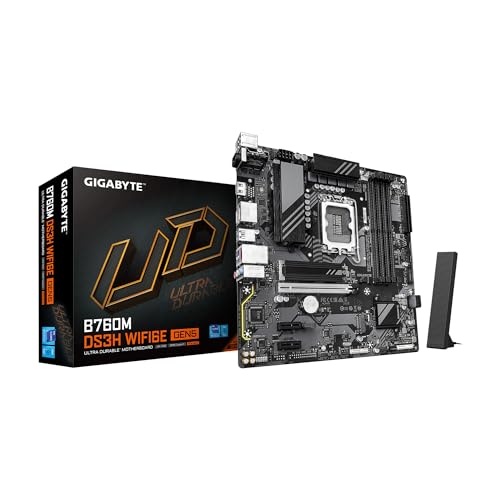
GIGABYTE Micro-ATX DDR5 Wi-Fi 6E Motherboard
Best for: Compact DDR5 builds needing Wi-Fi 6E
- CPU Socket
- LGA 1700 (what this guide is about)
- Form Factor
- mATX
- Memory Type
- DDR5
- PCIe Version
- PCIe 5.0
- Wi-Fi Standard
- WIFI6E
- Ethernet Speed
- 2.5GbE
View on Amazon: GIGABYTE Micro-ATX DDR5 Wi-Fi 6E Motherboard
This Micro-ATX motherboard fits Intel 12th, 13th, and 14th Gen processors on the LGA 1700 socket. It pairs DDR5 memory across four DIMM slots with a PCIe 5.0 x16 graphics slot for modern components. Integrated Wi-Fi 6E and a 2.5GbE LAN port handle wired and wireless networking. It suits you if you want a compact build with four M.2 drive slots, fast memory support, and multi-gigabit connectivity without a full ATX footprint.
Pros
- PCIe 5.0 x16 expansion slot with UD armor
- Integrated Wi-Fi 6E and 2.5GbE Ethernet
- Four M.2 slots across PCIe 4.0 and PCIe 3.0 speeds
- Four DDR5 DIMM slots with Intel XMP support
- Includes USB 3.2 Gen 2 Type-C connectivity
Cons
- Hybrid digital 6+2+1 power phase design
- No PCIe 5.0 speed on the M.2 storage slots
- Only one USB Type-C port listed
Good fit if
- You need a Micro-ATX board with both Wi-Fi 6E and 2.5GbE connectivity.
- You plan to run DDR5 memory with a PCIe 5.0 graphics card.
- You want multiple M.2 slots for storage in a smaller footprint.
Skip if
- You require a full ATX form factor with more expansion slots.
- You need a high-phase VRM setup beyond the 6+2+1 configuration.
- You want PCIe 5.0 transfer speeds on an M.2 NVMe SSD.
Verdict: GIGABYTE Micro-ATX DDR5 Wi-Fi 6E Motherboard delivers PCIe 5.0 graphics support, DDR5 memory capability, and solid networking in a compact footprint. It serves builders seeking multi-gigabit connections and multiple M.2 slots without a full ATX board.

GIGABYTE Micro ATX DDR5 Wi-Fi 6 Motherboard
Best for: compact DDR5 builds needing integrated wireless networking
- CPU Socket
- LGA 1700 (what this guide is about)
- Form Factor
- Micro ATX
- Memory Type
- DDR5
- PCIe Version
- PCIe 4.0
- M.2 Slots
- 1
- Wi-Fi Standard
- Wi-Fi 6
This GIGABYTE Micro-ATX motherboard supports Intel 12th, 13th, and 14th Gen processors on the LGA 1700 socket. It pairs two DDR5 memory slots with a reinforced PCIe 4.0 x16 slot for your discrete graphics card. You get onboard Wi-Fi 6, Bluetooth 5.3, and front-panel USB Type-C support. It fits compact desktop setups when you need current DDR5 support and integrated wireless connectivity without running extra internal cables or expansion cards.
Pros
- Integrated Wi-Fi 6 and Bluetooth 5.3 connectivity
- Reinforced PCIe 4.0 x16 graphics card slot
- Front-panel USB 3.2 Gen 1 Type-C header support
- DDR5 memory compatibility with Intel XMP support
Cons
- Limited to two DDR5 memory slots
- Only one PCIe 3.0 M.2 storage slot
- Gigabit Ethernet instead of 2.5GbE
Good fit if
- You need an LGA 1700 Micro-ATX board with DDR5 memory.
- You want integrated Wi-Fi 6 and Bluetooth 5.3 without add-in cards.
- You use a single M.2 NVMe solid-state drive.
Skip if
- You plan to install multiple M.2 NVMe drives.
- You need four DIMM slots for high-capacity memory upgrades.
- You require PCIe 4.0 speeds on your M.2 storage.
Verdict: GIGABYTE Micro ATX DDR5 Wi-Fi 6 Motherboard provides essential LGA 1700 platform support with DDR5 compatibility and integrated wireless networking. It serves compact builds that rely on a single graphics card and one M.2 storage drive.

GIGABYTE AORUS Elite DDR5 ATX Motherboard
Best for: LGA 1700 builds needing extensive drive storage
- CPU Socket
- LGA 1700 (what this guide is about)
- Form Factor
- ATX
- Memory Type
- DDR5
- M.2 Slots
- 4
- Dimensions
- 9.61 × 12 × 1.38 inches
- Weight
- 3.31 pounds
This ATX board features an Intel LGA 1700 socket and runs DDR5 memory across four slots, accommodating up to 128 GB of RAM. For storage, you get four onboard M.2 slots alongside six SATA ports for high-capacity setups. Expansion includes three full-length PCIe x16 slots to house your graphics card and add-in cards. It suits builders who want an ATX foundation with extensive drive capacity and modern DDR5 memory support.
Pros
- Four M.2 slots for solid-state storage
- Four DDR5 memory slots supporting up to 128 GB
- Three full-length PCIe x16 expansion slots
- Six SATA ports for internal hard drives and SSDs
Cons
- Standard ATX footprint will not fit smaller Micro ATX or Mini-ITX cases
- Incompatible with older DDR4 memory modules
Good fit if
- You need four M.2 slots and six SATA connectors for extensive storage.
- You plan to run up to 128 GB of DDR5 memory.
- You are assembling a system inside a standard ATX enclosure.
Skip if
- You want to reuse an existing set of DDR4 RAM sticks.
- You are building a compact PC using a small-form-factor case.
Verdict: GIGABYTE AORUS Elite DDR5 ATX Motherboard delivers extensive storage options with four M.2 slots and six SATA connectors for your LGA 1700 build. It provides a solid foundation for full-sized desktop setups running DDR5 memory.
Specifications side by side
| Spec | GIGABYTE AORUS Mini-ITX DDR4 Motherboard | GIGABYTE AORUS ATX DDR5 Motherboard | GIGABYTE AORUS Master 10GbE Motherboard | GIGABYTE Aorus Ultra DDR5 ATX Motherboard | GIGABYTE Gaming X AX DDR4 Motherboard | GIGABYTE Z790 AERO G DDR5 Motherboard | GIGABYTE Z790 ATX Motherboard with Wi-Fi 5 | GIGABYTE AORUS Elite ATX DDR5 Motherboard | GIGABYTE Gaming X ATX Motherboard | GIGABYTE Micro-ATX Intel LGA 1700 Motherboard | GIGABYTE Mini-ITX DDR5 Intel Motherboard | GIGABYTE Z790 Eagle AX ATX Motherboard | GIGABYTE Micro-ATX DDR5 Wi-Fi 6E Motherboard | GIGABYTE Micro ATX DDR5 Wi-Fi 6 Motherboard | GIGABYTE AORUS Elite DDR5 ATX Motherboard |
|---|---|---|---|---|---|---|---|---|---|---|---|---|---|---|---|
| CPU Socket | LGA 1700 | LGA 1700 | LGA 1700 | LGA 1700 | LGA 1700 | LGA 1700 | LGA 1700 | LGA 1700 | LGA 1700 | LGA 1700 | LGA 1700 | LGA 1700 | LGA 1700 | LGA 1700 | LGA 1700 |
| Chipset | B660 | Z790 | Intel Z690 | Intel Z690 | B660 | Intel Z790 | Z790 | not specified | Z790 | H610 | H610 | Intel Z790 | not specified | not specified | not specified |
| Form Factor | Mini-ITX | ATX | ATX | ATX | M-ATX | ATX | ATX | ATX | ATX | Micro ATX | Mini-ITX | ATX | mATX | Micro ATX | ATX |
| Memory Type | DDR4 | DDR5 | DDR5 | DDR5 | DDR4 | DDR5 | DDR5 | DDR5 | DDR5 | DDR4 | DDR5 | DDR5 | DDR5 | DDR5 | DDR5 |
| PCIe Version | PCIe 4.0 | PCIe 5.0 | PCIe 5.0 | PCIe 5.0 | PCIe 4.0 | PCIe 5.0 | PCIe 5.0 | PCIe 4.0 | PCIe 5.0 | PCIe 4.0 | PCIe 4.0 | PCIe 5.0, PCIe 4.0 | PCIe 5.0 | PCIe 4.0 | not specified |
| M.2 Slots | 1 | 4 | 4 | 4 | 2 | 5 | 3 | 3 | not specified | 1 | 1 | 3 | not specified | 1 | 4 |
| Wi-Fi Standard | Wi-Fi 6 | Wi-Fi 7 | Wi-Fi 6E | Wi-Fi 6 | WiFi 6E | WiFi 6E | not specified | WIFI6E | Wi-Fi 6E | not specified | not specified | Wi-Fi 6E | WIFI6E | Wi-Fi 6 | not specified |
| Ethernet Speed | 2.5 GbE | 2.5 GbE | 10 GbE, 2.5 GbE | 2.5 GbE | 2.5GbE | 2.5GbE | 2.5GbE | 2.5GbE LAN | 2.5GbE LAN | 1 GbE | GbE | 2.5 GbE | 2.5GbE | GbE | not specified |
| Power Phases | 8+1+1 | 16+1+2 | 19+1+2 | 16+1+2 | 8+1+1 | not specified | 16+1+1 | 12+1+1 | 16+2+1 | 6+1+1 | 4+1+1 | 12+1+1 | 6+2+1 | 5+1+1 | not specified |
| Wi-Fi | Wi-Fi 6 | Wi-Fi 7 | Wi-Fi 6E | Wi-Fi 6 | Wi-Fi 6 | Wi-Fi 6E | Wi-Fi 5 | Wi-Fi 6E | Wi-Fi 6E | not specified | not specified | Wi-Fi 6E | Wi-Fi 6E | Wi-Fi 6 | not specified |
| Use Case | Gaming | not specified | Gaming | Gaming | Gaming | not specified | not specified | not specified | Gaming | not specified | not specified | not specified | not specified | not specified | not specified |
| Dimensions | 9.25 × 8.94 × 3.74 inches | 13.2 × 10.6 × 3.14 inches | 13.6 × 11.6 × 3.14 inches | 13.2 × 10.6 × 3.14 inches | 10.6 × 10.6 × 2.67 inches | 10.6 × 3.14 × 13.2 inches | 13.2 × 10.6 × 3.14 inches | 13.2 × 10.6 × 3.14 inches | 13.2 × 10.6 × 3.14 inches | 10.4 × 10.4 × 2.13 inches | 8.74 × 7.09 × 2.56 inches | 3.31 × 10.9 × 13.3 inches | 8.82 × 8.82 × 1 inches | 9.6 × 9.6 × 1.75 inches | 9.61 × 12 × 1.38 inches |
| Weight | not specified | 4.89 pounds | not specified | 2.2 pounds | not specified | 4.41 pounds | 3.88 pounds | 3.31 pounds | 4.19 pounds | not specified | 1.3 pounds | 3.62 pounds | 1.98 pounds | not specified | 3.31 pounds |
| Size | B660I AORUS PRO DDR4 | ATX | Z690 AORUS MASTER | Z690 AORUS ULTRA | B660M GAMING X AX DDR4 | Z790 AERO G | Z790 | B760 AORUS ELITE AX | ATX | not specified | not specified | Z790 | mATX | mATX | not specified |
| Color | black | not specified | not specified | not specified | black | not specified | not specified | not specified | not specified | Multicolor | not specified | Black | Multicolor | Multicolor | black / black |
| Model | B660I | Z790 AORUS ELITE X WIFI7 | Z690 | Z690 | B660M | Z790 | Z790 UD AC | B760 AORUS ELITE AX | Z790 GAMING X AX | H610M S2H V2 DDR4 | H610I | Z790 EAGLE AX | B760M DS3H WIFI6E GEN5 | H610M D3W WIFI6 | Z790 AORUS ELITE AX |
You can evaluate the best CPU coolers for LGA 1700 to ensure your selected board has proper socket clearance and thermal management.
Choosing the Best GIGABYTE LGA 1700 Motherboard
-
Match Form Factor to Case
You must match the motherboard form factor to your computer case dimensions. Standard ATX boards offer the highest expansion capacity with several expansion slots and cooling clearance. Micro-ATX options balance space savings with multi-slot utility for mid-sized enclosures. Mini-ITX boards fit ultra-compact builds but restrict you to two memory channels and a single expansion slot. Check your case specifications before buying. If you plan a small build, the GIGABYTE AORUS Mini-ITX DDR4 Motherboard provides a dedicated small-footprint foundation that fits into compact chassis environments without unnecessary bulk.
-
Select DDR4 or DDR5 Memory
LGA 1700 processors support either DDR4 or DDR5 memory, but motherboards accommodate only one type. DDR4 boards let you reuse existing system memory or assemble budget-oriented setups without paying for newer modules. DDR5 boards unlock higher baseline memory frequencies and expanded bandwidth for demanding multitasking and modern workloads. Memory slots are physically keyed differently, so you cannot install DDR4 into a DDR5 slot. For example, the GIGABYTE Gaming X AX DDR4 Motherboard targets builds specifically utilizing DDR4 RAM, while Z790 and B760 models typically require purchasing a dedicated DDR5 memory kit.
-
Compare Chipset Capabilities
The motherboard chipset dictates platform expansion, connectivity limits, and processor overclocking capability. Intel H610 chipsets provide entry-level connectivity suitable for basic computing without extra bus lanes. Mainstream B660 and B760 chipsets add support for multiple storage drives and faster peripheral interfaces for gaming builds. Top-tier Z690 and Z790 chipsets deliver full CPU overclocking support, expanded PCIe lanes, and maximum USB connectivity. If you require advanced enthusiast features and extensive system headroom, choose a Z-series model like the GIGABYTE Z690 AORUS Master 10GbE Motherboard instead of stepping down to an entry-level H-series platform.
-
Evaluate Storage Drive Capacity
Examine the number of M.2 NVMe slots and SATA ports if you use multiple solid-state drives or mass-storage hard drives. Basic motherboards often supply only a single M.2 connection alongside standard SATA ports, restricting high-speed solid-state expansion. Mid-range boards generally incorporate two to three M.2 sockets for separate operating system and game libraries. High-capacity desktop configurations benefit from boards offering four M.2 slots for expansive high-speed storage arrays. The GIGABYTE AORUS Elite DDR5 ATX Motherboard provides four M.2 slots alongside six SATA connectors, accommodating setups that require extensive local storage capacity across multiple drives.
-
Inspect VRM Power Phases
Power delivery determines how cleanly and reliably a motherboard supplies voltage to an LGA 1700 processor under heavy operating loads. Entry-level boards use simpler power configurations designed for standard desktop tasks and lower-wattage processors. Demanding workloads and unlocked processors require robust voltage regulator modules to maintain stability without thermal throttling. Models with 16 or more power phases distribute thermal loads efficiently across components, ensuring consistent performance. For heavy system demands, the GIGABYTE Aorus Ultra DDR5 ATX Motherboard features a 16+1+2 phase power design that delivers steady voltage regulation to high-tier processors during sustained computing sessions.
-
Verify Wireless Networking Generation
Review the integrated wireless standard to ensure compatibility with your home router. Older Wi-Fi 5 motherboards handle basic internet browsing on 2.4 GHz and 5 GHz bands, while Wi-Fi 6 improves handling of congested local networks. Wi-Fi 6E introduces access to the less crowded 6 GHz wireless spectrum for lower latency. The latest Wi-Fi 7 hardware expands channel bandwidth even further for maximum wireless data transfers. If your network environment utilizes modern Wi-Fi 7 hardware, the GIGABYTE AORUS ATX DDR5 Motherboard includes onboard Wi-Fi 7 connectivity to match corresponding high-speed router infrastructure.
Frequently asked questions
Can you use DDR4 RAM on any GIGABYTE LGA 1700 motherboard?
No, you cannot swap memory types on a single motherboard. LGA 1700 boards are dedicated to either DDR4 or DDR5 memory slots. For DDR4 memory, you need specific models such as the B660I AORUS PRO DDR4 or H610M S2H V2 DDR4. If you purchase a DDR5 model like the Z790 AORUS Elite AX, you must install DDR5 modules.
Which Intel processor generations work in GIGABYTE LGA 1700 motherboards?
GIGABYTE LGA 1700 motherboards support 12th, 13th, and 14th Gen Intel Core desktop processors. The LGA 1700 physical socket design remains consistent across these three processor generations. When you select a board such as the GIGABYTE Z790 Eagle AX, it is built to provide power delivery and platform compatibility for any compatible desktop CPU from those generations.
Which GIGABYTE LGA 1700 motherboard features 10GbE networking?
The GIGABYTE Z690 AORUS Master ATX Motherboard includes integrated 10GbE Ethernet for high-bandwidth wired networks. Most standard LGA 1700 motherboards, like the Z790 Gaming X AX, feature 2.5GbE ports, while entry-level boards provide 1GbE speeds. The 10GbE interface gives you four times the wired throughput of 2.5GbE connections when connected to compatible high-speed switches or network storage devices.
How many M.2 storage drives can you install on GIGABYTE Z690 boards?
Motherboards like the GIGABYTE Z690 AORUS Master and Z690 AORUS Ultra provide four PCIe 4.0 M.2 slots for high-speed NVMe solid-state drives. This setup allows you to install multiple storage drives directly onto the motherboard without occupying standard PCIe expansion lanes. In comparison, smaller boards or entry designs like the H610M D3W often supply only a single M.2 connector for storage drives.
Which GIGABYTE LGA 1700 motherboard has Wi-Fi 7 capability?
The GIGABYTE AORUS ATX DDR5 Motherboard, model Z790 AORUS ELITE X WIFI7, features onboard Wi-Fi 7 networking. Most other wireless LGA 1700 boards in the lineup use Wi-Fi 6E, Wi-Fi 6, or Wi-Fi 5 standards. If you have a compatible wireless access point, this motherboard allows you to use newer frequency bands and broader channel bandwidths for faster wireless connectivity.
Do all GIGABYTE LGA 1700 motherboards support PCIe 5.0?
No, PCIe generations vary based on the specific motherboard chipset and design. Models like the Z790 AORUS ELITE X WIFI7, Z790 AERO G, and B760M DS3H feature PCIe 5.0 expansion support. Meanwhile, boards like the B660I AORUS PRO DDR4, H610M S2H V2 DDR4, and B760 AORUS Elite AX are limited to PCIe 4.0. You should check the board specification if you need PCIe 5.0 hardware support.
What features make the GIGABYTE Z790 AERO G distinct for content creators?
The GIGABYTE Z790 AERO G features VisionLINK connectivity alongside PCIe 5.0 support and DDR5 memory compatibility. VisionLINK allows you to transmit data, video signals, and power over a single connection, simplifying cabling for creative setups. The board also provides 2.5GbE LAN and Wi-Fi 6E, ensuring fast data transfers across both local storage networks and wireless internet connections for creator workloads.