Best LGA 1151 Motherboards: 12 Spec-Based Picks
As an Amazon Associate we earn from qualifying purchases. Links on this page are affiliate links.
Finding the best LGA 1151 motherboards requires looking strictly at published specifications. We compared 12 options to help you choose based on hardware data rather than marketing claims. The Biostar LGA 1151 DDR4 ATX Motherboard leads as our top pick because it offers essential ATX connectivity and standard DDR4 support for compatible Intel processors. This guide helps you decide which board fits your specific build needs, whether you require standard desktop features, multi-GPU expansion, or specialized server capabilities.
Quick picks
The best fit for you
- You want the best overall standard ATX build Biostar LGA 1151 DDR4 ATX Motherboard It provides essential ATX connectivity and DDR4 memory support for standard desktop setups.
- You need the most affordable option for LGA 1151 Biostar B250 LGA 1151 ATX Motherboard This budget board supports 12 GPUs on standard DDR4 memory for multi-card expansions.
- You require triple M.2 storage and dual wired LAN GIGABYTE AORUS LGA 1151 ATX Motherboard It delivers three M.2 drive slots and dual wired Ethernet for dedicated builds.
- You want premium performance for overclocked 8th and 9th Gen gaming MSI MPG Z390 Gaming Edge AC ATX Motherboard The Z390 chipset supports 4400 MHz memory and integrated Wi-Fi for high-end gaming.
- You are building a high-density multi-GPU server Biostar LGA 1151 8 GPU Server Board This server board provides dedicated hardware for multi-card compute nodes using SODIMM DDR4.
Our 12 picks

Biostar LGA 1151 DDR4 ATX Motherboard
Best for: standard ATX LGA 1151 desktop builds
- CPU Socket
- LGA 1151 (what this guide is about)
- Chipset
- B250
- Form Factor
- ATX
- Memory Type
- DDR4
- Series
- Core i7
- Dimensions
- 13.2 × 10.2 × 2.5 inches
This ATX motherboard from Biostar features the Intel LGA 1151 socket. It supports Intel Core i7, i5, and i3 processors alongside DDR4 memory. You get standard PCI Express, SATA, and USB connectivity for your components and storage drives. Its full-size ATX form factor fits standard desktop towers. This board suits you if you plan a desktop build around an LGA 1151 Intel processor and standard DDR4 system memory.
Pros
- Intel LGA 1151 CPU socket
- Supports DDR4 system memory
- Full-size ATX form factor
- Includes PCI Express and SATA connections
Cons
- No built-in Wi-Fi listed in specifications
- Requires an ATX-compatible PC case
Good fit if
- You need a board for an LGA 1151 Intel Core i7, i5, or i3 processor.
- You use DDR4 memory modules in a standard ATX enclosure.
Skip if
- You require integrated Wi-Fi networking on the board.
- You build inside a compact micro-ATX or Mini-ITX case.
Verdict: Biostar ATX LGA 1151 Motherboard provides essential ATX connectivity, DDR4 memory support, and an LGA 1151 socket for compatible Intel processors. It handles standard multi-card setups and desktop storage with standard SATA and PCI Express ports.

Biostar B250 LGA 1151 ATX Motherboard
Best for: high-density multi-GPU setups on LGA 1151
- CPU Socket
- LGA 1151 (what this guide is about)
- Chipset
- Intel B250
- Form Factor
- ATX
- Memory Type
- DDR4
- Series
- Core i7
- Dimensions
- 8.27 × 1.57 × 11.6 inches
This Biostar ATX board features an LGA 1151 socket designed for Intel processors including Core i7, Core i5, and Core i3 series. It runs DDR4 memory and supports up to 12 GPUs across PCI Express. Built on the Intel B250 platform with SATA and USB connections, it suits you if you deploy dense multi-card hardware configurations.
Pros
- Supports up to 12 GPUs
- Standard ATX form factor
- DDR4 memory architecture
- LGA 1151 socket with Core i3, i5, and i7 support
Cons
- No onboard Wi-Fi listed
- No M.2 expansion slots specified
Good fit if
- You need to run up to 12 GPUs on a single system.
- You are building with an Intel LGA 1151 processor and DDR4 memory.
Skip if
- You require integrated wireless connectivity.
- You use a processor requiring a different socket type.
Verdict: Biostar ATX LGA 1151 Motherboard delivers multi-card expansion with support for 12 GPUs on standard DDR4 memory. It offers a straightforward platform if you run multi-GPU configurations on the LGA 1151 socket.

GIGABYTE AORUS LGA 1151 ATX Motherboard
Best for: triple M.2 storage and dual wired LAN
- CPU Socket
- LGA 1151 (what this guide is about)
- Chipset
- Z370
- Form Factor
- ATX
- M.2 Slots
- 3
- Ethernet Speed
- Gigabit LAN
- Use Case
- Gaming
This ATX motherboard gives you an LGA 1151 socket paired with three M.2 slots and dual LAN connections from Killer and Intel. You get front and rear USB 3.1 Gen 2 Type-C connectivity alongside onboard ESS Sabre audio and multi-zone lighting. It fits your build if you run an 8th Generation Intel Core processor and need multi-drive storage options inside a standard ATX PC case.
Pros
- Three M.2 slots with M.2 Thermal Guard cooling
- Dual wired network ports with Killer E2500 and Intel Gigabit LAN
- Front-panel and rear USB 3.1 Gen 2 Type-C connectivity
- Integrated ESS Sabre DAC audio hardware
Cons
- Processor support specified only for 8th Generation Intel Core chips
- No integrated Wi-Fi adapter included on the board
Good fit if
- You use an 8th Generation Intel Core processor.
- You plan to install up to three M.2 solid-state drives.
- You want dual wired Ethernet connections.
Skip if
- You require integrated Wi-Fi networking out of the box.
- You need processor compatibility outside of 8th Generation Intel Core chips.
Verdict: GIGABYTE AORUS LGA 1151 ATX Motherboard delivers three M.2 drive slots and dual wired Ethernet for dedicated 8th Generation Intel gaming builds.

MSI MPG Z390 Gaming Edge AC ATX Motherboard
Best for: Overclocked 8th and 9th Gen gaming builds
- CPU Socket
- LGA 1151 (what this guide is about)
- Chipset
- Z390
- Form Factor
- ATX
- Memory Type
- DDR4
- M.2 Slots
- 2
- Use Case
- Gaming
This MSI MPG Z390 Gaming Edge AC is an ATX motherboard built for 8th and 9th Generation Intel Core processors on the LGA 1151 socket. It provides four DDR4 memory slots supporting up to 4400 MHz (OC), two Turbo M.2 slots, integrated Wi-Fi, and multi-GPU support for SLI and CrossFireX setups. It suits you if you need high-speed memory overclocking, dual M.2 solid-state storage, and integrated wireless connectivity in a full-size gaming desktop.
Pros
- Supports DDR4 memory speeds up to 4400 MHz (OC) across 4 DIMM slots
- Dual Turbo M.2 slots with Intel Optane Memory support
- Built-in Wi-Fi and Turbo USB 3.1 Gen 2
- Compatible with multi-GPU configurations via SLI and CrossFireX
Cons
- Full ATX form factor requires a compatible mid-tower or full-tower case
- Processor compatibility limited strictly to 8th and 9th Generation Intel CPUs
- Official operating system support listed only for 64-bit Windows 10
Good fit if
- You plan to run an 8th or 9th Gen Intel processor with overclocked DDR4 RAM.
- You need onboard Wi-Fi along with dual Turbo M.2 storage slots.
- You intend to use a multi-GPU setup using SLI or CrossFireX.
Skip if
- You use a compact chassis that requires a Micro-ATX or Mini-ITX board.
- You plan to use an operating system other than 64-bit Windows 10.
Verdict: MSI MPG Z390 Gaming Edge AC ATX Motherboard delivers Intel Z390 performance with dual M.2 slots, integrated Wi-Fi, and 4400 MHz memory support. It serves as a fully featured platform for 8th and 9th Gen Intel gaming builds.

MSI Gaming Pro Carbon ATX Motherboard
Best for: overclocked 8th and 9th Gen Intel gaming
- CPU Socket
- LGA 1151 (what this guide is about)
- Chipset
- Z390
- Form Factor
- ATX
- Memory Type
- DDR4
- M.2 Slots
- 2
- Use Case
- Gaming
This MSI ATX board features the LGA 1151 socket and Intel Z390 chipset, built for 8th and 9th Generation Intel processors. You get dual-channel DDR4 memory slots supporting speeds up to 4400 MHz overclocked, two Turbo M.2 slots for storage, and support for multi-GPU setups using SLI or CrossFire. It suits your build if you need fast memory tuning, dual high-speed storage slots, and DisplayPort or HDMI video outputs.
Pros
- Supports dual-channel DDR4 memory up to 4400(OC) MHz
- Dual Turbo M.2 slots with M.2 Shield Frozr heatsink
- Supports multi-GPU setups with SLI and CrossFire
- Integrated pre-installed rear I/O shielding
Cons
- No integrated Wi-Fi networking listed
- Full ATX footprint requires a mid-tower or larger case
Good fit if
- You run an 8th or 9th Generation Intel Core processor with high-speed DDR4 memory.
- You need dual M.2 solid-state drive slots alongside multi-GPU capability.
- You want addressable RGB synchronization using onboard Mystic Light headers.
Skip if
- You require onboard Wi-Fi rather than an Ethernet connection.
- You are building a compact small-form-factor micro-ATX or Mini-ITX system.
Verdict: MSI ATX LGA 1151 Gaming Motherboard delivers robust high-frequency DDR4 support and dual M.2 slots for 8th and 9th Gen Intel systems. It provides reliable multi-GPU readiness and pre-installed I/O protection for dedicated desktop builds.

MSI LGA 1151 ATX Motherboard with Wi-Fi
Best for: 8th and 9th Gen Intel gaming builds
- CPU Socket
- LGA 1151 (what this guide is about)
- Chipset
- Z390
- Form Factor
- ATX
- Memory Type
- DDR4
- M.2 Slots
- 2
- Wi-Fi Standard
- 802.11ac
This MSI ATX motherboard features the Intel Z390 chipset and an LGA 1151 socket designed for 8th and 9th Generation Intel processors. It gives you dual-channel DDR4 memory support reaching up to 4400 MHz overclocked speeds, onboard Intel 802.11ac Wi-Fi, and two M.2 slots for solid-state storage. It fits your build if you plan to install a compatible Core, Pentium Gold, or Celeron CPU in a standard multi-GPU capable ATX chassis.
Pros
- Supports dual-channel DDR4 memory up to 4400(OC) MHz
- Integrated Intel 802.11ac Wi-Fi
- Two M.2 slots with M.2 Shield Frozr
- Pre-installed I/O shielding
Cons
- Wi-Fi standard is limited to 802.11ac
- CPU support is limited to 8th and 9th Generation chips
- Full ATX footprint requires a standard or large case
Good fit if
- You use an 8th or 9th Generation Intel Core, Pentium Gold, or Celeron processor.
- You want onboard 802.11ac Wi-Fi without taking up a PCIe expansion slot.
- You plan to build a gaming system with dual M.2 drives and multi-GPU support.
Skip if
- You use a 6th or 7th Generation Intel LGA 1151 processor.
- You need a compact micro-ATX or mini-ITX motherboard.
- You require Wi-Fi hardware newer than 802.11ac.
Verdict: MSI MPG Carbon ATX Wi-Fi Motherboard delivers robust LGA 1151 connectivity with high-speed DDR4 memory support and integrated wireless networking. It provides dependable multi-GPU readiness and dual M.2 slots for 8th and 9th Gen Intel systems.

GIGABYTE AORUS Z390 ATX Motherboard
Best for: 8th and 9th Gen Intel gaming builds
- CPU Socket
- LGA 1151 (what this guide is about)
- Chipset
- Z390
- Form Factor
- ATX
- Memory Type
- DDR4
- M.2 Slots
- 2
- Wi-Fi Standard
- 802.11ac
This ATX motherboard features the Intel Z390 chipset on the LGA 1151 socket, built for 8th and 9th Generation Intel Core processors. It delivers power through a 12+1 phase digital VRM design and provides integrated connectivity via Intel 802.11ac Wi-Fi and Bluetooth 5. With four DDR4 DIMM slots and dual M.2 slots with Thermal Guard heatsinks, you get stable hardware support for a dedicated gaming build.
Pros
- 12+1 phase digital VRM design with DrMOS
- Built-in Intel 802.11ac Wave 2 Wi-Fi and Bluetooth 5
- Four DDR4 DIMM slots supporting dual-channel memory
- Dual M.2 connectors equipped with Thermal Guard heatsinks
Cons
- Supports only 8th and 9th Gen Intel Core CPUs, not 6th or 7th Gen
- Limited to Wi-Fi 5 (802.11ac) rather than newer Wi-Fi standards
Good fit if
- You are building with an 8th or 9th Generation Intel Core processor.
- You want built-in Wi-Fi and Bluetooth connectivity on an ATX board.
- You need four DDR4 memory slots and dual M.2 storage slots.
Skip if
- You plan to use a 6th or 7th Generation Intel Core processor.
- You require a compact microATX or Mini-ITX form factor.
Verdict: Gigabyte Aorus Pro Wi-Fi ATX Motherboard provides robust 12+1 phase power delivery, onboard wireless connectivity, and dual M.2 cooling for 8th and 9th Gen Intel processors. It serves as a fully featured ATX foundation for LGA 1151 systems.

Biostar LGA 1151 8 GPU Server Board
Best for: high-density multi-GPU server and mining setups
- CPU Socket
- LGA 1151 (what this guide is about)
- Chipset
- Intel 300 Series
- Memory Type
- DDR4
- Use Case
- Server
- Dimensions
- 20 × 10 × 2 inches
This Biostar motherboard pairs an LGA 1151 socket with an Intel 300 series chipset for server setups. It supports 8th and 9th generation Intel processors alongside SODIMM DDR4 memory. Built with support for up to eight graphics cards across a 20-inch frame, it suits you if you need a high-density compute or mining rack build rather than a standard desktop chassis.
Pros
- Supports up to 8 GPUs directly
- Compatible with Intel 8th and 9th Gen processors
- LGA 1151 socket with Intel 300 series chipset
- Uses compact SODIMM DDR4 memory
Cons
- Requires SODIMM laptop-style DDR4 RAM instead of standard desktop DIMMs
- Large 20 by 10 inch dimensions do not fit standard desktop cases
Good fit if
- You run a multi-GPU compute or mining server requiring 8 cards
- You plan to use an 8th or 9th Gen Intel processor on an LGA 1151 socket
- You have a specialized chassis that accommodates a 20-inch board length
Skip if
- You want to build inside a standard ATX or Micro-ATX desktop chassis
- You already own standard full-size desktop DDR4 RAM modules
Verdict: Biostar LGA 1151 8-GPU Server Motherboard provides dedicated hardware for multi-card compute nodes running 8th and 9th Gen Intel processors. Its large form factor and SODIMM DDR4 requirement make it strictly tailored for specialized server racks.

Biostar TB360-BTC Pro ATX Motherboard
Best for: LGA 1151 Intel B360 ATX builds
- CPU Socket
- LGA 1151 (what this guide is about)
- Chipset
- Intel B360
- Form Factor
- ATX
- Dimensions
- 1.1 × 9.7 × 6.5 inches
- Weight
- 2.2 pounds
The Biostar TB360-BTC Pro ATX Motherboard is an Intel-based board designed around the LGA 1151 socket. It features the Intel B360 chipset and comes in a full ATX form factor measuring 9.7 by 6.5 inches. If you are building a system that requires an LGA 1151 processor on an ATX layout, this platform provides standard compatibility for your build.
Pros
- Intel B360 chipset support
- LGA 1151 CPU socket
- Standard ATX form factor
- Published dimensions of 9.7 by 6.5 inches
Cons
- Integrated wireless networking not listed in specifications
- RAM type and maximum memory capacity not specified in data
Good fit if
- You need an LGA 1151 socket for your processor.
- You have a PC chassis compatible with ATX motherboards.
- You want a setup utilizing the Intel B360 chipset.
Skip if
- You require integrated Wi-Fi directly on the board.
- You are assembling a compact Mini-ITX or Micro-ATX build.
Verdict: Biostar TB360-BTC Pro ATX Motherboard provides an LGA 1151 socket and Intel B360 chipset on a full-size ATX board. It gives you the baseline hardware needed for standard desktop installations.

SHANGZHAOYUAN LGA 1151 DDR4 Motherboard
Best for: Intel Core i5 desktop builds
- CPU Socket
- LGA 1151 (what this guide is about)
- Chipset
- Intel H110
- Memory Type
- DDR4
- PCIe Version
- PCIe 3.0
- Series
- Core i5
This SHANGZHAOYUAN board delivers an LGA 1151 socket paired with the Intel H110 chipset. You get two DDR4 slots holding up to 32GB of memory at 2400MHz, alongside a switchable M.2 slot supporting both PCIe 2.0 x4 and SATA modes. It features HDMI and VGA outputs for processors with integrated graphics. It suits you if you need a straightforward base for a 6th through 9th Gen Intel Core i5 or i3 processor.
Pros
- Supports 6th through 9th Gen Intel Core i3 and i5 processors
- Dual-mode M.2 slot supports both NVMe PCIe 2.0 x4 and SATA NGFF drives
- Onboard HDMI and VGA ports support 1080p output with compatible CPUs
- Dedicated PCIe x16 slot with PCIe 3.0 support
Cons
- Specifications state it may not be compatible with Core i7 processors
- Package does not include a CR2032L battery
- Printed user manual is omitted from the packaging
Good fit if
- You build with a 6th to 9th Gen Intel Core i5, i3, Pentium, or Celeron processor.
- You need both HDMI and VGA video outputs for integrated graphics.
- You plan to use up to 32GB of DDR4 system memory.
Skip if
- You plan to run an Intel Core i7 processor.
- You require more than 32GB of total RAM.
- You need an included CMOS battery and printed physical manual out of the box.
Verdict: SHANGZHAOYUAN LGA 1151 DDR4 Motherboard provides essential connectivity for 6th through 9th Gen Core i5 builds with switchable M.2 storage and dual display outputs. It covers core computing tasks reliably, provided you do not need Core i7 support or beyond 32GB RAM.

ASRock Z390 Phantom Gaming 4/AC ATX Motherboard
Best for: LGA 1151 builds needing PCIe 3.0
- CPU Socket
- LGA 1151 (what this guide is about)
- Chipset
- Z390
- Form Factor
- ATX
- Memory Type
- DDR4
- PCIe Version
- PCIe 3.0
- Use Case
- Gaming
View on Amazon: ASRock Z390 Phantom Gaming 4/AC ATX Motherboard
This ATX board features the Intel Z390 chipset and an LGA 1151 socket designed for compatible Intel processors. It provides PCIe 3.0 expansion connectivity for your add-in cards alongside support for up to 64 GB of DDR4 system memory. If you are building a full-sized gaming desktop setup around LGA 1151 hardware and need standard ATX spacing with DDR4 memory support, this motherboard matches your core system requirements.
Pros
- Intel Z390 chipset with LGA 1151 processor socket
- PCIe 3.0 support for expansion cards
- Standard ATX form factor layout
- Supports up to 64 GB DDR4 memory
Cons
- PCIe 3.0 interface rather than newer generation slots
- Maximum memory capacity limited to 64 GB
- Full ATX dimensions will not fit smaller cases
Good fit if
- You need an LGA 1151 motherboard built on the Intel Z390 chipset.
- You plan to run PCIe 3.0 hardware with DDR4 system RAM.
- You have a PC chassis that fits full-size ATX motherboards.
Skip if
- You need a compact micro-ATX or Mini-ITX motherboard form factor.
- You require more than 64 GB of total system memory.
Verdict: ASRock Z390 Phantom Gaming ATX Motherboard provides Intel Z390 chipset capability, PCIe 3.0 connectivity, and 64 GB DDR4 memory capacity for LGA 1151 gaming builds. It delivers standard ATX expansion options for users assembling a compatible system.
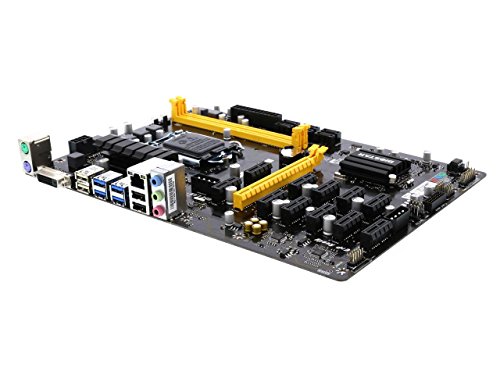
Biostar LGA 1151 Multi-GPU Motherboard
Best for: mixed AMD and NVIDIA 12-GPU mining rigs
- CPU Socket
- LGA 1151 (what this guide is about)
- Chipset
- Intel B250
- Memory Type
- DDR4
- Series
- Core i7
- Dimensions
- 13.1 × 10 × 2.5 inches
- Weight
- 1 pounds
This Biostar board features an LGA 1151 socket paired with the Intel B250 chipset for Core i7, i5, i3, Pentium, and Celeron processors. Built for multi-card setups, it accommodates up to 12 graphics cards using a combination of six AMD and six NVIDIA GPUs. System memory runs on DDR4 modules at speeds up to 2400 MHz. If you need a platform dedicated to multi-GPU arrays with LGA 1151 processors, this layout fits your hardware configuration.
Pros
- Supports up to 12 GPUs via six AMD and six NVIDIA cards
- Compatible with Intel Core i7, i5, i3, Pentium, and Celeron CPUs
- Supports DDR4 memory speeds at 1866, 2133, and 2400 MHz
Cons
- Requires BIOS setting changes to run 12 graphics cards
- Windows limits installations to no more than eight GPUs per brand
- Memory speed is capped at DDR4-2400
Good fit if
- You build a 12-card system using a split between AMD and NVIDIA GPUs.
- You run an LGA 1151 Core, Pentium, or Celeron processor with DDR4 memory.
Skip if
- You plan to run nine or more identical GPUs of the same brand under Windows.
- You need 12-card detection without altering default BIOS settings.
Verdict: Biostar LGA 1151 Multi-GPU Motherboard provides specialized 12-card expansion for mixed AMD and NVIDIA rigs using LGA 1151 processors. It delivers a dedicated multi-GPU platform as long as you configure the required BIOS options.
Specifications side by side
| Spec | Biostar LGA 1151 DDR4 ATX Motherboard | Biostar B250 LGA 1151 ATX Motherboard | GIGABYTE AORUS LGA 1151 ATX Motherboard | MSI MPG Z390 Gaming Edge AC ATX Motherboard | MSI Gaming Pro Carbon ATX Motherboard | MSI LGA 1151 ATX Motherboard with Wi-Fi | GIGABYTE AORUS Z390 ATX Motherboard | Biostar LGA 1151 8 GPU Server Board | Biostar TB360-BTC Pro ATX Motherboard | SHANGZHAOYUAN LGA 1151 DDR4 Motherboard | ASRock Z390 Phantom Gaming 4/AC ATX Motherboard | Biostar LGA 1151 Multi-GPU Motherboard |
|---|---|---|---|---|---|---|---|---|---|---|---|---|
| CPU Socket | LGA1151 | LGA1151 | LGA1151 | LGA 1151 | LGA 1151 | LGA 1151 | LGA1151 | LGA1151 | LGA 1151 | LGA 1151 | LGA 1151 | LGA1151 |
| Chipset | B250 | Intel B250 | Z370 | Z390 | Z390 | Z390 | Z390 | Intel 300 Series | Intel B360 | Intel H110 | Z390 | Intel B250 |
| Form Factor | ATX | ATX | ATX | ATX | ATX | ATX | ATX | not specified | ATX | not specified | ATX | not specified |
| Memory Type | DDR4 | DDR4 | not specified | DDR4 | DDR4 | DDR4 | DDR4 | DDR4 | not specified | DDR4 | DDR4 | DDR4 |
| PCIe Version | not specified | not specified | not specified | not specified | not specified | not specified | not specified | not specified | not specified | PCIe 3.0 | PCIe 3.0 | not specified |
| M.2 Slots | not specified | not specified | 3 | 2 | 2 | 2 | 2 | not specified | not specified | not specified | not specified | not specified |
| Wi-Fi Standard | not specified | not specified | not specified | not specified | not specified | 802.11ac | 802.11ac | not specified | not specified | not specified | not specified | not specified |
| Ethernet Speed | not specified | not specified | Gigabit LAN | not specified | not specified | not specified | Gigabit | not specified | not specified | not specified | not specified | not specified |
| Power Phases | not specified | not specified | not specified | not specified | not specified | not specified | 12+1 | not specified | not specified | not specified | not specified | not specified |
| Use Case | not specified | not specified | Gaming | Gaming | Gaming | Gaming | Gaming | Server | not specified | not specified | Gaming | not specified |
| Series | Core i7 | Core i7 | not specified | not specified | not specified | not specified | not specified | not specified | not specified | Core i5 | Core i7 | Core i7 |
| Dimensions | 13.2 × 10.2 × 2.5 inches | 8.27 × 1.57 × 11.6 inches | 13.2 × 10.6 × 3.14 inches | 12 × 9.6 × 1.2 inches | 12 × 9.6 × 1.2 inches | 12 × 9.6 × 1.2 inches | 13.2 × 10.6 × 3.14 inches | 20 × 10 × 2 inches | 1.1 × 9.7 × 6.5 inches | not specified | not specified | 13.1 × 10 × 2.5 inches |
| Weight | 1.98 pounds | not specified | 4.15 pounds | 3.3 pounds | 3.3 pounds | 3.3 pounds | 3.09 pounds | not specified | 2.2 pounds | not specified | not specified | 1 pounds |
| Model | FBA_TB250-BTC | TB250-BTC Pro | Z370 AORUS Gaming 7 | 007B17-002R | MPG Z390 GAMING PRO CARBON | MPG Z390 Gaming PRO Carbon AC | Z390 AORUS PRO WIFI | TB360-BTC D+ | IB36AAHS | H110M Gaming | LFDDDAGCB | TB250-BTC PRO |
| Size | not specified | not specified | not specified | ATX | ATX | ATX | not specified | not specified | not specified | not specified | One Size | not specified |
| Color | not specified | not specified | not specified | not specified | not specified | not specified | not specified | not specified | not specified | not specified | One Color | not specified |
Is an LGA 1151 motherboard right for your build?
The LGA 1151 socket supports Intel processors from the 6th through 9th generations. This platform uses DDR4 memory and standard ATX form factors. You can find boards for basic desktop use, high-end gaming with Z390 chipsets, or specialized multi-GPU server setups. The socket determines which CPUs fit your system. You must match the board to your specific processor generation for compatibility.
Worth it if
- You are building a system with 6th through 9th Gen Intel Core processors.
- You need a standard ATX board for desktop or gaming use.
- You require specific multi-GPU expansion for server or mining tasks.
Skip it if
- You plan to use Intel processors from the 10th generation or newer.
- You require DDR5 memory support.
- You are building a system with AMD Ryzen processors.
You can evaluate thermal requirements alongside motherboard clearance by comparing the best CPU coolers for LGA 1151.
How We Selected These Picks
We identified LGA 1151 motherboards by scanning Amazon listings for that specific CPU socket in the title or feature list. We only include products where the listing explicitly confirms this compatibility. This ensures you see boards designed for the correct Intel processors. We selected one variant per product family to keep the list clear and focused on your needs.
The 12 products are ordered by availability first. Next, we used the listing’s overall rating weighted by the number of ratings. Finally, we ranked them by how many of our guide’s criteria their published specifications meet. All details come from the listing data. We do not handle or test these items personally.
Check specs for your LGA 1151 build
-
Match chipset to CPU
Your Intel processor generation determines the required chipset. The Biostar FBA_TB250-BTC supports 6th and 7th Gen Core i7 processors using the B250 chipset. If you use 8th or 9th Gen chips, you must choose a Z390 board like the MSI MPG Z390 Gaming Edge AC. Using an incompatible chipset prevents the system from booting. Always verify the supported processor list in the specifications before purchasing.
-
Select the right form factor
Most listed boards use the ATX form factor, measuring roughly 12 by 9.6 inches. The Biostar TB250-BTC Pro has a unique width of 1.57 inches, which affects case compatibility. Standard ATX boards fit most mid-tower and full-tower cases. Verify your case supports the board size. The Biostar 8 GPU Server Board is significantly longer at 20 inches, requiring a specialized rack or large chassis for installation.
-
Verify memory type and capacity
All listed motherboards use DDR4 memory. The ASRock Z390 Phantom Gaming 4 supports up to 64 GB of RAM. The Biostar TB360-BTC D+ requires SODIMM DDR4 modules, which differ from standard desktop sticks. Check the maximum memory capacity in the specs. Ensure your chosen RAM fits the slot type. This prevents purchasing incompatible memory that will not work with your specific motherboard model.
-
Check storage expansion slots
Storage speed and capacity depend on available M.2 slots. The GIGABYTE AORUS Gaming 7 includes three M.2 drive slots for high-speed NVMe storage. The MSI MPG Z390 Gaming Edge AC offers dual M.2 slots. The Biostar H110M Gaming provides switchable M.2 storage. Count the slots you need for your drives. More slots allow for larger storage arrays without using SATA ports for every drive.
-
Review networking options
Connectivity varies by model. The GIGABYTE AORUS Gaming 7 features dual wired Ethernet ports for dedicated network setups. The MSI MPG Z390 Gaming Edge AC includes integrated Wi-Fi for wireless connectivity. The Biostar TB360-BTC D+ lacks standard wireless options. Choose based on your connection needs. Wired LAN offers stability, while Wi-Fi adds convenience. Verify the specific networking hardware listed in the product specifications.
Frequently asked questions
What is the best overall LGA 1151 motherboard?
The Biostar LGA 1151 DDR4 ATX Motherboard is the top pick for standard desktop builds. It features an LGA 1151 socket, ATX form factor, and DDR4 memory support. The board measures 13.2 inches by 10.2 inches and weighs 1.98 pounds. It provides essential connectivity for compatible Intel processors without unnecessary complexity.
Which LGA 1151 board is best for budget multi-GPU setups?
The Biostar B250 LGA 1151 ATX Motherboard is the best budget option for high-density multi-GPU configurations. It supports up to 12 GPUs on standard DDR4 memory. This ATX board is designed for users running multi-card expansions on the LGA 1151 socket, offering a straightforward platform for specialized hardware requirements.
Does the GIGABYTE AORUS LGA 1151 board have multiple M.2 slots?
Yes, the GIGABYTE AORUS LGA 1151 ATX Motherboard includes three M.2 drive slots. It also features dual wired Ethernet ports for dedicated 8th Generation Intel gaming builds. This board is ideal for users requiring extensive storage expansion and robust networking capabilities within a standard ATX chassis.
What is the best premium LGA 1151 motherboard for gaming?
The MSI MPG Z390 Gaming Edge AC ATX Motherboard is the best premium choice. It delivers Intel Z390 performance with dual M.2 slots and integrated Wi-Fi. The board supports 4400 MHz memory and serves as a fully featured platform for 8th and 9th Gen Intel gaming builds.
Is there an LGA 1151 motherboard for Core i5 processors?
The SHANGZHAOYUAN LGA 1151 DDR4 Motherboard is the best pick for Intel Core i5 desktop builds. It provides essential connectivity for 6th through 9th Gen Core i5 processors with switchable M.2 storage and dual display outputs. It covers core computing tasks reliably, provided you do not need Core i7 support.
Which LGA 1151 board is best for server or mining use?
The Biostar LGA 1151 8 GPU Server Board is the best option for high-density multi-GPU server setups. It provides dedicated hardware for compute nodes running 8th and 9th Gen Intel processors. Its large form factor and SODIMM DDR4 requirement make it strictly tailored for specialized server racks and mining operations.
Does the ASRock Z390 Phantom Gaming support PCIe 3.0?
Yes, the ASRock Z390 Phantom Gaming 4/AC ATX Motherboard provides PCIe 3.0 connectivity. It features the Intel Z390 chipset and supports up to 64 GB of DDR4 memory. This board delivers standard ATX expansion options for users assembling a compatible system for LGA 1151 gaming builds.