GIGABYTE AORUS Elite ATX Motherboard Review: Specs, Pros and Cons
As an Amazon Associate we earn from qualifying purchases. Links on this page are affiliate links.
This gigabyte b550 aorus elite ax review focuses on the B550 AORUS Elite AX V2. It is an ATX motherboard built for AMD AM4 processors. The board supports Ryzen 5000, 4000, and 3000 series CPUs. Its design centers on two key specs: a 12+2 phase digital power solution and PCIe 4.0 connectivity. These features ensure stable power delivery and fast data transfer speeds for compatible components. The board also includes Wi-Fi 6 and 2.5 GbE networking. You get DDR4 memory support with four DIMM slots. This listing provides the technical details you need to understand its capabilities for your next build.
What stands out
- Digital Twin 12+2 power phase for steady power delivery to the CPU
- PCIe 4.0 x16 slot and one PCIe 4.0 M.2 slot for high-speed storage
- Built-in Wi-Fi 6 for reliable wireless connectivity
- 2.5 GbE Ethernet port for faster wired network speeds
Who it fits
Good fit for
You should choose this motherboard if you are building a mid-range AM4 system. It suits users who want PCIe 4.0 support for future-proofing their GPU and storage drives. The 12+2 power phases handle Ryzen 3000 and 5000 series processors well. It is ideal for builders who need built-in Wi-Fi 6 and 2.5 GbE without adding separate cards. The ATX form factor fits standard cases. You will appreciate the reinforced PCIe slot and M.2 thermal guard for better heat dissipation during long sessions.
Who should skip it
You should look at another option if you need an AMD AM5 socket for Ryzen 7000 or newer processors. This board only supports AM4 CPUs. Skip it if you require DDR5 memory, as this model is limited to DDR4. It is also not suitable if you need an mATX form factor, as this listing is for the ATX version. While it has two M.2 slots, one is PCIe 3.0, which may be slower for high-end NVMe drives. Consider other boards if you need more USB ports or different connectivity options.
Verdict: The GIGABYTE B550 AORUS Elite AX V2 offers solid specs for AM4 builds with PCIe 4.0 and robust power delivery. It is a practical choice for users who do not need DDR5 or newer sockets.
Key specs explained for this board
CPU Socket: AM4
This socket fits AMD Ryzen 3000, 4000, and 5000 series processors. You can upgrade your CPU without changing the motherboard, provided the new chip uses the same AM4 interface. This creates a flexible upgrade path for users who want to improve performance over time. Check your current or target CPU compatibility list before purchasing to ensure the socket matches your processor model exactly.
Power Phases: 12+2
The board uses a 12+2 phase digital power solution to deliver steady energy to the CPU. More phases generally mean better stability and less heat during heavy workloads like gaming or rendering. This setup helps protect your processor from voltage spikes. When shopping, compare this to boards with fewer phases if you plan to run high-end Ryzen chips at full load for extended periods.
PCIe Version: PCIe 4.0
This standard allows faster data transfer between your CPU and connected devices like graphics cards or SSDs. It doubles the bandwidth compared to older PCIe 3.0. You benefit if you use a modern GPU or a fast NVMe SSD. Verify that your components also support PCIe 4.0 to see the speed increase. This is ideal for users building a high-performance system for gaming or content creation.
Wi-Fi Standard: Wi-Fi 6
Built-in Wi-Fi 6 provides faster wireless speeds and better connection stability in crowded networks. It handles multiple devices simultaneously with less lag. You get improved performance for streaming, gaming, or large file transfers without needing a separate card. Compare this to older Wi-Fi 5 boards if you want future-proof connectivity. This is useful for users who prefer wireless connections or lack easy Ethernet access.
Ethernet Speed: 2.5GbE
The onboard LAN port supports speeds up to 2.5 gigabits per second, which is faster than standard 1GbE. You get quicker wired internet speeds and lower latency for online gaming or large downloads. This requires a compatible router or network switch to realize the full benefit. It is a practical upgrade for users with high-speed home internet plans who want stable, wired connections for critical tasks.
Design and build quality
The GIGABYTE B550 AORUS Elite AX V2 follows a standard ATX form factor. According to the listing, the board measures 10.6 inches in length and 13.2 inches in width. This size fits most mid-tower and full-tower cases. The layout prioritizes compatibility with older AM4 sockets while integrating modern features. You will find four DIMM slots for DDR4 memory, allowing for substantial RAM upgrades. The board supports Extreme Memory Profile, which simplifies the process of running memory at higher speeds.
Power delivery is handled by a digital twin 12+2 phase design. This configuration uses premium chokes and capacitors to maintain steady power for your CPU. The listing notes that this setup helps prevent voltage drops under heavy loads. To manage heat, the board includes an advanced VRM heatsink and an M.2 Thermal Guard. These components dissipate heat away from critical areas, which helps maintain performance during long gaming sessions or rendering tasks.
Connectivity options are integrated directly into the rear panel. An integrated I/O shield is included to simplify assembly. You get one PCIe 4.0 x16 slot reinforced with UD Armor. This reinforcement protects the slot from the weight of heavy graphics cards. Two M.2 slots are present, one supporting PCIe 4.0 and the other PCIe 3.0. This allows you to install fast storage drives without sacrificing other expansion options.
Setup and daily use guide
Installing this motherboard begins with aligning the ATX board in your case. The listing notes an integrated I/O shield, which simplifies assembly by eliminating the need to install a separate metal plate. You will insert an AMD Ryzen 3000, 4000, or 5000 series processor into the AM4 socket. The board features a 12+2 phase digital power solution. This configuration delivers steady power to the CPU, supporting high-performance tasks without instability. You must populate the four DDR4 DIMM slots. The board supports Extreme Memory Profile settings, allowing you to optimize RAM speeds easily. For storage, you have two M.2 slots. One slot supports PCIe 4.0 speeds, while the other runs at PCIe 3.0. Both slots include thermal guards to manage heat during intensive workloads. Connectivity options include multiple USB ports. You get two USB 3.2 Gen 2 Type-A ports for fast peripheral transfers. Three USB 3.2 Gen 1 Type-A ports are also available. A front panel USB 3.2 Gen 1 Type-C header aids in case wiring. Networking is handled by 2.5 GbE Ethernet and Wi-Fi 6. These specs ensure stable, high-speed connections for streaming or gaming. The reinforced PCIe UD Armor protects the primary graphics card slot. Daily use involves leveraging these robust power and thermal features for consistent performance.
Before you buy this board
You need an AMD Ryzen 3000, 4000, or 5000 series processor to use this motherboard. The AM4 socket is specific to these chips. Ensure your chosen CPU is compatible with the BIOS version you receive. You must also buy DDR4 memory separately. The board supports four DIMMs, so plan your RAM capacity accordingly. Wi-Fi 6 and 2.5GbE Ethernet are built-in, so you do not need separate cards for fast networking. However, you still need a case that fits standard ATX dimensions. Keep the area around the VRM heatsink clear for airflow. This model sits alongside other B550 options in our guide. It offers a robust 12+2 power phase design. Check if other listings provide better thermal solutions or extra M.2 slots for your specific needs. Verify that your power supply has the required connectors for your system.
Check before you buy
- Verify your AMD Ryzen CPU is compatible with the AM4 socket.
- Ensure your case supports standard ATX motherboard dimensions.
- Purchase DDR4 memory sticks separately for the four DIMM slots.
- Check if your power supply has necessary connectors for the system.
The product at a glance
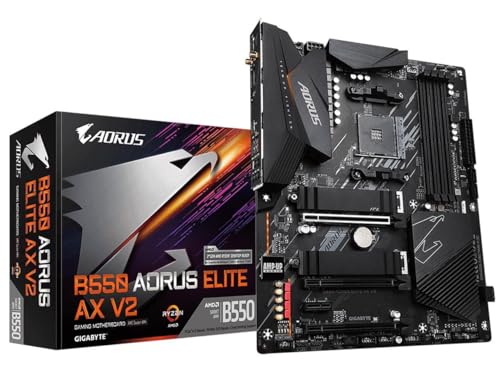
GIGABYTE AORUS Elite ATX Motherboard
Best for: AM4 Ryzen 5000 builds with Wi-Fi 6
- CPU Socket
- AM4
- Form Factor
- ATX
- Memory Type
- DDR4
- PCIe Version
- PCIe 4.0
- M.2 Slots
- 2
- Wi-Fi Standard
- Wi-Fi 6
View on Amazon: GIGABYTE AORUS Elite ATX Motherboard Affiliate link
This ATX motherboard supports AMD Ryzen 3000, 4000, and 5000 series processors via the AM4 socket. It features a 12+2 power phase design for stable power delivery and includes Wi-Fi 6 and 2.5 GbE networking. You get two M.2 slots, one supporting PCIe 4.0, along with DDR4 memory support. The board integrates an I/O shield for easier assembly. It suits users building mid-range AM4 systems with modern connectivity needs.
Pros
- Supports Ryzen 5000, 4000, and 3000 series CPUs
- Digital Twin 12+2 power phase design
- Built-in Wi-Fi 6 and 2.5 GbE Ethernet
- Two M.2 slots with PCIe 4.0 support
Cons
- Limited to DDR4 memory only
- Only one PCIe 4.0 M.2 slot
- No mention of USB 3.2 Gen 2x2 ports
Good fit if
- You are building an AM4 system with a Ryzen 5000 processor
- You need Wi-Fi 6 and 2.5 GbE connectivity
- You want a standard ATX form factor
Skip if
- You require DDR5 memory support
- You need multiple PCIe 4.0 M.2 slots
- You are building a new AM5 platform
Verdict: GIGABYTE B550 AORUS Elite AX ATX is a solid choice for builders using Ryzen 3000 to 5000 series processors who need reliable power delivery and modern wireless connectivity. It fits those prioritizing AM4 compatibility over DDR5 upgrades.
Specifications side by side
| Spec | GIGABYTE AORUS Elite ATX Motherboard |
|---|---|
| CPU Socket | AM4 |
| Form Factor | ATX |
| Memory Type | DDR4 |
| PCIe Version | PCIe 4.0 |
| M.2 Slots | 2 |
| Wi-Fi Standard | Wi-Fi 6 |
| Ethernet Speed | 2.5 GbE |
| Power Phases | 12+2 |
| Chipset | AMD B550 |
| Wi-Fi | Wi-Fi 6 |
| Dimensions | 10.6 × 3.14 × 13.2 inches |
| Size | ATX |
| Model | B550 AORUS ELITE AX V2 |
Frequently asked questions
Does the Gigabyte AORUS Elite support Wi-Fi 6?
Yes, this motherboard includes integrated Wi-Fi 6 connectivity. This standard offers faster wireless speeds and better performance in congested environments compared to older Wi-Fi 5 models. You also get 2.5GbE Ethernet for wired connections, which provides higher throughput than standard Gigabit ports for local network transfers.
What is the maximum memory speed supported on this board?
The board uses DDR4 memory modules. While the exact maximum speed depends on your CPU, the B550 chipset supports PCIe 4.0 for your primary graphics card and storage drives. This ensures your GPU and NVMe SSDs can run at their highest potential bandwidths without bottlenecking from older PCIe standards.
Is this motherboard compatible with Ryzen 5000 series CPUs?
Yes, the AM4 socket supports Ryzen 5000, 4000, and 3000 series processors. This broad compatibility allows you to use newer Zen 3 chips alongside older Zen 2 or Zen+ models. You must ensure your BIOS is updated to fully support the latest Ryzen 5000 processors upon installation.
Does the B550 AORUS Elite AX V2 have an I/O shield?
Yes, the listing notes an integrated I/O shield. This feature simplifies assembly by eliminating the need to install a separate metal plate into your case. It protects the rear ports from dust and reduces electromagnetic interference while saving you time during the initial build process.
What form factor does this motherboard use?
It is an ATX motherboard measuring 10.6 inches in length and 13.2 inches in width. This standard size fits most mid-tower and full-tower cases. The layout is designed to accommodate standard expansion cards and cooling solutions while maintaining compatibility with a wide range of computer chassis.
Can I use PCIe 4.0 graphics cards on this board?
Yes, the AMD B550 chipset supports PCIe 4.0. Your primary graphics card slot will operate at PCIe 4.0 speeds, allowing for higher data transfer rates. This ensures modern GPUs can communicate efficiently with the CPU, reducing latency and improving performance in high-resolution gaming and rendering tasks.