Biostar Motherboards: 11 Picks Ranked by Specs
As an Amazon Associate we earn from qualifying purchases. Links on this page are affiliate links.
You can find the best biostar motherboards for various legacy and specialized builds in this guide. The list covers 11 options ranked by their published specifications. Biostar offers Micro-ATX, ATX, and Mini-ITX boards supporting Intel LGA 1151, AM2+, AM3, and AM5 sockets. The Biostar Intel H310 Micro-ATX Motherboard leads as the top pick for 8th and 9th Gen Intel Core builds due to its compact form factor and essential 1GbE networking.
Quick picks
Our 11 picks

Biostar Intel H310 Micro-ATX Motherboard
Best for: 8th and 9th Gen Intel Core builds
- Chipset
- Intel H310
- Form Factor
- MicroATX
- Ethernet Speed
- Gigabit LAN
- Dimensions
- 0.98 × 8.9 × 6.73 inches
- Weight
- 1.34 pounds
This Biostar Micro-ATX board runs on the Intel H310 chipset and supports 8th and 9th Generation Intel Core processors. It features onboard HDMI and D-Sub video outputs, a 1GbE wired network port, and a compact micro-ATX footprint measuring roughly 8.9 by 6.7 inches. It suits you if you need a standard desktop platform for compatible older Intel CPUs without taking up full ATX case space.
Pros
- Supports 8th and 9th Generation Intel Core processors
- Dual onboard video outputs with HDMI and D-Sub
- 1GbE wired Ethernet connection
- Compact Micro-ATX form factor
Cons
- Socket compatibility limited to 8th and 9th Generation Intel CPUs
- No multi-gigabit wired Ethernet support
Good fit if
- You have an 8th or 9th Generation Intel Core processor to install.
- You need integrated video output options via HDMI or D-Sub.
- You are assembling your build inside a Micro-ATX enclosure.
Skip if
- You plan to build with 10th Generation or newer Intel processors.
- You require 2.5GbE or faster wired networking speeds.
Verdict: Biostar Micro-ATX Intel 8th and 9th Gen Motherboard provides essential display connectivity and 1GbE networking for legacy Intel builds. Its compact Micro-ATX layout fits neatly into standard smaller desktop cases.

Biostar Micro-ATX AM2+ Motherboard
Best for: Legacy AMD Socket AM2+ desktop rebuilds
- CPU Socket
- Socket AM2+/AM2
- Chipset
- NVIDIA GeForce 6150 / nforce430a
- Form Factor
- MATX
- Memory Type
- DDR2
- Dimensions
- 3 × 10 × 13 inches
- Weight
- 1 pounds
This micro-ATX board from Biostar is built around Socket AM2+ and AM2. It supports AMD Phenom II, Phenom, Athlon 64 X2, 64, FX, and Sempron processors with a recommended CPU power limit of 95W. Featuring DDR2 memory support and integrated NVIDIA GeForce 6150 graphics with the nForce 430a chipset, it suits you if you need a compact replacement platform for legacy AMD desktop hardware and basic display output.
Pros
- Supports Socket AM2+ and Socket AM2 processors
- Micro-ATX form factor for smaller chassis installations
- Integrated NVIDIA GeForce 6150 graphics with nForce 430a chipset
- HyperTransport technology up to 2G
Cons
- Recommended for CPUs up to 95W
- Limited to older DDR2 memory architecture
Good fit if
- You need a Micro-ATX board for an AMD Socket AM2 or AM2+ processor.
- You have an AMD processor rated at or below 95W.
- You want integrated NVIDIA GeForce 6150 graphics for basic video output.
Skip if
- You plan to run modern DDR4 or DDR5 system memory.
- You need support for processors drawing more than 95W.
Verdict: Biostar Micro-ATX AM2+ Motherboard provides dedicated compatibility for legacy AMD AM2 and AM2+ CPUs within a compact footprint. Its integrated NVIDIA graphics and 95W CPU ceiling make it a practical choice for maintaining older desktop systems.

Biostar Motherboard
Best for: direct replacement of version 2.0 systems
- Weight
- 3 pounds
This Biostar motherboard provides a standard platform weighing 3 pounds. It arrives as a version 2.0 hardware revision for your desktop build. You will find that the manufacturer lists minimal technical parameters, so you must verify socket, memory, and form factor compatibility independently before choosing it. This board suits you if you need a replacement Biostar unit and already know the exact layout requirements for your specific desktop setup.
Pros
- Manufactured by Biostar
- Hardware revision version 2.0
- Total weight of 3 pounds
Cons
- No CPU socket or chipset specifications provided
- No RAM type or memory capacity listed
- No expansion slot details specified
Good fit if
- You need a version 2.0 Biostar replacement motherboard.
- You can work with a 3-pound board format.
Skip if
- You require published chipset or CPU socket details.
- You need confirmed DDR memory specifications before purchasing.
Verdict: Biostar Motherboard Version 2.0 is a 3-pound desktop board designated as revision 2.0. It requires you to confirm processor and memory compatibility independently due to unlisted slot specifications.

Biostar LGA 1151 DDR4 ATX Motherboard
Best for: ATX Intel Core LGA 1151 builds
- CPU Socket
- LGA1151
- Chipset
- B250
- Form Factor
- ATX
- Memory Type
- DDR4
- Series
- Core i7
- Dimensions
- 13.2 × 10.2 × 2.5 inches
This Biostar motherboard is built on the ATX form factor and features the LGA 1151 CPU socket. It supports Intel Core i7, Core i5, and Core i3 processors alongside DDR4 system memory. You get SATA connectivity, PCI Express expansion, and USB support for standard hardware setups. It suits you if you are building an LGA 1151 desktop that requires full-size ATX spacing and DDR4 compatibility.
Pros
- Standard ATX form factor
- Supports LGA 1151 Intel Core i7, i5, and i3 processors
- DDR4 memory support
- Integrated PCI Express, SATA, and USB connectivity
Cons
- Full ATX footprint will not fit smaller cases
- Socket LGA 1151 does not support newer processor sockets
Good fit if
- You plan to install an Intel Core i7, i5, or i3 CPU on an LGA 1151 socket.
- You need a full-size ATX board running DDR4 memory.
Skip if
- You require a smaller micro-ATX or mini-ITX layout.
- You plan to use a newer CPU socket platform.
Verdict: Biostar LGA 1151 DDR4 ATX Motherboard delivers standard ATX expandability for compatible Intel Core processors. It provides essential DDR4 memory, PCI Express, and SATA connectivity for your build.

Biostar B250 LGA 1151 ATX Motherboard
Best for: 12-GPU multi-card ATX builds
- CPU Socket
- LGA1151
- Chipset
- Intel B250
- Form Factor
- ATX
- Memory Type
- DDR4
- Series
- Core i7
- Dimensions
- 8.27 × 1.57 × 11.6 inches
This Biostar ATX LGA 1151 DDR4 Motherboard provides an Intel B250 chipset foundation designed for multi-card setups. You get an LGA 1151 CPU socket supporting Intel Core i7, i5, and i3 processors, paired with DDR4 memory support. The board features an ATX form factor measuring 11.61 inches high by 8.27 inches long, and it offers support for up to 12 GPUs alongside SATA, USB, and PCI Express connectivity for specialized hardware builds.
Pros
- Supports up to 12 GPUs for multi-card configurations
- LGA 1151 socket supports Intel Core i7, i5, and i3 processors
- Uses DDR4 memory architecture
- ATX form factor with PCI Express, SATA, and USB connectivity
Cons
- Limited to LGA 1151 socket processors
- Does not support DDR5 memory modules
Good fit if
- You need a dedicated platform that supports up to 12 GPUs simultaneously.
- You plan to assemble a system using an LGA 1151 Intel processor and DDR4 memory.
Skip if
- You need support for newer processor socket standards beyond LGA 1151.
- You require DDR5 system memory compatibility.
Verdict: Biostar ATX LGA 1151 DDR4 Motherboard delivers a 12-GPU capable platform built on the Intel B250 chipset for high-density PCI Express expansion. It provides standard ATX dimensions and DDR4 memory compatibility for dedicated multi-card systems.

Biostar Mini ITX Integrated AMD DDR3 Motherboard
Best for: compact builds using legacy DDR3 memory
- Form Factor
- mITX
- Memory Type
- DDR3
- Dimensions
- 6.69 × 6.69 × 4.09 inches
- Weight
- 1.15 pounds
View on Amazon: Biostar Mini ITX Integrated AMD DDR3 Motherboard
This Biostar motherboard provides an integrated AMD configuration built into a compact Mini-ITX form factor measuring 6.69 by 6.69 inches. It utilizes DDR3 memory and offers a total weight of approximately 1.15 pounds. You get an all-in-one board and processor design suited for space-constrained desktop enclosures. It fits your needs if you require a small footprint for basic computing tasks without installing a separate discrete processor.
Pros
- Compact Mini-ITX footprint measuring 6.69 by 6.69 inches
- Integrated AMD processor
- Lightweight build at approximately 1.15 pounds
- DDR3 memory support
Cons
- Limited to older DDR3 memory standard
- Integrated processor prevents standalone CPU upgrades
Good fit if
- You need a compact Mini-ITX board for small enclosures.
- You have DDR3 memory modules ready to use.
- You prefer an integrated AMD processor rather than purchasing a separate CPU.
Skip if
- You require DDR4 or DDR5 system memory.
- You plan to install or upgrade a discrete desktop processor.
Verdict: Biostar Integrated AMD Mini-ITX DDR3 Motherboard delivers an all-in-one computing platform inside a compact 6.69-inch square footprint. It suits space-constrained configurations that specifically utilize legacy DDR3 memory.

Biostar LGA 1151 8 GPU Server Board
Best for: High-density multi-GPU server deployments
- CPU Socket
- LGA1151
- Chipset
- Intel 300 Series
- Memory Type
- DDR4
- Use Case
- Server
- Dimensions
- 20 × 10 × 2 inches
This Biostar server motherboard pairs an LGA 1151 socket with an Intel 300 series chipset. It supports Intel 8th and 9th Gen processors alongside SODIMM DDR4 memory. With dimensions of 20 by 10 inches, the board provides dedicated support for up to 8 GPUs. You get a specialized layout built for multi-GPU density if you operate dedicated compute or GPU server hardware.
Pros
- Supports up to 8 GPUs
- Intel 300 series chipset compatibility
- Socket LGA 1151 supports 8th and 9th Gen Intel CPUs
- Uses compact SODIMM DDR4 memory
Cons
- Large 20-inch by 10-inch footprint requires specialized chassis
- Requires laptop-style SODIMM RAM instead of standard desktop DIMMs
Good fit if
- You need high-density support for up to 8 GPUs.
- You run an Intel 8th or 9th Gen LGA 1151 processor.
- You have an enclosure built for a 20-inch long server board.
Skip if
- You plan to reuse standard desktop DDR4 memory sticks.
- You build inside standard ATX computer cases.
Verdict: Biostar LGA 1151 8-GPU Server Motherboard delivers multi-GPU capacity on Intel 300 series architecture. Its 20-inch frame fits specialized server and compute builds.

Biostar TB360-BTC Pro ATX Motherboard
Best for: ATX builds using LGA 1151 Intel processors
- CPU Socket
- LGA 1151
- Chipset
- Intel B360
- Form Factor
- ATX
- Dimensions
- 1.1 × 9.7 × 6.5 inches
- Weight
- 2.2 pounds
The Biostar TB360-BTC Pro is an ATX motherboard designed around the Intel B360 chipset and the LGA 1151 (Socket H4) CPU interface. Measuring 9.7 by 6.5 inches, this board provides a standard ATX layout suited for full-sized cases. If you want a dedicated platform for an LGA 1151 processor with standard physical dimensions, this model gives you the core Intel B360 architecture needed for your system setup.
Pros
- Intel B360 chipset support
- LGA 1151 (Socket H4) processor socket
- Standard ATX form factor
Cons
- LGA 1151 socket limits processor compatibility to specific Intel generations
- No built-in wireless networking or Bluetooth listed in specifications
Good fit if
- You need an ATX motherboard built around the Intel B360 chipset.
- You are installing a processor compatible with the LGA 1151 socket.
Skip if
- You need a compact micro-ATX or Mini-ITX build instead of full ATX.
- You plan to run a processor requiring a socket other than LGA 1151.
Verdict: Biostar TB360-BTC Pro ATX Motherboard delivers Intel B360 chipset support and an LGA 1151 socket in a standard full-size footprint. It serves as a straightforward choice if you are assembling an ATX configuration with compatible Intel hardware.

Biostar AM5 DDR5 Motherboard
Best for: AMD Ryzen 7000 builds with DDR5
- CPU Socket
- AM5
- Form Factor
- M-ATX
- Memory Type
- DDR5
- Dimensions
- 3.94 × 1.97 × 0.5 inches
- Weight
- 1.1 pounds
This Biostar motherboard features an AM5 socket built for AMD Ryzen 7000 series processors. You get two DDR5 memory slots supporting up to 96GB of total system RAM, alongside HDMI 4K display output compatibility. It fits your build if you need modern AM5 socket support and DDR5 performance in a standard black finish without legacy hardware constraints.
Pros
- Supports AMD Ryzen 7000 series processors on socket AM5
- Provides two DDR5 slots supporting up to 96GB capacity
- Includes HDMI 4K display support
Cons
- Limited to two memory slots
- Restricted to a maximum of 96GB RAM
Good fit if
- You plan to use an AMD Ryzen 7000 series processor
- You require DDR5 system memory up to 96GB
- You need 4K output through HDMI
Skip if
- You require four memory slots for expansion
- You need more than 96GB of total memory
- You use an older socket rather than AM5
Verdict: Biostar AM5 DDR5 Motherboard provides essential AMD Ryzen 7000 support paired with DDR5 compatibility up to 96GB. It gives you straightforward current-generation capability with 4K HDMI support.

Biostar Micro-ATX AM3 Motherboard
Best for: Legacy AMD Socket AM3 desktop builds
- CPU Socket
- Socket AM3
- Chipset
- nVidia MCP68S
- Form Factor
- Micro ATX
- Memory Type
- DDR3
- Dimensions
- 9.6 × 7.5 × 2 inches
This micro-ATX board features an AMD Socket AM3 setup powered by the nVidia MCP68S chipset. You get two dual-channel DDR3 slots supporting up to 8GB of memory and four SATA2 ports with RAID support. It accommodates 95W processors including Phenom II and Athlon II chips. This option suits you if you maintain or rebuild an older AMD desktop that requires legacy PCI expansion alongside a dedicated PCI-Express x16 graphics card slot.
Pros
- Supports Socket AM3 processors up to 95W TDP
- Includes 4 SATA2 connectors with RAID 0, 1, 5, and 10
- Features 1 PCI-Express x16 slot and 2 legacy PCI slots
- Provides 6 USB 2.0 ports across rear panel and internal headers
Cons
- Maximum memory capacity caps at 8GB across 2 slots
- Lacks USB 3.0 connectivity, providing only USB 2.0
- Integrated video output limited to a single VGA port
Good fit if
- You run an AMD Phenom II, Athlon II, or Sempron CPU up to 95W.
- You use legacy PCI add-in cards alongside a PCIe x16 graphics card.
- You need SATA2 storage arrays with RAID 0, 1, 5, or 10 support.
Skip if
- You need more than 8GB of total system RAM.
- You require digital display outputs such as HDMI or DVI.
- You want modern USB 3.0 or SATA3 transfer speeds.
Verdict: Biostar Socket AM3 Micro-ATX Motherboard provides a solid foundation for legacy AMD builds with dedicated PCI slots and RAID-ready SATA2 ports. It delivers essential connectivity for 95W AM3 CPUs without modern interfaces like USB 3.0 or digital display outputs.
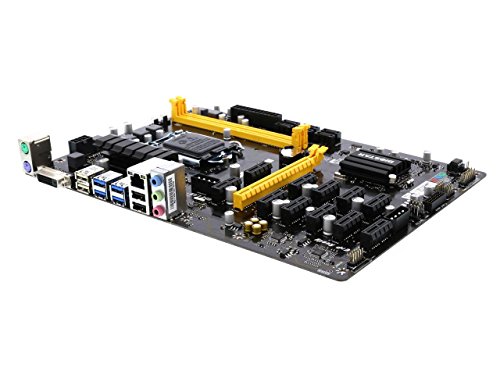
Biostar LGA 1151 Multi-GPU Motherboard
Best for: 12-card mixed AMD and NVIDIA mining rigs
- CPU Socket
- LGA1151
- Chipset
- Intel B250
- Memory Type
- DDR4
- Series
- Core i7
- Dimensions
- 13.1 × 10 × 2.5 inches
- Weight
- 1 pounds
This Biostar motherboard features an LGA 1151 socket paired with the Intel B250 chipset. It supports 12 total graphics cards, allowing configurations with six AMD and six NVIDIA cards simultaneously. You get DDR4 memory support across speeds of 1866, 2133, and 2400. It suits you if you need a dedicated platform to run multiple graphics cards across mixed GPU hardware using Intel Core, Pentium, or Celeron processors.
Pros
- Supports up to 12 GPUs using 6 AMD and 6 NVIDIA cards
- Compatible with Intel Core i7, i5, i3, Pentium, and Celeron LGA 1151 CPUs
- Supports DDR4 memory at 2400, 2133, and 1866 speeds
Cons
- Requires manual BIOS configuration changes to recognize 12 GPUs
- Windows limits configurations to at most 8 cards from AMD or NVIDIA
Good fit if
- You plan to run a 12-card rig split between AMD and NVIDIA GPUs.
- You use an Intel LGA 1151 Core, Pentium, or Celeron processor with DDR4 RAM.
Skip if
- You need to run more than 8 GPUs from a single brand under Windows.
- You want a plug-and-play 12-GPU setup without modifying BIOS settings.
Verdict: Biostar LGA 1151 12-GPU Motherboard delivers dedicated multi-card support for mixed AMD and NVIDIA rigs using LGA 1151 processors. It requires specific BIOS adjustments to enable its full 12-GPU capacity.
Specifications side by side
| Spec | Biostar Intel H310 Micro-ATX Motherboard | Biostar Micro-ATX AM2+ Motherboard | Biostar Motherboard | Biostar LGA 1151 DDR4 ATX Motherboard | Biostar B250 LGA 1151 ATX Motherboard | Biostar Mini ITX Integrated AMD DDR3 Motherboard | Biostar LGA 1151 8 GPU Server Board | Biostar TB360-BTC Pro ATX Motherboard | Biostar AM5 DDR5 Motherboard | Biostar Micro-ATX AM3 Motherboard | Biostar LGA 1151 Multi-GPU Motherboard |
|---|---|---|---|---|---|---|---|---|---|---|---|
| CPU Socket | not specified | Socket AM2+/AM2 | not specified | LGA1151 | LGA1151 | not specified | LGA1151 | LGA 1151 | AM5 | Socket AM3 | LGA1151 |
| Chipset | Intel H310 | NVIDIA GeForce 6150 / nforce430a | not specified | B250 | Intel B250 | not specified | Intel 300 Series | Intel B360 | not specified | nVidia MCP68S | Intel B250 |
| Form Factor | MicroATX | MATX | not specified | ATX | ATX | mITX | not specified | ATX | M-ATX | Micro ATX | not specified |
| Memory Type | not specified | DDR2 | not specified | DDR4 | DDR4 | DDR3 | DDR4 | not specified | DDR5 | DDR3 | DDR4 |
| Ethernet Speed | Gigabit LAN | not specified | not specified | not specified | not specified | not specified | not specified | not specified | not specified | not specified | not specified |
| Use Case | not specified | not specified | not specified | not specified | not specified | not specified | Server | not specified | not specified | not specified | not specified |
| Series | not specified | not specified | not specified | Core i7 | Core i7 | not specified | not specified | not specified | not specified | not specified | Core i7 |
| Dimensions | 0.98 × 8.9 × 6.73 inches | 3 × 10 × 13 inches | not specified | 13.2 × 10.2 × 2.5 inches | 8.27 × 1.57 × 11.6 inches | 6.69 × 6.69 × 4.09 inches | 20 × 10 × 2 inches | 1.1 × 9.7 × 6.5 inches | 3.94 × 1.97 × 0.5 inches | 9.6 × 7.5 × 2 inches | 13.1 × 10 × 2.5 inches |
| Weight | 1.34 pounds | 1 pounds | 3 pounds | 1.98 pounds | not specified | 1.15 pounds | not specified | 2.2 pounds | 1.1 pounds | not specified | 1 pounds |
| Model | H310MHP 3.0 | MCP6PB M2+ | not specified | FBA_TB250-BTC | TB250-BTC Pro | A68N-2100K | TB360-BTC D+ | IB36AAHS | B650MT | N68S3+ | TB250-BTC PRO |
| Color | not specified | not specified | not specified | not specified | not specified | not specified | not specified | not specified | black / black | not specified | not specified |
Biostar Motherboard Picks Ranked
The lineup spans diverse sockets and form factors. The Biostar Intel H310 Micro-ATX Motherboard suits 8th and 9th Gen Intel Core builds with 1GbE networking. For AMD users, the Biostar Micro-ATX AM2+ Motherboard supports legacy AM2 and AM2+ CPUs. The Biostar AM5 DDR5 Motherboard offers current-generation Ryzen 7000 support with DDR5 memory up to 96GB. You can choose based on socket compatibility and memory generation. Some boards prioritize compact Mini-ITX footprints for small cases. Others focus on multi-GPU expansion for mining or rendering tasks. The Biostar LGA 1151 DDR4 ATX Motherboard provides standard ATX expandability for older Intel Core processors. Select the group that matches your specific processor and case size requirements.
Where Biostar fits in your build
Biostar covers a wide spectrum of form factors, from compact Mini-ITX and Micro-ATX boards to full-size ATX and specialized server frames. You can find options for legacy AMD AM2+ and AM3 systems alongside Intel LGA 1151 platforms. The range also includes modern AM5 support with DDR5 memory. However, the list lacks high-end enthusiast boards with extensive VRM cooling or advanced networking like 10GbE. Most models prioritize basic connectivity and specific use cases like multi-GPU mining rather than premium aesthetics or extensive I/O expansion.
While selecting a motherboard, you can also evaluate data for the best mechanical keyboards with clicky switch.
How to choose the right Biostar motherboard
-
Match your CPU socket
Your processor determines the required socket. The Biostar AM5 DDR5 Motherboard supports AMD Ryzen 7000 series, while older builds need LGA 1151 or AM3. Check the listed CPU socket specification carefully. Mismatched sockets prevent installation entirely. You must verify the exact socket type before purchasing. The data lists specific sockets for each board. Do not assume backward compatibility across generations. Select the board that matches your existing or planned processor to ensure physical and electrical compatibility.
-
Check the form factor
The motherboard size must fit your case. Biostar offers Micro-ATX, ATX, and Mini-ITX options. The Biostar Intel H310 Micro-ATX Motherboard measures 8.9 by 6.73 inches. The standard ATX Biostar B250 LGA 1151 Motherboard is larger. Measure your case interior dimensions before buying. A larger board will not fit a smaller case. A smaller board fits larger cases but offers fewer expansion slots. Verify the width and height specifications listed in the data. This ensures your chassis can physically accommodate the selected board.
-
Select the correct memory type
DDR3 and DDR5 are not interchangeable. You must choose a board with the memory type your RAM uses. The Biostar Mini ITX Integrated AMD DDR3 Motherboard requires legacy DDR3 modules. The Biostar AM5 DDR5 Motherboard supports modern DDR5. Check the memory type attribute for each product. Installing the wrong RAM type will prevent the system from booting. Verify the maximum supported capacity as well. The AM5 board supports up to 96GB. Matching the memory generation is critical for functionality.
-
Identify your use case
Different boards serve different purposes. The Biostar LGA 1151 8 GPU Server Motherboard is built for high-density compute tasks. The Biostar Intel H310 Micro-ATX Motherboard is better for standard legacy desktops. The Biostar B250 LGA 1151 ATX Motherboard supports 12-GPU setups. Review the use case and badge descriptions. Mining or server needs require specific expansion capabilities. Standard desktop use needs basic connectivity. Align the board’s design with your intended workload to avoid overpaying for unused features or lacking necessary ones.
-
Verify legacy compatibility
Older systems require specific legacy support. The Biostar Micro-ATX AM2+ Motherboard supports legacy AMD AM2 and AM2+ CPUs. The Biostar Micro-ATX AM3 Motherboard is for AM3 processors. These boards lack modern interfaces like USB 3.0 or digital display outputs. If you are rebuilding an older system, check the socket and chipset details. Newer boards will not work with these legacy CPUs. Ensure the board includes the necessary PCI slots or SATA ports for your existing peripherals. Legacy compatibility is strictly defined by the socket and chipset.
Frequently asked questions
Which Biostar motherboard is best for modern AMD Ryzen 7000 processors?
The Biostar AM5 DDR5 Motherboard is the top choice for these builds. It features an AM5 socket and supports DDR5 memory up to 96GB. This board also includes 4K HDMI output, making it suitable for current-generation desktops that require high-speed memory and modern connectivity.
What is the best Biostar option for legacy Intel 8th and 9th Gen CPUs?
The Biostar Intel H310 Micro-ATX Motherboard is ranked as the best overall for these processors. It uses the H310 chipset and includes 1GbE networking for reliable wired connectivity. Its compact Micro-ATX form factor allows it to fit into standard smaller desktop cases easily.
Which Biostar board supports the most graphics cards for mining or compute?
The Biostar LGA 1151 12-GPU Motherboard supports up to twelve graphics cards. It is designed for mixed AMD and NVIDIA rigs and requires specific BIOS adjustments to enable full capacity. This board is ideal for high-density multi-GPU setups rather than standard gaming PCs.
Does Biostar offer a Mini-ITX board for small form factor builds?
Yes, the Biostar Mini ITX Integrated AMD DDR3 Motherboard is available for compact builds. It measures 6.69 inches square and supports legacy DDR3 memory. This integrated platform is well-suited for space-constrained configurations that need a small footprint without sacrificing basic computing capabilities.
Can I find a Biostar motherboard for older AMD AM2+ processors?
The Biostar Micro-ATX AM2+ Motherboard is designed for legacy AMD AM2 and AM2+ CPUs. It provides a dedicated platform for maintaining older desktop systems. The board includes integrated NVIDIA graphics and supports CPUs with a 95W thermal design power ceiling.
What is the best Biostar motherboard for 12-GPU multi-card ATX builds?
The Biostar B250 LGA 1151 ATX Motherboard is built for 12-GPU capable platforms. It uses the Intel B250 chipset to provide high-density PCI Express expansion. This board delivers standard ATX dimensions and DDR4 memory compatibility, making it a practical choice for dedicated multi-card systems.
Which Biostar board supports AMD Ryzen 7000 with DDR5 memory?
The Biostar AM5 DDR5 Motherboard supports AMD Ryzen 7000 series processors. It is compatible with DDR5 memory up to 96GB and features an ATX form factor. This board provides straightforward current-generation capability with essential connectivity options for modern desktop builds.
Is there a Biostar server motherboard for high-density deployments?
The Biostar LGA 1151 8 GPU Server Motherboard is designed for specialized server builds. It delivers multi-GPU capacity on Intel 300 series architecture. Its 20-inch frame fits into specialized server and compute builds that require significant expansion capabilities for professional workloads.