LGA 1700 vs LGA 1200 Processors: Which Should You Buy?
As an Amazon Associate we earn from qualifying purchases. Links on this page are affiliate links.
You are comparing an LGA 1700 vs LGA 1200 processor to find the right platform for your build. Both options are Intel Core i5 desktop chips designed for standard home and office computing tasks. The main difference lies in their architecture and performance capabilities. The newer LGA 1700 socket supports more cores and higher speeds, while the LGA 1200 option offers a lower power draw. Choosing between them depends on whether you prioritize raw speed or energy efficiency.
Key differences
| Aspect | Intel Core i5 10-Core Desktop Processor | Intel Core i5-10500 6-Core Processor |
|---|---|---|
| CPU Socket | LGA 1700 | LGA 1200 |
| Core Count | 10 (6P+4E) Cores | 6 cores |
| Max Boost Clock | 4.9 GHz | 4.5 GHz |
| Base Power / TDP | 125W | 65W |
Which one should you choose?
Choose Intel Core i5 10-Core Desktop Processor if
- You need higher multi-threaded performance for demanding workloads.
- You want the fastest single-core boost speeds available.
- You are building a new system with modern 600-series chipsets.
Choose Intel Core i5-10500 6-Core Processor if
- You prioritize lower power consumption and heat output.
- You are upgrading an existing system with LGA 1200 compatibility.
- You need a standard 6-core processor for general daily tasks.
Verdict: The LGA 1700 processor is the better choice if you need maximum performance and core count for multitasking. The LGA 1200 processor is suitable if you require lower power usage and sufficient power for standard applications. Your decision should hinge on whether you value speed or efficiency more.
LGA 1700 vs LGA 1200 Specs
cpu socket
The Intel Core i5-12600K uses the LGA 1700 socket, while the Intel Core i5-10500 relies on the older LGA 1200 socket. This difference dictates which motherboards you can use. LGA 1700 supports newer 600-series chipsets, offering more modern connectivity options. LGA 1200 pairs with 400-series chipsets, which are now mature and widely available. You must choose a motherboard compatible with your chosen socket. This is a fundamental hardware requirement that cannot be changed later. The socket type determines your entire platform upgrade path for the near future.
core count
The Intel Core i5-12600K features 10 cores, specifically six performance cores and four efficiency cores. This hybrid architecture helps handle multitasking and modern workloads more effectively. The Intel Core i5-10500 has 6 standard cores. For general computing, both processors are sufficient. However, the higher core count on the 12600K provides more headroom for demanding applications. You will notice a difference in how smoothly the system handles multiple heavy tasks simultaneously. The additional cores allow for better background processing without slowing down your main activities.
max boost clock
Speed matters for single-threaded tasks like gaming or web browsing. The Intel Core i5-12600K reaches a maximum boost clock of 4.9 GHz. The Intel Core i5-10500 tops out at 4.5 GHz. The 12600K is faster in burst scenarios. This higher frequency helps when you need quick responses from the CPU. The difference is measurable in application load times and frame rates. If you prioritize raw speed for specific tasks, the higher clock speed on the newer chip provides a clear advantage. The 10500 is still capable, but it operates at a lower peak frequency.
base power
Power efficiency affects your electricity bill and cooling needs. The Intel Core i5-10500 has a base power rating of 65W. The Intel Core i5-12600K requires 125W. The 10500 is significantly more power-efficient. It generates less heat and uses less energy under load. This makes it easier to cool and quieter. The 12600K demands more power, which may require a more robust power supply and cooler. If you build a compact or quiet PC, the lower power draw of the 10500 is a practical benefit for daily operation.
compatibility
Platform compatibility determines your future upgrade options. The LGA 1700 socket is part of Intel’s newer generation. It supports the latest memory standards and PCIe versions. The LGA 1200 socket is from an older generation. It supports older technologies that are still functional but less efficient. The 12600K on LGA 1700 offers a longer lifespan for upgrades. You can move to newer CPUs without changing the motherboard. The 10500 on LGA 1200 limits you to older platform features. For a new build, the newer socket provides better long-term value and flexibility.
Which processor fits your needs?
Users needing high single-thread speed
The Intel Core i5-12600K reaches a max boost clock of 4.9 GHz. This higher frequency benefits tasks that rely on single-core performance. Its 10 cores, including 6 performance and 4 efficient cores, handle complex workloads efficiently. You get a modern LGA 1700 platform for future upgrades.
Budget builders prioritizing low power
The Intel Core i5-10500 has a 65W TDP. This lower power draw reduces heat and cooling requirements. It features 6 cores and a 4.5 GHz boost clock. This setup suits standard office tasks and light media consumption. The LGA 1200 socket works with older 400-series chipsets.
Those wanting modern platform features
The i5-12600K uses the LGA 1700 socket with 600-series chipset support. This ensures access to newer connectivity standards and memory options. Its unlocked nature allows for overclocking. You gain a more robust foundation for a current-generation desktop build compared to the older LGA 1200 architecture.
Quick picks
| # | Product | Best for | Price |
|---|---|---|---|
| 1 | Intel Core i5 10-Core Desktop Processor | New LGA 1700 builds needing unlocked performance | Check price of Intel Core i5 10-Core Desktop Processor on Amazon |
| 2 | Intel Core i5-10500 6-Core Processor | Budget LGA 1200 builds | Check price of Intel Core i5-10500 6-Core Processor on Amazon |
The products compared
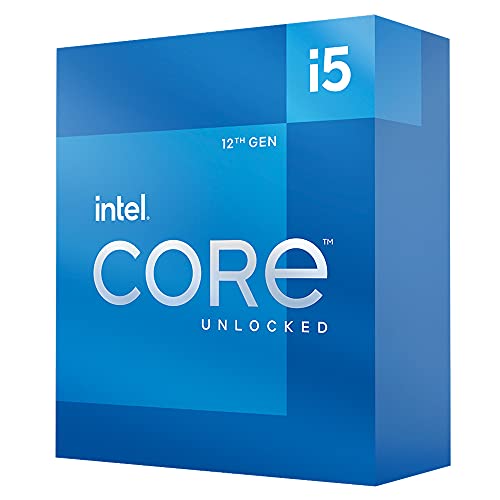
Intel Core i5 10-Core Desktop Processor
Best for: New LGA 1700 builds needing unlocked performance
- CPU Socket
- LGA 1700 (what this guide is about)
- Core Count
- 10 (6P+4E) Cores
- Max Boost Clock
- 4.9 GHz
- Base Power
- 125W
- Series
- Core i5
- Dimensions
- 4.57 × 1.73 × 3.98 inches
View on Amazon: Intel Core i5 10-Core Desktop Processor Affiliate link
The Intel Core i5-12600K uses the LGA 1700 socket, making it compatible with 600 series motherboards. It features 10 cores, combining 6 performance and 4 efficiency cores, and reaches a max boost clock of 4.9 GHz. This processor draws 125W of base power. It suits users who need a unlocked CPU for overclocking on modern platforms.
Pros
- LGA 1700 socket for modern motherboard compatibility
- 10 cores (6P+4E) for strong multitasking
- Max boost clock up to 4.9 GHz
- Unlocked for overclocking potential
Cons
- Higher 125W base power draw than older 65W parts
- Requires LGA 1700 motherboard, not LGA 1200
- Larger physical dimensions than some compact builds
Good fit if
- You are building on a new LGA 1700 platform
- You want unlocked performance for overclocking
- You need high single-thread speeds up to 4.9 GHz
Skip if
- You already have an LGA 1200 motherboard
- You need a lower power draw than 125W
- You prefer a locked non-K processor
Verdict: Intel Core i5-12600K LGA 1700 is a high-performance unlocked processor for new LGA 1700 builds. It fits users who want to push 4.9 GHz speeds and need 10 cores for heavy workloads.
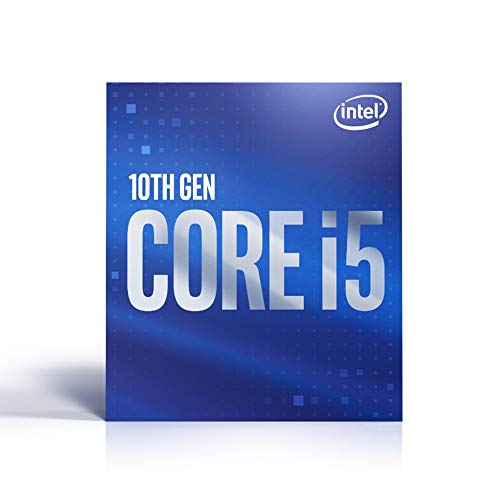
Intel Core i5-10500 6-Core Processor
Best for: Budget LGA 1200 builds
- CPU Socket
- LGA 1200 (what this guide is about)
- Core Count
- 6 cores
- Max Boost Clock
- 4.5 GHz
- Base Power
- 65W
- Series
- Core i5
- Dimensions
- 4.7 × 3.9 × 2.8 inches
View on Amazon: Intel Core i5-10500 6-Core Processor Affiliate link
This Intel Core i5-10500 processor uses the LGA 1200 socket and features six cores. It reaches a maximum boost clock of 4.5 GHz with a 65W thermal design power. It suits users who need reliable performance for everyday computing tasks without requiring the latest socket generation. The build is compact and efficient for standard desktop configurations.
Pros
- LGA 1200 socket compatibility
- 65W TDP for efficient power use
- Up to 4.5 GHz max boost clock
- Six physical cores for multitasking
Cons
- Lower max boost clock than newer 12th Gen models
- Older LGA 1200 socket limits future upgrade paths
- Fewer cores than modern i5 options
Good fit if
- You are building on an existing LGA 1200 motherboard
- You need a budget-friendly 6-core processor
- You prioritize power efficiency over peak speed
Skip if
- You want the latest LGA 1700 platform
- You need higher single-thread performance
- You plan to upgrade to a newer CPU soon
Verdict: Intel Core i5-10500 LGA 1200 is a solid choice for budget builders sticking with the older socket. It offers steady performance for general use but lacks the speed of newer generations.
Specifications side by side
| Spec | Intel Core i5 10-Core Desktop Processor | Intel Core i5-10500 6-Core Processor |
|---|---|---|
| Core Count | 10 (6P+4E) Cores | 6 cores |
| CPU Socket | LGA1700 | LGA1200 |
| Max Boost Clock | 4.9 GHz | 4.5 GHz |
| Base Power | 125W | 65W |
| Series | Core i5 | Core i5 |
| TDP | 125W | 65W |
| Dimensions | 4.57 × 1.73 × 3.98 inches | 4.7 × 3.9 × 2.8 inches |
| Weight | 1.41 ounces | 4.8 ounces |
| Model | i5-12600K | SRH3A |
Frequently asked questions
Is LGA 1700 better than LGA 1200 for new builds?
Yes, LGA 1700 is the superior choice for new builds. The Intel Core i5-12600K uses this socket and offers unlocked performance for pushing speeds up to 4.9 GHz. Its 10 cores handle heavy workloads more effectively than the older platform. This makes it ideal for users who want modern architecture and higher throughput for demanding tasks.
Can I use LGA 1200 processors on LGA 1700 motherboards?
No, you cannot mix these sockets. The Intel Core i5-10500 uses the LGA 1200 socket, which is physically and electrically incompatible with LGA 1700 motherboards. You must choose a motherboard that matches the specific socket type of your processor. LGA 1700 requires 600-series chipsets, while LGA 1200 uses older 400-series or 500-series boards.
Which processor has more cores for multitasking?
The Intel Core i5-12600K on LGA 1700 has more cores. It features 10 cores, including 6 performance and 4 efficient cores, designed for complex workloads. In contrast, the Intel Core i5-10500 on LGA 1200 provides only 6 cores. The higher core count on the newer chip allows for better parallel processing in heavy applications.
Is LGA 1200 still good for budget builds?
Yes, LGA 1200 remains a solid option for budget builders. The Intel Core i5-10500 offers steady performance for general use and standard office tasks. While it lacks the speed of newer generations, it fits users who want to stick with the older socket without investing in a new platform. It provides reliable everyday computing at a lower entry point.
What is the TDP difference between these processors?
There is a significant difference in thermal design power. The Intel Core i5-12600K has a TDP of 125W, reflecting its higher performance and power consumption. The Intel Core i5-10500 has a lower TDP of 65W. This means the LGA 1700 chip may require more robust cooling solutions compared to the more efficient LGA 1200 option.
Which CPU supports higher boost clocks?
The Intel Core i5-12600K supports higher boost clocks. It can reach speeds up to 4.9 GHz, benefiting tasks that rely on single-core performance. The Intel Core i5-10500 does not offer the same level of frequency headroom. If your workloads depend on fast single-threaded operations, the newer LGA 1700 processor provides a clear advantage in raw speed.