LGA 1700 vs LGA 1151 Processors: Which Should You Buy?
As an Amazon Associate we earn from qualifying purchases. Links on this page are affiliate links.
When you compare an LGA 1700 vs LGA 1151 processor, you are looking at two distinct Intel generations. Both options support unlocked cores for overclocking and fit into desktop builds. The main difference lies in the socket compatibility and performance architecture. The LGA 1700 platform uses a newer chipset and core design, while LGA 1151 relies on older 300-series boards. You must choose the socket that matches your motherboard to ensure the CPU fits properly.
Key differences
| Aspect | Intel Core i5 10-Core Desktop Processor | Intel Core i9-9900K 8-Core Processor |
|---|---|---|
| CPU Socket | LGA 1700 | LGA 1151 |
| Core Count | 10 (6P+4E) | 8 Cores |
| Max Boost Clock | 4.9 GHz | 5.00 GHz |
| Base Power (TDP) | 125W | 95W |
| Chipset Compatibility | 600 Series | 300 Series |
Which one should you choose?
Choose Intel Core i5 10-Core Desktop Processor if
- You want a newer platform with more cores for modern multitasking.
- You are building a new system with a 600-series motherboard.
- You need higher sustained power delivery for heavy workloads.
Choose Intel Core i9-9900K 8-Core Processor if
- You already own a 300-series motherboard and want to upgrade.
- You prefer a lower base power consumption at stock settings.
- You need a CPU that supports Intel Optane Memory.
Verdict: The LGA 1700 option offers more cores and fits the modern 600-series ecosystem, making it better for new builds. The LGA 1151 processor is a viable upgrade path only if you already have compatible 300-series hardware. Choose based on your existing motherboard socket.
Socket and Core Specs Compared
CPU Socket
The most fundamental difference between these two processors is the physical socket required for installation. Product A uses the LGA 1700 socket, which is part of Intel's 600 series chipset generation. This newer platform supports modern connectivity standards and memory types. Product B relies on the older LGA 1151 socket, compatible only with 300 series motherboards. If you are building a new system or upgrading from an older platform, the socket type dictates your motherboard choice. You cannot mix these processors with incompatible boards. The LGA 1700 offers a more future-proof path for current builds, while LGA 1151 is limited to legacy support.
Core Count
Performance potential often starts with core count. Product A features a 10-core design, specifically structured as 6 Performance cores and 4 Efficient cores. This hybrid architecture allows the processor to handle multiple tasks efficiently by distributing workloads. Product B provides 8 physical cores with 16 threads. While 8 cores are sufficient for many gaming and productivity tasks, the 10-core configuration in Product A offers more parallel processing capability. For heavy multitasking or rendering, the additional cores in the LGA 1700 processor provide a tangible advantage in throughput.
Boost Clock
Maximum speed varies slightly between these two models. Product B achieves a higher maximum boost clock of 5.00 GHz. This single-threaded speed can benefit applications that rely heavily on individual core performance, such as certain older games or legacy software. Product A reaches a slightly lower maximum boost of 4.9 GHz. However, the difference is minimal in most real-world scenarios. The higher clock speed on the older chip does not necessarily translate to better overall performance when the newer chip has more cores and a more advanced architecture.
Power Consumption
Thermal design power (TDP) indicates the heat output and energy usage. Product A has a base power of 125W, reflecting the demands of its newer 10-core hybrid architecture. Product B operates at a lower base power of 95W. This makes the older 8-core processor more energy-efficient and easier to cool with standard air coolers. If you are concerned about electricity costs or building a compact system with limited cooling capacity, the lower TDP of Product B is a practical advantage. You will need a robust cooling solution for the higher-wattage LGA 1700 chip.
Integrated Graphics
Both processors include integrated graphics, allowing you to use your PC without a discrete GPU. Product B explicitly lists Intel UHD Graphics 630 as its integrated solution. This provides basic display output for office work and media consumption. Product A also includes integrated graphics, though the specific model name is not detailed in the provided data. For basic display needs, both options function adequately. However, neither is designed for gaming or intensive graphical workloads. You should plan for a dedicated graphics card if you intend to play modern games or perform video editing.
Which processor fits your build needs
Users needing modern platform features and higher core counts
Product A offers ten cores with six performance and four efficiency designs. The LGA 1700 socket ensures compatibility with 600 series chipsets for future upgrades. You get a base power rating of 125W and a max boost clock of 4.9 GHz. This architecture provides better multitasking performance for contemporary workloads compared to older generations.
Budget builders on older 300 series motherboard platforms
Product B fits LGA 1151 motherboards based on Intel 300 series chipsets. It delivers eight cores and sixteen threads with a max boost clock of 5.00 GHz. The 95W TDP is efficient for existing systems. You retain access to Intel UHD Graphics 630 and Intel Optane Memory support, making it a viable choice for upgrading legacy desktops without changing the motherboard.
Enthusiasts prioritizing peak single-threaded boost speeds
Product A reaches 4.9 GHz, but Product B pushes slightly higher to 5.00 GHz. If your workflow relies heavily on single-core performance, the 5.00 GHz turbo boost on the i9-9900K offers a marginal advantage. You get eight physical cores and sixteen threads, which still handle modern gaming well. The unlocked nature allows for further tuning on compatible 300 series boards.
Quick picks
| # | Product | Best for | Price |
|---|---|---|---|
| 1 | Intel Core i5 10-Core Desktop Processor | New LGA 1700 builds requiring multi-core power | Check price of Intel Core i5 10-Core Desktop Processor on Amazon |
| 2 | Intel Core i9-9900K 8-Core Processor | Upgrading existing LGA 1151 platforms | Check price of Intel Core i9-9900K 8-Core Processor on Amazon |
The products compared
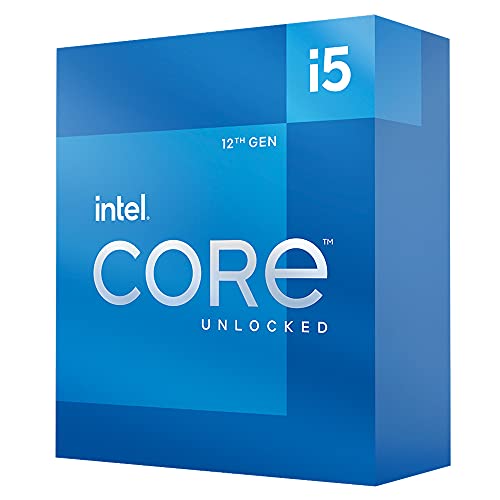
Intel Core i5 10-Core Desktop Processor
Best for: New LGA 1700 builds requiring multi-core power
- CPU Socket
- LGA 1700 (what this guide is about)
- Core Count
- 10 (6P+4E) Cores
- Max Boost Clock
- 4.9 GHz
- Base Power
- 125W
- Series
- Core i5
- Dimensions
- 4.57 × 1.73 × 3.98 inches
View on Amazon: Intel Core i5 10-Core Desktop Processor Affiliate link
This processor uses the LGA 1700 socket, making it compatible with 600-series motherboards. It features 10 cores, combining 6 performance and 4 efficiency cores. The max boost clock reaches 4.9 GHz. With a 125W TDP, it handles demanding tasks. You should choose this if you need modern socket support and strong multi-threaded performance for desktop builds.
Pros
- LGA 1700 socket for modern motherboard compatibility
- 10 cores (6P+4E) for robust multitasking
- Max boost clock of 4.9 GHz
- Unlocked for potential overclocking
Cons
- 125W TDP requires adequate cooling
- Limited to LGA 1700 platform upgrades
Good fit if
- You are building a new PC with a 600-series motherboard
- You need strong multi-core performance for productivity
- You want a modern socket for future-proofing
Skip if
- You are upgrading from an LGA 1151 system without changing the motherboard
- You require a low-power processor under 65W
- You are building a compact mini-ITX system with strict thermal limits
Verdict: Intel Core i5-12600K LGA 1700 delivers strong 10-core performance for users building on modern platforms. It suits those prioritizing multi-threaded workloads and current socket compatibility over legacy upgrade paths.

Intel Core i9-9900K 8-Core Processor
Best for: Upgrading existing LGA 1151 platforms
- CPU Socket
- LGA 1151 (what this guide is about)
- Core Count
- 8 Cores
- Thread Count
- 16 Threads
- Max Boost Clock
- 5.00 GHz
- Base Clock
- 3.60 GHz
- Cache Size
- 16 MB
View on Amazon: Intel Core i9-9900K 8-Core Processor Affiliate link
This Intel Core i9-9900K processor uses the older LGA 1151 socket and 300-series chipsets. It offers 8 cores and 16 threads with a base clock of 3.60 GHz and a max boost of 5.00 GHz. The 95W TDP and 16 MB cache support high performance. You should choose this if you already own compatible hardware. It suits users who need unlocked multi-core performance on established platforms.
Pros
- 8 cores and 16 threads for heavy multitasking
- Max boost clock reaches 5.00 GHz
- Unlocked multiplier for manual overclocking
- Includes Intel UHD Graphics 630
Cons
- Requires older LGA 1151 socket and 300-series motherboards
- Sold as a renewed unit
- Lower core count compared to modern 12th-gen alternatives
Good fit if
- You already have an LGA 1151 motherboard
- You need high single-core speed for gaming
- You want to upgrade an existing 300-series system
Skip if
- You are building a new PC from scratch
- You require the latest LGA 1700 socket
- You need more than 8 cores for productivity
Verdict: Intel Core i9-9900K 8-Core LGA 1151 is a powerful option for upgrading existing LGA 1151 systems. It fits users who want high clock speeds without buying new motherboards.
Specifications side by side
| Spec | Intel Core i5 10-Core Desktop Processor | Intel Core i9-9900K 8-Core Processor |
|---|---|---|
| Core Count | 10 (6P+4E) Cores | 8 Cores |
| Thread Count | not stated | 16 Threads |
| CPU Socket | LGA1700 | LGA1151 |
| Max Boost Clock | 4.9 GHz | 5.00 GHz |
| Base Clock | not stated | 3.60 GHz |
| Cache Size | not stated | 16 MB |
| Base Power | 125W | 95W |
| Integrated Graphics | not stated | Intel UHD Graphics 630 |
| Series | Core i5 | Core i9 |
| TDP | 125W | 95W |
| Dimensions | 4.57 × 1.73 × 3.98 inches | 2.91 × 4.41 × 4.61 inches |
| Weight | 1.41 ounces | not stated |
| Model | i5-12600K | SRELS |
Frequently asked questions
Can I install an LGA 1700 CPU on an LGA 1151 motherboard?
No. The physical pin layouts and socket designs differ completely between these two generations. You cannot mix them. The LGA 1700 socket requires a 600-series chipset motherboard. The LGA 1151 socket fits 100-series through 300-series boards. You must buy a new motherboard for either upgrade path.
Which processor offers more cores for multi-threaded workloads?
The Intel Core i5-12600K offers more cores. It features a 10-core design with six performance and four efficiency cores. The i9-9900K provides eight cores. If your work involves heavy multi-threaded tasks, the LGA 1700 option delivers higher parallel processing power. This suits modern productivity and gaming demands better.
Is the LGA 1151 platform still good for upgrading?
Yes, if you already own an LGA 1151 motherboard. The i9-9900K fits existing systems without requiring a new board. It delivers high clock speeds for gaming. You save money by keeping your current platform. However, you miss out on newer connectivity standards and efficiency improvements found in LGA 1700.
What is the thermal design power difference between these CPUs?
The i5-12600K has a 125W TDP. The i9-9900K has a 95W TDP. The LGA 1700 processor draws more power under load. You need a robust cooling solution for the newer chip. The older LGA 1151 chip runs cooler but offers less raw multi-core performance. Check your cooler compatibility before buying.
Do both processors support overclocking?
Yes. Both the i5-12600K and i9-9900K feature unlocked cores. You can adjust clock speeds manually for higher performance. This requires a motherboard with an unlocked chipset. LGA 1700 boards use 600-series chipsets. LGA 1151 boards use 100, 200, or 300-series chipsets. Ensure your board supports Z-series or equivalent unlocked variants.
Which socket is better for future-proofing a new build?
LGA 1700 is the better choice for new builds. It supports modern memory standards and PCIe versions. The i5-12600K uses this newer socket. LGA 1151 is a legacy platform. You cannot upgrade to newer CPU generations on it. If you want a system that lasts longer without replacing the board, choose LGA 1700.
Can I use the same cooler for both processors?
Likely yes, but you need new mounting hardware. Both are Intel desktop CPUs. The physical footprint is similar. However, the mounting brackets differ between LGA 1151 and LGA 1700 sockets. You must buy the correct bracket kit for your specific motherboard. Check your cooler package or manufacturer website for the right adapter.