What Is Wi-Fi? A Guide for Motherboards Buyers (2026)
As an Amazon Associate we earn from qualifying purchases. Links on this page are affiliate links.
Wi-Fi Explained for Motherboard Buyers
You need a stable wireless connection for modern computing. This spec defines how your motherboard communicates with your router without cables. Understanding the differences between Wi-Fi 6, Wi-Fi 6E, and Wi-Fi 7 helps you choose the right hardware for your network speed and latency needs. The term wi fi explained covers the technical standards that dictate performance.
Wi-Fi 6 is the current standard for most users. It improves efficiency in crowded areas with many devices. It uses technologies like OFDMA and BSS coloring to reduce interference. You will see this listed as 802.11ax. It offers good speeds for gaming and streaming. It supports more simultaneous connections than older standards. If you have a modern router, this is usually sufficient.
Wi-Fi 6E expands on Wi-Fi 6 by adding the 6 GHz band. This band is less crowded than the 2.4 GHz and 5 GHz bands. It provides more channels and less interference. You get higher throughput and lower latency. This is ideal for high-end gaming and VR. Look for 6 GHz support in the listing. Not all routers support this band yet. You need compatible hardware on both ends.
Wi-Fi 7 is the newest standard. It brings even faster speeds and lower latency. It supports wider channels and multi-link operation. This allows devices to use multiple bands at once. You get better reliability and performance. It is future-proof for upcoming network upgrades. However, it requires a Wi-Fi 7 router to work. Most current networks do not need this yet.
When shopping, check the wireless card specifications. Ensure the motherboard has the correct antenna connectors. Match the Wi-Fi standard to your router. Buying a higher standard now may save you upgrades later. Consider your current network setup before deciding.
Wi-Fi Standards Compared
Wi-Fi 6
Wi-Fi 6 improves speed and efficiency over older standards. It supports multiple devices simultaneously without significant lag. This standard is suitable for general internet use, streaming, and standard gaming. You get reliable connectivity in crowded areas. The trade-off is lower maximum bandwidth compared to newer versions. It lacks access to the less congested 6 GHz band. Choose this if your router supports it and you do not need extreme throughput. The ASUS TUF Gaming Z790-Plus WiFi ATX uses Wi-Fi 6. It suits Intel 12th to 14th Gen builders who prioritize storage and standard ATX sizing over the latest wireless speeds.
Wi-Fi 6E
Wi-Fi 6E extends Wi-Fi 6 capabilities by adding the 6 GHz frequency band. This band is currently less crowded than the 2.4 GHz and 5 GHz bands. You experience reduced interference and higher potential speeds. Latency is also lower, which benefits competitive gaming. This standard requires a compatible router to fully utilize the 6 GHz band. If your router only supports older bands, you may not see a significant difference. The MSI PRO Z790-P WiFi ATX offers Wi-Fi 6E. It fits users who want modern wireless standards for Intel 12th through 14th Gen builds without paying top-tier prices.
Wi-Fi 7
Wi-Fi 7 is the latest standard, offering significantly higher speeds and lower latency. It uses wider channels and advanced modulation techniques. This results in faster data transfers and better performance in dense environments. You benefit from improved reliability for 4K streaming and large file transfers. The 6 GHz band is fully integrated into this standard. However, you need a Wi-Fi 7 router to access these benefits. The technology is still new and may be overkill for basic tasks. The MSI MAG B850 Tomahawk MAX WiFi supports Wi-Fi 7. It is ideal for new AMD Ryzen systems where modern connectivity is a priority.
Wi-Fi Upgrade Worth It
Who needs it
You should prioritize Wi-Fi 6E or Wi-Fi 7 if you live in a dense apartment complex or house with many connected devices. These newer standards utilize the less congested 6 GHz band to reduce interference from neighbors. This results in significantly lower latency and more stable connections during peak hours. If you stream high-resolution video, download large files frequently, or play competitive online games, the increased bandwidth and efficiency matter. Wi-Fi 7 offers even greater throughput and multi-link operation, which helps maintain speed when multiple devices are active. For users who demand the highest possible wireless performance without cable constraints, upgrading to these latest standards ensures your network does not become a bottleneck for your system.
Who can skip it
You can skip the latest Wi-Fi standards if you primarily use an Ethernet cable for your desktop PC. Wired connections offer superior stability, lower latency, and consistent speeds that wireless cannot match. If your usage is limited to web browsing, email, and occasional streaming on a single device, Wi-Fi 6 is more than sufficient. Older standards like Wi-Fi 5 may still work for light tasks, though they lack the efficiency of newer tech. Do not pay extra for Wi-Fi 6E or 7 if your router does not support it, as you will not see the benefits. Instead, prioritize a motherboard with robust SATA ports or M.2 slots for storage. Focus your budget on CPU performance or RAM capacity if wireless connectivity is not a critical daily requirement for your workflow.
Wi-Fi Glossary for Buyers
Wi-Fi 6
An older standard offering improved speed and efficiency. It handles multiple devices well for general use and streaming. Typical speeds reach 9.6 Gbps.
Wi-Fi 6E
An extension of Wi-Fi 6 that adds the 6 GHz band. This reduces interference in crowded areas. It offers lower latency for gaming and high-bandwidth tasks.
Wi-Fi 7
The latest standard providing the highest speeds and lowest latency. It uses wider channels and advanced modulation. Ideal for future-proofing and demanding wireless workloads.
6 GHz Band
A frequency range used by Wi-Fi 6E and Wi-Fi 7. It is less congested than 2.4 GHz or 5 GHz. This leads to faster and more stable connections.
Channel Width
The bandwidth of a single Wi-Fi channel. Wider channels, like 160 MHz, allow more data to flow. This increases maximum potential speed but may reduce range.
MIMO
Multiple Input Multiple Output technology. It uses multiple antennas to send and receive data simultaneously. This improves throughput and connection stability for your devices.
Router
The device that directs network traffic. Your motherboard connects to it wirelessly. The router’s capabilities limit your maximum wireless speed, regardless of your motherboard’s specs.
Quick picks
| # | Product | Best for | Price |
|---|---|---|---|
| 1 | MSI PRO ATX DDR5 Motherboard | Intel 12th-14th Gen Wi-Fi 6E builds | Check price of MSI PRO ATX DDR5 Motherboard on Amazon |
| 2 | MSI Tomahawk ATX AM5 Motherboard | New AMD Ryzen 7000/9000 builds | Check price of MSI Tomahawk ATX AM5 Motherboard on Amazon |
| 3 | ASUS TUF Gaming PCIe 5.0 ATX Motherboard | Intel gaming builds needing Wi-Fi 6 | Check price of ASUS TUF Gaming PCIe 5.0 ATX Motherboard on Amazon |
| 4 | MSI Gaming Plus ATX DDR5 Motherboard | Intel gaming builds needing Wi-Fi 6E | Check price of MSI Gaming Plus ATX DDR5 Motherboard on Amazon |
| 5 | GIGABYTE AORUS ATX DDR5 Motherboard | Intel LGA 1700 builders needing Wi-Fi 7 | Check price of GIGABYTE AORUS ATX DDR5 Motherboard on Amazon |
| 6 | ASUS Prime Micro-ATX DDR5 Motherboard | compact Intel builds needing Wi-Fi 6 | Check price of ASUS Prime Micro-ATX DDR5 Motherboard on Amazon |
Our 6 picks

MSI PRO ATX DDR5 Motherboard
Best for: Intel 12th-14th Gen Wi-Fi 6E builds
- Wi-Fi
- Wi-Fi 6E (what this guide is about)
- CPU Socket
- LGA 1700
- Form Factor
- ATX
- Memory Type
- DDR5
- PCIe Version
- PCIe 5.0
- Wi-Fi Standard
- Wi-Fi 6E
View on Amazon: MSI PRO ATX DDR5 Motherboard Affiliate link
This ATX motherboard supports 12th, 13th, and 14th Gen Intel processors via the LGA 1700 socket. It features Wi-Fi 6E and Bluetooth 5.3 for reliable wireless connectivity. You get four DDR5 slots for up to 128GB of RAM and PCIe 5.0 support for fast data transfer. The 2.5Gbps LAN provides a wired boost. It suits users who want modern wireless standards without premium pricing.
Pros
- Wi-Fi 6E and Bluetooth 5.3 support
- Four DDR5 memory slots up to 128GB
- PCIe 5.0 interface for future GPUs
- 2.5Gbps Ethernet LAN port
Cons
- Wi-Fi 6E is slower than Wi-Fi 7
- No mention of USB4 or Thunderbolt support
- ATX size may not fit small cases
Good fit if
- You want Wi-Fi 6E speeds
- You plan to use DDR5 RAM
- You need PCIe 5.0 for new GPUs
Skip if
- You require Wi-Fi 7 speeds
- You are building a microATX system
- You only have DDR4 memory
Verdict: MSI PRO Z790-P WiFi ATX offers solid Wi-Fi 6E and DDR5 support for Intel 12th through 14th Gen builds. It fits users who want modern wireless and memory standards without the cost of top-tier boards.

MSI Tomahawk ATX AM5 Motherboard
Best for: New AMD Ryzen 7000/9000 builds
- Wi-Fi
- Wi-Fi 7 (what this guide is about)
- CPU Socket
- AM5
- Chipset
- B850
- Form Factor
- ATX
- Memory Type
- DDR5
- PCIe Version
- PCIe 5.0
View on Amazon: MSI Tomahawk ATX AM5 Motherboard Affiliate link
This ATX motherboard supports AMD Ryzen 9000, 8000, and 7000 processors on the AM5 socket. It features Wi-Fi 7 for high-speed wireless connectivity and 5G LAN for robust wired networking. The board uses DDR5 memory and supports PCIe 5.0 standards. It is designed for users who need modern connectivity options and broad CPU compatibility within the AM5 platform.
Pros
- Supports Wi-Fi 7 standard
- Includes 5G LAN connectivity
- Compatible with Ryzen 9000/8000/7000 series
- Features PCIe 5.0 support
Cons
- Limited to AM5 socket, excluding Intel users
- B850 chipset lacks advanced overclocking features of X870
- ATX form factor requires larger cases
Good fit if
- You are building an AMD Ryzen 7000 or newer system
- You need Wi-Fi 7 for future-proof wireless speeds
- You require 5G LAN for high-bandwidth wired connections
Skip if
- You are using an Intel processor
- You need a microATX or ITX form factor
- You require DDR4 memory support
Verdict: The MSI MAG B850 Tomahawk MAX WiFi offers solid AM5 support with Wi-Fi 7 and 5G LAN. It fits users building new Ryzen systems who value modern connectivity.
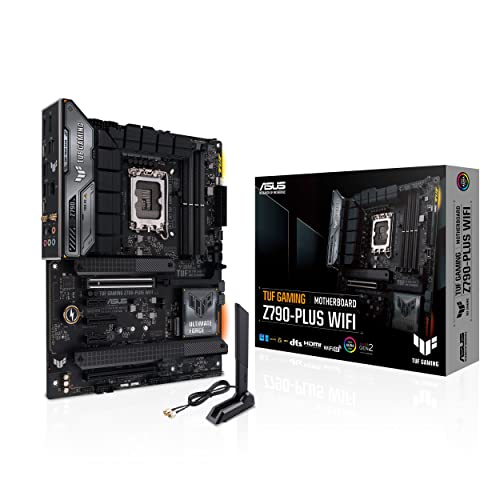
ASUS TUF Gaming PCIe 5.0 ATX Motherboard
Best for: Intel gaming builds needing Wi-Fi 6
- Wi-Fi
- Wi-Fi 6 (what this guide is about)
- CPU Socket
- LGA 1700
- Chipset
- Z790
- Form Factor
- ATX
- Memory Type
- DDR5
- PCIe Version
- PCIe 5.0
View on Amazon: ASUS TUF Gaming PCIe 5.0 ATX Motherboard Affiliate link
This ATX motherboard pairs the Z790 chipset with LGA 1700 support for Intel 12th, 13th, and 14th Gen processors. It features Wi-Fi 6 and 2.5GbE Ethernet for network connectivity. You get PCIe 5.0 lanes, DDR5 memory support, and four M.2 slots for storage expansion. The 16+1 power phases handle CPU power delivery. It is designed for gaming builds that need reliable wired and wireless connections.
Pros
- Wi-Fi 6 connectivity
- 2.5GbE Ethernet port
- Four M.2 slots
- PCIe 5.0 support
- 16+1 power phases
Cons
- Wi-Fi 6 is older than Wi-Fi 6E or Wi-Fi 7 options
- ATX form factor requires a larger case
- Heavier build at 2.91 pounds
Good fit if
- You need Wi-Fi 6 and 2.5GbE Ethernet
- You want four M.2 slots for storage
- You are building a standard ATX gaming PC
Skip if
- You require Wi-Fi 7 speeds
- You prefer a smaller microATX board
- You are using AMD Ryzen processors
Verdict: ASUS TUF Z790-Plus WiFi ATX offers solid Wi-Fi 6 and 2.5GbE connectivity for Intel 12th to 14th Gen users. It suits builders who prioritize storage capacity and standard ATX sizing over the latest wireless standards.

MSI Gaming Plus ATX DDR5 Motherboard
Best for: Intel gaming builds needing Wi-Fi 6E
- Wi-Fi
- Wi-Fi 6E (what this guide is about)
- CPU Socket
- LGA 1700
- Chipset
- Z790
- Form Factor
- ATX
- Memory Type
- DDR5
- PCIe Version
- PCIe 5.0
View on Amazon: MSI Gaming Plus ATX DDR5 Motherboard Affiliate link
The MSI Z790 Gaming Plus WiFi supports 12th, 13th, and 14th Gen Intel processors via the LGA 1700 socket. It features Wi-Fi 6E for robust wireless connectivity and 2.5GbE Ethernet for fast wired networking. The board uses DDR5 memory and PCIe 5.0 lanes. This ATX motherboard is designed for gaming builds that require modern standards without the premium cost of Wi-Fi 7.
Pros
- Built-in Wi-Fi 6E support
- 2.5GbE Ethernet port
- PCIe 5.0 compatibility
- DDR5 memory support
Cons
- Wi-Fi 6E lacks the low-latency benefits of Wi-Fi 7
- ATX size may not fit smaller cases
- No mention of onboard USB-C headers
Good fit if
- You need Wi-Fi 6E for stable wireless connections
- You are building a standard ATX gaming PC
- You want PCIe 5.0 for future-proofing
Skip if
- You require the latest Wi-Fi 7 standard
- You are building in a compact mATX or ITX case
- You are using AMD Ryzen processors
Verdict: MSI Z790 Gaming Plus WiFi ATX delivers solid Wi-Fi 6E performance and modern connectivity for Intel 12th through 14th Gen builds. It is a practical choice for gamers who do not need Wi-Fi 7 speeds.

GIGABYTE AORUS ATX DDR5 Motherboard
Best for: Intel LGA 1700 builders needing Wi-Fi 7
- Wi-Fi
- Wi-Fi 7 (what this guide is about)
- CPU Socket
- LGA 1700
- Chipset
- Z790
- Form Factor
- ATX
- Memory Type
- DDR5
- PCIe Version
- PCIe 5.0
View on Amazon: GIGABYTE AORUS ATX DDR5 Motherboard Affiliate link
This ATX motherboard supports Intel 12th through 14th Gen processors via the LGA 1700 socket. It features Wi-Fi 7 for modern wireless connectivity and 2.5 GbE for wired networks. The board includes a 16+1+2 phase VRM design and four PCIe 4.0 M.2 slots for storage. You get dual-channel DDR5 memory support with XMP 3.0. It suits builders who need high-end connectivity and robust power delivery for current Intel CPUs.
Pros
- Wi-Fi 7 standard for latest wireless speeds
- 16+1+2 phase digital VRM solution
- Four PCIe 4.0 x4 M.2 slots
- 2.5 GbE Ethernet port
Cons
- Heavier build at 4.89 pounds
- Only four M.2 slots, fewer than some competitors
- Standard ATX size may not fit smaller cases
Good fit if
- You are building with Intel 12th, 13th, or 14th Gen CPUs
- You want the latest Wi-Fi 7 connectivity
- You need multiple fast NVMe storage drives
Skip if
- You prefer AMD Ryzen processors
- You need Wi-Fi 6E instead of Wi-Fi 7
- You are building a compact microATX system
Verdict: GIGABYTE Z790 AORUS Elite X Wi-Fi 7 delivers modern Wi-Fi 7 and strong power phases for Intel LGA 1700 systems. It is a solid choice for users prioritizing wireless standards and storage capacity over compact form factors.

ASUS Prime Micro-ATX DDR5 Motherboard
Best for: compact Intel builds needing Wi-Fi 6
- Wi-Fi
- Wi-Fi 6 (what this guide is about)
- CPU Socket
- LGA 1700
- Form Factor
- microATX
- Memory Type
- DDR5
- PCIe Version
- PCIe 4.0
- M.2 Slots
- 2
View on Amazon: ASUS Prime Micro-ATX DDR5 Motherboard Affiliate link
The ASUS Prime B760M-A AX is a microATX motherboard for 12th and 13th Gen Intel processors. It includes built-in Wi-Fi 6 for wireless connectivity and a 2.5 Gb LAN port for faster wired speeds. You get DDR5 memory support and PCIe 4.0 slots for modern components. This board suits users who want solid wireless performance in a compact form factor without needing the latest Wi-Fi 7 standards.
Pros
- Built-in Wi-Fi 6 for wireless networking
- 2.5 Gb Ethernet port for faster LAN speeds
- Supports DDR5 memory for enhanced multitasking
- PCIe 4.0 slots for high-speed storage and graphics
Cons
- microATX form factor limits expansion slots
- Wi-Fi 6 is slower than Wi-Fi 7 found on competitors
- Only two M.2 slots available for storage
Good fit if
- You need Wi-Fi 6 on a budget
- You prefer a compact microATX build
- You use 12th or 13th Gen Intel CPUs
Skip if
- You require Wi-Fi 7 for maximum wireless speeds
- You need a full-size ATX board for more slots
- You are building with AMD Ryzen processors
Verdict: The ASUS Prime B760M-A AX microATX delivers reliable Wi-Fi 6 and 2.5 Gb LAN in a small package. It is a practical choice for Intel 12th and 13th Gen users who prioritize wireless connectivity and compact size over the latest Wi-Fi 7 standards.
Specifications side by side
| Spec | MSI PRO ATX DDR5 Motherboard | MSI Tomahawk ATX AM5 Motherboard | ASUS TUF Gaming PCIe 5.0 ATX Motherboard | MSI Gaming Plus ATX DDR5 Motherboard | GIGABYTE AORUS ATX DDR5 Motherboard | ASUS Prime Micro-ATX DDR5 Motherboard |
|---|---|---|---|---|---|---|
| CPU Socket | LGA 1700 | AM5 | LGA 1700 | LGA 1700 | LGA 1700 | LGA 1700 |
| Chipset | not stated | B850 | Z790 | Z790 | Z790 | not stated |
| Form Factor | ATX | ATX | ATX | ATX | ATX | microATX |
| Memory Type | DDR5 | DDR5 | DDR5 | DDR5 | DDR5 | DDR5 |
| PCIe Version | PCIe 5.0 | PCIe 5.0 | PCIe 5.0 | PCIe 5.0 | PCIe 5.0 | PCIe 4.0 |
| M.2 Slots | not stated | not stated | 4 | not stated | 4 | 2 |
| Wi-Fi Standard | Wi-Fi 6E | Wi-Fi 7 | not stated | Wi-Fi 6E | Wi-Fi 7 | Wi-Fi 6 |
| Ethernet Speed | 2.5Gbps | 5G LAN | not stated | 2.5Gbps | 2.5 GbE | 2.5 Gb |
| Power Phases | not stated | not stated | 16+1 | not stated | 16+1+2 | not stated |
| Wi-Fi | Wi-Fi 6E | Wi-Fi 7 | Wi-Fi 6 | Wi-Fi 6E | Wi-Fi 7 | Wi-Fi 6 |
| Use Case | not stated | not stated | Gaming | Gaming | not stated | not stated |
| Dimensions | 5.91 × 1.57 × 5.91 inches | not stated | 10.7 × 2.75 × 14 inches | not stated | 13.2 × 10.6 × 3.14 inches | 10.8 × 10.4 × 2.58 inches |
| Weight | 1.25 pounds | not stated | 2.91 pounds | not stated | 4.89 pounds | 3.11 pounds |
| Model | PRO Z790-P WiFi ProSeries | MAG B850 TOMAHAWK MAX WIFI | TUF GAMING Z790-PLUS WIFI | MSI Z790 GAMING PLUS WIFI-AMZ | Z790 AORUS ELITE X WIFI7 | PRIME B760M-A AX |
| Color | not stated | Black | BLACK | Black | not stated | BLACK |
| Size | not stated | not stated | not stated | ATX | ATX | PRIME B760M-A AX |
Frequently asked questions
Does Wi-Fi 6E offer better performance than Wi-Fi 6?
Wi-Fi 6E provides lower latency and less congestion by adding the 6 GHz band. While Wi-Fi 6 operates on 2.4 GHz and 5 GHz bands, Wi-Fi 6E utilizes the additional spectrum. This reduces interference in dense environments. Products like the MSI PRO Z790-P WiFi support this standard for Intel 12th through 14th Gen builds.
Is Wi-Fi 7 necessary for a new motherboard purchase?
Wi-Fi 7 offers the latest connectivity standards with higher throughput and efficiency. It is ideal for users wanting future-proof hardware. Boards like the MSI MAG B850 Tomahawk MAX WiFi feature this standard for AMD AM5 systems. It suits builders who prioritize modern connectivity and do not need to compromise on wireless speed.
What is the difference between Wi-Fi 6 and Wi-Fi 6E?
The key difference is the 6 GHz frequency band. Wi-Fi 6 uses 2.4 GHz and 5 GHz bands, while Wi-Fi 6E adds the 6 GHz band. This extra band reduces interference from other devices. The ASUS Prime B760M-A AX uses Wi-Fi 6 for compact Intel builds, while the MSI PRO Z790-P WiFi uses Wi-Fi 6E.
Which Wi-Fi standard is best for gaming motherboards?
Wi-Fi 6 and Wi-Fi 6E provide solid performance for gaming with low latency. Wi-Fi 7 offers the highest speeds but may be overkill for some. The ASUS TUF Z790-Plus WiFi supports Wi-Fi 6 for Intel gaming builds. The MSI Z790 Gaming Plus WiFi offers Wi-Fi 6E for similar Intel systems, ensuring reliable wireless connections.
Do all ATX motherboards include Wi-Fi capabilities?
No, not all ATX motherboards include built-in Wi-Fi. You must check the specific model attributes. For example, the MSI PRO ATX DDR5 Motherboard includes Wi-Fi 6E. The ASUS TUF Gaming PCIe 5.0 ATX Motherboard includes Wi-Fi 6. Always verify the wireless spec in the product data before purchasing.
Can I use Wi-Fi 7 on an older Intel socket?
Yes, if the motherboard supports it. The GIGABYTE Z790 AORUS Elite X supports Wi-Fi 7 and uses the LGA 1700 socket. This socket handles Intel 12th, 13th, and 14th Gen processors. You can access modern wireless standards on older platforms if the board manufacturer includes the necessary hardware.
What is the benefit of 2.5GbE alongside Wi-Fi?
2.5GbE provides a faster wired connection than standard Gigabit Ethernet. It complements wireless speeds by offering a stable, high-bandwidth link. Many boards, like the MSI PRO Z790-P WiFi, include both Wi-Fi 6E and 2.5GbE. This combination ensures you can switch between fast wireless and reliable wired connections as needed.