Micro Center Intel Ultra 7 265KF Review: Specs, Pros and Cons
As an Amazon Associate we earn from qualifying purchases. Links on this page are affiliate links.
This micro center intel ultra 7 265kf review covers a bundled platform featuring the Intel Core Ultra 7 265KF processor and an ASUS Z890 motherboard. The CPU offers 20 cores, combining eight performance cores with twelve efficiency cores, and reaches up to 5.5 GHz. It pairs with a Z890 AYW GAMING WIFI W mainboard built for stability and modern connectivity. This combo targets builders seeking a balanced foundation for gaming rigs. The listing highlights robust power delivery and next-gen support for fast storage and memory, making it a practical choice for DIY enthusiasts constructing a new PC from scratch.
What stands out
- 20 cores (8 P-cores + 12 E-cores) with up to 5.5 GHz boost
- 12+1+2+1 80A DrMOS power stages for stable voltage delivery
- One PCIe 5.0 M.2 slot and three PCIe 4.0 M.2 slots
- Rear USB 20Gbps Type-C with front panel 30W PD/PPS fast-charge support
Who it fits
Good fit for
You should consider this bundle if you are building a gaming PC from scratch and want a modern LGA 1851 socket platform. The 20-core configuration handles multitasking well, while the Z890 motherboard provides ample M.2 slots for fast storage. If you value DIY-friendly features like Q-Latch and BIOS FlashBack, this motherboard simplifies the assembly process. The inclusion of Wi-Fi 6 and Thunderbolt header support also suits users who need versatile connectivity options without adding extra expansion cards.
Who should skip it
Skip this option if you need integrated graphics, as the 265KF processor requires a discrete graphics card to display video. This bundle is also unsuitable if you already own an older LGA 1700 CPU and motherboard, as the new LGA 1851 socket is not backward compatible. Additionally, if you prefer a pre-built system rather than assembling components yourself, this DIY-focused combo may not fit your needs. The requirement for DDR5 memory and specific power delivery standards also means you must purchase compatible RAM separately.
Verdict: This bundle provides a solid, feature-rich foundation for new LGA 1851 builds. It suits DIY builders who need a balanced CPU and a motherboard with modern connectivity and storage options.
Key specs explained for this bundle
20 cores (8 P-cores + 12 E-cores)
This processor uses a hybrid design with eight performance cores for heavy tasks and twelve efficiency cores for background work. You get strong single-thread speed for gaming alongside high multi-thread throughput for productivity. This configuration helps balance high frame rates with smooth multitasking. It suits users who want a versatile CPU for both gaming and content creation without needing a higher core count.
Up to 5.5 GHz
The maximum boost clock indicates the highest speed the performance cores can reach under load. Higher frequencies generally improve gaming performance and responsiveness in single-threaded applications. You benefit from faster frame rates in CPU-bound games. When comparing processors, look for boost speeds above 5.0 GHz for modern gaming rigs. This spec shows the CPU can handle demanding workloads efficiently.
36MB Cache
The large cache stores frequently accessed data close to the processor cores, reducing latency. This helps maintain high frame rates in games and speeds up data-heavy applications. A larger cache allows the CPU to process more instructions without waiting for memory. You should compare this value against other mid-range chips to ensure smooth performance. It supports consistent responsiveness during intense computing tasks.
LGA 1851 Socket
This socket type determines which motherboards are compatible with the processor. You must pair this CPU with a Z890 motherboard to use its full features. The socket design ensures physical and electrical compatibility with the platform. When building a new PC, verify your motherboard uses LGA 1851. This standard supports the latest Intel Core Ultra processors and future upgrades within the same generation.
Discrete graphics required
This processor lacks integrated graphics, so you must install a dedicated graphics card to display video. You cannot connect monitors directly to the motherboard. This design often lowers the base price and focuses power on CPU performance. You need to budget for a GPU separately. This option suits gamers and creators who already plan to use a powerful discrete video card for rendering and gaming.
Design and build quality
According to the listing, the ASUS Z890 AYW GAMING WIFI W motherboard features a robust power solution with 12+1+2+1 80A DrMOS stages. This configuration, paired with alloy chokes and durable capacitors, aims to provide stable power delivery under load. The board utilizes a six-layer PCB to support these components. Large VRM heatsinks are included to manage thermal output during intensive tasks. This design choice suggests the platform is built for sustained performance in gaming or creative workflows without thermal throttling.
The layout prioritizes ease of use for builders. It includes PCIe Slot Q-Release and M.2 Q-Latch mechanisms for simpler component installation. You also get Q-Dashboard and Q-LED indicators to help diagnose issues quickly. A BIOS FlashBack button and LED allow for firmware updates without needing a CPU installed. The pre-mounted I/O shield further simplifies the assembly process. These features indicate a focus on accessibility for DIY enthusiasts who value straightforward construction.
Thermal management extends to storage and chipset areas. The board provides one PCIe 5.0 M.2 slot and three PCIe 4.0 M.2 slots, all equipped with cooling solutions. Hybrid fan headers and Fan Xpert 4 with AI Cooling II offer control over system temperatures. This approach ensures that both the processor and storage drives remain within safe operating limits. The overall design reflects a balance between high-performance capabilities and user-friendly construction elements.
Setup and everyday use guide
Setting up this bundle begins with installing the Intel Core Ultra 7 265KF into the LGA 1851 socket on the ASUS Z890 AYW GAMING WIFI W motherboard. Since the processor requires discrete graphics, you must connect a dedicated video card to the PCIe 5.0 slot. The motherboard supports DDR5 memory, so ensure your RAM matches this standard for proper operation. The listing highlights several DIY-friendly features to simplify assembly. You will find Q-Release for the PCIe slot and Q-Latch for the M.2 drives, allowing for tool-free installation of components. The pre-mounted I/O shield removes the need for separate alignment during case installation. For storage, the board offers one PCIe 5.0 M.2 slot and three PCIe 4.0 slots, all equipped with cooling solutions to manage thermal output during heavy workloads. Connectivity options include Wi-Fi 6 and USB 20Gbps Type-C ports on the rear, along with a front panel header supporting Thunderbolt. The BIOS FlashBack button lets you update firmware without needing a CPU installed, which is useful if you are upgrading from an older platform. In daily use, the 125W base power and 36MB cache support both gaming and productivity tasks. The hybrid core count handles background processes efficiently while the performance cores manage intensive applications. Fan Xpert 4 with AI Cooling II helps maintain stable temperatures, keeping the system quiet during routine operations.
Before you buy this bundle
This bundle includes the CPU and motherboard, but you must supply your own RAM, storage, and power supply. The listing specifies DDR5 memory support, so verify your existing modules are compatible before purchasing. Since the Intel Core Ultra 7 265KF lacks integrated graphics, you need a discrete video card to display an image. Check your case for sufficient clearance around the large VRM heatsinks and M.2 cooling solutions. The motherboard offers multiple M.2 slots, so ensure you have compatible NVMe drives for storage. This platform suits users who want a high-core-count gaming PC with future-proof connectivity like USB4 and PCIe 5.0. It fits alongside other Z890 options by providing a complete DIY foundation. You will need to manage fan curves using the included BIOS features for optimal thermal performance. Regularly check for BIOS updates to maintain stability with the latest microcode. This approach ensures your system runs efficiently without unnecessary bloat.
Check before you buy
- Verify you have a discrete graphics card, as none is included.
- Confirm your RAM is DDR5 compatible with the Z890 motherboard.
- Check case clearance for the large VRM and M.2 heatsinks.
- Ensure your power supply meets the 125W CPU base power needs.
The product at a glance
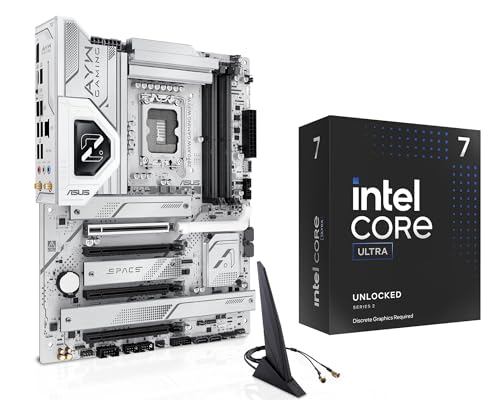
Micro Center Intel Ultra 7 265KF ASUS Z890 Bundle
Best for: High-performance gaming and content creation builds
- Core Count
- 20 cores
- Thread Count
- 20 threads
- CPU Socket
- LGA 1851
- Max Boost Clock
- 5.5 GHz
- Cache Size
- 36MB
- Base Power
- 125W
View on Amazon: Micro Center Intel Ultra 7 265KF ASUS Z890 Bundle Affiliate link
This bundle pairs the Intel Core Ultra 7 265KF with the ASUS Z890 AYW Gaming WiFi W motherboard. The CPU offers 20 cores and a 5.5 GHz boost on the LGA 1851 socket. The board features DDR5 support, Wi-Fi 6, and PCIe 5.0 connectivity. It includes robust power delivery and multiple M.2 slots with cooling. This setup targets gamers and builders seeking a modern, high-performance platform.
Pros
- 20 cores (8 P-cores + 12 E-cores) for strong multitasking
- Up to 5.5 GHz max boost clock for high speed
- Z890 motherboard with PCIe 5.0 and Wi-Fi 6
- 12+1+2+1 power stages for stable performance
- DIY-friendly features like Q-Latch and BIOS FlashBack
Cons
- Requires a discrete graphics card as it lacks integrated graphics
- Wi-Fi 6 is standard rather than the latest Wi-Fi 6E or 7
- Limited to 20 threads despite having 20 cores
Good fit if
- You need a high-core-count CPU for gaming and productivity
- You want a modern LGA 1851 platform with PCIe 5.0
- You prefer a bundle that includes a feature-rich motherboard
Skip if
- You require integrated graphics for systems without a GPU
- You are looking for the latest Wi-Fi 7 connectivity
- You want a processor with more than 20 threads
Verdict: Micro Center Intel Ultra 7 265KF Combo delivers a powerful 20-core CPU paired with a feature-packed Z890 motherboard. It is ideal for builders who want a complete, high-performance gaming and creation platform ready for modern standards.
Specifications side by side
| Spec | Micro Center Intel Ultra 7 265KF ASUS Z890 Bundle |
|---|---|
| Core Count | 20 cores |
| Thread Count | 20 threads |
| CPU Socket | LGA 1851 |
| Max Boost Clock | 5.5 GHz |
| Cache Size | 36MB |
| Base Power | 125W |
| Integrated Graphics | Discrete graphics required |
| Form Factor | ATX |
| Memory Type | DDR5 |
| Use Case | Gaming |
| Color | Ultra7-265KF+Asus Z890 AYW Gaming WiFi W |
| Model | 265KFZ890AYWWFW |
Frequently asked questions
Is the Intel Core Ultra 7 265KF good for gaming?
Yes, this processor is well-suited for gaming. It features eight performance cores that deliver strong single-thread speeds, reaching up to 5.5 GHz. This high clock speed ensures smooth frame rates in modern titles. The bundled ASUS Z890 motherboard also includes WiFi capabilities, which supports a stable connection for online multiplayer sessions.
What is the core count of the Ultra 7 265KF?
The Intel Core Ultra 7 265KF contains a total of 20 cores. This hybrid architecture combines eight performance cores with twelve efficiency cores. The performance cores handle demanding tasks and gaming, while the efficiency cores manage background processes. This design balances high performance with effective multitasking capabilities for various workloads.
Does this bundle include integrated graphics?
No, the Intel Core Ultra 7 265KF does not include integrated graphics. You must install a dedicated video card to get a display output. The processor is designed for discrete GPU setups, allowing you to pair it with a high-end graphics card for optimal gaming or content creation performance on the ASUS Z890 motherboard.
What type of memory does the ASUS Z890 motherboard support?
The ASUS Z890 AYW GAMING WIFI W motherboard supports DDR5 memory. You need to purchase DDR5 RAM modules separately, as they are not included in the bundle. Ensure your chosen memory modules are compatible with the motherboard specifications to achieve optimal system stability and data transfer speeds for your build.
Who is this Micro Center bundle best for?
This bundle is best for builders seeking a high-performance gaming and content creation platform. It pairs a powerful 20-core CPU with a feature-rich Z890 motherboard. It is ideal for users who want a complete, ready-to-use foundation for modern standards. The combination provides the necessary power for heavy multitasking and demanding applications.
How many power stages does the motherboard have?
The ASUS Z890 AYW GAMING WIFI W motherboard features a robust power solution with 12+1+2+1 80A DrMOS stages. This configuration aims to provide stable power delivery to the CPU under heavy load. The board uses alloy chokes and durable capacitors to ensure consistent performance during intensive gaming or rendering tasks.
Does the motherboard have WiFi built-in?
Yes, the ASUS Z890 AYW GAMING WIFI W motherboard includes built-in WiFi. The model name indicates this wireless connectivity feature. This allows you to connect to your network without needing additional expansion cards. It provides a convenient option for modern gaming and content creation setups that require reliable internet access.