Intel Z390 or AMD B550 Motherboards? Compared by Specs
As an Amazon Associate we earn from qualifying purchases. Links on this page are affiliate links.
You are deciding between an Intel Z390 vs AMD B550 motherboard for your next build. Both boards support DDR4 memory and are designed for gaming use cases. The main difference lies in their physical size and socket compatibility. The MSI option uses a larger ATX form factor with an LGA 1151 socket. The ASUS board is a compact Micro ATX design built for the AM4 socket. These specifications dictate which processor you can install and how much space the board requires.
Key differences
| Aspect | MSI MPG Z390 Gaming Edge AC ATX Motherboard | ASUS TUF Gaming B550M-PLUS Micro-ATX |
|---|---|---|
| CPU Socket | LGA 1151 | AM4 |
| Form Factor | ATX | Micro ATX |
| Chipset | Intel Z390 | AMD B550 |
| PCIe Version | not listed | PCIe 4.0 |
| Ethernet Speed | not listed | 2.5 Gb Ethernet |
Which one should you choose?
Choose MSI MPG Z390 Gaming Edge AC ATX Motherboard if
- You need an ATX motherboard for a larger case and multi-GPU setups.
- You are building with 8th or 9th Generation Intel Core processors.
- You prefer the traditional Intel platform architecture.
Choose ASUS TUF Gaming B550M-PLUS Micro-ATX if
- You want a smaller Micro ATX board for compact builds.
- You require PCIe 4.0 support for faster storage or graphics.
- You plan to use AMD Ryzen processors on the AM4 socket.
Verdict: Choose the MSI Z390 if you are sticking with Intel and need the extra expansion slots of an ATX board. Pick the ASUS B550 if you want a more compact form factor with modern PCIe 4.0 connectivity and faster Ethernet.
Z390 vs B550 Spec Comparison
cpu socket
The MSI MPG Z390 Gaming Edge AC uses an LGA 1151 socket. This fits 8th and 9th Generation Intel Core processors. You can install i9-9900K or i7-9700K models. The ASUS TUF Gaming B550M-PLUS uses an AM4 socket. This supports AMD Ryzen processors. The sockets are not compatible with each other. You must choose a CPU before buying the board. Intel and AMD platforms are distinct. Your choice depends on which processor family you prefer. The MSI board targets Intel users. The ASUS board targets AMD users. This is a fundamental platform decision.
form factor
The MSI board is an ATX size. It measures 12 inches by 9.6 inches. This larger size offers more expansion slots. It fits standard mid-tower and full-tower cases. The ASUS board is Micro-ATX. It measures 9.61 inches by 9.61 inches. This smaller size saves space. It fits in smaller cases. It is more portable. The MSI board provides more room for multiple graphics cards. The ASUS board is compact. Choose ATX for maximum expansion. Choose Micro-ATX for compact builds. The physical size dictates your case choice.
chipset
The MSI board uses the Intel Z390 chipset. This is a high-end Intel platform. It supports overclocking on compatible CPUs. The ASUS board uses the AMD B550 chipset. This is a mainstream AMD platform. It supports PCIe 4.0 for faster storage. The Z390 chipset focuses on Intel features. The B550 chipset brings modern AMD features. Both support DDR4 memory. The chipsets define the feature set. Intel Z390 offers specific Intel capabilities. AMD B550 offers PCIe 4.0 support. The chipset choice aligns with your CPU brand.
pcie version
The ASUS B550 board supports PCIe 4.0. This doubles the bandwidth for compatible devices. It allows faster SSDs and GPUs. The MSI Z390 board uses PCIe 3.0. This is the previous generation standard. It is still fast for most users. PCIe 4.0 is newer technology. The ASUS board has a clear advantage here. If you plan to use Gen4 NVMe drives, the B550 is better. The Z390 is limited to Gen3 speeds. Future-proofing favors the AMD platform.
ethernet speed
The ASUS TUF Gaming B550M-PLUS includes 2.5 Gb Ethernet. This is faster than standard Gigabit networking. It reduces bottlenecks on local networks. The MSI MPG Z390 Gaming Edge AC does not list its Ethernet speed in the provided data. It likely has standard Gigabit Ethernet. The ASUS board offers superior wired connectivity. Faster LAN speeds help with large file transfers. The ASUS board has a clear advantage. If you have a 2.5Gb network, this matters. Otherwise, the difference may be negligible.
memory type
Both boards support DDR4 memory. The MSI board supports up to 4400 MHz with overclocking. It has four DIMM slots. The ASUS board also supports DDR4. It likely supports high speeds too. Both boards use the same memory type. There is no difference in compatibility. You can use DDR4 RAM on either board. The MSI board explicitly lists 4400 MHz support. The ASUS board features are not fully detailed here. Both are equal in memory type. Choose based on other factors.
Which Motherboard Fits Your Build
You need full ATX expansion slots
The MSI MPG Z390 Gaming Edge AC uses an ATX form factor. This larger size provides more room for multiple graphics cards and additional expansion cards. It supports dual-channel DDR4 memory up to 4400 MHz with overclocking. You get two M.2 slots for fast storage and Turbo USB 3.1 Gen 2 ports. The extended heatsink helps manage thermals during intensive gaming sessions.
You want PCIe 4.0 speed
The ASUS TUF Gaming B550M-PLUS supports PCIe 4.0. This allows for faster data transfer rates with compatible NVMe SSDs and graphics cards. It features an 8+2 DrMOS power solution for stable performance. The board includes 2.5 Gb Ethernet for quicker network speeds. Dual M.2 slots are present, and the compact Micro ATX size fits smaller cases while maintaining robust cooling features.
You prefer a compact case
The ASUS TUF Gaming B550M-PLUS is a Micro ATX board. It measures 9.61 inches square, making it ideal for smaller builds. Despite its size, it offers comprehensive cooling with VRM and PCH heatsinks. The Realtek S1200A codec provides high-quality audio. It supports AM4 processors and DDR4 memory. This form factor saves space without sacrificing essential gaming features or connectivity options.
You need built-in Wi-Fi
The MSI MPG Z390 Gaming Edge AC includes integrated Wi-Fi capabilities. This allows for wireless connectivity without needing additional adapters. It also supports Mystic Light for RGB customization. The board features four DIMM slots for memory upgrades. You get multiple USB ports, including front panel headers. The ATX size ensures ample connectivity options for peripherals and storage devices.
Quick picks
| # | Product | Best for | Price |
|---|---|---|---|
| 1 | MSI MPG Z390 Gaming Edge AC ATX Motherboard | Intel 8th/9th Gen gaming builds | Check price of MSI MPG Z390 Gaming Edge AC ATX Motherboard on Amazon |
| 2 | ASUS TUF Gaming B550M-PLUS Micro-ATX | compact gaming rigs with fast storage needs | Check price of ASUS TUF Gaming B550M-PLUS Micro-ATX on Amazon |
The products compared

MSI MPG Z390 Gaming Edge AC ATX Motherboard
Best for: Intel 8th/9th Gen gaming builds
- Chipset
- Intel Z390 (what this guide is about)
- CPU Socket
- LGA 1151
- Form Factor
- ATX
- Memory Type
- DDR4
- M.2 Slots
- 2
- Use Case
- Gaming
View on Amazon: MSI MPG Z390 Gaming Edge AC ATX Motherboard Affiliate link
This MSI motherboard uses the Intel Z390 chipset with an LGA 1151 socket for 8th and 9th Gen processors. It features four DDR4 slots supporting up to 4400 MHz and includes dual M.2 slots for fast storage. The ATX form factor provides ample space for multi-GPU setups. Built-in Wi-Fi and USB 3.1 Gen 2 ports offer solid connectivity for gaming builds.
Pros
- Intel Z390 chipset supports 9th Gen Intel Core processors
- Dual M.2 slots for high-speed NVMe storage
- DDR4 memory support up to 4400 MHz (OC)
- Built-in Wi-Fi and USB 3.1 Gen 2 ports
Cons
- Limited to Intel LGA 1151 socket, excluding AMD Ryzen
- ATX size may not fit smaller cases
- No mention of USB-C connectivity in specifications
Good fit if
- You are building a desktop with an Intel 8th or 9th Gen CPU
- You need dual M.2 slots for storage expansion
- You require built-in Wi-Fi for wireless connectivity
Skip if
- You plan to use an AMD Ryzen processor
- You need a Micro ATX or Mini ITX form factor
- You require native USB-C ports on the rear I/O
Verdict: MSI MPG Z390 Gaming Edge AC ATX is a solid choice for Intel-based gaming rigs. It fits users who want strong CPU support and fast storage options in a standard ATX case.
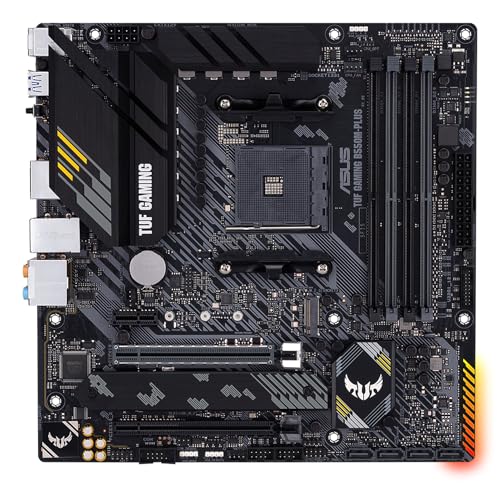
ASUS TUF Gaming B550M-PLUS Micro-ATX
Best for: compact gaming rigs with fast storage needs
- Chipset
- AMD B550 (what this guide is about)
- CPU Socket
- AM4
- Form Factor
- Micro-ATX
- Memory Type
- DDR4
- PCIe Version
- PCIe 4.0
- M.2 Slots
- Dual M.2
View on Amazon: ASUS TUF Gaming B550M-PLUS Micro-ATX Affiliate link
This AMD B550 Micro ATX motherboard supports Ryzen AM4 processors with PCIe 4.0. It features a robust 8+2 DrMOS power solution and dual M.2 slots for storage. The board includes 2.5 Gb Ethernet and Realtek S1200A audio. It suits gamers who want solid durability in a compact form factor without needing full-size ATX dimensions.
Pros
- 8+2 DrMOS power stages for stable voltage delivery
- Dual M.2 slots with PCIe 4.0 support
- 2.5 Gb Ethernet for faster network speeds
- Realtek S1200A codec with 108 dB SNR
Cons
- Micro ATX form factor limits expansion slots
- No built-in Wi-Fi module listed
- AM4 socket supports only Ryzen 3000/5000 series
Good fit if
- You need a compact build with PCIe 4.0 storage
- You want durable TUF components for gaming
- You prefer wired 2.5 Gb Ethernet connections
Skip if
- You require full-size ATX expansion options
- You need integrated Wi-Fi connectivity
- You plan to use Intel processors
Verdict: ASUS TUF Gaming B550M-PLUS Micro ATX delivers reliable performance for Ryzen AM4 builds. It fits users who prioritize network speed and storage bandwidth in a smaller chassis.
Specifications side by side
| Spec | MSI MPG Z390 Gaming Edge AC ATX Motherboard | ASUS TUF Gaming B550M-PLUS Micro-ATX |
|---|---|---|
| CPU Socket | LGA 1151 | AM4 |
| Chipset | Z390 | AMD B550 |
| Form Factor | ATX | Micro-ATX |
| Memory Type | DDR4 | DDR4 |
| PCIe Version | not stated | PCIe 4.0 |
| M.2 Slots | 2 | Dual M.2 |
| Ethernet Speed | not stated | 2.5 Gb |
| Power Phases | not stated | 8+2 |
| Use Case | Gaming | Gaming |
| Dimensions | 12 × 9.6 × 1.2 inches | 9.61 × 1.57 × 9.61 inches |
| Weight | 3.3 pounds | 1.76 pounds |
| Size | ATX | Micro-ATX |
| Model | 007B17-002R | 90MB14A0-M0EAY0 |
| Color | not stated | Black |
Frequently asked questions
Does the Intel Z390 chipset support PCIe 4.0?
No. The MSI MPG Z390 Gaming Edge AC does not list PCIe 4.0 support. It relies on PCIe 3.0 speeds for its expansion slots and storage interfaces. If you need the higher bandwidth of PCIe 4.0, you should look at AMD B550 boards instead. The ASUS TUF Gaming B550M-PLUS explicitly includes PCIe 4.0 capability.
Can I use DDR5 memory on these motherboards?
No. Both the Intel Z390 and AMD B550 motherboards listed here support DDR4 memory only. You will need to purchase DDR4 RAM sticks to work with either board. Neither the MSI Z390 nor the ASUS B550 offers slots for the newer DDR5 standard. Check your existing RAM compatibility before building.
Which board is better for a small PC case?
The ASUS TUF Gaming B550M-PLUS is better for compact builds. It uses a Micro-ATX form factor, which measures 9.61 by 9.61 inches. This smaller footprint fits into mini-tower and small form factor cases. The MSI Z390 is a full ATX board, measuring 12 by 9.6 inches, which requires a larger chassis.
Does the MSI Z390 support Wi-Fi?
Yes. The model name MSI MPG Z390 Gaming Edge AC includes AC Wi-Fi capability. You can connect to wireless networks without adding a separate adapter. The ASUS B550 listing does not explicitly mention Wi-Fi in its attributes. You may need to check the full product page for wireless details on the AMD board.
What CPUs fit the AMD B550 board?
The ASUS TUF Gaming B550M-PLUS uses an AM4 socket. This fits AMD Ryzen processors, including 1st, 2nd, 3rd, and 5000 series models. You can install various Ryzen 5, 7, and 9 CPUs. Ensure your specific Ryzen model is compatible with the BIOS version available at the time of purchase.
Is the MSI Z390 suitable for overclocking?
Yes. The Intel Z390 chipset is designed for overclocking Intel Core processors. The MSI board supports this feature, allowing you to push CPU speeds beyond stock limits. It works with unlocked 8th and 9th Gen Intel chips. You will need a compatible cooler and sufficient power delivery to achieve stable overclocks.