Best ASRock Motherboards with Pcie 5.0: 15 Spec-Based Picks
As an Amazon Associate we earn from qualifying purchases. Links on this page are affiliate links.
Finding the best ASRock motherboards with pcie 5 0 requires checking the exact specifications for your build. We compared 15 models to help you choose. The ASRock PG Lightning DDR5 ATX Motherboard leads this list because it offers a PCIe 5.0 graphics slot alongside 2.5GbE wired networking. These picks are based strictly on the specifications published on the product listings. You will see details for Intel LGA1700 and AMD AM5 sockets across various form factors. This guide helps you decide which board matches your CPU socket, storage needs, and connectivity requirements.
Quick picks
The best fit for you
- You build an Intel LGA1700 system using wired Ethernet ASRock PG Lightning DDR5 ATX Motherboard It features an LGA 1700 socket, PCIe 5.0 expansion, DDR5 compatibility, and a 2.5GbE Ethernet port.
- You want a compact Intel gaming build ASRock Phantom Gaming Mini-ITX DDR5 Motherboard The Mini-ITX form factor includes an LGA 1700 socket, PCIe 5.0 slot, and onboard Wi-Fi 6E.
- You need a compact Micro-ATX AMD AM5 board ASRock Micro-ATX AM5 Motherboard It combines a Micro-ATX form factor with an AM5 CPU socket, DDR5 memory, and PCIe 5.0 storage support.
Our 15 picks
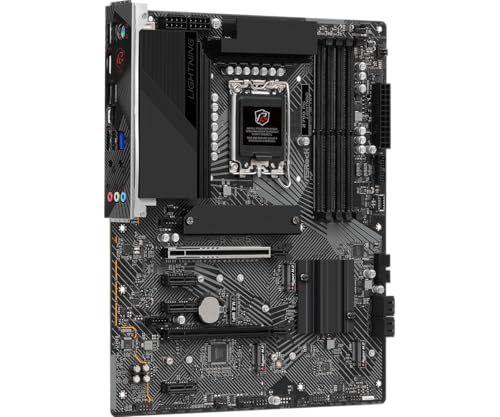
ASRock PG Lightning DDR5 ATX Motherboard
Best for: Intel LGA1700 builds prioritizing PCIe 5.0 graphics
- PCIe Version
- PCIe 5.0 (what this guide is about)
- CPU Socket
- LGA1700
- Chipset
- Z790
- Form Factor
- ATX
- Memory Type
- DDR5
- M.2 Slots
- 4
View on Amazon: ASRock PG Lightning DDR5 ATX Motherboard Affiliate link
This ATX motherboard pairs an Intel LGA1700 socket with a PCIe 5.0 x16 slot for next-generation expansion cards. You get four DDR5 slots supporting up to 256 GB of system memory, alongside four Gen4x4 M.2 sockets and a 2.5 GbE wired LAN port. It suits you if you plan to build an Intel-based desktop system with high-speed memory and fast storage connectivity.
Pros
- One dedicated PCIe 5.0 x16 slot with SMT design
- Four DDR5 DIMM slots supporting up to 256 GB
- Four PCIe Gen4x4 Hyper M.2 storage sockets
- Integrated Dragon RTL8125BG 2.5 GbE LAN
- Rear USB 3.2 Gen2x2 Type-C connectivity
Cons
- No integrated Wi-Fi networking listed
- M.2 storage sockets support PCIe 4.0 rather than PCIe 5.0
Good fit if
- You run a 12th, 13th, or 14th Gen Intel Core processor on an LGA1700 socket.
- You plan to install up to 256 GB of DDR5 system memory.
- You rely on a 2.5 GbE wired network connection.
Skip if
- You need integrated Wi-Fi connectivity without adding an adapter.
- You require PCIe 5.0 bandwidth for your M.2 solid-state drives.
Verdict: ASRock PG Lightning ATX Motherboard delivers PCIe 5.0 graphics bandwidth alongside substantial DDR5 and M.2 storage capacity. It functions as a solid ATX foundation for Intel LGA1700 desktop systems using wired Ethernet.

ASRock Z790 PG Sonic DDR5 Motherboard
Best for: Intel LGA 1700 builds needing PCIe 5.0
- PCIe Version
- PCIe 5.0 (what this guide is about)
- CPU Socket
- LGA1700
- Chipset
- Z790
- Form Factor
- ATX
- Memory Type
- DDR5
- M.2 Slots
- 5
View on Amazon: ASRock Z790 PG Sonic DDR5 Motherboard Affiliate link
The ASRock Z790 PG Sonic DDR5 Motherboard provides an LGA 1700 socket designed for Intel 12th, 13th, and 14th Generation processors. It delivers PCIe 5.0 expansion alongside DDR5 memory support reaching speeds above 7200 MHz under overclocking. Built-in 2.5GbE wired networking handles high-bandwidth local transfers. You will find this board fits your needs if you want modern PCIe 5.0 bandwidth and fast DDR5 memory for an Intel-based desktop build.
Pros
- Supports PCIe 5.0 hardware
- DDR5 memory support rated for 7200+ MHz (OC)
- Equipped with 2.5GbE wired networking
- Compatible with Intel 12th, 13th, and 14th Gen processors
- Features dedicated Lightning Gaming Ports
Cons
- No integrated Wi-Fi listed in specifications
- Restricted to Intel LGA 1700 socket CPUs
Good fit if
- You plan to install an Intel 12th, 13th, or 14th Gen processor.
- You want PCIe 5.0 expansion paired with DDR5 memory.
- You rely on a high-speed 2.5GbE wired network connection.
Skip if
- You need an AMD socket such as AM5.
- You require factory-installed onboard Wi-Fi.
Verdict: ASRock Z790 PG Sonic DDR5 Motherboard delivers PCIe 5.0 compatibility, fast DDR5 overclocking support, and 2.5GbE networking for Intel LGA 1700 processors. It is a solid foundation if your desktop build prioritizes modern expansion standards over integrated wireless.

ASRock Z790 LiveMixer ATX Motherboard
Best for: LGA 1700 builds needing 2.5GbE and DDR5
- PCIe Version
- PCIe 5.0 (what this guide is about)
- CPU Socket
- LGA1700
- Chipset
- Z790
- Form Factor
- ATX
- Memory Type
- DDR5
- Ethernet Speed
- 2.5 GbE
View on Amazon: ASRock Z790 LiveMixer ATX Motherboard Affiliate link
The ASRock Z790 LiveMixer ATX Motherboard gives you PCIe 5.0 connectivity for next-generation expansion cards on the Intel LGA 1700 platform. It accommodates 14th, 13th, and 12th Gen Intel Core processors alongside four DDR5 memory slots handling speeds up to 7200+ (OC) MHz in dual-channel configuration. With integrated 2.5GbE Ethernet and SATA3 6.0 Gb/s support, this board suits builders who want high-speed networking and modern memory standards in a standard ATX build.
Pros
- PCIe 5.0 support for expansion
- Four DDR5 slots up to 7200+ (OC) MHz
- 2.5GbE wired network connectivity
- Compatible with Intel 12th, 13th, and 14th Gen processors
Cons
- No integrated Wi-Fi listed
- Incompatible with DDR4 memory
Good fit if
- You use an Intel 12th, 13th, or 14th Gen LGA 1700 processor.
- You need high-bandwidth networking via a 2.5GbE wired LAN port.
- You plan to run DDR5 memory at speeds up to 7200+ (OC) MHz.
Skip if
- You want built-in Wi-Fi connectivity out of the box.
- You plan to use older DDR4 memory modules.
Verdict: ASRock Z790 LiveMixer ATX Motherboard delivers PCIe 5.0 compatibility, fast 2.5GbE networking, and DDR5 support for modern LGA 1700 Intel processors. It provides a solid foundation if you prioritize wired performance and memory overclocking headroom.

ASRock Z790 Pro RS WiFi ATX
Best for: Intel LGA1700 builds with single PCIe 5.0 GPU
- PCIe Version
- PCIe 5.0 (what this guide is about)
- CPU Socket
- LGA1700
- Chipset
- Z790
- Form Factor
- ATX
- Memory Type
- DDR5
- M.2 Slots
- 4
View on Amazon: ASRock Z790 Pro RS WiFi ATX Affiliate link
The ASRock Z790 Pro RS WiFi is an ATX motherboard for Intel 14th, 13th, and 12th Gen processors. It features one PCIe 5.0 x16 slot for future graphics cards. The board includes a 14+1+1 phase power design and supports DDR5 memory up to 7200+ MHz. It offers WiFi 6E and 2.5G LAN for connectivity. This model suits users seeking stable performance with modern expansion options.
Pros
- One PCIe 5.0 x16 slot for next-gen GPUs
- 14+1+1 phase power design with Dr.MOS technology
- DDR5 memory support up to 7200+ MHz
- WiFi 6E and 2.5G LAN connectivity
Cons
- PCIe 5.0 support is limited to one x16 slot
- Audio codec is Realtek ALC897, a lower-tier option
- Four M.2 slots is fewer than some competitors
Good fit if
- You need a reliable ATX board for Intel LGA1700 CPUs
- You want PCIe 5.0 support for future graphics cards
- You require WiFi 6E and 2.5G LAN connectivity
Skip if
- You need multiple PCIe 5.0 slots for multi-GPU setups
- You prefer higher-end audio codecs than ALC897
- You need more than four M.2 storage slots
Verdict: ASRock Z790 Pro RS WiFi ATX delivers solid specs for Intel users. It fits builders who prioritize a single PCIe 5.0 slot and modern networking over expanded storage or premium audio.

ASRock B760 Pro RS ATX DDR5
Best for: Intel 12th-14th Gen builds needing PCIe 5.0
- PCIe Version
- PCIe 5.0 (what this guide is about)
- CPU Socket
- LGA1700
- Chipset
- B760
- Form Factor
- ATX
- Memory Type
- DDR5
- Ethernet Speed
- 2.5G LAN
View on Amazon: ASRock B760 Pro RS ATX DDR5 Affiliate link
The ASRock B760 Pro RS is an ATX motherboard built for Intel 14th, 13th, and 12th Gen processors. It features a 10+1+1 power phase design and supports DDR5 memory speeds up to 7200 MHz with overclocking. The board includes a PCIe 5.0 x16 slot for future graphics cards and provides 2.5GbE LAN connectivity. This setup offers a solid foundation for mainstream gaming and productivity tasks.
Pros
- Supports DDR5 memory up to 7200 MHz (OC)
- Includes one PCIe 5.0 x16 slot
- Features a 10+1+1 power phase configuration
- Equipped with 2.5GbE LAN
Cons
- B760 chipset limits CPU overclocking compared to Z-series boards
- No built-in Wi-Fi or Bluetooth modules listed in specifications
Good fit if
- You are building a system with an Intel 12th, 13th, or 14th Gen processor
- You prioritize wired 2.5GbE network speeds over wireless connectivity
- You want PCIe 5.0 support for your primary graphics card
Skip if
- You need native Wi-Fi or Bluetooth without adding a separate card
- You plan to overclock your Intel CPU beyond stock settings
- You prefer a micro-ATX form factor for a smaller case
Verdict: The ASRock B760 Pro RS ATX Motherboard is a practical pick for users who need PCIe 5.0 speed and strong DDR5 support without the premium price of a Z-series board. It fits builders who value wired networking and stable power delivery for Intel 12th through 14th Gen CPUs.

ASRock Micro-ATX AM5 Motherboard
Best for: compact AMD AM5 builds needing PCIe 5.0 storage
- PCIe Version
- PCIe 5.0 (what this guide is about)
- CPU Socket
- AM5
- Chipset
- B650
- Form Factor
- Micro-ATX
- Memory Type
- DDR5
- Ethernet Speed
- Gigabit
View on Amazon: ASRock Micro-ATX AM5 Motherboard Affiliate link
This micro-ATX board gives you an entry point to the AM5 platform with PCIe 5.0 storage support. You get one PCIe Gen5x4 M.2 slot for high-speed NVMe drives, alongside a PCIe 4.0 slot and four SATA3 ports. Two DDR5 slots handle system memory up to 6400 MHz. It suits you if you want a compact build with modern storage speeds for AMD Ryzen 7000, 8000, or 9000 series processors.
Pros
- One Blazing M.2 PCIe Gen5x4 slot for fast storage
- Supports AMD AM5 Ryzen 9000, 8000, and 7000 series processors
- Two DDR5 memory slots supporting up to 6400+ (OC)
- Includes BIOS Flashback for easy firmware updates
Cons
- Only two DDR5 memory slots
- Standard 1GbE Ethernet instead of multi-gigabit networking
- Entry 6+1+1 power phase design
Good fit if
- You need a PCIe 5.0 M.2 slot in a micro-ATX chassis.
- You run an AMD Ryzen 7000, 8000, or 9000 processor with two memory modules.
- You want basic wired networking with standard 1GbE speeds.
Skip if
- You require four memory slots for larger DDR5 configurations.
- You need multi-gigabit networking beyond 1GbE speeds.
- You plan heavy overclocking that requires more power phases.
Verdict: ASRock Micro-ATX AM5 Motherboard provides essential PCIe 5.0 NVMe storage support and DDR5 performance in a compact layout. It serves as a focused foundation for AMD Ryzen builds without unneeded extras.

ASRock Z790 Lightning Wi-Fi Motherboard
Best for: Intel LGA 1700 builds needing PCIe 5.0
- PCIe Version
- PCIe 5.0 (what this guide is about)
- CPU Socket
- LGA1700
- Memory Type
- DDR5
- M.2 Slots
- 3
- Wi-Fi Standard
- WiFi 6E
- Ethernet Speed
- 2.5G LAN
View on Amazon: ASRock Z790 Lightning Wi-Fi Motherboard Affiliate link
The ASRock Z790 Lightning WiFi is an LGA 1700 motherboard built for Intel 14th, 13th, and 12th Gen processors. For your graphics setup, you get a high-speed PCIe 5.0 x16 slot alongside four DDR5 memory slots supporting up to 7600+ MHz. It also features Killer 2.5G LAN and Wi-Fi 6E for fast networking. This board suits you if you want next-generation GPU bandwidth and DDR5 support on an Intel system.
Pros
- PCIe 5.0 x16 slot for modern expansion cards
- Killer 2.5G LAN and Killer Wi-Fi 6E connectivity
- Four DDR5 DIMM slots supporting up to 7600+ (OC)
- USB 3.2 Gen2x2 Type-C port offering 20Gbps speeds
Cons
- M.2 storage slots run at PCIe 4.0 speeds rather than PCIe 5.0
- Uses entry-level Realtek ALC897 audio codec
- Lacks newer Wi-Fi 7 wireless connectivity
Good fit if
- You need a PCIe 5.0 x16 slot for an Intel LGA 1700 processor build.
- You plan to run high-speed DDR5 memory up to 7600+ MHz.
- You want integrated 2.5GbE Ethernet alongside Wi-Fi 6E.
Skip if
- You require a PCIe 5.0 M.2 slot for ultra-fast solid-state drives.
- You are building an AMD AM5 processor configuration.
- You want a higher-tier integrated audio codec.
Verdict: ASRock Z790 Lightning WiFi Motherboard delivers a PCIe 5.0 x16 slot, DDR5 compatibility, and 2.5G networking for Intel LGA 1700 systems. It provides balanced modern connectivity, though solid-state storage tops out at PCIe 4.0 speeds.

ASRock Phantom Gaming Mini-ITX DDR5 Motherboard
Best for: compact Intel LGA1700 small-form-factor gaming builds
- PCIe Version
- PCIe 5.0 (what this guide is about)
- CPU Socket
- LGA1700
- Chipset
- Z790
- Form Factor
- Mini-ITX
- Memory Type
- DDR5
- M.2 Slots
- 2
View on Amazon: ASRock Phantom Gaming Mini-ITX DDR5 Motherboard Affiliate link
This Mini-ITX motherboard brings Intel LGA1700 socket support and a high-bandwidth PCIe 5.0 x16 slot to compact builds. It features a 14+1+1 phase power design with 110A SPS, handles DDR5 memory speeds up to 8600+ (OC) MHz across two DIMMs, and includes Wi-Fi 6E alongside 2.5G LAN. If you plan to assemble a small-form-factor gaming PC with full-size graphics bandwidth and high-speed memory support, this board fits your requirements.
Pros
- PCIe 5.0 x16 expansion slot with 15µ gold contacts
- 14+1+1 phase power design with 110A SPS and enlarged heatsink armor
- Supports DDR5 memory up to 8600+ (OC) MHz
- Phantom Gaming 2.5G LAN, Wi-Fi 6E, and Bluetooth 5.3 networking
- Dual Hyper M.2 slots with NVMe RAID 0, 1, 5, and 10 support
Cons
- Hyper M.2 storage slots run at PCIe Gen4x4 rather than Gen5 speeds
- Limited to two memory slots with a 128GB maximum capacity
- Provides only three SATA3 connectors for traditional storage drives
Good fit if
- You are building a compact small-form-factor PC requiring a PCIe 5.0 x16 GPU slot.
- You need a 14+1+1 phase VRM with 110A SPS for an LGA1700 Intel processor.
- You plan to run high-speed DDR5 memory up to 8600+ (OC) MHz.
Skip if
- You require PCIe 5.0 transfer speeds on your M.2 NVMe storage drives.
- You need four DIMM slots or more than 128GB of system memory.
- You plan to use more than one PCIe expansion card or more than three SATA drives.
Verdict: ASRock Phantom Gaming Mini-ITX Motherboard provides a PCIe 5.0 x16 slot and robust 14+1+1 phase power delivery in a compact 6.7-inch footprint. It is a focused choice if you want top-tier Intel LGA1700 hardware inside a small-form-factor chassis.

ASRock Z890 Riptide WiFi ATX Motherboard
Best for: Intel Core Ultra Wi-Fi 7 builds
- PCIe Version
- PCIe 5.0 (what this guide is about)
- CPU Socket
- LGA1851
- Chipset
- Z890
- Form Factor
- ATX
- Memory Type
- DDR5
- M.2 Slots
- 5
View on Amazon: ASRock Z890 Riptide WiFi ATX Motherboard Affiliate link
This ATX motherboard features PCIe 5.0 support alongside the LGA1851 socket designed for Intel Core Ultra Series 2 processors. You get built-in Wi-Fi 7 connectivity, an 18+1+1+1+1 power phase design with 80A SPS, and five M.2 sockets for fast internal storage expansion. It handles dual-channel DDR5 memory up to 9066 MHz across four DIMM slots. This board suits you if you plan a modern Intel desktop build focused on high-speed hardware.
Pros
- Supports Intel Core Ultra Series 2 processors via LGA1851 socket
- PCIe 5.0 support and five onboard M.2 sockets
- Dual-channel DDR5 support up to 9066+ MHz overclocked
- Built-in Wi-Fi 7 wireless networking
Cons
- LGA1851 socket is not compatible with Intel LGA1700 or AMD CPUs
- ATX form factor does not fit smaller Micro-ATX or Mini-ITX cases
- Requires DDR5 memory and cannot use DDR4 modules
Good fit if
- You are building a desktop with an Intel Core Ultra Series 2 processor
- You need five M.2 sockets for extensive solid-state storage
- You want built-in Wi-Fi 7 wireless connectivity
Skip if
- You plan to use an AMD processor or an older Intel LGA1700 chip
- You are building inside a compact Micro-ATX or Mini-ITX chassis
- You want to reuse an existing DDR4 memory kit
Verdict: ASRock Z890 Riptide WiFi ATX Motherboard pairs LGA1851 socket compatibility with PCIe 5.0, five M.2 slots, and Wi-Fi 7. It delivers high-bandwidth expansion and a 18+1+1+1+1 power phase design for modern Intel builds.

ASRock B850 Steel Legend WiFi ATX Motherboard
Best for: AMD AM5 builds needing PCIe 5.0 storage
- PCIe Version
- PCIe 5.0 (what this guide is about)
- CPU Socket
- AM5
- Chipset
- B850
- Form Factor
- ATX
- Memory Type
- DDR5
- M.2 Slots
- 4
View on Amazon: ASRock B850 Steel Legend WiFi ATX Motherboard Affiliate link
This ATX motherboard provides an AMD AM5 socket designed for Ryzen 9000, 8000, and 7000 series processors. For bandwidth-heavy builds, you get one PCIe 5.0 x16 expansion slot alongside a dedicated PCIe 5.0 x4 M.2 slot for high-speed storage. Built-in Wi-Fi 7 and 2.5GbE networking deliver modern connection speeds. It suits builders who want current AM5 hardware, dual PCIe 5.0 support, and high-speed wireless networking without needing extra expansion cards.
Pros
- PCIe 5.0 support on both the primary x16 slot and one M.2 slot
- Built-in Wi-Fi 7 and 2.5GbE wired networking
- 14+2+1 phase power design with 80A Dr.MOS
- Four total M.2 slots and four SATA3 connectors
Cons
- Only one of the four M.2 slots operates at PCIe 5.0 speeds
- ATX form factor does not fit compact Micro-ATX or Mini-ITX cases
Good fit if
- You need PCIe 5.0 speeds for both a graphics card and an NVMe drive.
- You are building an AMD AM5 system with Ryzen 9000, 8000, or 7000 series CPUs.
- You want integrated Wi-Fi 7 and 2.5GbE LAN without add-in cards.
Skip if
- You plan to use an Intel processor.
- You are assembling a compact Micro-ATX or Mini-ITX PC.
- You require more than one PCIe 5.0 M.2 storage slot.
Verdict: ASRock Steel Legend WiFi ATX Motherboard provides PCIe 5.0 throughput across both GPU and storage slots alongside fast Wi-Fi 7 connectivity. It serves as a well-rounded foundation for modern AMD AM5 desktop configurations.

ASRock B860M Pro RS WiFi Motherboard
Best for: compact Intel LGA1851 PCIe 5.0 builds
- PCIe Version
- PCIe 5.0 (what this guide is about)
- CPU Socket
- LGA1851
- Form Factor
- Micro ATX
- Memory Type
- DDR5
- Wi-Fi Standard
- WiFi 6E
View on Amazon: ASRock B860M Pro RS WiFi Motherboard Affiliate link
This Micro-ATX board supports Intel Core Ultra processors on the LGA1851 socket. You get high-speed PCIe 5.0 data rates via a Blazing M.2 slot, alongside four DDR5 DIMM slots handling up to 256GB of memory at 8666+ MHz. Integrated Wi-Fi 6E and Realtek ALC1220 audio cover networking and sound needs without add-in cards. It suits you if you want a compact build with fast storage bandwidth and high-frequency memory.
Pros
- PCIe Gen5 x4 Blazing M.2 slot
- Four DDR5 slots supporting up to 256GB and 8666+ MHz (OC)
- Realtek ALC1220 7.1-channel HD audio with Nahimic Audio
- Integrated Wi-Fi 6E wireless networking
Cons
- Micro-ATX form factor provides fewer expansion options than full ATX
- Includes Wi-Fi 6E rather than Wi-Fi 7
Good fit if
- You need PCIe 5.0 M.2 storage speeds inside a Micro-ATX case.
- You want high-capacity DDR5 support up to 256GB on the LGA1851 platform.
Skip if
- You require the larger footprint and slot capacity of a standard ATX motherboard.
- You want the newer Wi-Fi 7 wireless standard.
Verdict: ASRock Pro RS Micro ATX Intel Motherboard delivers PCIe 5.0 M.2 storage and DDR5 memory speeds up to 8666+ MHz in a space-saving design. It handles core connectivity needs well with onboard Wi-Fi 6E and dual display outputs.

ASRock B650M Pro X3D WiFi 6E
Best for: compact Ryzen X3D gaming builds
- PCIe Version
- PCIe 5.0 (what this guide is about)
- CPU Socket
- AM5
- Form Factor
- Micro-ATX
- Memory Type
- DDR5
- M.2 Slots
- 3
- Wi-Fi Standard
- WiFi 6E
View on Amazon: ASRock B650M Pro X3D WiFi 6E Affiliate link
This Micro-ATX board targets AMD Ryzen X3D CPUs with an 8+2+1 phase power design. It includes one PCIe 5.0 x16 slot and one PCIe 5.0 M.2 slot for high-speed components. You get DDR5 support up to 8000+ MHz and WiFi 6E connectivity. The compact 9.61-inch footprint fits smaller cases while maintaining robust thermal management for modern hardware.
Pros
- 8+2+1 phase power delivery for stable operation
- Dual PCIe 5.0 slots for GPU and storage
- DDR5 support up to 8000+ MHz overclock
- WiFi 6E and 2.5GbE LAN included
Cons
- Micro-ATX form factor limits expansion slots
- Realtek ALC897 codec offers basic audio quality
- Smaller chassis restricts multi-GPU configurations
Good fit if
- You use Ryzen X3D processors for gaming
- You need PCIe 5.0 for future GPUs
- You build in compact Micro-ATX cases
Skip if
- You require full ATX expansion space
- You prefer premium audio codecs
- You need extensive M.2 storage slots
Verdict: ASRock B650M Pro X3D Micro-ATX suits gamers using Ryzen X3D chips who want PCIe 5.0 in a compact build. It delivers strong power delivery and connectivity for small form factor systems.

ASRock Micro-ATX AM5 Wi-Fi 6E Motherboard
Best for: compact AM5 builds needing PCIe 5.0 storage
- PCIe Version
- PCIe 5.0 (what this guide is about)
- CPU Socket
- AM5
- Chipset
- AMD B850
- Form Factor
- Micro-ATX
- Memory Type
- DDR5
- M.2 Slots
- 2
View on Amazon: ASRock Micro-ATX AM5 Wi-Fi 6E Motherboard Affiliate link
This ASRock micro-ATX board supports AMD AM5 Ryzen 9000, 8000, and 7000 series processors. You get one PCIe 5.0 x16 slot for your graphics card alongside a Gen5x4 Blazing M.2 slot for high-speed storage. It also includes built-in Wi-Fi 6E and a 2.5G Ethernet port. This board suits you if you want a compact build with modern DDR5 memory support up to 8200+ MHz and current-generation expansion options without moving to full ATX.
Pros
- One PCIe 5.0 x16 expansion slot
- Blazing M.2 slot with PCIe Gen5x4 bandwidth
- Realtek 2.5G LAN and Wi-Fi 6E connectivity
- Two USB 3.2 Gen1 Type-C ports across rear and front
Cons
- Only two DDR5 DIMM slots
- Limited to two M.2 storage slots
Good fit if
- You want PCIe 5.0 graphics and NVMe support in a micro-ATX case.
- You need integrated Wi-Fi 6E and 2.5G Ethernet networking.
- You plan to run an AM5 processor with a two-stick DDR5 configuration.
Skip if
- You require four DDR5 DIMM slots for high-capacity memory setups.
- You need more than two M.2 NVMe drives installed directly on the board.
Verdict: ASRock AM5 Micro-ATX PCIe 5.0 Motherboard provides essential PCIe 5.0 lanes for graphics and storage in a compact form factor. It gives you 2.5G networking and DDR5 support while limiting memory capacity to two slots.

ASRock X870 Pro-A WiFi ATX Motherboard
Best for: AM5 systems needing PCIe 5.0 and USB4
- PCIe Version
- PCIe 5.0 (what this guide is about)
- CPU Socket
- AM5
- Form Factor
- ATX
- Memory Type
- DDR5
- M.2 Slots
- 3
- Wi-Fi Standard
- Wi-Fi 7
View on Amazon: ASRock X870 Pro-A WiFi ATX Motherboard Affiliate link
This ATX motherboard is built for AMD AM5 processors across the Ryzen 9000, 8000, and 7000 series. For high-speed hardware, it provides a PCIe 5.0 x16 expansion slot and a dedicated PCIe Gen5x4 Blazing M.2 slot for storage. With integrated Wi-Fi 7, dual rear USB4 Type-C ports, and four DDR5 slots, it suits you if you want current connectivity standards on an AMD platform.
Pros
- PCIe 5.0 x16 slot for modern graphics cards
- Dedicated PCIe Gen5x4 M.2 slot for high-speed NVMe storage
- Dual rear USB4 Type-C ports and Wi-Fi 7 connectivity
- 16+2+1 power phase design with 80A Dr.MOS
Cons
- Uses entry-level Realtek ALC897 audio codec
- Third M.2 slot is limited to PCIe Gen3x2 or SATA3 speeds
Good fit if
- You need PCIe 5.0 support for both an expansion card and an NVMe SSD.
- You want high-speed networking with onboard Wi-Fi 7 and 2.5GbE LAN.
- You plan to build using an AMD Socket AM5 processor.
Skip if
- You need an Intel LGA socket processor build.
- You require more than one PCIe Gen5 M.2 storage slot.
Verdict: ASRock X870 Pro-A WiFi ATX Motherboard delivers PCIe 5.0 expansion, high-speed Gen5 storage, and Wi-Fi 7 for AMD AM5 systems. It provides balanced connectivity with dual USB4 ports and robust power delivery.

ASRock B650M-HDV M.2 White Micro-ATX Motherboard
Best for: compact white AMD AM5 builds
- PCIe Version
- PCIe 5.0 (what this guide is about)
- CPU Socket
- AM5
- Form Factor
- Micro-ATX
- Memory Type
- DDR5
- M.2 Slots
- 2
- Ethernet Speed
- 2.5 GbE
View on Amazon: ASRock B650M-HDV M.2 White Micro-ATX Motherboard Affiliate link
This Micro-ATX AM5 motherboard offers a PCIe 5.0 x16 slot and a PCIe 5.0 M.2 storage slot on a compact white board. You get support for AMD Ryzen 7000, 8000, and 9000 series processors, DDR5 memory up to 8200 MHz, and 2.5 Gbps Ethernet. It suits you if you want a compact AMD AM5 setup with next-generation expansion capability and high-speed networking.
Pros
- PCIe 5.0 x16 expansion slot and PCIe Gen5x4 M.2 storage slot
- Realtek 2.5G LAN alongside front and rear USB 3.2 Gen2 Type-C
- 8+2+1 phase Dr.MOS power design with AM5 processor support
- Dedicated BIOS Flashback button for firmware maintenance
Cons
- No pre-installed Wi-Fi module included with the board
- Limited to two total M.2 solid-state drive slots
Good fit if
- You need PCIe 5.0 support for your graphics card and primary SSD in a Micro-ATX case.
- You plan to build with an AMD AM5 processor and high-frequency DDR5 memory.
- You prefer a white motherboard design for your desktop build.
Skip if
- You require built-in Wi-Fi straight out of the box without adding a Key E module.
- You need more than two M.2 NVMe storage drives installed simultaneously.
Verdict: ASRock B650M-HDV White Micro-ATX Motherboard brings PCIe 5.0 expansion and 2.5GbE networking to compact AM5 setups. It delivers essential modern connectivity in a streamlined white form factor.
Specifications side by side
| Spec | ASRock PG Lightning DDR5 ATX Motherboard | ASRock Z790 PG Sonic DDR5 Motherboard | ASRock Z790 LiveMixer ATX Motherboard | ASRock Z790 Pro RS WiFi ATX | ASRock B760 Pro RS ATX DDR5 | ASRock Micro-ATX AM5 Motherboard | ASRock Z790 Lightning Wi-Fi Motherboard | ASRock Phantom Gaming Mini-ITX DDR5 Motherboard | ASRock Z890 Riptide WiFi ATX Motherboard | ASRock B850 Steel Legend WiFi ATX Motherboard | ASRock B860M Pro RS WiFi Motherboard | ASRock B650M Pro X3D WiFi 6E | ASRock Micro-ATX AM5 Wi-Fi 6E Motherboard | ASRock X870 Pro-A WiFi ATX Motherboard | ASRock B650M-HDV M.2 White Micro-ATX Motherboard |
|---|---|---|---|---|---|---|---|---|---|---|---|---|---|---|---|
| CPU Socket | LGA1700 | LGA1700 | LGA1700 | LGA1700 | LGA1700 | AM5 | LGA1700 | LGA1700 | LGA1851 | AM5 | LGA1851 | AM5 | AM5 | AM5 | AM5 |
| Chipset | Z790 | Z790 | Z790 | Z790 | B760 | B650 | not stated | Z790 | Z890 | B850 | not stated | not stated | AMD B850 | not stated | not stated |
| Form Factor | ATX | ATX | ATX | ATX | ATX | Micro-ATX | not stated | Mini-ITX | ATX | ATX | Micro ATX | Micro-ATX | Micro-ATX | ATX | Micro-ATX |
| Memory Type | DDR5 | DDR5 | DDR5 | DDR5 | DDR5 | DDR5 | DDR5 | DDR5 | DDR5 | DDR5 | DDR5 | DDR5 | DDR5 | DDR5 | DDR5 |
| PCIe Version | PCIe 5.0 | PCIe 5.0 | PCIe 5.0 | PCIe 5.0 | PCIe 5.0 | not stated | PCIe 5.0 | PCIe 5.0 | PCIe 5.0 | PCIe 5.0 | PCIe 5.0 | PCIe 5.0 | PCIe 5.0 | PCIe 5.0 | PCIe 5.0 |
| M.2 Slots | 4 | 5 | not stated | 4 | not stated | not stated | 3 | 2 | 5 | 4 | not stated | 3 | 2 | 3 | 2 |
| Wi-Fi Standard | not stated | not stated | not stated | WiFi 6E | not stated | not stated | WiFi 6E | Wi-Fi 6E | Wi-Fi 7 | WiFi 7 | WiFi 6E | WiFi 6E | Wi-Fi 6E | Wi-Fi 7 | not stated |
| Ethernet Speed | 2.5 GbE | 2.5 Gigabit | 2.5 GbE | 2.5G LAN | 2.5G LAN | Gigabit | 2.5G LAN | 2.5G | not stated | 2.5G LAN | not stated | 2.5G LAN | 2.5 GbE | 2.5GbE | 2.5 GbE |
| Power Phases | 14+1+1 | 14+1+1 | not stated | 14+1+1 | 10+1+1 | 6+1+1 | 16+1+1 | 14+1+1 | 18+1+1+1+1 | 14+2+1 | not stated | 8+2+1 | 6+1+1 | 16+2+1 | 8+2+1 |
| Wi-Fi | not stated | not stated | not stated | Wi-Fi 6E | not stated | not stated | Wi-Fi 6E | Wi-Fi 6E | Wi-Fi 7 | Wi-Fi 7 | Wi-Fi 6E | Wi-Fi 6E | Wi-Fi 6E | Wi-Fi 7 | not stated |
| Use Case | not stated | not stated | not stated | not stated | not stated | not stated | not stated | Gaming | Gaming | not stated | not stated | not stated | not stated | not stated | not stated |
| Dimensions | 12 × 15.9 × 1.22 inches | 19.7 × 19.7 × 11 inches | 1.1 × 9.7 × 6.5 inches | 1.2 × 0.96 × 1.1 inches | 1.1 × 9.7 × 6.5 inches | 19.7 × 19.7 × 11 inches | 5.91 × 6.3 × 1.97 inches | not stated | 14 × 11 × 3 inches | not stated | not stated | 9.61 × 96.1 × 1.57 inches | 9.45 × 9.45 × 1.57 inches | 12.2 × 10.6 × 1.97 inches | 9.6 × 1.77 × 9.6 inches |
| Weight | 3.09 pounds | 4.41 pounds | 2.2 pounds | 2.65 pounds | 2.65 pounds | 2.16 pounds | not stated | not stated | 3.75 pounds | 4 pounds | not stated | 1.9 pounds | 2.2 pounds | 3.97 pounds | 2.6 pounds |
| Model | Z790 PG LIGHTNING | 90-MXBKF0-A0UAYZ | 90-MXBK10-A0UAYZ | 90-MXBL50-A0UAYZ | B760 PRO RS | B650M-HM2 | Z790 Lightning WiFi | Z790ILIGHTNINGWIFI | Z890 RIPTIDE WIFI | B850 STEEL LEGEND WIFI | B860M Pro RS WiFi | B650M Pro X3D WiFi | B850M-X WIFI R2.0 | X870 Pro-A WiFi | 90-MXBT40-A0UAYAZ |
| Color | not stated | Black | Black | not stated | Multicolor | Black | not stated | not stated | not stated | Multicolor | Multicolor | not stated | Multicolour | not stated | White |
| Size | not stated | not stated | ATX | ATX | not stated | Micro ATX | not stated | Mini ITX | ATX | ATX | Micro ATX | not stated | R2.0 | ATX | Micro ATX |
If you need hardware that matches this expansion slot, you can compare the best graphics cards with pcie 5 0 for your build.
How to Choose a PCIe 5.0 Motherboard
-
Select the Right Form Factor
Check your computer case dimensions before choosing a motherboard size. Standard ATX boards offer full expansion headroom across multiple slots for components. Micro-ATX options reduce vertical height while maintaining balanced connectivity for compact mid-tower enclosures. Mini-ITX models, such as the ASRock Phantom Gaming Mini-ITX DDR5 Motherboard, measure around 6.7 inches for dedicated small-form-factor builds. Always review your chassis specifications to verify standoff locations, card clearances, and physical compartment spacing. Choosing the appropriate form factor prevents mounting conflicts during assembly and preserves proper airflow inside your system.
-
Verify PCIe 5.0 Slot Destinations
Examine how each motherboard distributes its PCIe 5.0 bandwidth across system slots. Some models provide a PCIe 5.0 x16 slot dedicated entirely to high-speed graphics cards, while their M.2 solid-state storage runs at PCIe 4.0 speeds. Other motherboards provide PCIe 5.0 routing directly to primary M.2 storage slots for ultra-fast NVMe drives. If you want maximum throughput across both graphics hardware and internal solid-state drives simultaneously, select a board like the ASRock B850 Steel Legend WiFi ATX Motherboard. Always match board slot assignments to your planned hardware components.
-
Assess Integrated Wi-Fi Standards
Wireless networking specifications vary substantially across motherboard lineups. Models without onboard wireless require wired cables or separate add-in cards. If wireless connectivity is essential, compare the supported generation. Basic motherboards may feature older Wi-Fi 5, whereas modern alternatives incorporate Wi-Fi 6E or cutting-edge Wi-Fi 7. A board like the ASRock Z890 Riptide WiFi ATX Motherboard includes integrated Wi-Fi 7 for compatible wireless routers. Verify your local network equipment before selecting a model. Matching your motherboard to your home wireless infrastructure ensures you achieve the intended wireless speed and signal stability.
-
Compare Wired Ethernet Speeds
Review the onboard LAN controller specifications if your system relies on physical network cabling. Many modern ASRock motherboards feature 2.5GbE network controllers, which deliver more than double the bandwidth of standard Gigabit ports. This extra throughput benefits high-speed local network file transfers, network attached storage backups, and multi-gigabit broadband tiers. However, baseline models like the ASRock Micro-ATX AM5 Motherboard provide standard 1GbE Ethernet. If your home network switches and routers only support standard Gigabit speeds, a 1GbE port satisfies daily internet tasks without requiring upgraded networking gear.
-
Check Memory Slot Quantities
Inspect the number of physical RAM slots on the circuit board. Full-sized ATX and select micro-ATX boards generally supply four DIMM slots, letting you expand overall memory capacity later by adding extra modules. In contrast, compact boards like the ASRock Micro-ATX AM5 Wi-Fi 6E Motherboard feature two memory slots. Dual-slot layouts limit future expansion capacity, requiring you to replace existing sticks rather than adding new ones when upgrading. If your workflows require substantial system memory or future additions, choose a motherboard that includes four memory slots from the start.
-
Review External Peripheral Connectivity
Look closely at the rear input and output configurations before buying. Advanced desktop motherboards, such as the ASRock X870 Pro-A WiFi ATX Motherboard, provide specialized dual USB4 connectivity for high-speed external storage drives and high-bandwidth peripherals. Other models prioritize onboard display ports like HDMI and DisplayPort, which are necessary if you run integrated graphics rather than a dedicated discrete graphics card. Determine your peripheral demands, external storage drives, and monitor connection requirements ahead of time to confirm the motherboard rear panel accommodates your setup without requiring external adapters.
Frequently asked questions
Do ASRock PCIe 5.0 motherboards support PCIe 4.0 graphics cards?
Yes, PCIe 5.0 expansion slots are backward compatible with PCIe 4.0 and PCIe 3.0 graphics cards. You can install an older GPU into boards like the ASRock PG Lightning DDR5 ATX Motherboard without bandwidth bottlenecks. The interface automatically negotiates the fastest transfer speed supported by both your motherboard and graphics card.
Which ASRock PCIe 5.0 motherboards feature Wi-Fi 7?
Several ASRock models include integrated Wi-Fi 7 for wireless networking. You can select the ASRock Z890 Riptide WiFi ATX Motherboard for modern Intel processors, or choose options like the ASRock B850 Steel Legend WiFi, X870 Pro-A WiFi, and B650 Rock WiFi 7 for AMD AM5 platforms. These motherboards also feature fast 2.5GbE wired ports.
Can you find an ASRock PCIe 5.0 motherboard in a Mini-ITX form factor?
Yes, you can choose the ASRock Phantom Gaming Mini-ITX DDR5 Motherboard for compact systems. It fits Intel LGA 1700 processors and provides a PCIe 5.0 x16 slot in a small 6.7-inch frame. It also includes Wi-Fi 6E connectivity and a 14+1+1 phase power design to support high-performance components inside small desktop enclosures.
Do all ASRock PCIe 5.0 motherboards require DDR5 RAM?
Most ASRock PCIe 5.0 models use DDR5 memory, but specific options support DDR4 instead. The ASRock Z690-C/ac ATX Motherboard runs standard DDR4 memory on the Intel LGA 1700 socket while still providing a PCIe 5.0 slot. Additionally, options like the ASRock H610M Combo II offer memory flexibility for builders who want PCIe 5.0 expansion with older modules.
Which ASRock AM5 motherboards support PCIe 5.0 for storage?
Several AMD AM5 models in this lineup provide PCIe 5.0 speeds for storage drives. The ASRock B850 Steel Legend WiFi and ASRock X870 Pro-A WiFi ATX boards support PCIe 5.0 storage and expansion. If you prefer smaller cases, the Micro-ATX ASRock B650M-HM2 and B850M-X WiFi R2.0 also feature dedicated PCIe 5.0 lanes for high-speed NVMe drives.
What wired Ethernet speeds are available on ASRock PCIe 5.0 motherboards?
Most ASRock PCIe 5.0 motherboards come equipped with 2.5GbE Ethernet controllers. Models like the ASRock Z790 PG Lightning, Z790 PG Sonic, and B650M-HDV M.2 deliver wired speeds up to 2.5 Gbps. If your network uses basic Gigabit hardware, entry boards like the ASRock B650M-HM2 include standard 1GbE ports to cover essential wired connectivity.
How many M.2 slots does the ASRock Z890 Riptide WiFi offer?
The ASRock Z890 Riptide WiFi ATX Motherboard features five onboard M.2 slots for high-speed storage. Built for Intel Core Ultra LGA1851 processors, it pairs PCIe 5.0 expansion with substantial storage capacity. The board also provides an 18+1+1+1+1 power phase design, integrated Wi-Fi 7 wireless networking, and full ATX space for multiple desktop hardware components.