ASUS TUF Gaming AM4 ATX Motherboard Review: Who It Fits and Who Should Skip It
As an Amazon Associate we earn from qualifying purchases. Links on this page are affiliate links.
This asus tuf gaming am4 atx motherboard review focuses on the ASUS TUF Gaming X570-Plus. It is built for AMD AM4 processors, supporting both Zen 3 Ryzen 5000 and 3rd Gen Ryzen CPUs. The board features an AMD X570 chipset and offers PCIe 4.0 connectivity. It includes dual M.2 slots for fast storage. The power delivery uses a 12+2 phase design with military-grade components. These specs define its role as a durable gaming platform. You get comprehensive cooling options and reliable networking. This guide explains how these features impact your build.
What stands out
- Supports AMD AM4 socket with PCIe 4.0 for Zen 3 Ryzen 5000 and 3rd Gen Ryzen CPUs
- 12+2 power phase design with military-grade TUF Gaming components and Digi+ VRM
- Dual PCIe 4.0 M.2 slots with dedicated heatsinks for thermal management
- Relate S1200A audio codec with 108dB SNR for stereo line-out and 103dB SNR for line-in
Who it fits
Good fit for
This motherboard suits gamers building on the AM4 platform who want PCIe 4.0 speed. It fits users who need robust power delivery for Ryzen 5000 or 3rd Gen processors. The dual M.2 slots appeal to those requiring high-speed storage without sacrificing other expansion slots. Gamers who value audio quality will appreciate the high SNR audio codec. The TUF Gaming durability makes it a solid choice for long-term reliability in a standard ATX case.
Who should skip it
You should look elsewhere if you plan to use AMD AM5 CPUs, as this board uses the AM4 socket. Users needing more than two M.2 slots will find the two slots limiting. If you require 10Gb Ethernet, the Gigabit port may not suffice. Those seeking DDR5 memory support should avoid this platform. Buyers looking for the latest AM5 features or newer socket types will not find compatibility here. This is a mature platform, not a next-gen solution.
Verdict: The ASUS TUF Gaming X570-Plus is a solid, durable choice for AM4 Ryzen builds. It delivers reliable PCIe 4.0 performance and strong power delivery for gaming.
Key specs explained for this board
AMD X570 Chipset
The X570 is AMD’s high-end desktop chipset. It provides native support for PCIe 4.0 lanes, which doubles the bandwidth compared to previous generations. This allows for faster data transfer speeds for compatible storage drives and expansion cards. You benefit from future-proof connectivity for high-speed peripherals. When shopping, compare this to lower-tier chipsets like B550, which may offer fewer PCIe 4.0 lanes or require external power for the chipset itself.
AM4 CPU Socket
The AM4 socket is the physical interface for AMD processors. This listing confirms support for both 3rd Gen Ryzen and Zen 3 Ryzen 5000 series CPUs. You can use a wide range of processors, from entry-level to high-end models. Note that installing a Ryzen 5000 series CPU may require a BIOS update. When comparing, check the socket type to ensure compatibility with your chosen processor, as AM4 is distinct from newer AM5 sockets.
ATX Form Factor
ATX is the standard size for most mid-tower and full-tower computer cases. This board measures 12 by 9.6 inches, fitting into standard chassis designs. It offers ample space for multiple expansion slots and cooling solutions. You benefit from wide case compatibility and easier airflow management. When shopping, verify your case supports ATX if you plan to upgrade later, as smaller boards like Micro-ATX or Mini-ITX fit in fewer standard enclosures.
PCIe 4.0
PCIe 4.0 is the latest interface standard for connecting high-speed components like graphics cards and NVMe SSDs. It offers twice the bandwidth of PCIe 3.0. This ensures your storage drives and GPU can operate at maximum theoretical speeds without bottlenecking. You benefit from faster load times and data transfers. When comparing motherboards, prioritize those with PCIe 4.0 support if you plan to use modern, high-performance storage or graphics hardware.
Dual M.2 Slots
This board includes two M.2 slots for installing NVMe solid-state drives. These slots allow for high-speed storage expansion without using SATA ports. You can install a fast boot drive and a secondary storage drive simultaneously. This is ideal for gamers and creators who need quick access to large files. When shopping, check if the slots support PCIe 4.0 or 3.0, as this affects the maximum read and write speeds you can achieve.
Design and build details
The ASUS TUF Gaming X570-Plus uses military-grade TUF Gaming components to ensure durability. This includes a Digi+ VRM system and a precooled socket. The board features an active PCH heatsink, a VRM heatsink, and an M.2 heatsink. These elements manage heat for the chipset, voltage regulator module, and storage slots. You benefit from stable performance under load. The listing also notes hybrid fan headers and Fan Expert 4 software. This allows you to control cooling based on system temperatures.
According to the listing, the motherboard measures 13.3 inches in length and 10.7 inches in width. It weighs 2.6 pounds. The ATX form factor fits standard mid-tower and full-tower cases. The 12+2 power phases suggest robust power delivery for compatible AMD Ryzen processors. This design supports high-end gaming and content creation tasks. The board includes dual PCIe 4.0 M.2 slots for fast storage. It also features USB 3.2 Gen 2 ports and Gigabit Ethernet via the Relate L8200A controller. TUF LANGuard and Turbo LAN technology protect the network connection.
The audio section uses the Realtek S1200A codec. It provides a 108dB signal-to-noise ratio for line-out and 103dB for line-in. This specification aims for clear audio output. The overall build focuses on longevity and thermal management. You get a standard ATX layout with comprehensive cooling solutions. The design prioritizes stability for gaming setups. It does not include wireless connectivity features in the listed specifications. You must ensure your BIOS is updated for Ryzen 5000 series CPUs.
Setup and everyday use
Setting up this motherboard requires attention to BIOS compatibility before installation. You must ensure your firmware is updated if you plan to use a Ryzen 5000 series processor. The listing advises visiting the ASUS support site to download the latest BIOS for your specific model. This step is critical for proper function with Zen 3 CPUs. Once installed, the board pairs with AMD AM4 sockets and supports both 3rd Gen Ryzen and newer Zen 3 processors. The 12+2 power phase design provides a stable power solution for these CPUs. This configuration helps maintain system stability under load. Daily use involves managing thermal performance through the board’s cooling features. You will benefit from an active PCH heatsink, a VRM heatsink, and an M.2 heatsink. These components work to dissipate heat from critical areas. The hybrid fan headers and Fan Expert 4 software allow you to control fan speeds based on temperature readings. Connectivity is handled by a Gigabit Ethernet port using the Relate L8200A controller. Turbo LAN technology helps prioritize network traffic for gaming. Audio is processed by the Relate S1200A codec. It offers a 108dB signal-to-noise ratio for line-out and 103dB for line-in. This specification indicates clear audio output for your headphones or speakers. The dual PCIe 4.0 M.2 slots provide fast storage options. You can install high-speed NVMe drives for quick boot times and game loading. USB 3.2 Gen 2 ports are also available for peripheral connections. The ATX form factor fits standard mid-tower and full-tower cases. This setup ensures a reliable foundation for your gaming PC.
Check Compatibility And Setup Needs
Before you buy, verify your processor compatibility. This motherboard supports Zen 3 Ryzen 5000 and 3rd Gen Ryzen CPUs. You must update the BIOS if using a Ryzen 5000 series chip. Check the ASUS support site for the latest firmware. Ensure your case fits the ATX form factor. The board measures 13.3 inches by 10.7 inches. You need sufficient airflow for the active PCH and VRM heatsinks. The dual M.2 slots require compatible NVMe drives. The Gigabit Ethernet port connects to your router. This option suits gamers who need PCIe 4.0 speeds. It fits alongside other X570 boards in our 1 recommendations. Consider your cooling setup carefully. The hybrid fan headers help manage temperatures. You should also check your power supply for stable voltage. The Digi+ VRM system supports up to 12+2 power phases. This ensures stability under load. Read the manual for BIOS update instructions. This step is critical for new CPU support. The board is designed for gaming use cases. It pairs well with compatible AMD processors. Always check your existing components before purchasing.
Check before you buy
- Update BIOS for Ryzen 5000 CPUs
- Verify ATX case fitment
- Check NVMe drive compatibility
- Ensure adequate case airflow
The product at a glance
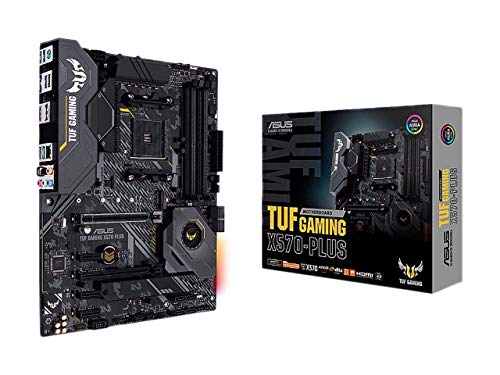
ASUS TUF Gaming AM4 ATX Motherboard
Best for: AM4 gaming builds needing PCIe 4.0 storage
- CPU Socket
- AM4
- Chipset
- AMD X570
- Form Factor
- ATX
- PCIe Version
- PCIe 4.0
- M.2 Slots
- 2
- Ethernet Speed
- Gigabit
View on Amazon: ASUS TUF Gaming AM4 ATX Motherboard Affiliate link
This is an AMD X570 ATX motherboard for AM4 sockets. It supports Ryzen 5000 and 3rd Gen CPUs with PCIe 4.0. The board includes two M.2 slots and a 12+2 power phase design. It features Relate audio with high signal-to-noise ratios. The build uses military-grade components for durability. It suits gamers who need reliable connectivity and cooling options.
Pros
- Supports PCIe 4.0 for faster data transfer
- Dual M.2 slots for multiple storage drives
- 12+2 power phase design for stable CPU power
- Relate S1200A codec with 108dB SNR for audio
Cons
- Requires BIOS update for Ryzen 5000 CPUs
- Only includes Gigabit Ethernet ports
- Heavier at 2.6 pounds
Good fit if
- You are building a gaming PC with Ryzen 3000 or 5000 series processors
- You need dual M.2 SSD support for storage
- You want military-grade components for long-term durability
Skip if
- You require Wi-Fi connectivity as it only has Gigabit Ethernet
- You are using an Intel CPU as it only fits AM4 sockets
- You need 10Gb Ethernet speeds as it is limited to Gigabit
Verdict: ASUS TUF Gaming X570-Plus ATX is a solid choice for AM4 gaming builds that prioritize PCIe 4.0 storage and reliable power delivery. It fits users who value durable components and clear audio specs over wireless networking features.
Specifications side by side
| Spec | ASUS TUF Gaming AM4 ATX Motherboard |
|---|---|
| CPU Socket | AM4 |
| Chipset | AMD X570 |
| Form Factor | ATX |
| PCIe Version | PCIe 4.0 |
| M.2 Slots | 2 |
| Ethernet Speed | Gigabit |
| Power Phases | 12+2 |
| Use Case | Gaming |
| Dimensions | 13.3 × 10.7 × 2.68 inches |
| Weight | 2.6 pounds |
| Size | 128 |
| Model | TUF GAMING X570-PLUS |
Frequently asked questions
Is this motherboard suitable for high-speed NVMe SSDs?
Yes, it supports PCIe 4.0 storage, which doubles the bandwidth of previous generations. This allows for significantly faster data transfer speeds for compatible drives. The board includes an M.2 heatsink to help manage thermal output from these high-performance components during intensive tasks.
What form factor does this board use?
It uses the standard ATX form factor. The dimensions are 13.3 inches in length, 10.7 inches in width, and 2.68 inches in height. It weighs 2.6 pounds. You should verify that your computer case can accommodate these standard ATX measurements before installation.
Does it include built-in wireless networking?
The published specifications do not list built-in wireless networking features. It is designed for users who value durable components and clear audio specs over wireless connectivity. You will need to use a separate Wi-Fi adapter or Ethernet connection for network access.
Which AMD processors are compatible with this board?
It is built for AMD AM4 processors. It supports both Zen 3 Ryzen 5000 and 3rd Gen Ryzen CPUs. You must update the BIOS to the latest version from the ASUS support site if you plan to use a Ryzen 5000 series processor to ensure proper functionality.
How does the board manage heat?
It features multiple cooling solutions for thermal management. These include an active PCH heatsink, a VRM heatsink, and an M.2 heatsink. The design also includes a precooled socket. These elements work together to dissipate heat from critical components during operation.
What chipset powers this motherboard?
It is powered by the AMD X570 chipset. This is AMD’s high-end desktop chipset that provides native support for PCIe 4.0 lanes. It is ideal for gaming builds that prioritize high-speed storage connectivity and reliable power delivery for modern processors.
Is this board good for gaming builds?
Yes, it is a solid choice for AM4 gaming builds. It fits users who prioritize PCIe 4.0 storage and reliable power delivery. The board uses military-grade TUF Gaming components, including a Digi+ VRM system, to ensure durability and stability during demanding gaming sessions.