ASUS ROG Strix LGA 1700 ATX Motherboard Review: Specs, Pros and Cons
As an Amazon Associate we earn from qualifying purchases. Links on this page are affiliate links.
This asus rog strix z790 e gaming review focuses on the ASUS ROG Strix Z790-E Gaming WiFi 6E. It is an ATX motherboard built for Intel’s 12th, 13th, and 14th Gen Core processors via the LGA 1700 socket. Two specs define its core capability: support for PCIe 5.0 and DDR5 memory. These features allow for high-speed data transfer and modern memory performance. The board also includes robust power delivery and advanced thermal designs. You get a platform ready for Windows 11 out of the box. This setup targets gamers and creators who need reliable, high-bandwidth connectivity and storage options for their builds.
What stands out
- 18+1 power stages with 90A capacity for stable multi-core performance
- Five M.2 slots with double-sided heatsinks for extensive storage expansion
- On-board Wi-Fi 6E and Intel 2.5 Gb Ethernet for fast networking
- AI Overclocking, AI Cooling II, and AI Noise Cancellation utilities
- Robust thermal design including VRM and PCH fanless heatsinks
Who it fits
Good fit for
This motherboard suits users building high-end gaming rigs or content creation workstations using Intel’s latest processors. The 18+1 power phases and VRM heatsink support heavy workloads without throttling. If you need multiple high-speed NVMe drives, the five M.2 slots with dedicated cooling are ideal. Gamers who prioritize low latency will appreciate the Wi-Fi 6E and 2.5 Gb Ethernet. It is also a good fit for enthusiasts who want AI-driven tuning for CPU, cooling, and networking without manual tweaking.
Who should skip it
You should look elsewhere if you are building a compact PC. This is an ATX motherboard, which requires a standard or large case, not a Mini-ITX chassis. If you are using older Intel CPUs or DDR4 memory, this board is incompatible due to its LGA 1700 socket and DDR5 support. Users on a tight budget may find the feature set excessive for their needs. Additionally, if you prefer a white aesthetic, this model is black, though white variants exist in the broader lineup.
Verdict: The ASUS ROG Strix Z790-E offers a strong blend of power delivery, storage options, and modern networking for Intel LGA 1700 builds. It is a solid choice for high-performance gaming and creation setups.
Key specs explained
CPU Socket: LGA 1700
This socket fits Intel 12th, 13th, and 14th Gen Core processors. You can upgrade your CPU within this generation without changing the motherboard. It ensures broad compatibility with recent high-performance chips. If you plan to build a new system or upgrade an existing one, this socket type determines which processors you can install. Check your current CPU model to confirm it matches this physical connection standard.
Memory Type: DDR5
DDR5 is the latest standard for system RAM. It offers higher bandwidth and efficiency compared to older DDR4 modules. This supports faster data transfer speeds for gaming and content creation tasks. You must purchase DDR5 compatible memory sticks to use this board. When shopping, look for DDR5 ratings and timings to match your performance needs and budget constraints effectively.
PCIe Version: PCIe 5.0
PCIe 5.0 doubles the data transfer speed of PCIe 4.0. This future-proofs your storage and graphics cards for next-generation hardware. You get faster load times for games and quicker file transfers with compatible NVMe drives. While current devices may not fully utilize this speed, it ensures longevity. Compare this against PCIe 4.0 boards if you want the latest standard for maximum potential throughput.
Power Phases: 18+1
This power delivery system uses 18 phases for the CPU and one for auxiliary components. It provides stable voltage to high-core-count processors under heavy loads. This robust design helps maintain performance during intense gaming or rendering sessions. It reduces heat generation in the power delivery area. When comparing motherboards, higher phase counts generally indicate better stability and overclocking potential for demanding CPUs.
Design and build quality
The listing describes the ASUS ROG Strix Z790-E as an ATX motherboard with a black finish. Its physical dimensions are 13.5 inches in length and 10.8 inches in width. It weighs 12 ounces. These measurements confirm it fits standard mid-tower and full-tower cases that support the ATX form factor. You will need a case with enough clearance for the board’s length and the attached heatsinks. The weight suggests a sturdy PCB, which helps stabilize heavy CPUs and graphics cards.
According to the listing, the board features a robust power solution with 18+1 power stages rated at 90A. It uses ProCool II power connectors, alloy chokes, and durable capacitors. This design supports multi-core processors by delivering stable current under load. You get thermal management via a VRM heatsink and a fanless PCH heatsink. There are also double-sided M.2 heatsinks for the five M.2 slots. These components keep critical areas cool during intensive tasks like gaming or rendering.
The layout includes hybrid fan headers and Fan Xpert 4 utility support. You can connect multiple fans and control their speeds based on temperature. On-board Wi-Fi 6E and Intel 2.5 Gb Ethernet provide high-speed networking. The overall build focuses on durability and thermal efficiency. You get a platform designed to handle high-performance components without compromising stability. The design choices align with a gaming use case, prioritizing heat dissipation and power delivery for sustained performance.
Setup and everyday use
Setting up this motherboard begins with installing an Intel 12th, 13th, or 14th Gen Core processor into the LGA 1700 socket. You must use DDR5 memory, as the board does not support older DDR4 modules. The listing notes it is out-of-box Windows 11 ready, which simplifies the initial operating system installation. You will connect high-speed storage via five M.2 slots, which benefit from double-sided heatsinks to manage thermal output during heavy data transfers. Power delivery is handled by an 18+1 phase configuration with 90A power stages. This robust setup supports multi-core processors under load without throttling. You can monitor and control system temperatures using the hybrid fan headers and Fan Xpert 4 utility. The VRM and PCH areas have dedicated cooling solutions to maintain stability. For networking, you have onboard Wi-Fi 6E and Intel 2.5 Gb Ethernet. These connections provide low-latency gaming performance and fast file transfers. The AI features, including AI Overclocking and AI Networking, run in the background to optimize system performance. You do not need to manually adjust every setting for basic operation. The board is designed for gaming use cases, so you can expect straightforward compatibility with modern peripherals. Setup involves standard ATX mounting and connecting power cables to the ProCool II connectors. Once powered, the system initializes with default safe settings, allowing you to apply advanced configurations through the BIOS if needed.
Before you buy this board
You need DDR5 memory modules to use this motherboard, as it does not support older DDR4 types. Ensure your CPU cooler fits the LGA 1700 socket and your case accommodates the standard ATX form factor. The listing highlights robust power stages, but you should verify your power supply unit can handle the load if you plan to overclock. Since it includes WiFi 6E, you may not need a separate network card, but check your router compatibility. This model sits among 1 options in our guide. It targets gamers who want high-end features like PCIe 5.0 and multiple M.2 slots. If you prefer smaller builds, consider the Mini-ITX variations listed. Regular BIOS updates are recommended to maintain stability with newer 14th Gen processors. Keep your drivers current for optimal performance with the integrated networking tools.
Check before you buy
- Confirm you have DDR5 RAM, not DDR4.
- Check your CPU cooler fits LGA 1700.
- Verify your case fits standard ATX size.
- Ensure your power supply meets the load.
The product at a glance
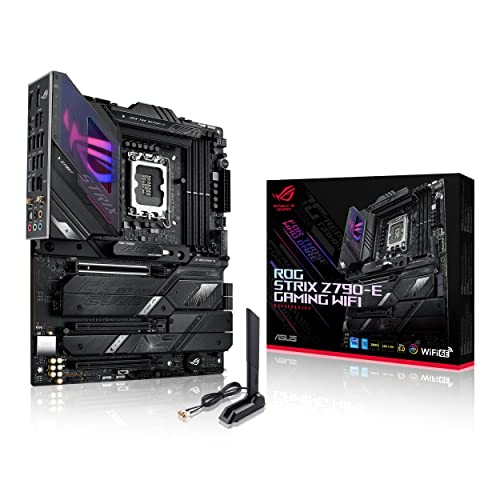
ASUS ROG Strix LGA 1700 ATX Motherboard
Best for: High-end gaming and storage expansion
- CPU Socket
- LGA 1700
- Form Factor
- ATX
- Memory Type
- DDR5
- PCIe Version
- PCIe 5.0
- M.2 Slots
- 5
- Wi-Fi Standard
- Wi-Fi 6E
View on Amazon: ASUS ROG Strix LGA 1700 ATX Motherboard Affiliate link
This ATX motherboard supports 12th, 13th, and 14th Gen Intel Core processors via the LGA 1700 socket. It features a robust 18+1 power phase design with 90A power stages for stable performance. You get five M.2 slots, PCIe 5.0 support, and DDR5 memory compatibility. Connectivity includes Wi-Fi 6E and 2.5 Gb Ethernet. It is designed for gamers who need high-speed networking and ample storage options.
Pros
- 18+1 power phases with 90A stages
- Five M.2 slots for storage
- Wi-Fi 6E and 2.5 Gb Ethernet
- Supports DDR5 memory and PCIe 5.0
Cons
- ATX form factor requires a large case
- 12-ounce weight adds bulk to the build
- No mention of USB4 or Thunderbolt support
Good fit if
- You need high-speed Wi-Fi 6E connectivity
- You plan to use multiple M.2 drives
- You want a robust power delivery system
Skip if
- You prefer a smaller Mini-ITX board
- You are building a silent PC with strict size limits
- You need integrated Wi-Fi 7
Verdict: ASUS ROG Strix Z790-E ATX delivers strong power and connectivity for high-end gaming builds. It fits users who prioritize storage expansion and network speed over compact dimensions.
Specifications side by side
| Spec | ASUS ROG Strix LGA 1700 ATX Motherboard |
|---|---|
| CPU Socket | LGA 1700 |
| Form Factor | ATX |
| Memory Type | DDR5 |
| PCIe Version | PCIe 5.0 |
| M.2 Slots | 5 |
| Wi-Fi Standard | Wi-Fi 6E |
| Ethernet Speed | 2.5 GbE |
| Power Phases | 18+1 |
| Wi-Fi | Wi-Fi 6E |
| Use Case | Gaming |
| Dimensions | 10.8 × 3.03 × 13.5 inches |
| Weight | 12 ounces |
| Size | Z790-E|M.2 x5|WiFi 6E|ATX |
| Color | BLACK |
| Model | ROG STRIX Z790-E GAMING WIFI |
Frequently asked questions
What type of memory does this motherboard support?
This motherboard requires DDR5 memory modules. It does not support older DDR4 RAM types. You must purchase DDR5 sticks to use this board. This ensures you get the latest memory speeds and bandwidth. Check your existing RAM before buying to avoid compatibility issues.
How many M.2 slots are on this board?
The product size description lists five M.2 slots. This provides significant storage expansion capability for high-end builds. You can install multiple NVMe drives for fast data access. This is ideal for users who need large storage arrays for gaming or content creation.
Does it include wireless networking?
Yes, it includes Wi-Fi 6E support. This provides faster and more reliable wireless connections. It also features 2.5GbE Ethernet for wired networking. These options ensure low latency for gaming and fast file transfers. You do not need to buy separate network cards.
Is this motherboard compatible with Intel 14th Gen CPUs?
Yes, the LGA 1700 socket supports Intel 12th, 13th, and 14th Gen Core processors. You can upgrade your CPU within this generation without changing the motherboard. This ensures broad compatibility with recent high-performance chips. It is a future-proof choice for current Intel platforms.
What is the physical size of this motherboard?
It is an ATX form factor motherboard. The dimensions are 13.5 inches in length and 10.8 inches in width. It weighs 12 ounces. These standard measurements confirm it fits most mid-tower and full-tower cases. Ensure your case supports ATX boards before installation.
What is the best use case for this board?
It is best for high-end gaming and storage expansion. The strong power delivery and connectivity suit demanding builds. Users who prioritize network speed and multiple storage options will benefit most. It fits users who need robust performance for gaming and heavy workloads.