6 Best Alternatives to the ASUS ROG Strix X570 ATX Motherboard (2026)
As an Amazon Associate we earn from qualifying purchases. Links on this page are affiliate links.
The ASUS ROG Strix X570 ATX motherboard offers strong networking and cooling specs for AM4 systems. If you need asus rog strix x570 atx motherboard alternatives, consider that this board prioritizes Wi-Fi 6 and 2.5 Gbps LAN alongside robust thermal solutions. These features suit gamers who want fast wired and wireless connections without compromising on storage speed.
You might want a different board if you prefer a different brand, lack need for onboard Wi-Fi, or seek a lower price point. We selected these alternatives because their specs overlap with the original. All listed boards use the AMD X570 chipset and AM4 socket. They all support PCIe 4.0 and DDR4 memory. This ensures you get comparable core performance while choosing features that better match your specific build requirements.
How these alternatives compare
ASUS ROG Strix AM4 ATX Motherboard
The ASUS ROG Strix X570-F Gaming drops the onboard Wi-Fi module found in the original ROG Strix X570-E. You get a standard Gigabit Ethernet port instead of the 2.5 Gbps LAN and Wi-Fi 6 combo. This board focuses on wired stability and thermal management for AM4 gaming builds. It retains the X570 chipset and PCIe 4.0 support for fast storage. If you prefer a wired connection and do not need wireless networking, this model offers a solid alternative with strong cooling capabilities.
MSI MPG X570 Gaming Edge ATX Motherboard
The MSI MPG X570 Gaming Edge WiFi uses Wi-Fi 5 rather than the Wi-Fi 6 standard in the ASUS ROG Strix X570-E. It provides integrated wireless convenience but with slightly slower wireless speeds. The board keeps PCIe 4.0 support and the AM4 socket for Ryzen processors. You lose the 2.5 Gbps LAN found in the original, opting for standard Gigabit connectivity instead. This motherboard suits users who want built-in wireless but do not require the latest Wi-Fi standards or high-speed wired networking options.
Gigabyte X570 Gaming X ATX Motherboard
The Gigabyte X570 Gaming X ATX removes the onboard Wi-Fi entirely, focusing on wired performance and storage speeds. It maintains the X570 chipset and PCIe 4.0 lanes for NVMe drives. You get a standard ATX form factor and DDR4 memory support. This board lacks the 2.5 Gbps LAN and wireless features of the ASUS ROG Strix X570-E. It is a practical choice for gamers who prioritize wired network stability and core PCIe 4.0 storage performance over integrated wireless connectivity and advanced networking specs.
Gigabyte Aorus Elite ATX Motherboard
The Gigabyte X570 AORUS Elite ATX is a budget-friendly option that strips away premium features like Wi-Fi and 2.5 Gbps LAN. It retains the X570 chipset and PCIe 4.0 support for Ryzen 3000 processors. You get standard DDR4 memory slots and a reliable power delivery system. This motherboard is designed for users who want core performance without extra connectivity options. It offers a straightforward ATX layout for standard builds, sacrificing the advanced networking and wireless capabilities found in the original ASUS ROG Strix X570-E.
MSI MPG Gaming Edge Wi-Fi ATX Motherboard
The MSI MPG Gaming Edge Wi-Fi ATX includes Wi-Fi 5, which is an older standard compared to the Wi-Fi 6 in the ASUS ROG Strix X570-E. It provides stable wireless connectivity for gaming builds but with reduced maximum speeds. The board supports PCIe 4.0 storage and AM4 CPUs. You lose the 2.5 Gbps LAN, relying on standard Gigabit Ethernet instead. This model suits users who need built-in wireless but do not require the latest Wi-Fi 6 speeds or high-bandwidth wired networking options for their system.
GIGABYTE X570 AORUS Elite Wi-Fi ATX Motherboard
The Gigabyte X570 AORUS Elite Wi-Fi ATX offers Wi-Fi 5 instead of the Wi-Fi 6 standard in the original ASUS ROG Strix X570-E. It provides integrated wireless access but with older technology. The board keeps PCIe 4.0 support and the X570 chipset for Ryzen processors. You do not get the 2.5 Gbps LAN, opting for standard Gigabit connectivity. This motherboard is ideal for users who want basic wireless convenience and solid power delivery for ATX builds, without needing the latest wireless speeds or advanced wired networking features.
Quick picks
Our 7 picks
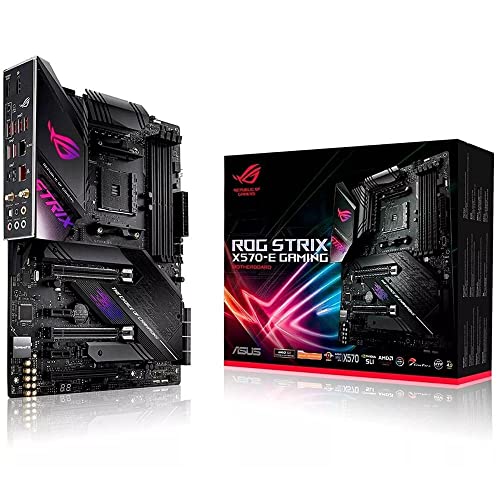
ASUS ROG Strix X570 ATX Motherboard
Best for: AM4 gamers needing fast networking and cooling
- CPU Socket
- AM4
- Chipset
- X570
- Form Factor
- ATX
- PCIe Version
- PCIe 4.0
- M.2 Slots
- 2
- Wi-Fi Standard
- Wi-Fi 6 (802.11ax)
View on Amazon: ASUS ROG Strix X570 ATX Motherboard Affiliate link
The ASUS ROG Strix X570-E Gaming is an ATX motherboard built for AMD AM4 processors. It supports PCIe 4.0 for faster data transfer and includes Wi-Fi 6 for wireless connectivity. You get dual M.2 slots for storage and a 2.5 Gbps Ethernet port for wired connections. The board features comprehensive cooling with dedicated heatsinks for the chipset and MOSFETs. This setup suits gamers who need robust networking and expansion options.
Pros
- Supports PCIe 4.0 for high-speed devices
- Includes Wi-Fi 6 (802.11ax)
- Features 2.5 Gbps Ethernet LAN
- Dual M.2 slots with heatsinks
- Active PCH and MOS heatsinks for cooling
Cons
- Only one standard Gigabit Ethernet port
- No mention of USB-C on front panel headers
- Heavier build at 2.5 pounds
Good fit if
- You need Wi-Fi 6 connectivity
- You want 2.5 Gbps wired networking
- You plan to use multiple M.2 drives
Skip if
- You require a B550 chipset
- You prefer a smaller micro-ATX form factor
- You need built-in Wi-Fi 7
Verdict: ASUS ROG Strix X570-E Gaming ATX delivers strong networking and cooling specs for AM4 systems. It fits users who prioritize fast wired and wireless connections alongside ample storage options.

ASUS ROG Strix AM4 ATX Motherboard
Best for: AM4 gaming builds needing strong cooling
- CPU Socket
- AM4
- Chipset
- AMD X570
- Form Factor
- ATX
- Memory Type
- DDR4
- PCIe Version
- PCIe 4.0
- M.2 Slots
- 2
View on Amazon: ASUS ROG Strix AM4 ATX Motherboard Affiliate link
The ASUS ROG Strix X570-F Gaming is an ATX motherboard built for AMD AM4 processors. It supports PCIe 4.0 and DDR4 memory. The board includes two M.2 slots with dedicated heatsinks and active PCH cooling. Networking relies on Intel Gigabit Ethernet rather than wireless. It features Aura Sync RGB lighting and comprehensive thermal management for sustained performance.
Pros
- Supports PCIe 4.0 for faster data transfer
- Dual M.2 slots with on-board heatsinks
- Active PCH and MOS heatsink cooling
- Intel Gigabit Ethernet with LANGuard
Cons
- No built-in Wi-Fi connectivity
- Supports only DDR4 memory, not DDR5
- Uses Intel Ethernet instead of premium Killer NIC
Good fit if
- You want robust cooling for high-end Ryzen CPUs
- You prefer wired Gigabit Ethernet connections
- You need dual M.2 storage options
Skip if
- You require built-in Wi-Fi support
- You plan to use DDR5 memory modules
- You want a smaller micro-ATX form factor
Verdict: The ASUS ROG Strix X570-F Gaming suits builders who prioritize thermal performance and wired networking over wireless convenience. It is a solid choice for AM4 systems that do not require DDR5 or onboard Wi-Fi.

MSI MPG X570 Gaming Edge ATX Motherboard
Best for: Gamers needing built-in Wi-Fi 5
- CPU Socket
- AM4
- Chipset
- X570
- Form Factor
- ATX
- Memory Type
- DDR4
- PCIe Version
- PCIe 4.0
- Wi-Fi
- Wi-Fi 5
View on Amazon: MSI MPG X570 Gaming Edge ATX Motherboard Affiliate link
The MSI MPG X570 Gaming Edge WiFi is an ATX motherboard built for AMD AM4 processors. It supports PCIe 4.0 and DDR4 memory, ensuring fast data transfer and compatibility with modern Ryzen CPUs. A key advantage is the integrated Wi-Fi 5 (802.11ac) with MU-MIMO support, allowing wireless connectivity without extra cards. Audio Boost 4 and Nahimic 3 enhance sound quality for gaming. The board includes a Frozr Heatsink for thermal management.
Pros
- Integrated Wi-Fi 5 (802.11ac) with MU-MIMO support
- Supports 2nd and 3rd Gen AMD Ryzen processors
- Frozr Heatsink with Propeller Blade Technology for cooling
- Audio Boost 4 technology with Nahimic 3 software
Cons
- Only includes Wi-Fi 5, lacking faster Wi-Fi 6
- No mention of RGB lighting synchronization features
- Pre-installed IO shielding is basic protection only
Good fit if
- You need built-in wireless connectivity for your build
- You are using a 2nd or 3rd Gen AMD Ryzen CPU
- You want reliable audio performance for gaming
Skip if
- You require the latest Wi-Fi 6 or Wi-Fi 6E standards
- You want extensive RGB lighting customization options
- You are building a system with newer AM5 processors
Verdict: MSI MPG X570 Gaming Edge WiFi offers solid gaming features with integrated Wi-Fi 5. It suits users who value wireless convenience and audio enhancements over cutting-edge wireless speeds.

Gigabyte X570 Gaming X ATX Motherboard
Best for: Standard ATX Ryzen builds with PCIe 4.0
- Chipset
- X570
- Form Factor
- ATX
- Memory Type
- DDR4
- PCIe Version
- PCIe 4.0
- M.2 Slots
- 2
- Ethernet Speed
- GbE
View on Amazon: Gigabyte X570 Gaming X ATX Motherboard Affiliate link
This ATX motherboard uses the AMD X570 chipset and supports PCIe 4.0. It features a 12-phase digital VRM for stable power delivery. You get two M.2 slots with NVMe support and DDR4 memory. The board includes Realtek ALC887 audio and RGB Fusion 2.0. It fits gamers who want reliable connectivity and standard ATX dimensions without extra frills.
Pros
- 12-phase digital VRM design
- Dual PCIe 4.0 M.2 slots
- ATX form factor with standard dimensions
- Supports 3rd Gen Ryzen processors
Cons
- Realtek ALC887 audio codec is entry-level
- Single thermal guard for M.2 slots
- No Wi-Fi or Bluetooth mentioned in specs
Good fit if
- You need a standard ATX board with PCIe 4.0 support
- You are building with 3rd Gen Ryzen processors
- You prefer wired Ethernet and basic audio
Skip if
- You require built-in Wi-Fi or Bluetooth connectivity
- You need high-end audio hardware like ALCS1200
- You want multiple M.2 thermal guards
Verdict: Gigabyte X570 Gaming X ATX offers solid PCIe 4.0 storage options and a 12-phase VRM for Ryzen builds. It suits users who prioritize wired performance and standard ATX sizing over premium audio or wireless features.
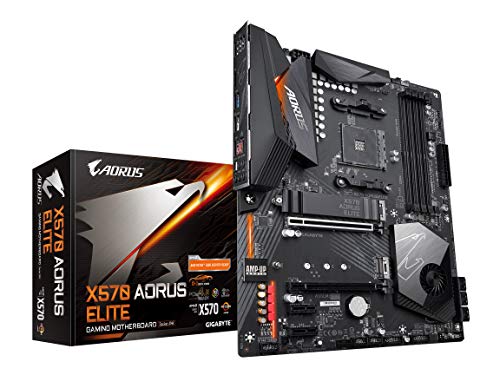
Gigabyte Aorus Elite ATX Motherboard
Best for: Budget-conscious Ryzen 3000 gaming builds
- Chipset
- X570
- Form Factor
- ATX
- Memory Type
- DDR4
- PCIe Version
- PCIe 4.0
- M.2 Slots
- 2
- Power Phases
- 12
View on Amazon: Gigabyte Aorus Elite ATX Motherboard Affiliate link
The Gigabyte X570 AORUS Elite is an ATX motherboard built for AMD Ryzen 3000 and 2nd Gen processors. It features a 12-phase digital VRM with an extended heatsink for stable power delivery. You get dual PCIe 4.0 M.2 slots with thermal guards and DDR4 memory support. This board suits gamers who want reliable performance without the premium price tag of higher-end ROG Strix models.
Pros
- 12-phase digital VRM with extended heatsink
- Dual PCIe 4.0 M.2 slots with thermal guards
- Supports AMD Ryzen 3000 and 2nd Gen CPUs
- Front USB Type-C connectivity
Cons
- Only 12 power phases compared to competitors
- No built-in Wi-Fi mentioned in specs
- Lacks RGB lighting features found on rivals
Good fit if
- You want solid VRM cooling for Ryzen CPUs
- You need dual fast M.2 storage slots
- You prefer a straightforward ATX layout
Skip if
- You require integrated Wi-Fi
- You want extensive RGB customization
- You need more than 12 power phases
Verdict: The Gigabyte X570 AORUS Elite ATX delivers reliable power and storage for Ryzen builders. It fits users who prioritize core performance over flashy extras.

MSI MPG Gaming Edge Wi-Fi ATX Motherboard
Best for: Gamers needing Wi-Fi 5 and PCIe 4.0
- CPU Socket
- AM4
- Chipset
- AMD X570
- Form Factor
- ATX
- Memory Type
- DDR4
- PCIe Version
- PCIe 4.0
- Wi-Fi
- Wi-Fi 5
View on Amazon: MSI MPG Gaming Edge Wi-Fi ATX Motherboard Affiliate link
This MSI motherboard pairs the AMD X570 chipset with an ATX form factor and PCIe 4.0 support. It includes onboard Wi-Fi 5 and Audio Boost 4 for connectivity and sound. The Frozr heatsink uses double ball bearings for cooling. It fits users who need reliable wireless networking and modern expansion speeds for their Ryzen desktop builds.
Pros
- On-board Wi-Fi 5 with MU-MIMO support
- PCIe 4.0 support for fast data transfer
- Audio Boost 4 with Nahimic 3 software
- Frozr heatsink with double ball bearing fans
Cons
- Only supports Wi-Fi 5, not Wi-Fi 6
- Heavier at 4.1 pounds compared to lighter boards
- No mention of USB 3.2 Gen 2x2 ports
Good fit if
- You need reliable Wi-Fi 5 connectivity
- You want PCIe 4.0 expansion options
- You prefer ATX form factor builds
Skip if
- You require Wi-Fi 6 or newer
- You are building a smaller ITX system
- You need the latest USB speeds
Verdict: MSI MPG X570 Gaming Edge WiFi ATX is a solid choice for gamers who prioritize stable Wi-Fi 5 and PCIe 4.0 speeds. It suits users who value robust audio features and durable cooling components in their AM4 platform builds.
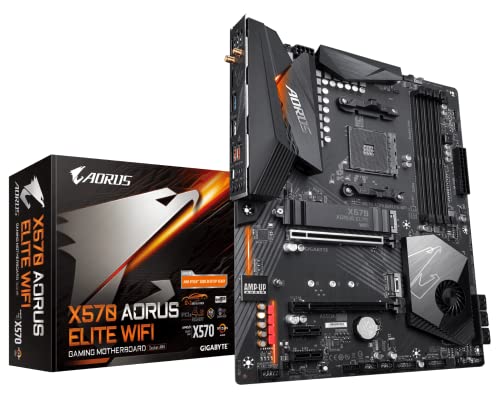
GIGABYTE X570 AORUS Elite Wi-Fi ATX Motherboard
Best for: ATX builds needing PCIe 4.0 and VRM stability
- Chipset
- X570
- Form Factor
- ATX
- Memory Type
- DDR4
- PCIe Version
- PCIe 4.0
- M.2 Slots
- 2
- Wi-Fi Standard
- 802.11ac
View on Amazon: GIGABYTE X570 AORUS Elite Wi-Fi ATX Motherboard Affiliate link
This ATX motherboard uses the AMD X570 chipset to support 3rd Gen Ryzen processors. It features a 12+2 phase digital VRM with DrMOS for stable power delivery. You get dual PCIe 4.0 M.2 slots for fast storage. The board includes Intel Dual Band 802.11ac Wi-Fi and four DDR4 DIMM slots. It is a solid choice for gamers who need reliable connectivity and storage options.
Pros
- 12+2 phase digital VRM solution with DrMOS
- Dual ultra-fast NVMe PCIe 4.0 M.2 slots
- Intel Dual Band 802.11ac Wi-Fi support
- Advanced heatsink design with enlarge heatsink
Cons
- Wi-Fi 5 (802.11ac) instead of newer Wi-Fi 6
- Single thermal guard for M.2 slots
- No mention of USB Type-C on rear I/O in data
Good fit if
- You need PCIe 4.0 storage speeds for gaming
- You want a 12+2 phase VRM for stability
- You require built-in Wi-Fi 5 connectivity
Skip if
- You require Wi-Fi 6 or Wi-Fi 6E
- You need more than two M.2 slots
- You prefer a smaller form factor than ATX
Verdict: Gigabyte X570 AORUS Elite Wi-Fi offers robust power delivery and PCIe 4.0 storage for Ryzen 3000 builds. It suits users who prioritize wired performance and standard Wi-Fi over cutting-edge wireless speeds.
Specifications side by side
| Spec | ASUS ROG Strix X570 ATX Motherboard | ASUS ROG Strix AM4 ATX Motherboard | MSI MPG X570 Gaming Edge ATX Motherboard | Gigabyte X570 Gaming X ATX Motherboard | Gigabyte Aorus Elite ATX Motherboard | MSI MPG Gaming Edge Wi-Fi ATX Motherboard | GIGABYTE X570 AORUS Elite Wi-Fi ATX Motherboard |
|---|---|---|---|---|---|---|---|
| CPU Socket | AM4 | AM4 | AM4 | not stated | not stated | AM4 | not stated |
| Chipset | X570 | AMD X570 | X570 | X570 | X570 | AMD X570 | X570 |
| Form Factor | ATX | ATX | ATX | ATX | ATX | ATX | ATX |
| Memory Type | not stated | DDR4 | DDR4 | DDR4 | DDR4 | DDR4 | DDR4 |
| PCIe Version | PCIe 4.0 | PCIe 4.0 | PCIe 4.0 | PCIe 4.0 | PCIe 4.0 | PCIe 4.0 | PCIe 4.0 |
| M.2 Slots | 2 | 2 | not stated | 2 | 2 | not stated | 2 |
| Wi-Fi Standard | Wi-Fi 6 (802.11ax) | not stated | not stated | not stated | not stated | not stated | 802.11ac |
| Ethernet Speed | 2.5 Gbps, Gigabit | Gigabit | not stated | GbE | not stated | not stated | not stated |
| Power Phases | not stated | not stated | not stated | 12 | 12 | not stated | 12+2 |
| Wi-Fi | Wi-Fi 6 | not stated | Wi-Fi 5 | not stated | not stated | Wi-Fi 5 | Wi-Fi 5 |
| Use Case | Gaming | Gaming | Gaming | Gaming | Gaming | Gaming | Gaming |
| Dimensions | 13.5 × 10.8 × 3.03 inches | 13.3 × 10.7 × 2.68 inches | 12 × 9.6 × 2.5 inches | 13.2 × 10.6 × 3.14 inches | 13.2 × 10.6 × 3.14 inches | 12 × 9.6 × 2.5 inches | 13.2 × 10.6 × 3.14 inches |
| Weight | 2.5 pounds | 2.2 pounds | 4.1 pounds | 3 pounds | 3 pounds | 4.1 pounds | 12.3 ounces |
| Size | 128 | ROG X570-F|DDR4|WiFi | 1 | not stated | not stated | 1 | not stated |
| Model | ROG STRIX X570-E GAMING | ROG STRIX X570-F GAMING | MSI MPG X570 Gaming Edge WiFi | 889523018026 | X570 AORUS ELITE | MPG X570 GAMING EDGE WIFI | 889523018729 |
Frequently asked questions
Which X570 motherboard has the fastest wireless connectivity?
The ASUS ROG Strix X570-E Gaming offers the quickest wireless speeds among these options. It features built-in Wi-Fi 6 support alongside 1GbE Ethernet. This setup suits users who need high-bandwidth connections for gaming and streaming without relying on wired cables for every device.
Do these alternatives support DDR5 memory?
No, none of these listed motherboards support DDR5 memory. All models in this group use DDR4 RAM slots. This is standard for the AMD X570 chipset platform. You will need to use DDR4 modules with any of these boards to ensure compatibility with your system.
Which board is best if I do not need Wi-Fi?
The ASUS ROG Strix X570-F Gaming is a strong choice if you skip wireless features. It drops the onboard Wi-Fi module to focus on wired stability and thermal performance. You get a standard Gigabit Ethernet port and robust cooling solutions for sustained gaming sessions.
Which X570 board includes Wi-Fi 5?
Several models in this list include integrated Wi-Fi 5. The MSI MPG X570 Gaming Edge WiFi and the Gigabyte X570 AORUS Elite Wi-Fi both feature this wireless standard. These boards suit users who want convenient wireless connectivity without needing the higher speeds of Wi-Fi 6.
What PCIe version do these motherboards support?
All the motherboards listed here support PCIe 4.0. This version allows for faster data transfer rates with compatible NVMe SSDs and graphics cards. You get modern expansion capabilities across every model, from the budget-friendly options to the premium picks in this guide.
Which motherboard is the lightest?
The Gigabyte X570 AORUS Elite Wi-Fi is the lightest option at 12.3 ounces. Most other boards in this list weigh between 2.2 and 4.1 pounds. This lighter weight may matter if you are building in a case with strict weight limits or using a vertical mount.
Are all these boards ATX size?
Yes, every motherboard in this list uses the standard ATX form factor. This means they fit in most mid-tower and full-tower computer cases. You can expect consistent mounting hole patterns and expansion slot layouts across all models, simplifying your case compatibility checks.