6 Cores vs 20 Cores Motherboards: Which Should You Buy?
As an Amazon Associate we earn from qualifying purchases. Links on this page are affiliate links.
This guide compares a 6 Cores vs 20 Cores motherboard bundle to help you decide which setup fits your needs. Both options include a processor and an ATX motherboard designed for gaming and productivity. The primary difference lies in core count and architecture. The first bundle uses an AMD Ryzen 5 5600X with six cores on a B550 chipset. The second features an Intel Core i7-14700K with twenty cores on a Z790 platform. We will break down the specs to show you which path offers better value for your specific tasks.
Key differences
| Aspect | INLAND Ryzen 5 5600X and TUF Gaming ATX Bundle | INLAND Core i7-14700K and MSI PRO Z790-P Bundle |
|---|---|---|
| CPU Core Count | 6 Cores | 20 Cores |
| CPU Socket | AM4 | LGA 1700 |
| Chipset | AMD B550 | Intel Z790 |
| Memory Type | DDR4 | DDR5 |
| PCIe Version | PCIe 4.0 | PCIe 5.0 |
| Ethernet Speed | 2.5 GbE | not listed |
Which one should you choose?
Choose INLAND Ryzen 5 5600X and TUF Gaming ATX Bundle if
- You prioritize efficient gaming performance with established DDR4 memory support
- You want a bundle that includes a cooler and Wi-Fi 6 connectivity
- You are building a mid-range PC for popular esports titles
Choose INLAND Core i7-14700K and MSI PRO Z790-P Bundle if
- You need high core counts for video editing and heavy multitasking
- You want the latest PCIe 5.0 standards for future-proof storage
- You prefer DDR5 memory for higher bandwidth speeds
Verdict: The AMD bundle suits gamers who want reliable performance without needing excessive cores. The Intel bundle is better for creators who require twenty cores for demanding professional workloads. Choose based on whether your workflow leans toward gaming or heavy content creation.
6 Cores vs 20 Cores
core count
The INLAND Ryzen 5 5600X bundle features a 6-core, 12-thread processor based on the Zen 3 architecture. It delivers a max boost of 4.6 GHz. In contrast, the INLAND Core i7-14700K bundle includes a 20-core, 28-thread processor with 8 performance cores and 12 efficiency cores. This CPU reaches up to 5.6 GHz. The higher core count and thread count on the Intel side provide significantly more parallel processing power. This makes the 20-core option better for heavy multitasking and demanding professional workloads, while the 6-core setup is sufficient for standard gaming.
chipset
The motherboard in the first bundle is the ASUS TUF Gaming B550-PLUS WiFi II, which uses the AMD B550 chipset. This chipset supports PCIe 4.0 and is designed for the AM4 socket. The second bundle uses the MSI PRO Z790-P WIFI, built on the Intel Z790 chipset. The Z790 chipset is a high-end option that supports the latest LGA 1700 processors and offers more expansion capabilities. The B550 is a solid mid-range choice for gamers. The Z790 provides more features for enthusiasts and professionals who need extensive connectivity and overclocking potential on the Intel platform.
memory type
Memory technology differs significantly between these two bundles. The ASUS TUF Gaming B550-PLUS WiFi II supports DDR4 memory. This is a mature standard that is often more affordable. The MSI PRO Z790-P WIFI motherboard supports DDR5 memory, with speeds up to 7000+ MHz when overclocked. DDR5 offers higher bandwidth and improved efficiency compared to DDR4. This means the Intel bundle can handle data-intensive tasks faster. If you prioritize future-proofing and maximum memory bandwidth, the DDR5 support in the 20-core bundle is a clear advantage for high-performance computing.
pcie version
Expansion speeds vary based on the PCIe version supported. The AMD B550 motherboard in the 6-core bundle provides PCIe 4.0 connectivity. This is fast enough for current high-end graphics cards and NVMe SSDs. The Intel Z790 motherboard in the 20-core bundle supports PCIe 5.0. This newer standard doubles the bandwidth of PCIe 4.0, preparing the system for next-generation GPUs and storage devices. The Z790 also includes four PCIe 4.0 M.2 slots. While PCIe 4.0 is still excellent, the inclusion of PCIe 5.0 on the Intel side offers greater future-proofing for high-speed components.
power design
The power delivery systems are built differently for each platform. The ASUS TUF Gaming B550-PLUS WiFi II features a robust power design and optimized thermal solution suitable for the Ryzen 5 5600X. The MSI PRO Z790-P WIFI motherboard is constructed with a 6-layer 2oz copper PCB. It includes a 14+1+1 DRPS with 55A DrMOS for stable power delivery to the high-core-count CPU. It also uses extended heatsinks and thermal pads rated for 7W/mK. This heavy-duty power design is necessary to sustain the high power draw of the 20-core i7-14700K under load, making it more robust for intensive workloads.
Which Bundle Fits Your Workflow
Competitive gamers on a budget
The Ryzen 5 5600X delivers ultra-fast performance for popular titles. You get 6 cores and 12 threads with a 4.6 GHz boost. The B550 motherboard supports PCIe 4.0 and Wi-Fi 6. This setup prioritizes high frame rates and responsive gaming without unnecessary complexity. It is a solid choice for pure gaming tasks.
Video editors and multitaskers
The Core i7-14700K offers 20 cores and 28 threads for demanding workloads. You gain significant multi-threading power for video editing and heavy multitasking. The Z790 motherboard includes PCIe 5.0 and four M.2 slots for fast data transfers. DDR5 memory support ensures rapid responsiveness for creative professionals who need maximum processing power.
Users wanting modern connectivity
This bundle features the latest Z790 chipset with PCIe 5.0 support. You benefit from faster data transfer speeds and future-proof expansion. The motherboard includes USB 3.2 Gen 2x2 ports and robust power delivery with 14+1+1 phases. DDR5 memory compatibility provides higher bandwidth. This setup is ideal if you prioritize the newest standards and high-end connectivity options.
Quick picks
| # | Product | Best for | Price |
|---|---|---|---|
| 1 | INLAND Ryzen 5 5600X and TUF Gaming ATX Bundle | 6-core gaming builds with Wi-Fi 6 | Check price of INLAND Ryzen 5 5600X and TUF Gaming ATX Bundle on Amazon |
| 2 | INLAND Core i7-14700K and MSI PRO Z790-P Bundle | heavy multi-threading workloads | Check price of INLAND Core i7-14700K and MSI PRO Z790-P Bundle on Amazon |
The products compared

INLAND Ryzen 5 5600X and TUF Gaming ATX Bundle
Best for: 6-core gaming builds with Wi-Fi 6
- Core Count
- 6 Cores (what this guide is about)
- CPU Socket
- AM4
- Chipset
- AMD B550
- Form Factor
- ATX
- Memory Type
- DDR4
- PCIe Version
- PCIe 4.0
View on Amazon: INLAND Ryzen 5 5600X and TUF Gaming ATX Bundle Affiliate link
This bundle pairs the AMD Ryzen 5 5600X six-core processor with the ASUS TUF Gaming B550-PLUS WiFi II motherboard. The CPU delivers 4.6 GHz max boost and 35 MB of cache. The ATX motherboard supports PCIe 4.0, Wi-Fi 6, and 2.5 GbE LAN. It suits gamers seeking a balanced 6-core setup for popular titles.
Pros
- Six cores and twelve threads for multitasking
- 4.6 GHz max boost speed
- PCIe 4.0 support for fast storage
- Built-in Wi-Fi 6 connectivity
Cons
- Six cores limit heavy multi-core workloads
- Uses older DDR4 memory standard
- AM4 socket lacks future upgrade path
Good fit if
- You play modern games at 100+ FPS
- You want a complete CPU and board combo
- You prefer Wi-Fi 6 and 2.5 GbE LAN
Skip if
- You need more than six cores for rendering
- You want the latest DDR5 memory support
- You plan to upgrade to a newer CPU socket
Verdict: INLAND Ryzen 5 5600X and TUF B550 Bundle delivers solid 6-core gaming performance with modern connectivity. It fits players who want a ready-to-use system without chasing the latest socket generations.
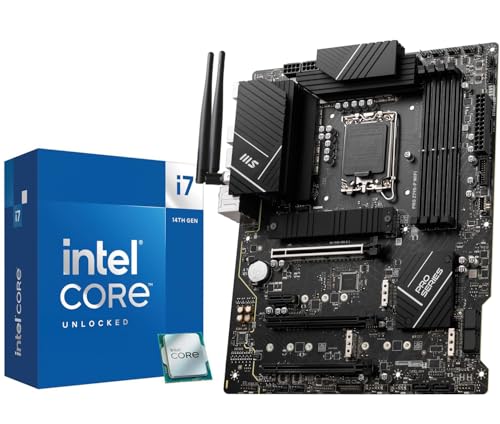
INLAND Core i7-14700K and MSI PRO Z790-P Bundle
Best for: heavy multi-threading workloads
- Core Count
- 20 Cores (what this guide is about)
- CPU Socket
- LGA 1700
- Chipset
- Z790
- Memory Type
- DDR5
- PCIe Version
- PCIe 5.0
- M.2 Slots
- 4
View on Amazon: INLAND Core i7-14700K and MSI PRO Z790-P Bundle Affiliate link
This combo pairs the Intel Core i7-14700K with an MSI PRO Z790-P WIFI motherboard. The CPU delivers 20 cores and 28 threads, reaching speeds up to 5.6 GHz. The board features PCIe 5.0 support and four M.2 slots for fast storage. It uses DDR5 memory for high bandwidth. This setup suits users needing heavy multi-threading power for video editing or intensive multitasking.
Pros
- 20 physical cores (8P + 12E) for robust multi-threading performance
- MSI PRO Z790-P WIFI motherboard with PCIe 5.0 support
- Four PCIe 4.0 M.2 slots for high-speed storage expansion
- 14+1+1 power phases with 55A DrMOS for stable power delivery
Cons
- Higher core count may be excessive for basic web browsing or office tasks
- Requires DDR5 memory, which is more expensive than DDR4 alternatives
- Integrated graphics are basic Intel UHD 770, limiting light gaming without a dedicated GPU
Good fit if
- You need maximum multi-core performance for video editing or 3D rendering
- You want a modern platform with PCIe 5.0 for future-proofing
- You plan to use DDR5 memory for higher bandwidth speeds
Skip if
- You are on a tight budget and need a more affordable 6-core option
- You only need a system for light office work or web browsing
- You prefer DDR4 memory to save on upgrade costs
Verdict: INLAND Intel Core i7-14700K Combo provides serious multi-core power for demanding workloads. It fits professionals who edit video or run complex simulations, rather than casual users who only browse the web.
Specifications side by side
| Spec | INLAND Ryzen 5 5600X and TUF Gaming ATX Bundle | INLAND Core i7-14700K and MSI PRO Z790-P Bundle |
|---|---|---|
| CPU Socket | AM4 | LGA 1700 |
| Chipset | AMD B550 | Z790 |
| Form Factor | ATX | not stated |
| Memory Type | DDR4 | DDR5 |
| PCIe Version | PCIe 4.0 | PCIe 5.0 |
| M.2 Slots | not stated | 4 |
| Wi-Fi Standard | Wi-Fi 6 | not stated |
| Ethernet Speed | 2.5 GbE | not stated |
| Power Phases | not stated | 14+1+1 |
| Use Case | Gaming | not stated |
| Series | Ryzen 5 | Core i7 |
| Core Count | 6 Cores | 20 Cores |
| Thread Count | 12 Threads | not stated |
| Size | AMD Ryzen 5 5600X + ASUS TUF GAM B550-PLUS WF II | not stated |
| Color | AMD Ryzen 5 5600X + ASUS TUF GAM B550-PLUS WF II | Intel 14th I7-14700K+ PRO Z790-P WiFi DDR5 |
| Model | ASUS TUF GAMING B550-PLUS WIFI II | 14700KPROZ790PWFD5 |
Frequently asked questions
Does a 6-core motherboard support modern Wi-Fi standards?
Yes, the INLAND Ryzen 5 5600X bundle includes an ASUS TUF GAMING B550-PLUS WIFI II motherboard. This board features built-in Wi-Fi 6 connectivity. You get reliable wireless performance without needing extra adapters. The AM4 socket supports the Ryzen 5 processor for solid gaming speeds.
What memory type does a 20-core motherboard require?
The INLAND Core i7-14700K bundle uses DDR5 memory. This high-speed RAM type supports the 20-core Intel processor on the MSI PRO Z790-P motherboard. DDR5 offers greater bandwidth than older standards. It helps handle heavy multi-threading tasks like video editing or complex simulations efficiently.
Which bundle is better for competitive gaming?
The 6-core Ryzen 5 5600X bundle is ideal for gaming. It provides 12 threads and a 4.6 GHz boost clock. This setup prioritizes single-core speed for popular titles. The included B550 motherboard supports PCIe 4.0. You get a ready-to-use system optimized for fast frame rates.
How many threads does the 20-core processor have?
The Intel Core i7-14700K features 28 threads. This comes from its 20 physical cores. The high thread count allows for parallel processing. It is designed for demanding workloads. Professionals editing video or running simulations benefit from this massive multi-core power.
What form factor do these motherboards use?
Both bundles include ATX motherboards. The ASUS TUF GAMING B550-PLUS WIFI II and the MSI PRO Z790-P are standard ATX sizes. This form factor fits most mid-tower and full-tower cases. You get ample space for components and cooling solutions. It is a versatile choice for various builds.
Can I use DDR5 memory with the 6-core bundle?
No, the 6-core Ryzen 5 5600X bundle uses the AM4 socket. This platform typically supports DDR4 memory. The included ASUS B550 motherboard is designed for DDR4 RAM. You cannot install DDR5 sticks in this system. You must choose the correct memory type for your specific motherboard.
Is the 20-core bundle suitable for web browsing?
It is overkill for casual web browsing. The Intel Core i7-14700K bundle is built for heavy multi-threading workloads. It provides serious power for demanding tasks. Casual users who only browse the web do not need this level of performance. It fits professionals who edit video or run complex simulations.