24 Cores or 20 Cores Motherboards? Compared by Specs
As an Amazon Associate we earn from qualifying purchases. Links on this page are affiliate links.
You are comparing a 24 Cores vs 20 Cores motherboard bundle to find the right balance of power and value. Both setups use the LGA 1700 socket and support PCIe 5.0 for modern components. The primary difference lies in the processor core count and the accompanying motherboard features. One bundle offers higher core density for intensive workloads, while the other provides a solid foundation for gaming and productivity with slightly fewer cores.
Key differences
| Aspect | Micro Center Intel Core i9 TUF Z790 Bundle | INLAND Core i7-14700K and MSI PRO Z790-P Bundle |
|---|---|---|
| Core Count | 24 Cores (8P + 16E) | 20 Cores (8P + 12E) |
| CPU Model | Intel Core i9-14900K | Intel Core i7-14700K |
| Max Clock Speed | Up to 6.0 GHz | Up to 5.6 GHz |
| Motherboard VRM | 16+1 DrMOS | 14+1+1 DRPS with 55A DrMOS |
| Ethernet Speed | 2.5Gb | not listed |
Which one should you choose?
Choose Micro Center Intel Core i9 TUF Z790 Bundle if
- You need maximum multi-threading performance for video editing or heavy multitasking.
- You prefer the highest possible clock speeds for gaming responsiveness.
- You want a motherboard with explicitly listed 2.5Gb Ethernet connectivity.
Choose INLAND Core i7-14700K and MSI PRO Z790-P Bundle if
- You prioritize a balance between core count and value for gaming.
- You want a motherboard with a 6-layer 2oz copper PCB for durability.
- You are satisfied with 20 cores for most productivity and gaming tasks.
Verdict: Choose the 24-core bundle if you need every bit of extra core count and clock speed for professional workloads. The 20-core option remains a strong choice for gamers and general users who do not require the absolute peak of multi-threaded performance.
24 Cores Versus 20 Cores Specs
core count
The Micro Center Intel Core i9 TUF Z790 Bundle features the Intel Core i9-14900K processor, which includes 24 total cores. This configuration consists of 8 performance cores and 16 efficiency cores, supporting 32 threads for heavy multitasking. The INLAND Core i7-14700K and MSI PRO Z790-P Bundle uses the Intel Core i7-14700K, offering 20 cores. This setup includes 8 performance cores and 12 efficiency cores, supporting 28 threads. The higher core count in the i9-14900K provides more parallel processing power for demanding workloads.
clock speed
Processor speed impacts responsiveness and single-threaded performance. The i9-14900K in the Micro Center bundle reaches a maximum clock speed of up to 6.0 GHz. This higher frequency can deliver smoother gameplay and faster application loading. The i7-14700K in the INLAND bundle boosts up to 5.6 GHz. While still fast, this lower maximum speed may result in slightly reduced peak performance for tasks that rely on single-core speed. The difference is noticeable in high-frame-rate gaming scenarios.
power phases
VRM power phases determine how stable the CPU receives power under load. The ASUS TUF GAMING Z790-PLUS WiFi motherboard in the Micro Center bundle uses a 16+1 DrMOS power solution. This robust design supports the high power demands of the i9-14900K. The MSI PRO Z790-P WIFI motherboard in the INLAND bundle features a 14+1+1 DRPS configuration with 55A DrMOS. While efficient, the 16+1 layout in the Micro Center bundle offers a higher phase count for potentially better thermal distribution and stability during intensive tasks.
memory type
Memory compatibility affects upgrade paths and performance potential. The INLAND bundle specifies DDR5 memory support, with the MSI PRO Z790-P WIFI motherboard supporting Dual Channel DDR5 speeds of 7000+ MHz when overclocked. This ensures access to the latest high-bandwidth memory standards. The Micro Center bundle data does not explicitly list the supported memory type for the ASUS TUF GAMING Z790-PLUS WiFi motherboard. You must verify if this model supports DDR5 or DDR4 to ensure compatibility with your chosen RAM.
ethernet speed
Wired network speed influences large file transfers and online latency. The ASUS TUF GAMING Z790-PLUS WiFi motherboard in the Micro Center bundle includes a 2.5Gb Ethernet port. This provides faster local network throughput compared to standard Gigabit connections. The INLAND bundle data does not specify the Ethernet speed for the MSI PRO Z790-P WIFI motherboard. If the MSI board uses a standard 1Gb port, the Micro Center bundle offers a clear advantage for users requiring high-speed wired connectivity.
m.2 slots
Storage expansion options are critical for installing multiple fast drives. Both bundles provide four M.2 slots for NVMe SSDs. The Micro Center bundle includes heatsinks for these slots to manage thermal output. The INLAND bundle also lists four PCIe 4.0 M.2 slots with an M.2 Shield Frozr for cooling. Since both offer the same quantity of high-speed storage connectors, there is no significant difference in storage capacity or expansion potential between the two setups.
Which bundle fits your workflow best
Users needing maximum multi-threaded power
The Intel Core i9-14900K offers 24 cores and 32 threads. This configuration handles demanding video editing and heavy multitasking more effectively than lower core counts. The ASUS TUF Z790 motherboard supports this power with a robust 16+1 power phase design, ensuring stable performance during sustained workloads.
Budget-conscious builders prioritizing value
The Intel Core i7-14700K provides 20 cores and 28 threads, which remains highly capable for gaming and general productivity. This bundle uses the MSI PRO Z790-P, featuring a 14+1+1 power phase setup. It delivers strong performance for most users at a typically lower price point than flagship options.
Gamers seeking highest clock speeds
The i9-14900K reaches a max clock speed of 6.0 GHz. This higher frequency translates to smoother gameplay and higher frame rates in CPU-bound titles. Combined with the ASUS TUF Z790's durable components, this setup ensures rapid responsiveness for competitive gaming and fast application loading times.
Quick picks
| # | Product | Best for | Price |
|---|---|---|---|
| 1 | Micro Center Intel Core i9 TUF Z790 Bundle | 24-core gaming and professional workloads | Check price of Micro Center Intel Core i9 TUF Z790 Bundle on Amazon |
| 2 | INLAND Core i7-14700K and MSI PRO Z790-P Bundle | 20-core DDR5 gaming and productivity builds | Check price of INLAND Core i7-14700K and MSI PRO Z790-P Bundle on Amazon |
The products compared

Micro Center Intel Core i9 TUF Z790 Bundle
Best for: 24-core gaming and professional workloads
- Core Count
- 24 Cores (what this guide is about)
- CPU Socket
- LGA 1700
- PCIe Version
- PCIe 5.0
- M.2 Slots
- 4
- Wi-Fi Standard
- WiFi 6
- Ethernet Speed
- 2.5Gb
View on Amazon: Micro Center Intel Core i9 TUF Z790 Bundle Affiliate link
This bundle pairs the 24-core Intel Core i9-14900K with the ASUS TUF GAMING Z790-PLUS WiFi motherboard. The processor delivers up to 6.0 GHz clock speeds and 32 threads for heavy multitasking. The board features 16+1 power phases and four M.2 slots. It supports PCIe 5.0 and includes WiFi 6 connectivity. This setup targets users needing high core counts for gaming and professional workloads.
Pros
- 24-core Intel Core i9-14900K with 32 threads
- ASUS TUF GAMING Z790-PLUS WiFi motherboard
- 16+1 DrMOS power phases for stability
- Four M.2/NVMe SSD slots
- Supports PCIe 5.0 and Thunderbolt 4
Cons
- WiFi 6 is slower than newer WiFi 6E or 7 standards
- Ethernet is limited to 2.5Gb speeds
- Integrated Intel UHD Graphics 770 is basic for gaming
Good fit if
- You need 24 cores for demanding multitasking or rendering
- You want a complete CPU and motherboard bundle
- You require four M.2 slots for storage expansion
Skip if
- You prioritize the latest WiFi 6E or 7 connectivity
- You need 10Gb Ethernet for high-speed networking
- You prefer a 20-core processor configuration
Verdict: Micro Center i9-14900K Z790 Combo offers robust 24-core performance for heavy workloads. It suits builders who want a bundled solution with ample storage options and stable power delivery.
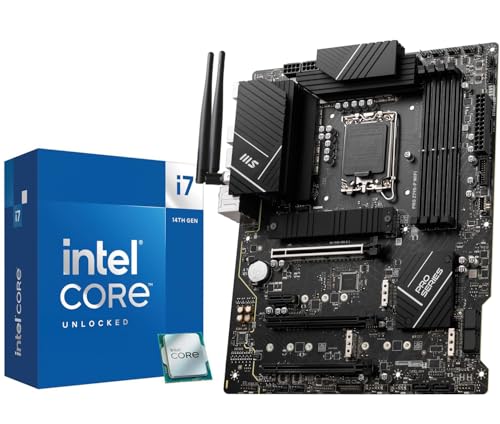
INLAND Core i7-14700K and MSI PRO Z790-P Bundle
Best for: 20-core DDR5 gaming and productivity builds
- Core Count
- 20 Cores (what this guide is about)
- CPU Socket
- LGA 1700
- Chipset
- Z790
- Memory Type
- DDR5
- PCIe Version
- PCIe 5.0
- M.2 Slots
- 4
View on Amazon: INLAND Core i7-14700K and MSI PRO Z790-P Bundle Affiliate link
This combo pairs the Intel Core i7-14700K with the MSI PRO Z790-P WIFI motherboard. The CPU offers 20 cores and speeds up to 5.6 GHz. The board supports DDR5 memory and includes PCIe 5.0. It features four M.2 slots and a robust 14+1+1 power design. You get a solid foundation for gaming and productivity tasks without needing separate purchases.
Pros
- 20-core i7-14700K CPU with up to 5.6 GHz boost
- MSI PRO Z790-P WIFI motherboard with DDR5 support
- Four PCIe 4.0 M.2 slots for fast storage
- 14+1+1 power phases with premium cooling design
Cons
- Lower core count than the 24-core alternative
- DDR5 memory version limits DDR4 compatibility
- Integrated graphics are basic UHD 770
Good fit if
- You want a complete 20-core system in one box
- You prefer DDR5 memory for future-proofing
- You need multiple M.2 storage slots
Skip if
- You require more than 20 cores for heavy workloads
- You already own a compatible motherboard
- You need DDR4 memory support
Verdict: INLAND i7-14700K Z790 DDR5 Combo delivers a balanced 20-core performance with a feature-rich Z790 board. It fits users who want a ready-to-build DDR5 system with ample storage options.
Specifications side by side
| Spec | Micro Center Intel Core i9 TUF Z790 Bundle | INLAND Core i7-14700K and MSI PRO Z790-P Bundle |
|---|---|---|
| CPU Socket | LGA 1700 | LGA 1700 |
| Chipset | not stated | Z790 |
| Memory Type | not stated | DDR5 |
| PCIe Version | PCIe 5.0 | PCIe 5.0 |
| M.2 Slots | 4 | 4 |
| Wi-Fi Standard | WiFi 6 | not stated |
| Ethernet Speed | 2.5Gb | not stated |
| Power Phases | 16+1 | 14+1+1 |
| Use Case | Gaming | not stated |
| Series | Core i9 | Core i7 |
| Core Count | 24 Cores | 20 Cores |
| Color | Intel 14th i9-14900K + Tuf Gaming Z790-Plus Wifi | Intel 14th I7-14700K+ PRO Z790-P WiFi DDR5 |
| Model | TUF GAMING Z790-Plus WiFi | 14700KPROZ790PWFD5 |
Frequently asked questions
Does a 24 core motherboard handle gaming better than 20 cores?
The 24-core Micro Center Intel Core i9 TUF Z790 Bundle is designed for heavy workloads and gaming. Its i9-14900K processor provides robust performance for demanding tasks. The 20-core alternative uses an i7-14700K, which balances power with efficiency for standard gaming and productivity builds.
What is the main difference between the i9 and i7 bundles?
The primary difference is the core count and series. The top pick features a Core i9-14900K with 24 cores for maximum multi-threaded power. The second option includes a Core i7-14700K with 20 cores. Both use the LGA 1700 socket and support DDR5 memory for modern systems.
Are these bundles ready to build a complete system?
Yes, both items are bundled solutions that include the processor and motherboard. The Micro Center bundle pairs the i9 with a TUF Gaming Z790-Plus WiFi board. The INLAND bundle combines the i7 with an MSI PRO Z790-P WiFi DDR5 board, offering a ready-to-build setup with ample storage options.
Which processor supports more threads for multitasking?
The Intel Core i9-14900K in the 24-core bundle supports 32 threads. This configuration includes 8 performance cores and 16 efficiency cores. It handles heavy multitasking and video editing more effectively than the 20-core i7-14700K, making it ideal for users needing maximum multi-threaded power.
Do both motherboards include Wi-Fi capabilities?
Yes, both bundles include motherboards with Wi-Fi support. The Micro Center option uses the ASUS TUF GAMING Z790-Plus WiFi model. The INLAND bundle features the MSI PRO Z790-P WiFi DDR5 model. This allows for wireless connectivity without needing additional expansion cards for either system.
Is DDR5 memory supported in both 24 and 20 core setups?
Both bundles support DDR5 memory for faster data transfer speeds. The 20-core INLAND bundle explicitly highlights DDR5 compatibility in its model name. The 24-core Micro Center bundle also utilizes modern memory standards. This ensures both systems can leverage the latest performance benefits from DDR5 modules.