Best Motherboards Under $300 in 2026: 15 Picks Ranked by Specs
As an Amazon Associate we earn from qualifying purchases. Links on this page are affiliate links.
Selecting the right motherboard under 300 requires matching your CPU socket and bandwidth requirements to verified hardware data. You will find 15 models compared here using the specifications published on each listing.
The MSI MPG X570 Gaming Edge ATX Motherboard takes the top spot by pairing the AMD X570 chipset and AM4 socket with PCIe 4.0 lane support and onboard Wi-Fi 5. This comparison helps you decide which form factor, socket generation, and connectivity layout fits your next desktop build.
Quick picks
The best fit for you
- You want an AM4 gaming build with PCIe 4.0 MSI MPG X570 Gaming Edge ATX Motherboard This ATX board features the AMD X570 chipset, PCIe 4.0 bandwidth, and integrated Wi-Fi 5.
- You want a compact Intel LGA 1700 DDR4 build GIGABYTE AORUS Mini-ITX DDR4 Motherboard Its Mini-ITX form factor supports LGA 1700 CPUs with DDR4 memory and 2.5GbE networking.
- You want an AMD AM5 setup with PCIe 5.0 MSI MPG X670E Carbon WiFi ATX Motherboard It provides an AM5 socket, DDR5 memory support, PCIe 5.0 bandwidth, and Wi-Fi 6E connectivity.
- You need high storage expansion for LGA 1700 ASUS ROG Strix Z690 ATX Motherboard This Z690 ATX motherboard provides five M.2 slots alongside PCIe 5.0 and DDR5 memory support.
Our 15 picks

MSI MPG X570 Gaming Edge ATX Motherboard
Best for: AMD AM4 gaming builds needing PCIe 4.0
- CPU Socket
- AM4
- Chipset
- X570
- Form Factor
- ATX
- Memory Type
- DDR4
- PCIe Version
- PCIe 4.0
- Wi-Fi
- Wi-Fi 5
View on Amazon: MSI MPG X570 Gaming Edge ATX Motherboard (paid link)
The MSI MPG X570 Gaming Edge ATX Motherboard is an AMD AM4 platform designed for gaming setups. It supports 2nd and 3rd Gen AMD Ryzen processors and features PCIe 4.0 connectivity alongside DDR4 memory support. You get integrated Wi-Fi 5 with MU-MIMO, high-speed M.2 storage options, and USB 3.2 Gen 2 ports. It suits you if you want a full-sized ATX foundation with active chipset cooling and built-in wireless networking.
Pros
- PCIe 4.0 expansion support
- On-board Wi-Fi 5 (802.11ac) with MU-MIMO support
- FROZR heatsink with dedicated fan for chipset cooling
- Pre-installed I/O shielding
- High-speed M.2 and USB 3.2 Gen 2 connectivity
Cons
- Uses Wi-Fi 5 rather than newer wireless standards
- Limited to DDR4 memory rather than DDR5
- AM4 socket restricts compatibility to 2nd and 3rd Gen AMD Ryzen chips
Good fit if
- You build with a 2nd or 3rd Gen AMD Ryzen processor.
- You want an ATX board with built-in Wi-Fi 5 and PCIe 4.0 lanes.
- You prefer pre-installed I/O shielding for simpler assembly.
Skip if
- You plan to use newer DDR5 memory modules.
- You require Wi-Fi 6 or newer wireless hardware.
- You need an Intel CPU socket.
Verdict: MSI MPG X570 Gaming Edge ATX Motherboard delivers a stable AM4 foundation with PCIe 4.0 and built-in wireless connectivity. It provides essential high-speed storage and cooling features for compatible AMD Ryzen gaming builds.

Supermicro Mini-ITX Celeron Motherboard
Best for: compact dual-Ethernet embedded server builds
- Form Factor
- Mini-ITX
- Memory Type
- DDR3
- Ethernet Speed
- 2GbE
- Dimensions
- 13 × 10 × 2 inches
- Weight
- 4 pounds
View on Amazon: Supermicro Mini-ITX Celeron Motherboard (paid link)
This Supermicro board is a compact Mini-ITX platform featuring an integrated Intel Celeron J1900 processor running at 2.42GHz. It is built with DDR3 memory support, onboard USB 3.0, and dual Gigabit Ethernet ports for straightforward networking. The all-in-one embedded processor design means you do not need to buy or install a separate CPU. It suits you if you need a small-footprint system for dedicated networking tasks.
Pros
- Integrated 2.42GHz Intel Celeron J1900 processor
- Dual Gigabit Ethernet network ports
- Compact Mini-ITX form factor
- USB 3.0 connectivity
Cons
- Uses older DDR3 memory instead of newer standards
- Integrated processor prevents future CPU upgrades
Good fit if
- You need an all-in-one Mini-ITX board with a pre-installed processor.
- You want dual Gigabit Ethernet ports on a single compact board.
- You plan to build around existing DDR3 memory modules.
Skip if
- You need compatibility with DDR4 or DDR5 RAM.
- You plan to replace or upgrade your CPU down the road.
Verdict: Supermicro Mini-ITX Celeron Motherboard delivers an integrated processor with dual Gigabit Ethernet ports in a space-saving footprint. It offers a dedicated hardware package if you want an all-in-one low-maintenance platform.

Supermicro Mini-ITX Pentium N3700 Server Motherboard
Best for: compact low-power server and networking builds
- CPU Socket
- Socket BGA-1170
- Form Factor
- Mini-ITX
- Memory Type
- DDR3
- Dimensions
- 23.6 × 23.6 × 33.5 inches
- Weight
- 6 pounds
View on Amazon: Supermicro Mini-ITX Pentium N3700 Server Motherboard (paid link)
This Supermicro server board pairs an integrated Intel Pentium N3700 processor with a compact Mini-ITX form factor. It supports DDR3 memory and single-processor operation on Socket BGA-1170. You also get quad Gigabit Ethernet ports, SATA3, and USB 3.0 connectivity. It suits you if you need a space-saving server board for dedicated networking tasks or embedded applications without buying a separate processor.
Pros
- Integrated Intel Pentium N3700 processor included
- Four Gigabit Ethernet ports (4GbE) onboard
- Compact Mini-ITX form factor
- Onboard SATA3 and USB 3.0 connectivity
Cons
- Limited to older DDR3 memory
- Soldered BGA-1170 processor cannot be upgraded
- Ships in bulk packaging
Good fit if
- You need an embedded Intel processor already installed on the board.
- You require four Gigabit Ethernet ports for compact server applications.
- You are building a Mini-ITX system using DDR3 memory.
Skip if
- You plan to choose or upgrade your own processor.
- You require DDR4 or DDR5 system memory.
- You need retail packaging rather than bulk distribution.
Verdict: Supermicro Mini-ITX Pentium N3700 Server Motherboard delivers an integrated low-power CPU and quad Ethernet ports in a compact layout. It gives you a complete networking foundation if you do not need CPU upgrade paths.

MSI LGA 1151 ATX Motherboard with Wi-Fi
Best for: 8th and 9th Gen Intel gaming builds
- CPU Socket
- LGA 1151
- Chipset
- Z390
- Form Factor
- ATX
- Memory Type
- DDR4
- M.2 Slots
- 2
- Wi-Fi Standard
- 802.11ac
View on Amazon: MSI LGA 1151 ATX Motherboard with Wi-Fi (paid link)
This MSI ATX motherboard is built on the Intel Z390 chipset for LGA 1151 socket processors. It supports 8th and 9th Generation Intel Core CPUs along with dual-channel DDR4 memory up to 4400 MHz when overclocked. You get two Turbo M.2 slots, integrated 802.11ac Wi-Fi, and pre-installed I/O shielding. It suits you if you want a full-size gaming board for compatible Intel hardware with multi-GPU support and customizable lighting headers.
Pros
- Supports DDR4 memory speeds up to 4400 MHz (OC)
- Built-in Intel 802.11ac Wi-Fi and Turbo USB 3.1 Gen 2
- Two Turbo M.2 slots with M.2 Shield Frozr heatsink
- Pre-installed I/O shielding for streamlined assembly
Cons
- Limited to 8th and 9th Generation Intel LGA 1151 processors
- Uses 802.11ac Wi-Fi rather than Wi-Fi 6
Good fit if
- You are building with an 8th or 9th Generation Intel Core processor
- You need built-in 802.11ac Wi-Fi on an ATX motherboard
- You plan to run dual-channel DDR4 memory up to 4400 MHz
Skip if
- You use a 10th Generation or newer Intel processor
- You require an AMD processor socket
Verdict: MSI LGA 1151 ATX Motherboard with Wi-Fi provides a balanced ATX foundation for 8th and 9th Gen Intel builds. It delivers high DDR4 overclocking limits, dual M.2 storage options, and onboard wireless connectivity.

GIGABYTE AORUS Z390 ATX Motherboard
Best for: 8th and 9th Gen Intel gaming builds
- CPU Socket
- LGA1151
- Chipset
- Z390
- Form Factor
- ATX
- Memory Type
- DDR4
- M.2 Slots
- 2
- Wi-Fi Standard
- 802.11ac
View on Amazon: GIGABYTE AORUS Z390 ATX Motherboard (paid link)
This ATX motherboard runs on the Intel Z390 chipset with an LGA 1151 socket. It supports 8th and 9th Generation Intel Core processors across four dual-channel DDR4 memory slots. Built-in Intel 802.11ac Wi-Fi and Bluetooth 5 handle wireless networking, while a 12+1 phase digital VRM manages power delivery. You get two M.2 slots with thermal guards for storage drives. This board fits your build if you use older LGA 1151 Intel hardware.
Pros
- 12+1 phases digital VRM solution with DrMOS
- Onboard Intel CNVi 802.11ac 2x2 Wave 2 Wi-Fi and Bluetooth 5
- ALC1220-VB audio with WIMA capacitors
- Four DIMM slots supporting dual-channel DDR4 memory
Cons
- Socket LGA 1151 limits compatibility to 8th and 9th Gen Intel CPUs
- Features older Wi-Fi 5 standard rather than Wi-Fi 6
Good fit if
- You build around an 8th or 9th Gen Intel Core CPU.
- You want built-in Wi-Fi and Bluetooth on an ATX board.
- You need four DDR4 DIMM slots with Intel Optane support.
Skip if
- You need an LGA 1200 or LGA 1700 socket for newer processors.
- You require Wi-Fi 6 or Wi-Fi 7 connectivity.
- You plan to build on an AMD platform.
Verdict: GIGABYTE AORUS Z390 ATX Motherboard provides a 12+1 phase power design and integrated Wi-Fi for 8th and 9th Generation Intel processors. It handles standard ATX gaming setups that rely on DDR4 memory.

MSI MPG Gaming Edge Wi-Fi ATX Motherboard
Best for: AM4 builds using 2nd or 3rd Gen Ryzen
- CPU Socket
- AM4
- Chipset
- AMD X570
- Form Factor
- ATX
- Memory Type
- DDR4
- PCIe Version
- PCIe 4.0
- Wi-Fi
- Wi-Fi 5
View on Amazon: MSI MPG Gaming Edge Wi-Fi ATX Motherboard (paid link)
This MSI ATX motherboard is built on the AMD X570 chipset and uses the AM4 socket. It supports second- and third-generation AMD Ryzen desktop processors alongside DDR4 memory. Key hardware includes PCIe 4.0 lanes for high-speed expansion cards, integrated Wi-Fi 5 with MU-MIMO support, and a Frozr heatsink fan. You will find it suits your build if you need dependable AM4 connectivity, active chipset cooling, and pre-installed rear input-output shielding.
Pros
- AMD AM4 socket with PCIe 4.0 support
- Integrated Wi-Fi 5 with MU-MIMO support
- Frozr heatsink fan with double ball bearings
- Pre-installed grounded rear I/O shield
Cons
- Limited to Wi-Fi 5 rather than newer wireless standards
- Compatibility listed only for 2nd and 3rd Gen Ryzen AM4 processors
- Uses DDR4 memory rather than DDR5
Good fit if
- You run a 2nd or 3rd Gen AMD Ryzen processor on the AM4 platform.
- You need PCIe 4.0 expansion support for graphics and storage.
- You want integrated Wi-Fi 5 without installing an add-in card.
Skip if
- You plan to build with DDR5 memory.
- You need faster Wi-Fi 6 or Wi-Fi 7 wireless networking.
- You use an Intel processor or non-AM4 socket.
Verdict: MSI MPG Gaming Edge Wi-Fi ATX Motherboard delivers PCIe 4.0 capability, active chipset cooling, and integrated Wi-Fi 5 for AM4 setups. It provides reliable ATX connectivity and pre-installed shielding for second- and third-generation AMD Ryzen desktop systems.

ASUS Prime LGA 1200 ATX Motherboard
Best for: 10th Gen Intel Core ATX desktop builds
- CPU Socket
- LGA 1200
- Chipset
- Z490
- Form Factor
- ATX
- Memory Type
- DDR4
- M.2 Slots
- 2
- Ethernet Speed
- 1 Gb Ethernet
View on Amazon: ASUS Prime LGA 1200 ATX Motherboard (paid link)
The ASUS Prime LGA 1200 ATX Motherboard is an ATX board built for 10th Gen Intel Core desktop processors. It pairs an LGA 1200 socket and Z490 chipset with a 10+1 DrMOS power phase design for stable power delivery. You also get two M.2 slots for solid-state storage and support for DDR4 memory up to 4600 MHz. It suits you if you need a standard ATX foundation for a 10th Gen Intel build.
Pros
- 10+1 DrMOS power stages with a 6-layer PCB
- Dual M.2 slots for high-speed storage
- Supports DDR4 memory speeds up to 4600 MHz
- Includes Thunderbolt 3 header support and USB 3.2 Gen 2
Cons
- Wired networking limited to 1 Gb Ethernet
- No integrated Wi-Fi module included
- LGA 1200 socket limits CPU support to 10th Gen Intel processors
Good fit if
- You are building a system with a 10th Gen Intel Core desktop processor.
- You need dual M.2 slots on an ATX form factor board.
- You want DDR4 memory support reaching up to 4600 MHz.
Skip if
- You plan to use newer LGA 1700 or AMD socket processors.
- You require built-in Wi-Fi without adding an expansion card.
- You want multi-gigabit wired network speeds faster than 1 Gb Ethernet.
Verdict: ASUS Prime LGA 1200 ATX Motherboard delivers a reliable 10+1 phase power design and dual M.2 slots for 10th Gen Intel builds. It provides essential ATX expansion without extra features like integrated Wi-Fi.

GIGABYTE AORUS Mini-ITX DDR4 Motherboard
Best for: compact 12th Gen Intel DDR4 builds
- CPU Socket
- LGA 1700
- Chipset
- B660
- Form Factor
- Mini-ITX
- Memory Type
- DDR4
- PCIe Version
- PCIe 4.0
- M.2 Slots
- 1
View on Amazon: GIGABYTE AORUS Mini-ITX DDR4 Motherboard (paid link)
This GIGABYTE Mini-ITX motherboard pairs an Intel LGA 1700 socket with dual DDR4 memory slots for compact PC setups. You get an 8+1+1 phase digital VRM design with 90A power stages, a PCIe 4.0 expansion slot, and one PCIe 4.0 x4 M.2 connector. Integrated Wi-Fi 6, 2.5GbE Ethernet, and USB 3.2 Gen 2x2 Type-C deliver high-speed connectivity. It fits your build if you want small-form-factor desktop hardware with DDR4 support.
Pros
- 8+1+1 phase digital VRM with 90A SPS
- Integrated Wi-Fi 6 and 2.5GbE LAN
- USB 3.2 Gen 2x2 Type-C connectivity
- Q-Flash Plus BIOS updating without CPU or RAM
Cons
- Only one PCIe 4.0 M.2 slot
- Limited to two DDR4 memory slots
- Lacks PCIe 5.0 expansion support
Good fit if
- You build a compact Mini-ITX system around an LGA 1700 processor.
- You want to utilize DDR4 memory instead of DDR5.
- You need integrated Wi-Fi 6 alongside 2.5GbE wired networking.
Skip if
- You need more than one onboard M.2 NVMe SSD.
- You plan on using DDR5 memory kits.
- You need more than two memory DIMM slots.
Verdict: GIGABYTE AORUS Mini-ITX DDR4 Motherboard provides robust 90A digital power delivery and fast networking in a space-saving layout. It fits builders needing a compact 12th Gen Intel setup powered by DDR4 memory.

MSI Z690 Force WiFi ATX Motherboard
Best for: 12th Gen Intel DDR5 gaming builds
- CPU Socket
- LGA 1700
- Chipset
- Z690
- Form Factor
- ATX
- Memory Type
- DDR5
- PCIe Version
- PCIe 4
- Wi-Fi Standard
- Wi-Fi 6E
View on Amazon: MSI Z690 Force WiFi ATX Motherboard (paid link)
The MSI Z690 Force WiFi ATX Motherboard is built for 12th Gen Intel Core processors on the LGA 1700 socket. It pairs the Intel Z690 chipset with DDR5 memory support reaching up to 5600(OC) MHz. You also get high-speed connectivity via onboard 2.5G LAN and Intel Wi-Fi 6E. This board suits you if you want a full-size ATX setup running DDR5 and PCIe 4 storage for a modern Intel build.
Pros
- Supports DDR5 memory up to 5600(OC) MHz
- Intel Wi-Fi 6E and 2.5G LAN networking
- PCIe Gen4 x4 Lightning M.2 slot support
- Extended Heatsink Design and M.2 Shield Frozr cooling
Cons
- Lists support only for 12th Gen Intel Core processors
- Uses PCIe 4 instead of PCIe 5
Good fit if
- You plan to build with a 12th Gen Intel Core processor on LGA 1700.
- You want DDR5 system memory and Wi-Fi 6E connectivity.
Skip if
- You need an AMD AM4 or AM5 motherboard.
- You plan to reuse existing DDR4 memory modules.
Verdict: MSI Z690 Force WiFi ATX Motherboard delivers DDR5 support, Wi-Fi 6E, and 2.5G LAN for 12th Gen Intel LGA 1700 desktop builds. It provides essential high-speed networking and PCIe 4 M.2 storage in a standard ATX layout.
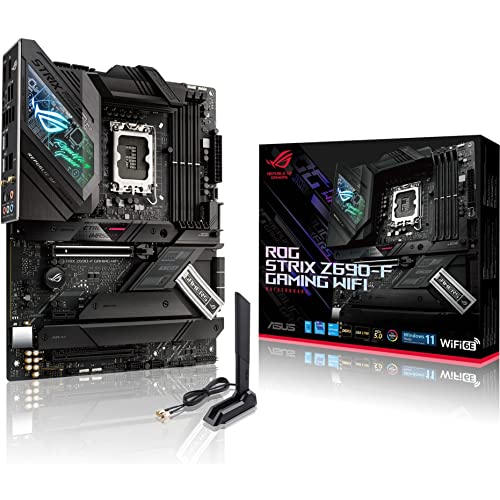
ASUS ROG Strix Z690-F ATX Motherboard
Best for: 12th Gen Intel DDR5 gaming setups
- CPU Socket
- LGA 1700
- Chipset
- Z690
- Form Factor
- ATX
- Memory Type
- DDR5
- PCIe Version
- PCIe 5.0
- M.2 Slots
- 4
View on Amazon: ASUS ROG Strix Z690-F ATX Motherboard (paid link)
This ASUS ROG Strix ATX board runs on the Intel Z690 chipset with an LGA 1700 socket designed for 12th Gen Intel Core processors. It equips your build with DDR5 memory support, a PCIe 5.0 expansion slot, and four onboard M.2 slots for high-speed storage. Built-in WiFi 6E and 2.5Gb Ethernet handle your networking needs. It fits your setup if you want modern connectivity and multi-core power delivery for an Intel desktop.
Pros
- 16+1 power stages with ProCool II connectors
- PCIe 5.0 readiness and DDR5 memory support
- Four onboard M.2 slots with double-sided heatsinks
- Integrated WiFi 6E and 2.5Gb Ethernet
Cons
- Only supports Intel 12th Gen CPUs in provided specifications
- Requires DDR5 memory and lacks DDR4 compatibility
Good fit if
- You plan to build with a 12th Gen Intel Core processor and DDR5 RAM.
- You need four M.2 drive slots for high-capacity solid-state storage.
- You require both 2.5Gb wired networking and onboard WiFi 6E.
Skip if
- You want an AMD-based system using AM4 or AM5 sockets.
- You plan to reuse existing DDR4 memory kits.
- You are assembling a small-form-factor Mini-ITX or Micro-ATX build.
Verdict: ASUS ROG Strix Z690 ATX Motherboard pairs PCIe 5.0 and DDR5 bandwidth with four M.2 slots for 12th Gen Intel desktop builds. Its 16+1 power stages and dual high-speed networking options supply clean power and fast data transfer.

ASUS Prime Z690 WiFi ATX Motherboard
Best for: 12th Gen Intel DDR5 desktop builds
- CPU Socket
- LGA 1700
- Form Factor
- ATX
- Memory Type
- DDR5
- PCIe Version
- PCIe 5.0
- M.2 Slots
- 3
- Wi-Fi Standard
- Wi-Fi 6
View on Amazon: ASUS Prime Z690 WiFi ATX Motherboard (paid link)
This ATX motherboard is built for 12th Gen Intel Core processors on the LGA 1700 socket. It pairs DDR5 memory support with a PCIe 5.0 expansion slot, giving you modern platform bandwidth for storage and graphics cards. With 14+1 DrMOS power stages, three M.2 slots, Wi-Fi 6, and 2.5Gb Ethernet, it provides balanced high-speed connectivity if you want an Intel desktop build with current-generation standards.
Pros
- Supports high-speed DDR5 memory
- PCIe 5.0 expansion slot support
- Onboard Wi-Fi 6 and 2.5Gb Ethernet
- Three M.2 storage slots
- 14+1 DrMOS power stages
Cons
- Limited to 12th Gen Intel CPU support out of the box
- Uses Wi-Fi 6 rather than newer Wi-Fi 6E
- Thunderbolt 4 connectivity requires an add-on card
Good fit if
- You plan to build a 12th Gen Intel system with DDR5 memory.
- You want a PCIe 5.0 slot alongside 2.5Gb LAN and Wi-Fi 6.
- You need three M.2 slots for high-speed storage drives.
Skip if
- You intend to reuse an existing DDR4 memory kit.
- You are building an AMD processor platform.
- You require built-in Wi-Fi 6E connectivity.
Verdict: ASUS Prime ATX DDR5 Motherboard delivers PCIe 5.0 bandwidth, DDR5 compatibility, and 2.5Gb networking for 12th Gen Intel builds. It balances high-speed connections and multi-drive storage on a standard ATX layout.

ASUS ROG Strix Z690 ATX Motherboard
Best for: DDR5 systems needing five M.2 slots
- CPU Socket
- LGA 1700
- Form Factor
- ATX
- Memory Type
- DDR5
- PCIe Version
- PCIe 5.0
- M.2 Slots
- 5
- Wi-Fi Standard
- Wi-Fi 6E
View on Amazon: ASUS ROG Strix Z690 ATX Motherboard (paid link)
The ASUS ROG Strix DDR5 ATX Motherboard is built around the Intel LGA 1700 socket for 12th Gen Intel Core processors. It features an 18+1 power stage setup, five M.2 slots, and PCIe 5.0 support alongside DDR5 memory capability. It also provides onboard Wi-Fi 6E and 2.5 Gb Ethernet. This board suits you if you need extensive NVMe drive capacity and high-speed networking for a modern Intel desktop build.
Pros
- 18+1 90A power stages for Intel LGA 1700 processors
- Five M.2 slots including PCIe 5.0 M.2 support
- Onboard Wi-Fi 6E and Intel 2.5 Gb Ethernet
- Front and rear USB 3.2 Gen 2x2 Type-C connectivity
Cons
- Does not support DDR4 memory modules
- PCIe 5.0 M.2 support relies on bundled ROG Hyper M.2 card
- Integrated display connectivity capped at HDMI 2.0 output
Good fit if
- You need up to five M.2 drives for high-speed NVMe storage.
- You are building an Intel LGA 1700 system using DDR5 memory.
- You want integrated Wi-Fi 6E and 2.5 Gb Ethernet networking.
Skip if
- You want to reuse DDR4 memory instead of buying DDR5 RAM.
- You require native HDMI 2.1 display output from the motherboard.
Verdict: ASUS ROG Strix DDR5 ATX Motherboard delivers an 18+1 power architecture, five M.2 slots, and PCIe 5.0 support for LGA 1700 processors. It provides extensive storage expansion and high-speed Wi-Fi 6E connectivity for demanding desktop configurations.

MSI MPG X670E Carbon WiFi ATX Motherboard
Best for: AMD AM5 builds needing PCIe 5.0
- CPU Socket
- AM5
- Form Factor
- ATX
- Memory Type
- DDR5
- PCIe Version
- PCIe 5.0
- Wi-Fi Standard
- Wi-Fi 6E
- Ethernet Speed
- 2.5Gbps
View on Amazon: MSI MPG X670E Carbon WiFi ATX Motherboard (paid link)
The MSI MPG X670E Carbon WiFi ATX Motherboard provides an AM5 socket for AMD Ryzen 7000, 8000, and 9000 series processors. You get four DDR5 slots supporting dual-channel memory up to DDR5-5600+ overclocked. It features PCIe 5.0 expansion, a Gen 5 x4 M.2 slot, Wi-Fi 6E, and 2.5Gbps Ethernet. This board suits you if you plan an AMD build requiring high-speed storage and fast networking.
Pros
- AM5 socket supports AMD Ryzen 7000, 8000, and 9000 series processors
- PCIe 5.0 expansion and Lightning Gen 5 x4 M.2 interface
- Built-in Wi-Fi 6E and 2.5Gbps Ethernet
- Four DDR5 DIMM slots supporting DDR5-5600+ (OC)
Cons
- Incompatible with DDR4 memory kits
- AM5 socket does not support Intel processors
- Full ATX size cannot fit Micro-ATX or Mini-ITX cases
Good fit if
- You are building a system with an AMD AM5 Ryzen processor.
- You want PCIe 5.0 support for expansion and Gen 5 M.2 storage.
- You require both 2.5Gbps wired LAN and Wi-Fi 6E.
Skip if
- You plan to use an Intel processor or an older AM4 CPU.
- You want to reuse an existing DDR4 memory kit.
- You need a smaller board for a compact Mini-ITX case.
Verdict: MSI MPG X670E Carbon WiFi ATX Motherboard delivers PCIe 5.0, DDR5 support, and Wi-Fi 6E for AM5 systems. It provides robust thermal hardware and high-speed networking for modern AMD desktop builds.

ASUS Prime X670 Wi-Fi ATX Motherboard
Best for: mainstream AMD AM5 DDR5 desktop builds
- CPU Socket
- AM5
- Chipset
- AMD X670
- Form Factor
- ATX
- Memory Type
- DDR5
- PCIe Version
- PCIe 5.0
- M.2 Slots
- 3
View on Amazon: ASUS Prime X670 Wi-Fi ATX Motherboard (paid link)
This ATX board runs on the AMD X670 chipset with the AM5 socket, built for AMD Ryzen 7000, 8000, and 9000 series desktop processors. You get DDR5 memory support, three M.2 slots including PCIe 5.0 storage capability, and a 12+2 DrMOS power stage setup. With integrated Wi-Fi 6 and 2.5Gb Ethernet, it gives you stable high-speed networking for modern multi-core computing setups.
Pros
- PCIe 5.0 M.2 slot support alongside two additional M.2 slots
- 12+2 DrMOS power stages with 6-layer PCB and large VRM heatsinks
- Built-in Wi-Fi 6 and Realtek 2.5Gb Ethernet
- BIOS FlashBack button enables firmware updates without CPU or RAM installed
Cons
- May require a BIOS update before running Ryzen 8000 or 9000 series processors
- Features Wi-Fi 6 rather than the newer Wi-Fi 6E standard
Good fit if
- You need PCIe 5.0 NVMe storage support on the AM5 socket.
- You want DDR5 memory with optimized trace routing for stable performance.
- You plan to update firmware without needing a CPU or RAM installed.
Skip if
- You need built-in Wi-Fi 6E wireless networking.
- You plan to run four or more M.2 solid-state drives simultaneously.
Verdict: ASUS Prime AM5 ATX Motherboard provides a solid foundation for modern Ryzen builds with its PCIe 5.0 M.2 interface, DDR5 support, and 2.5Gb networking. It delivers reliable power stages and essential connectivity for mainstream desktop systems.

ASUS ROG Strix LGA 1700 ATX Motherboard
Best for: multi-drive Intel Core desktop builds
- CPU Socket
- LGA 1700
- Form Factor
- ATX
- Memory Type
- DDR5
- PCIe Version
- PCIe 5.0
- M.2 Slots
- 5
- Wi-Fi Standard
- Wi-Fi 6E
View on Amazon: ASUS ROG Strix LGA 1700 ATX Motherboard (paid link)
This ASUS ROG Strix board is an ATX motherboard built for 12th, 13th, and 14th Gen Intel Core processors on the LGA 1700 socket. It pairs an 18+1 power stage delivery system with DDR5 memory support and PCIe 5.0 speed. You also get five M.2 slots for high-speed storage, 2.5 Gb Ethernet, and Wi-Fi 6E. It suits you if you want expansive expansion options and robust power for multi-core Intel builds.
Pros
- Five onboard M.2 storage slots with double-sided heatsinks
- 18+1 90A power stages for multi-core processors
- PCIe 5.0 and DDR5 memory compatibility
- Wi-Fi 6E and Intel 2.5 Gb Ethernet
Cons
- Socket LGA 1700 limits CPU compatibility to 14th Gen and older Intel chips
- Equipped with Wi-Fi 6E rather than Wi-Fi 7
Good fit if
- You build with a 12th, 13th, or 14th Gen Intel Core processor.
- You need up to five M.2 solid-state drives for internal storage.
- You want an 18+1 power stage setup for multi-core performance.
Skip if
- You plan to run an AMD Ryzen processor.
- You require a compact Mini-ITX or microATX build layout.
Verdict: ASUS ROG Strix LGA 1700 ATX Motherboard delivers extensive storage capacity with five M.2 slots alongside a heavy-duty 18+1 power delivery design. It gives Intel builders modern PCIe 5.0 bandwidth and DDR5 memory support in a standard ATX layout.
Specifications side by side
| Spec | MSI MPG X570 Gaming Edge ATX Motherboard | Supermicro Mini-ITX Celeron Motherboard | Supermicro Mini-ITX Pentium N3700 Server Motherboard | MSI LGA 1151 ATX Motherboard with Wi-Fi | GIGABYTE AORUS Z390 ATX Motherboard | MSI MPG Gaming Edge Wi-Fi ATX Motherboard | ASUS Prime LGA 1200 ATX Motherboard | GIGABYTE AORUS Mini-ITX DDR4 Motherboard | MSI Z690 Force WiFi ATX Motherboard | ASUS ROG Strix Z690-F ATX Motherboard | ASUS Prime Z690 WiFi ATX Motherboard | ASUS ROG Strix Z690 ATX Motherboard | MSI MPG X670E Carbon WiFi ATX Motherboard | ASUS Prime X670 Wi-Fi ATX Motherboard | ASUS ROG Strix LGA 1700 ATX Motherboard |
|---|---|---|---|---|---|---|---|---|---|---|---|---|---|---|---|
| CPU Socket | AM4 | not specified | Socket BGA-1170 | LGA 1151 | LGA1151 | AM4 | LGA 1200 | LGA 1700 | LGA 1700 | LGA 1700 | LGA 1700 | LGA 1700 | AM5 | AM5 | LGA 1700 |
| Chipset | X570 | not specified | not specified | Z390 | Z390 | AMD X570 | Z490 | B660 | Z690 | Z690 | not specified | not specified | not specified | AMD X670 | not specified |
| Form Factor | ATX | Mini-ITX | Mini-ITX | ATX | ATX | ATX | ATX | Mini-ITX | ATX | ATX | ATX | ATX | ATX | ATX | ATX |
| Memory Type | DDR4 | DDR3 | DDR3 | DDR4 | DDR4 | DDR4 | DDR4 | DDR4 | DDR5 | DDR5 | DDR5 | DDR5 | DDR5 | DDR5 | DDR5 |
| PCIe Version | PCIe 4.0 | not specified | not specified | not specified | not specified | PCIe 4.0 | not specified | PCIe 4.0 | PCIe 4 | PCIe 5.0 | PCIe 5.0 | PCIe 5.0 | PCIe 5.0 | PCIe 5.0 | PCIe 5.0 |
| M.2 Slots | not specified | not specified | not specified | 2 | 2 | not specified | 2 | 1 | not specified | 4 | 3 | 5 | not specified | 3 | 5 |
| Wi-Fi Standard | not specified | not specified | not specified | 802.11ac | 802.11ac | not specified | not specified | Wi-Fi 6 | Wi-Fi 6E | WiFi 6E | Wi-Fi 6 | Wi-Fi 6E | Wi-Fi 6E | Wi-Fi 6 | Wi-Fi 6E |
| Ethernet Speed | not specified | 2GbE | not specified | not specified | Gigabit | not specified | 1 Gb Ethernet | 2.5 GbE | 2.5G | 2.5Gb | 2.5 GbE | 2.5 GbE | 2.5Gbps | 2.5Gb | 2.5 GbE |
| Power Phases | not specified | not specified | not specified | not specified | 12+1 | not specified | 10+1 | 8+1+1 | not specified | 16+1 | 14+1 | 18+1 | not specified | 12+2 | 18+1 |
| Wi-Fi | Wi-Fi 5 | not specified | not specified | not specified | not specified | Wi-Fi 5 | not specified | Wi-Fi 6 | Wi-Fi 6E | Wi-Fi 6E | Wi-Fi 6 | Wi-Fi 6E | Wi-Fi 6E | Wi-Fi 6 | Wi-Fi 6E |
| Use Case | Gaming | not specified | not specified | Gaming | Gaming | Gaming | not specified | Gaming | Gaming | Gaming | not specified | Gaming | Gaming | not specified | Gaming |
| Dimensions | 12 × 9.6 × 2.5 inches | 13 × 10 × 2 inches | 23.6 × 23.6 × 33.5 inches | 12 × 9.6 × 1.2 inches | 13.2 × 10.6 × 3.14 inches | 12 × 9.6 × 2.5 inches | 12.9 × 10.4 × 2.09 inches | 9.25 × 8.94 × 3.74 inches | 12 × 9.6 × 2.5 inches | 13.3 × 10.7 × 2.7 inches | 9.2 × 3 × 12 inches | 14.4 × 12.2 × 4.5 inches | 12 × 9.6 × 2.5 inches | 13.4 × 10.8 × 2.7 inches | 10.8 × 3.03 × 13.5 inches |
| Weight | 4.1 pounds | 4 pounds | 6 pounds | 3.3 pounds | 3.09 pounds | 4.1 pounds | 1.6 pounds | not specified | not specified | 2.99 pounds | 3.3 pounds | 6 pounds | 4.61 pounds | not specified | 12 ounces |
| Size | 1 | not specified | 8 Gb | ATX | not specified | 1 | 15-15.99 inches | B660I AORUS PRO DDR4 | not specified | 12"x9.6" | 12"x9.2" | not specified | ATX | not specified | Z790-E|M.2 x5|WiFi 6E|ATX |
| Model | MSI MPG X570 Gaming Edge WiFi | MBD-X10SBA | MBD-X11SBA-LN4F-B | MPG Z390 Gaming PRO Carbon AC | Z390 AORUS PRO WIFI | MPG X570 GAMING EDGE WIFI | PRIME Z490-P | B660I | Z690FORCEWIFI | ROG STRIX Z690-F GAMING WIFI | PRIME Z690-P WIFI | ROG STRIX Z690-E GAMING WIFI | 7D70-010R | PRIME X670-P WIFI | ROG STRIX Z790-E GAMING WIFI |
| Color | not specified | not specified | not specified | not specified | not specified | not specified | Black | black | not specified | not specified | not specified | not specified | Black | BLACK | BLACK |
Trade-offs Across Under $300 Motherboards
When you evaluate motherboards in the Under $300 selection, you balance socket platform against expansion bandwidth. Most ATX and Mini-ITX options feature DDR4 memory and PCIe 4.0 lanes rather than newer standards. Built-in wireless connectivity is not universal across the lineup, with multiple desktop boards omitting Wi-Fi entirely or utilizing older Wi-Fi 5 hardware. Wired networking speeds often cap at 1GbE or 2.5GbE connections. You also find legacy sockets like LGA 1151 and AM2+ alongside integrated CPU layouts that restrict your future processor upgrade paths.
- PCIe Version: Most boards limit expansion slots to PCIe 4.0 or older revisions.
- Ethernet Speed: Wired networking caps at 2.5GbE, with several boards restricted to 1GbE.
- Wi-Fi: Multiple models lack integrated wireless networking or rely on Wi-Fi 5.
- CPU Socket: Several designs use legacy sockets or non-upgradable integrated processors.
If you need standby power for your workstation, compare specifications for a generator under 300 to match continuous output ratings.
How We Picked These Motherboards
To build this guide, Amazon listings matching Under $300 are gathered for 2026. You see only one size or variant from each product family to keep comparisons focused. All technical details come directly from the specifications and feature lists published on the listings. Products are never physically handled.
Eligible motherboards appear with items in stock first, followed by Amazon sales rank, placing better-selling products first. Live pricing and inventory refresh on the page at least daily. Motherboards enter or leave this list of 15 picks as their pricing shifts relative to Under $300.
How to Choose the Best Motherboard
-
Match Form Factor and Case
You must match the motherboard form factor to your computer chassis. Standard ATX boards measure roughly 12 by 9.6 inches and provide room for multiple expansion slots. Micro-ATX and Mini-ITX formats reduce physical footprint for compact setups. Selecting a compact model like the GIGABYTE AORUS Mini-ITX DDR4 Motherboard lets you build inside smaller enclosures, but you lose additional expansion card slots. Check your enclosure specifications for supported motherboard sizes before you finalize your hardware selection, ensuring standoffs and backplate clearances align properly with your chassis layout.
-
Check Wired Ethernet Speeds
You should evaluate the onboard Ethernet controller speed to match your local network infrastructure. Basic desktop boards feature standard 1GbE ports, which handle everyday web browsing and normal local data transfers. If you move large files across local networks or connect to high-speed switches, choose a board with a 2.5GbE controller, such as the Gigabyte Z590 UD ATX Motherboard. Server-oriented boards may offer multiple gigabit ports for dedicated routing tasks. Verify whether your router and switch hardware support multi-gigabit connections to utilize the faster wired bandwidth properly.
-
Select Supported Wi-Fi Standards
You should check the specific wireless standard if you plan to connect your computer without an Ethernet cable. Motherboard listings indicate whether Wi-Fi hardware is integrated, along with generations ranging from Wi-Fi 5 up to Wi-Fi 7. The MSI MPG Micro-ATX Wi-Fi Motherboard features integrated Wi-Fi 6, which offers improved wireless performance over older Wi-Fi 5 protocols when paired with a compatible router. If your setup operates strictly through direct Ethernet cabling, you can disregard built-in wireless specs completely and focus on models prioritizing wired connectivity or additional expansion slots instead.
-
Evaluate PCIe Generation Support
You need to check the PCI Express generation supported by the motherboard slots. The PCIe standard dictates maximum transfer speeds for graphics cards and high-speed NVMe solid-state storage. Options like the ASUS TUF Gaming AM4 ATX Motherboard feature PCIe 4.0, which doubles theoretical throughput over legacy PCIe 3.0 interfaces. Newer platforms introduce PCIe 5.0 support for compatible components. Ensure your planned expansion cards and storage drives match the motherboard generation to prevent bandwidth bottlenecks, noting that PCIe slots remain backward compatible with components built on older revisions.
-
Choose Socketed or Embedded Processors
You should decide whether your build requires an upgradable CPU socket or an integrated processor combo. Standard desktop motherboards feature discrete sockets, allowing you to swap processors as requirements evolve. Embedded solutions, such as the Supermicro Mini-ITX Pentium N3700 Server Motherboard, solder the CPU directly to the circuit board. These integrated systems consume minimal power and eliminate CPU installation, making them practical for dedicated network appliances or light servers. However, embedded configurations prevent future processor upgrades, requiring a complete motherboard replacement whenever higher processing power is needed.
-
Check M.2 Storage Expansion Slots
You should verify the quantity and layout of onboard M.2 storage slots before buying. Fast NVMe solid-state drives install directly into M.2 interfaces without requiring SATA data or power cables. A board with dual M.2 connectors, such as the MSI Gaming Pro Carbon ATX Motherboard, enables you to install a dedicated operating system drive alongside a secondary high-speed storage volume. Basic motherboards may provide fewer M.2 slots, forcing reliance on traditional SATA ports. Check whether the motherboard includes heatsinks over these slots to keep high-speed drives within proper operational temperatures.
Frequently asked questions
Can you run DDR5 memory on an LGA 1700 motherboard?
Yes, specific LGA 1700 motherboards support DDR5, but memory compatibility depends on the exact model. LGA 1700 boards like the ASUS ROG Strix Z690-F and MSI Z690 Force WiFi require DDR5 memory modules. Other LGA 1700 options, such as the GIGABYTE B660I AORUS, are built for DDR4. You cannot install DDR5 into a DDR4 slot because the pin configuration and keying differ.
Which motherboards support PCIe 5.0 expansion?
Several LGA 1700 and AM5 motherboards feature PCIe 5.0 connectivity for high-speed expansion cards and solid-state storage. Models such as the ASUS Prime Z690-P WIFI, ASUS ROG Strix Z690-E GAMING WIFI, and MSI MPG X670E Carbon WiFi include PCIe 5.0 support. This standard doubles the lane bandwidth over PCIe 4.0, while maintaining backward compatibility with previous-generation expansion cards and graphics hardware.
What is the difference between Wi-Fi 5, Wi-Fi 6, and Wi-Fi 6E on a motherboard?
The differences involve supported radio frequencies, data throughput, and handling of network traffic. Wi-Fi 5 models, like the MSI MPG X570 Gaming Edge, operate on 2.4 GHz and 5 GHz bands. Newer motherboards like the ASUS Prime X670-P feature Wi-Fi 6. High-tier boards like the ASUS ROG Strix Z790-E support Wi-Fi 6E, which introduces access to the 6 GHz band for reduced signal congestion.
Do all gaming motherboards include integrated wireless connectivity?
No, not every motherboard includes built-in wireless networking. While many ATX gaming boards include Wi-Fi modules, models like the ASUS Prime Z490-P omit wireless hardware entirely to focus on standard wired connections and dual M.2 slots. If you choose a board without integrated Wi-Fi, you must rely on a physical Ethernet cable or add a dedicated PCIe or USB wireless network adapter.
Can you upgrade the processor on an embedded Mini-ITX motherboard?
No, embedded Mini-ITX motherboards feature permanently soldered processors that cannot be replaced or upgraded. Units like the Supermicro MBD-X10SBA and Supermicro MBD-X11SBA-LN4F-B come with integrated Celeron or Pentium N3700 processors fixed to the board. These systems suit dedicated low-power networking or compact server builds where you do not need CPU replacement pathways or standard desktop socket hardware.
How many M.2 NVMe storage drives can you install on an ATX motherboard?
The supported number of M.2 drives depends on the motherboard design and board layout. Standard ATX models like the ASUS Prime Z490-P provide two M.2 slots for storage. Advanced boards increase this capacity; the ASUS ROG Strix Z690-F provides four slots, and the ASUS ROG Strix Z690-E includes five M.2 slots. Extra slots let you mount multiple high-speed NVMe drives directly.
What does a 2.5GbE Ethernet port offer compared to standard Gigabit Ethernet?
A 2.5GbE Ethernet port delivers up to 2.5 Gbps of network bandwidth, which is two and a half times faster than standard 1 Gbps Gigabit LAN. Motherboards like the MSI Z690 Force WiFi and ASUS ROG Strix Z690-F feature 2.5GbE interfaces. This added speed improves local network file transfers to NAS devices and supports high-speed internet connections when connected to compatible switches.